





1.概述
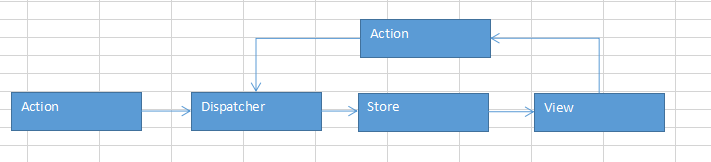
整个流程如下:
- 首先要有 action,通过定义一些 action creator 方法根据需要创建 Action 提供给 dispatcher
- View 层通过用户交互(比如 onClick)会触发 Action
- Dispatcher 会分发触发的 Action 给所有注册的 Store 的回调函数
- Store 回调函数根据接收的 Action 更新自身数据之后会触发一个 change 事件通知 View 数据更改了
- View 会监听这个 change 事件,拿到对应的新数据并调用 setState 更新组件 UI
2.代码
package test2;

import java.util.ArrayList;
import java.util.HashMap;
import java.util.List;
import java.util.Map;

class MyDataBase{
	static int index = 0;
	static String[] texts = new String[10];
	void create(String text) {
		texts[index] = text;
		index++;
	}
	void update(int id,String text) {
		texts[id] = text;
	}
	Map<String,Object> getView(int id){
		Map<String,Object> view = new HashMap<String,Object>();
		view.put("text", texts[id]);
		return view;
	}

	List<String> getAll(String key) {
		List<String> list = new ArrayList<String>();
		for(int i=0;i<texts.length;i++) {
			if(texts[i]!=null&&texts[i].contains(key)) {
				list.add(texts[i]);
			}
		}
		return list;
	}
}
public class Flux {
	public static void main(String[] args) {
		// TODO Auto-generated method stub
		System.out.println("flux test");
		Flux flax = new Flux();
		View view = flax.new View();
		view.buttonCrete("text1");
		view.buttonCrete("text2");
		view.buttonCrete("text3");

		view.buttonGetView(0);

		view.buttonUpdate(1, "text2-update");
		view.buttonGetView(1);
		view.buttonGetAll("text");
	}
	interface CallBack{
		void exe(Action action);
	}
	interface CallBackStore{
		void exe();
	}

	class Action{
		String actonType;
		Map<String,Object> data;
	}
	class AppDispatcher{
		CallBack callBack;
		public void dispatch(Action action) {
			callBack.exe(action);
		}
		void register(CallBack callBack) {
			this.callBack = callBack;
		}
	}

	class ToDoAction{
		AppDispatcher appDispatcher;
		void create(String text){
			Action action = new Action();
			Map<String,Object> data = new HashMap<String,Object>();
			data.put("text", text);
			action.actonType = "create";
			action.data = data;
			appDispatcher.dispatch(action);
		}
		void update(int id,String text) {
			Action action = new Action();
			Map<String,Object> data = new HashMap<String,Object>();
			data.put("id", id);
			data.put("text", text);
			action.actonType = "update";
			action.data = data;
			appDispatcher.dispatch(action);
		}
		void getView(int id) {
			Action action = new Action();
			Map<String,Object> data = new HashMap<String,Object>();
			data.put("id", id);
			action.actonType = "getView";
			action.data = data;
			appDispatcher.dispatch(action);
		}
		void getAll(String key) {
			Map<String,Object> data = new HashMap<String,Object>();
			data.put("key", key);
			Action action = new Action();
			action.actonType = "getAll";
			action.data = data;
			appDispatcher.dispatch(action);
		}
	}
    class Store{
		AppDispatcher appDispatcher = new AppDispatcher();
		CallBackStore callBackStore;
		MyDataBase myDataBase = new MyDataBase();
		String text;
		List<String> allTexts;

		public Store() {
			appDispatcher.register(new CallBack(){
				public void exe(Action action) {
					switch(action.actonType){
						case"create":
							create(action.data.get("text").toString());
							emitChange();
							break;
						case"update":
							update(Integer.valueOf(action.data.get("id").toString()) ,action.data.get("text").toString());
							emitChange();
							break;
						case"getView":
							getView(Integer.valueOf(action.data.get("id").toString()));
							emitChange();
							break;
						case"getAll":
							getAll(action.data.get("key").toString());
							emitChange();
							break;
					}
				};
			});
		}
		void create(String text) {
			myDataBase.create(text);
		}
		void update(int id,String text) {
			myDataBase.update(id, text);
		}
		void getView(int id){
			text = myDataBase.getView(id).get("text").toString();
		}

		void getAll(String key) {
			allTexts = myDataBase.getAll(key);
		}

		void emitChange() {
			callBackStore.exe();
		}
		void addChangeListener(CallBackStore callBackStore) {
			this.callBackStore = callBackStore;
		}
	}
	class View{
		DisplayView displayView= new DisplayView();
		ToDoAction toDoAction =new ToDoAction();
		Store store = new Store();
		public View() {
			toDoAction.appDispatcher =  store.appDispatcher;
			store.addChangeListener(new CallBackStore() {
				public void exe() {
					getData();
				}
			});
		}
		void buttonCrete(String text) {
			displayView.text = text;
			toDoAction.create(displayView.text);
		}
		void buttonUpdate(int id,String text) {
			displayView.id = id;
			displayView.text = text;
			toDoAction.update(displayView.id,displayView.text);
		}

		void buttonGetView(int id) {
			displayView.id = id;
			toDoAction.getView(displayView.id);
			displayView.displayView();
		}
		void buttonGetAll(String key) {
			toDoAction.getAll(key);
			displayView.displayGetAll();
		}
		class DisplayView{
			int id;
			String text;
			String key;
			List<String> allTexts;
			void displayView() {
				System.out.println("\ndisplayView");
				System.out.println("text:"+text);
			}
			void displayGetAll() {
				System.out.println("\ndisplayGetAll");
				for(String text:allTexts) {
					System.out.println("text:"+text);
				}
			}
			void displayViewUpdate() {
				System.out.println("displayViewUpdate");
				System.out.println("id:"+id);
				System.out.println("text:"+text);
			}
		}
		void getData() {
			displayView.text = store.text;
			displayView.allTexts = store.allTexts;
		}
	}
}
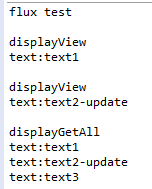
3.运行效果
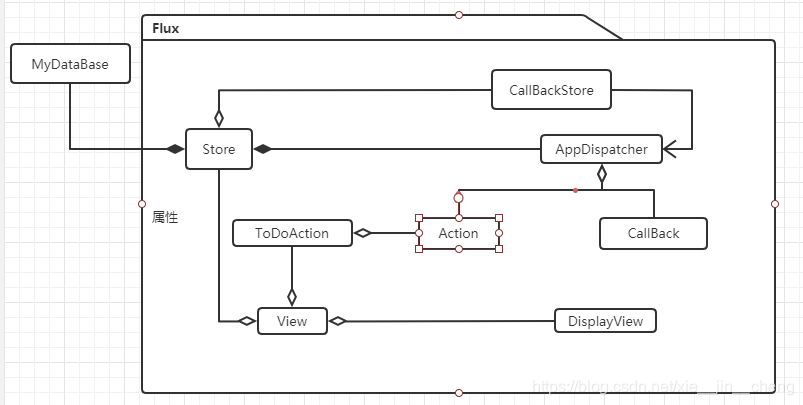
4.类图





 扫一扫
扫一扫


 985
985

 被折叠的 条评论
为什么被折叠?
被折叠的 条评论
为什么被折叠?
 到【灌水乐园】发言





