


目录
一、ioc
1.1概念
ioc容器:用来管理对象和依赖关系的容器,用来控制反转,不用new的方式创建对象
di依赖注入:容器里有关系的对象(bean)进行相互绑定(在类中获取其它类的bean)
bean:容器里的对象
1.2ioc入门步骤
导入坐标(基础坐标)->
<dependency>
      <groupId>org.springframework</groupId>
      <artifactId>spring-context</artifactId>
      <version>5.2.10.RELEASE</version>
</dependency>
创建配置文件->
定义要管理的类->
配置bean(其中的id为获取bean时指定的类型,class为该接口类型的实现类)->
<bean id="BookDao" class="com.xiaoyu.dao.impl.BookDaoImpl" scope="prototype"></bean>获取容器加载配置文件->
ApplicationContext applicationContext=new ClassPathXmlApplicationContext("applicationContext.xml");获取bean->
BookDao bookDao = (BookDao) applicationContext.getBean("BookDao");调用方法
1.2di入门步骤(在ioc入门基础上)
在service层中删除取消用new的方式获取对象降低耦合性->
private BookDao bookDao; //取消new的方式进行实例化降低耦合度在service层中提供获取对象属性的set方法(提供入口)->
    public void setBookDao(BookDao bookDao) {      //用set方法
        this.bookDao = bookDao;
    }
在配置文件中绑定关系
 <bean id="BookService" class="com.xiaoyu.service.impl.BookServiceImpl">
                <!--
                property为BookService的属性,用来绑定和BookDao的关系
                name属性为在service层创建dao层对象的对象名,
                ref为dao层的bean的名称
                -->
                <property name="bookDao" ref="BookDao"></property>
 </bean>
1.3bean基本配置
基本配置:
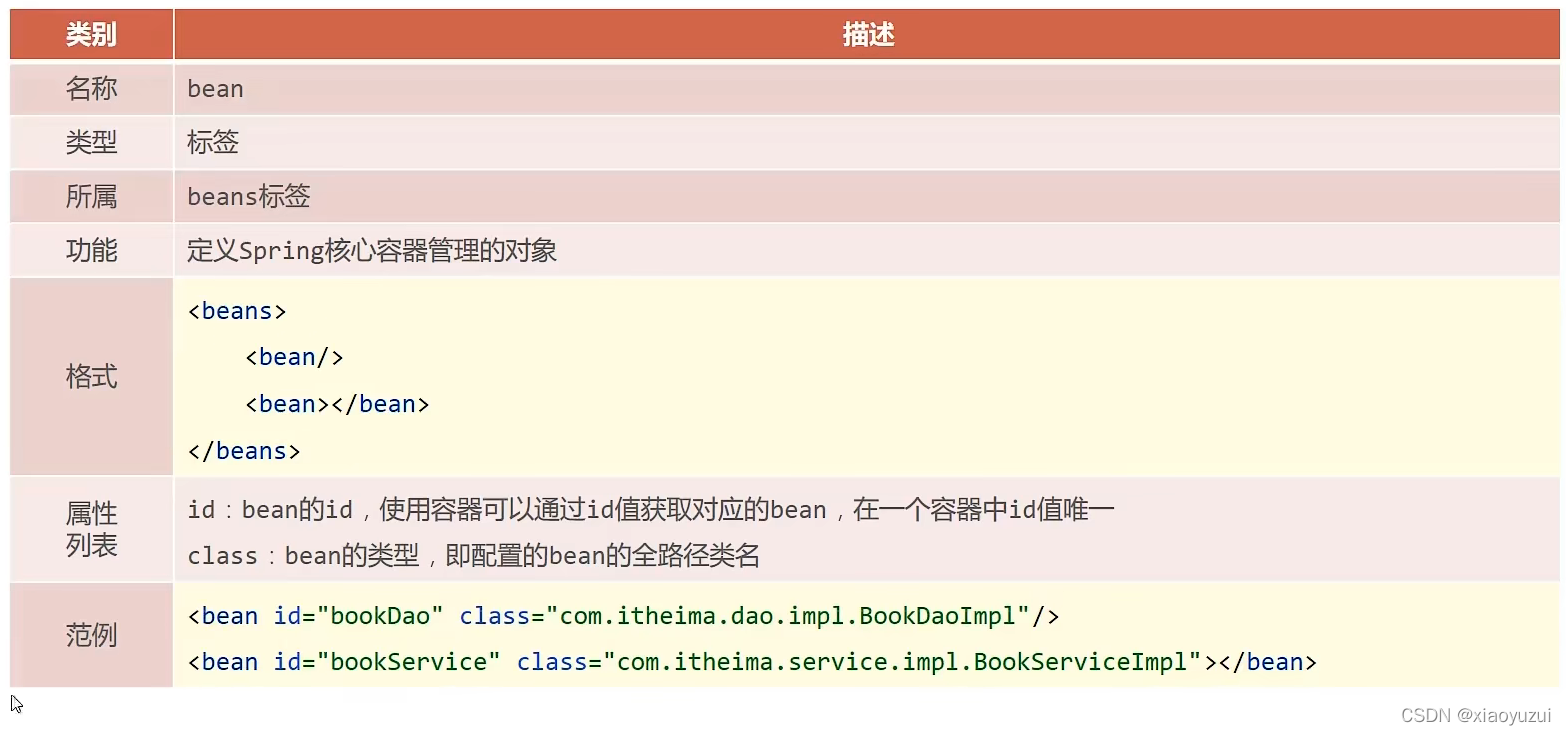
别名配置:
<bean>标签有name属性用来给起别名,不同别名可用,; 来分开,功能和id属性一样。
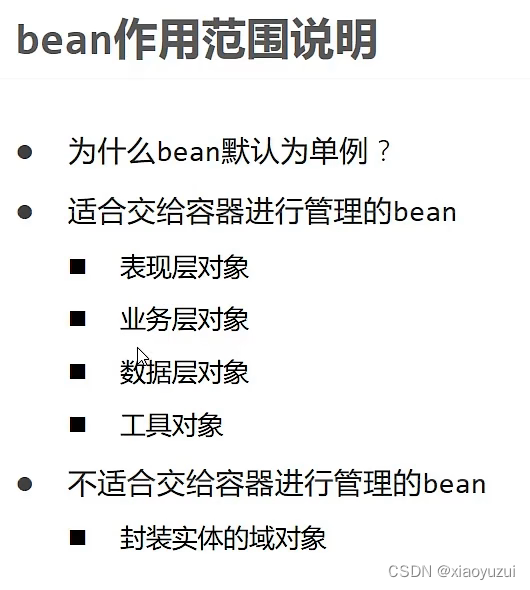
bean作用范围配置:
<bean>标签有个scope属性用来配置管理的对象为单例还是多个
a)单例singleton默认方式
b)多个prototype
1.4bean实例化
默认无参构造方法实例化:在实现类里面有默认的无参构造方法。
静态工厂实例化:创建工具类->在工具类中编写静态方法->配置bean
实例工厂实例化:创建工具类->在工具类中编写普通方法获取子类对象->配置bean
Facory方法实例化:实现FactoryBean<>接口->重写方法返回->配置bean
| 方式 | 默认构造方法 | 静态工厂 | 实例化工厂 | FactoryBean |
| 工具类中的get方法 | 不需要工具类 | 返回类型:需要的对象类型 实际返回类型:返回类型的实现类 方法类型:静态方法 | 返回类型:需要的对象类型 实际返回类型:返回类型的实现类 方法类型:普通方法 | 返回类型:需要的对象类型 实际返回类型:返回类型的实现类 方法:重写方法 |
| 不同点 | 无 | 方法类型为静态方法 | 方法类型为普通方法 | 方法为重写来自于FactoryBean中 <>需要指定泛型,泛型为所需要的返回类型 |
| 相同点 | 无 | 1.返回类型相同,均为送需要对象的类型 2.实际返回类型均为返回类型的实现类 | ||
| bean的配置方式 | 1、id 2、class为所需对象的实体类 | 1、id 2、class为工具类 3、factory-method为工具类里的静态方法 | 1、id 2、需要两个bean标签,第一个bean标签为工具类,属性有id,class为工具类,第二个bean标签id、factory-bean为工具类bean的id、factory-method为工具类里的普通方法 | 1、id 2、class为FactoryBean工具类 |
| 不同点 | class为所需实体类 | 1、class为工具类 2、需要属性factory-method指明静态方法 | 1、需要两个bean标签 2、需要指明factory-bean属性 3、需要factory-method指明普通方法 | class为FactoryBean工具类 |
| 相同点 | 均需要id | |||
| 获取对象的方式 | 容器获取 | 1、容器获取 2、工具类名调用get静态方法获取 | 1、容器获取 2、工具类对象名调用get普通方法获取 | 容器获取 |
1.5bean的生命周期
提供生命周期方法:
在实现类里定义init()和destroy()方法-->
//init初始化
    public void init(){
        System.out.println("init...");
    }
//destroy销毁
    public void destroy(){
        System.out.println("destroy...");
    }
在配置文件中的bean标签绑定init-method和destroy-method-->
<bean id="bookDao" class="com.itheima.dao.impl.BookDaoImpl" init-method="init" destroy-method="destroy"/>init()方法自动执行-->
destroy()方法用注册钩子函数关闭容器或用close()方法直接关闭-->
 //注册关闭钩子函数,在虚拟机退出之前调用钩子函数关闭容器
        ctx.registerShutdownHook();
//强制关闭容器
        ctx.close();
配置生命周期控制方法:
实现InitializingBean,DisposableBean两个接口-->
implements InitializingBean,DisposableBean重写destroy和afterPropertiesSet方法-->
public void destroy() throws Exception {
        System.out.println("接口方式销毁bean。。。");
    }

    public void afterPropertiesSet() throws Exception {
        System.out.println("当属性运行完后执行初始化bean。。。");
    }
二、依赖注入
2.1setter注入
引用类型注入:
1.在实现类里创建对象(取消new的方式)-->
//1.创建dao层对象
    private BrandDao brandDao;
    private UserDao userDao;
2.提供都相应的setter-->
//2.提供setter
    public void setBrandDao(BrandDao brandDao){
        this.brandDao=brandDao;
    }

    public void setUserDao(UserDao userDao) {
        this.userDao = userDao;
    }
3.配置bean
<!--注入引用类型-->
    <bean id="brandDao" class="com.itheima.dao.impl.BrandDaoImpl"></bean>
    <bean id="brandService" class="com.itheima.service.impl.BrandServiceImpl">
        <property name="brandDao"  ref="brandDao"></property>
        <property name="userDao" ref="userDao"></property>
    </bean>
简单类型注入
1.创建属性名
//1.创建引用类型属性
    private int count;
    private String name;
2.提供相应的setter
//提供setter
    public void setCount(int count) {
        this.count = count;
    }

    public void setName(String name) {
        this.name = name;
    }
3.配置bean
bean id="brandDao2" class="com.itheima.dao.impl.BrandDaoImpl">
    <!--name为注入的属性名-->
    <!--value为初始化值-->
        <property name="count" value="99"></property>
        <property name="name" value="xiaoyu"></property>
</bean>| 方式 | 简单类型注入 | 引用类型注入 |
| 创建属性名 | 一致 | |
| 提供相应setter | 一致 | |
| 配置bean | 1、一个bean标签 2、property标签的属性为name+value,其中name为成员变量value为成员变量的值 | 1、两个bean标签,一个为引用类型bean标签,另一个为自身的bean标签 2、property标签属性为name+ref,其中name为成员变量名,ref为成员变量引用类型的bean标签id |
2.2构造器注入
简单类型注入:
1.创建成员变量
private int id;
private String databaseName;
2.提供构造方法
public BookDaoImpl(int id,String databaseName){
        this.id=id;
        this.databaseName=databaseName;
    }
3.配置bean
<!--    书写简单类型和String类型注入-->
    <bean id="bookDao" class="com.itheima.dao.impl.BookDaoImpl">
        <constructor-arg name="id" value="167"></constructor-arg>
        <constructor-arg name="databaseName" value="mysql"></constructor-arg>
    </bean>
引用类型注入
1.创建成员变量
//1.创建引用类型成员变量
    private UserDao userDao;
    private BookDao bookDao;
2.提供构造方法
//2.提供构造方法
    public BookServiceImpl(UserDao userDao,BookDao bookDao){
        this.userDao=userDao;
        this.bookDao=bookDao;
    }
3.配置bean
<!--    引用类型注入-->
    <bean id="userDao" class="com.itheima.dao.impl.UserDaoImpl"></bean>
    <bean id="bookService" class="com.itheima.service.impl.BookServiceImpl">
        <constructor-arg index="0" ref="userDao"></constructor-arg>
        <constructor-arg index="1" ref="bookDao"></constructor-arg>
    </bean>
区别:
1.property标签改为了constructor-org标签
2.property标签里的name属性为成员变量的名称,constructor-org标签里的name为构造方法的形参名称(可用参数类型type属性和索引index属性代替用来降低耦合性)。
2.3自动装配

用bean标签里的autowire属性根据类型(推荐)或根据名称(耦合度高,不推荐)自动装配。
2.4集合注入
1.创建成员变量
//1.创建成员变量
    private int[] array;

    private List<String> list;

    private Set<String> set;

    private Map<String,String> map;

    private Properties properties;
2.提供set方法
//2.提供setter方法
    public void setArray(int[] array) {
        this.array = array;
    }

    public void setList(List<String> list) {
        this.list = list;
    }

    public void setSet(Set<String> set) {
        this.set = set;
    }

    public void setMap(Map<String, String> map) {
        this.map = map;
    }

    public void setProperties(Properties properties) {
        this.properties = properties;
    }
3.配置bean
<bean id="bookDao" class="com.itheima.dao.impl.BookDaoImpl">
        <!--数组注入-->
        <property name="array">
            <array>
                <value>100</value>
                <value>200</value>
                <value>300</value>
            </array>
        </property>
        <!--list集合注入-->
        <property name="list">
            <list>
                <value>itcast</value>
                <value>itheima</value>
                <value>boxuegu</value>
                <value>chuanzhihui</value>
            </list>
        </property>
        <!--set集合注入-->
        <property name="set">
            <set>
                <value>itcast</value>
                <value>itheima</value>
                <value>boxuegu</value>
                <value>boxuegu</value>
            </set>
        </property>
        <!--map集合注入-->
        <property name="map">
            <map>
                <entry key="country" value="china"/>
                <entry key="province" value="henan"/>
                <entry key="city" value="kaifeng"/>
            </map>
        </property>
        <!--Properties注入-->
        <property name="properties">
            <props>
                <prop key="country">china</prop>
                <prop key="province">henan</prop>
                <prop key="city">kaifeng</prop>
            </props>
        </property>
    </bean>
2.5第三方数据源管理
2.6加载properties文件
1.在applicationContext.xml新建命名空间
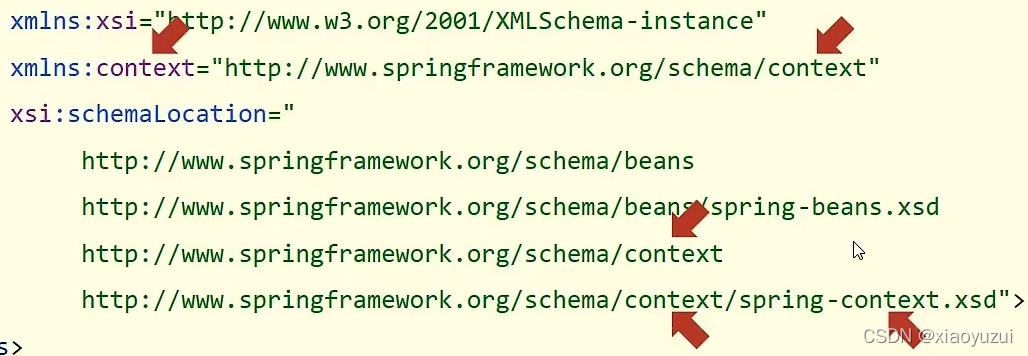
xmlns:context="http://www.springframework.org/schema/context"
xsi:schemaLocation="http://www.springframework.org/schema/context
            http://www.springframework.org/schema/context/spring-context.xsd"
2.用新建的命名空间加载properties文件(property-placeholder location)
<context:property-placeholder location="jdbc.properties"></context:property-placeholder>3.用属性占位符读取properties文件中的属性值
<bean id="c3p0DataSource" class="com.mchange.v2.c3p0.ComboPooledDataSource">
        <property name="driverClass" value="${jdbc.driver}"></property>
        <property name="jdbcUrl" value="${jdbc.url}"></property>
        <property name="user" value="${jdbc.userName}"></property>
        <property name="password" value="${jdbc.password}"></property>
    </bean>
4.加载多个properties文件时推荐两种方式
加载项目工程全部自己编写的properties
<context:property-placeholder location="classpath:*.properties"></context:property-placeholder>properties文件名称用(,)分隔开
<context:property-placeholder location="jdbc.properties,jdbc2.properties"></context:property-placeholder>2.6加载核心配置文件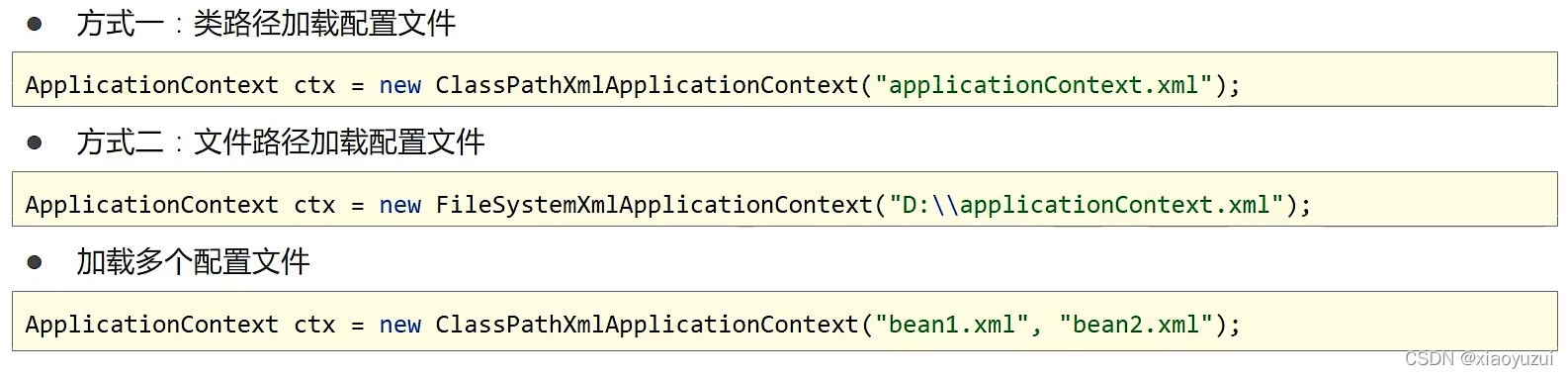
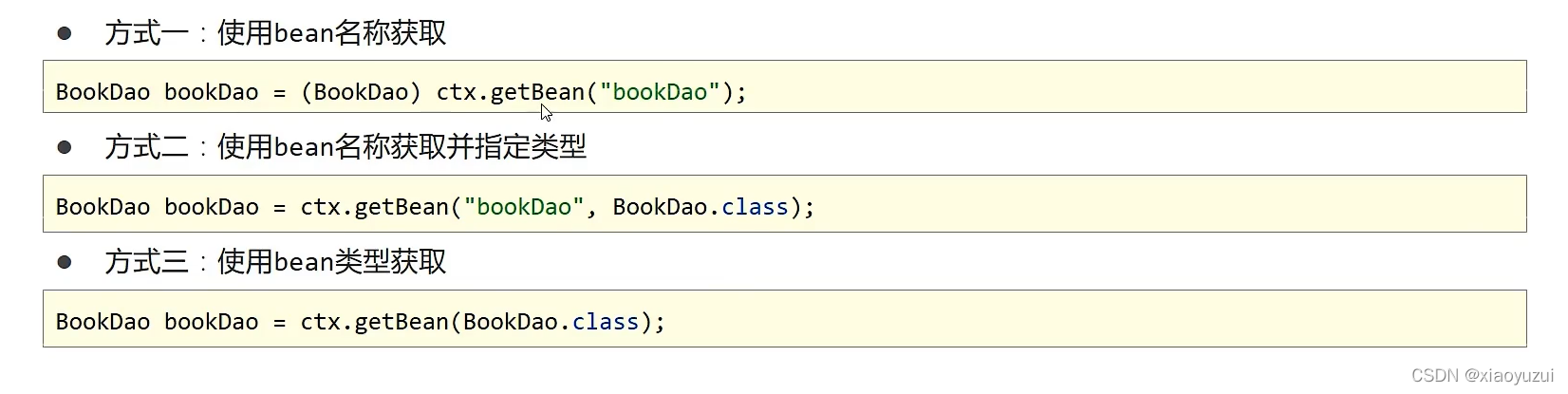
2.7获取容器方式
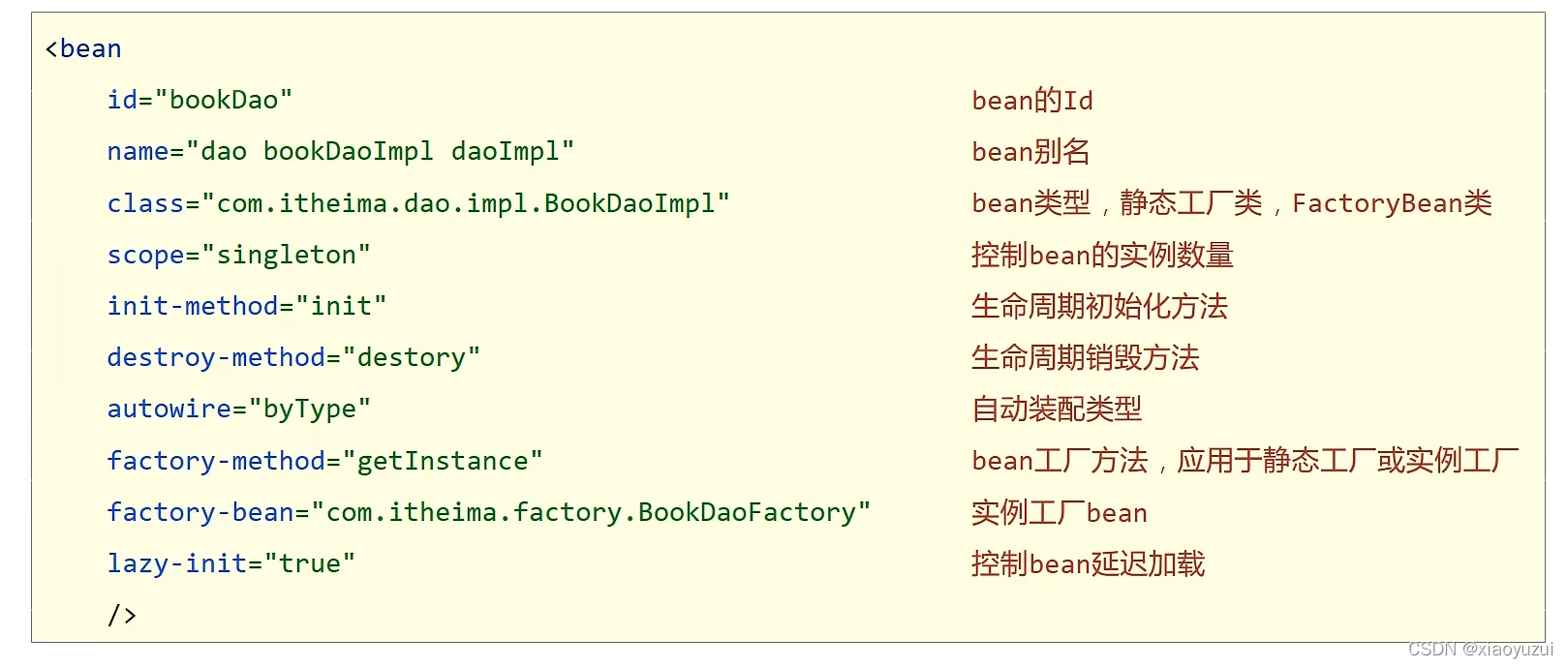
2.8bean总结
三、注解开发
3.1注解定义bean
@Repository 数据访问层
@Service 业务逻辑层
@Controller 表现层
@Component 通用方式
1.添加注解(相当于定义bean)
@Repository2.添加id(里面的参数相当于id)
@Repository("bookDao")3.在配置文件中扫描bean
a)新建命名空间
xmlns:context="http://www.springframework.org/schema/context"
xsi:schemaLocation="http://www.springframework.org/schema/context  http://www.springframework.org/schema/context/spring-context.xsd"
b)扫描bean
<context:component-scan base-package="com.itheima"></context:component-scan>3.2纯注解开发(代替配置类代替配置文件)
1.新建配置类
package com.itheima.config;

import org.springframework.context.annotation.Configuration;

@Configuration
public class SpringConfig {
}
@Configuration等同于配置文件
<?xml version="1.0" encoding="UTF-8"?>
<beans xmlns="http://www.springframework.org/schema/beans"
       xmlns:xsi="http://www.w3.org/2001/XMLSchema-instance"
       xsi:schemaLocation="http://www.springframework.org/schema/beans http://www.springframework.org/schema/beans/spring-beans.xsd">

</beans>
2.扫描bean

@ComponentScan("com.itheima")等同于
<context:component-scan base-package="com.itheima"></context:component-scan>3.获取容器
AnnotationConfigApplicationContext annotationConfigApplicationContext=new AnnotationConfigApplicationContext(SpringConfig.class);3.2管理bean
1.bean作用范围(默认单例)
@Scope("prototype") //配置bean为多个2.生命周期
1.设置初始化方法
@PostConstruct        //加载构造函数后加载
    public void init(){
        System.out.println("init...");
    }
2.设置销毁方法
//@PreDestroy设置bean的销毁方法
    @PreDestroy
    public void destroy() {
        System.out.println("destroy ...");
    }
3.关闭容器或调用注册关闭钩子函数
ctx.close();3.3注解开发自动装配注入
引用类型自动装配
1.创建dao层的bean-->
指定名称(id)
@Repository("bookDao")不指定名称按类型配置
@Repository2.创建service层bean-->
指定名称(id)
@Service("BookService")不指定名称按类型配置
@Service3.自动装配注入(注意要写在创建该bean成员变量之前)-->
指定名称(id)自动装配
@Autowired
@Qualifier("bookDao")
不指定名称按类型自动装配
@Autowired简单类型注入(值注入)
1.创建成员变量并注入值-->
@Value("${name}")
private String name;
2.加载properties文件(数组形式加载,多个配置文件用,分隔开)
@PropertySource({"classpath:jdbc.properties","jdbc2.properties"})3.4管理第三方bean
1.新建配置类
package com.itheima.config;

public class JdbcConfig {
}
2.在配置类里定义方法获取要管理的bean并且添加@Bean注解表名方法的返回值为要管理的bean
@Bean
public DataSource getDataSource(){
        DruidDataSource druidDataSource=new DruidDataSource();
        druidDataSource.setDriverClassName("com.mysql.jdbc.Driver");
        druidDataSource.setUrl("jdbc:mysql://localhost:3306/spring_db");
        druidDataSource.setUsername("root");
        druidDataSource.setPassword("xiaoyu");
        return druidDataSource;
    }
3.在管理bean的配置类(SpringConfig相当于配置文件applicationContext.xml)中导入获取第三方管理bean的配置类.class
@Import({JdbcConfig.class})4.获取bean
//1.加载容器
        AnnotationConfigApplicationContext ctx = new AnnotationConfigApplicationContext(SpringConfig.class);

//2.获取第三方bean
        DataSource dataSource = ctx.getBean(DataSource.class);

//3.操作
        System.out.println(dataSource);
3.5第三方bean注入资源
第三方简单类型注入(成员变量)
1.创建简单类型成员变量并添加注解
    @Value("com.mysql.jdbc.Driver")
    private String driver;
    @Value("jdbc:mysql://localhost:3306/spring_db")
    private String url;
    @Value("root")
    private String user;
    @Value("xiaoyu")
    private String password;
第三方引用类型注入(形参)
1.在配置类里定义的方法中添加要注入引用类型的参数
 @Bean
    public DataSource getDataSource(BookDao bookDao){
        System.out.println(bookDao);
        DruidDataSource druidDataSource=new DruidDataSource();
        druidDataSource.setDriverClassName(driver);
        druidDataSource.setUrl(url);
        druidDataSource.setUsername(user);
        druidDataSource.setPassword(password);
        System.out.println(user);
        return druidDataSource;
    }
2.配置形参中的bean
@ComponentScan("com.itheima")四、xml配置和注解开发比较
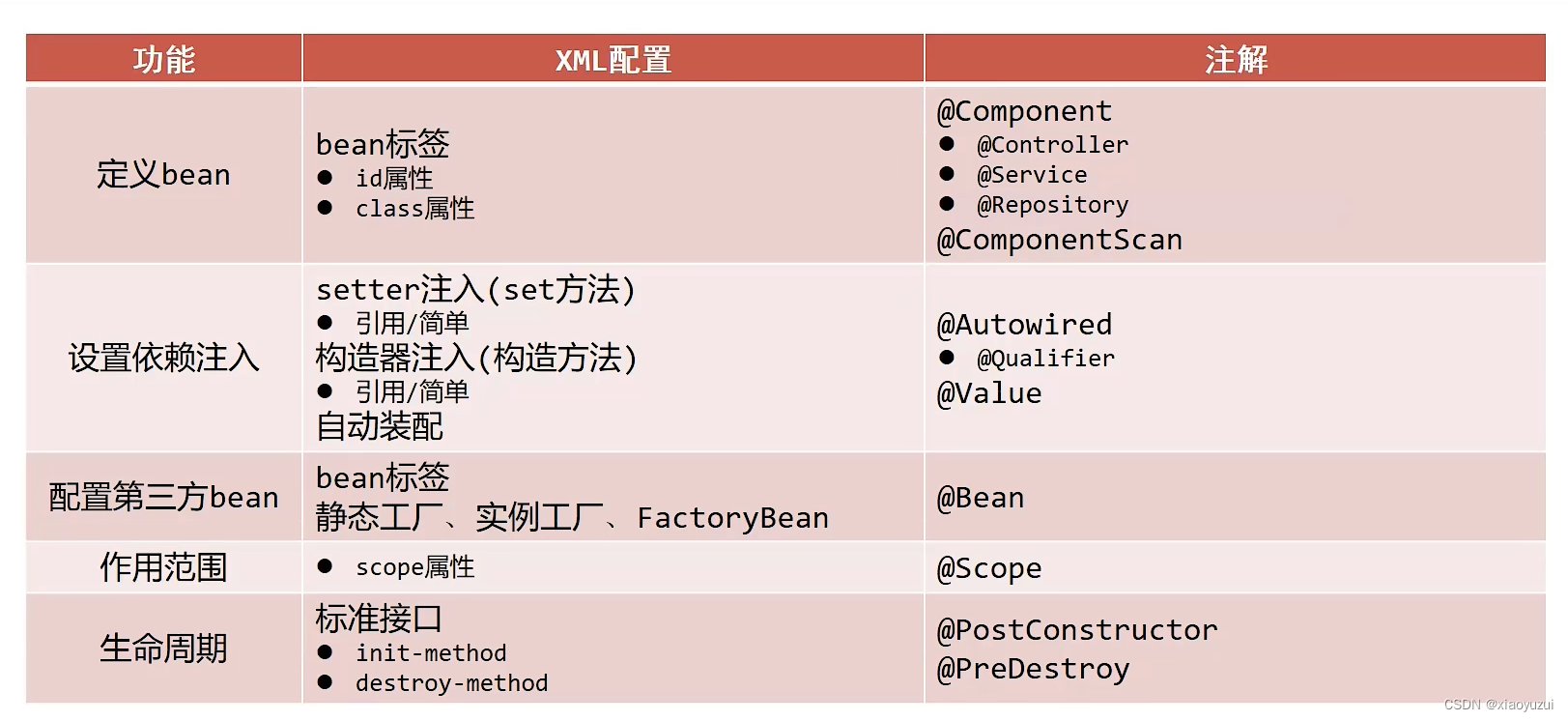
| 功能 | xml配置 | 注解开发 |
| 配置方式 | xml配置文件 | java配置类 |
| 配置类基础结构 | @Configuration | |
| 定义bean | bean标签 id属性 class属性 | @Component dao层:@Repository service层:@Service controller层:@Controller @ComponentScan 在配置类里 用来扫描定义的bean |
| 依赖注入 | 1.setter注入 引用/简单 2.构造器注入 引用/简单 3.自动装配 引用 | @Autowired用来自动装配 @Qualifier根据bean名称注入 两个搭配使用 @Value用来进行简单注入 搭配properties文件使用 |
| 配置第三方bean | bean标签(构造方法) 静态工厂 实例工厂 FactoryBean | @Bean @Bean注解表名get方法的返回值为要管理的bean 需要在基本配置类里导入第三方bean管理配置类 @Value简单类型注入(成员变量) 引用类型注入(形参注入) |
| 生命周期 | 1.实现InitializingBean,DisposableBean接口; 重写destroy和afterPropertiesSet方法; 调用注册关闭钩子函数或直接关闭容器 2.在实现类自定义init和destroy方法; bean标签里的init-method属性和destroy-method属性 | @PostConstruct //执行构造方法后执行初始化方法; @PreDestroy //容器关闭前销毁; 调用注册关闭钩子函数或直接关闭容器 |
| 作用范围 | bean标签中的scope属性设置单例还是多个 | @Scope用来设置单例还是多个 |
五、spring整合mybatis
1.spring操作数据库坐标和spring整合mybatis坐标
<!--    spring操作数据库坐标-->
    <dependency>
      <groupId>org.springframework</groupId>
      <artifactId>spring-jdbc</artifactId>
      <version>5.2.10.RELEASE</version>
    </dependency>
<!--    spring整合mybatis坐标,由spring提供接口(规则),mybatis提供坐标(包)-->
<!--      该坐标的版本要和mybatis的版本有所对应,否则会报错-->
    <dependency>
      <groupId>org.mybatis</groupId>
      <artifactId>mybatis-spring</artifactId>
      <version>1.3.0</version>
    </dependency>
2.配置获取DataSource对象配置类(第三方数据源)
package com.itheima.config;

import com.alibaba.druid.pool.DruidDataSource;
import org.springframework.beans.factory.annotation.Value;
import org.springframework.context.annotation.Bean;

import javax.sql.DataSource;


public class JdbcConfig {
    @Value("${jdbc.driver}")
    private String driver;
    @Value("${jdbc.url}")
    private String url;
    @Value("${jdbc.username}")
    private String userName;
    @Value("${jdbc.password}")
    private String password;

    @Bean
    public DataSource dataSource(){
        DruidDataSource ds = new DruidDataSource();
        ds.setDriverClassName(driver);
        ds.setUrl(url);
        ds.setUsername(userName);
        ds.setPassword(password);
        return ds;
    }
}
3.编写spring整合配置类坐标
package com.itheima.config;

import org.mybatis.spring.SqlSessionFactoryBean;
import org.mybatis.spring.mapper.MapperScannerConfigurer;
import org.springframework.context.annotation.Bean;
import javax.sql.DataSource;

/*
整个类相当于mapper代理配置文件
 */
public class MybatisConfig {

    /*
    该方法用来获取SqlSessionFactoryBean对象(bean)
     */
    @Bean
    public SqlSessionFactoryBean getSqlSessionFactoryBean(DataSource dataSource) {
        //1.创建SqlSessionFactoryBean
        SqlSessionFactoryBean sqlSessionFactoryBean = new SqlSessionFactoryBean();

        //2.配置包别名
        /*相当于配置文件中的如下信息
        <typeAliases>
            <package name="com.itheima.domain"/>
        </typeAliases>
         */
        sqlSessionFactoryBean.setTypeAliasesPackage("com.itheima.domain");

        //3.获取dataSource
        /*相当于配置文件中的如下配置信息
        <dataSource type="POOLED">
            <property name="driver" value="${jdbc.driver}"></property>
            <property name="url" value="${jdbc.url}"></property>
            <property name="username" value="${jdbc.username}"></property>
            <property name="password" value="${jdbc.password}"></property>
        </dataSource>
         */
        sqlSessionFactoryBean.setDataSource(dataSource);

        //4.返回该第三方bean
        return sqlSessionFactoryBean;
    }

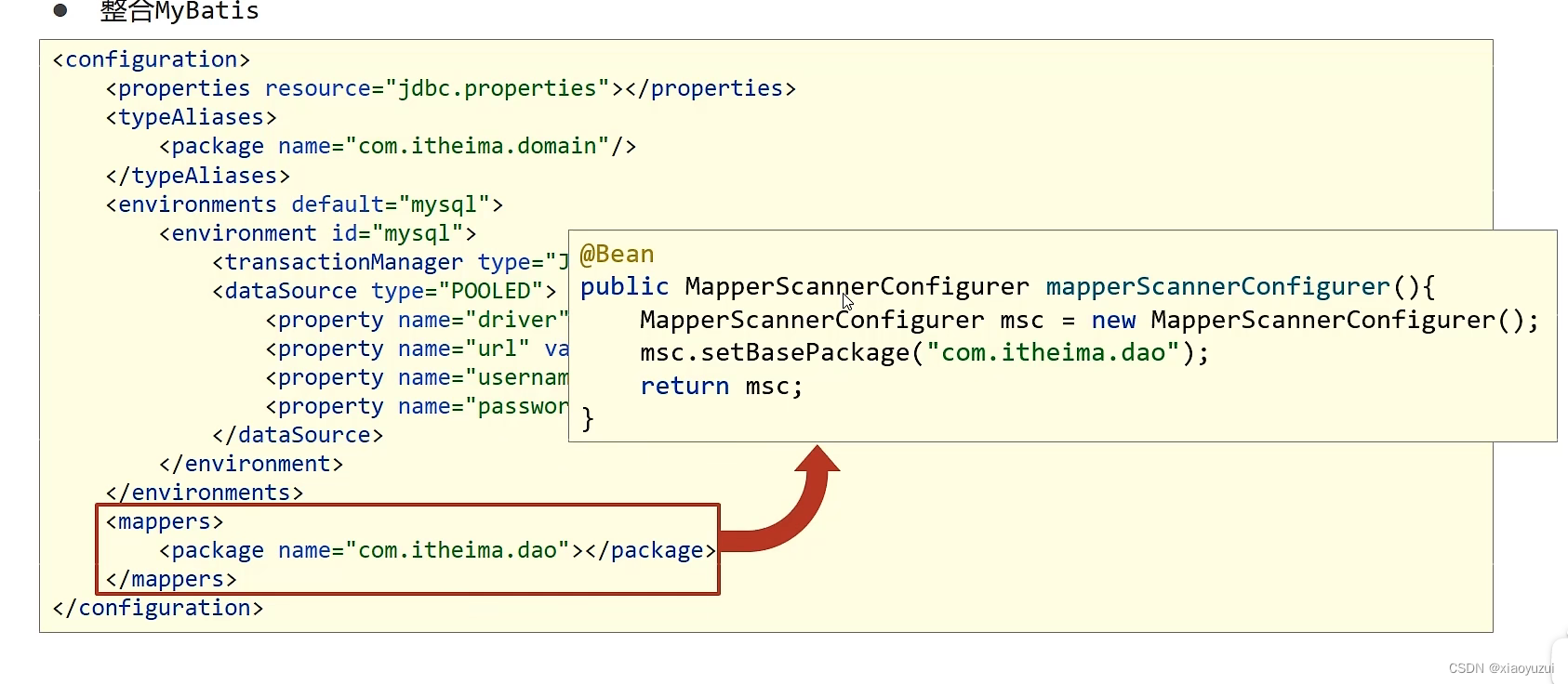
    @Bean
    public MapperScannerConfigurer getMapperScannerConfigurer() {
        //1.扫描包的对象获取对象
        /*相当于
        <mappers>
            <package name="com.itheima.dao"></package>
        </mappers>
         */
        MapperScannerConfigurer mapperScannerConfigurer = new MapperScannerConfigurer();

        //2.设置参数扫描包
        /*
        相当于
            <package name="com.itheima.dao"></package>
         */
        mapperScannerConfigurer.setBasePackage("com.itheima.dao");

        //3.返回该对象
        return mapperScannerConfigurer;
    }
}
4.扫描bean、导入mybatis配置类和jdbc数据源配置类、加载properties文件
@Configuration
//扫描要管理的bean
@ComponentScan("com.itheima")
//加载类路径jdbc.properties文件
@PropertySource("classpath:jdbc.properties")
//导入要整合1的配置类
@Import({JdbcConfig.class,MybatisConfig.class})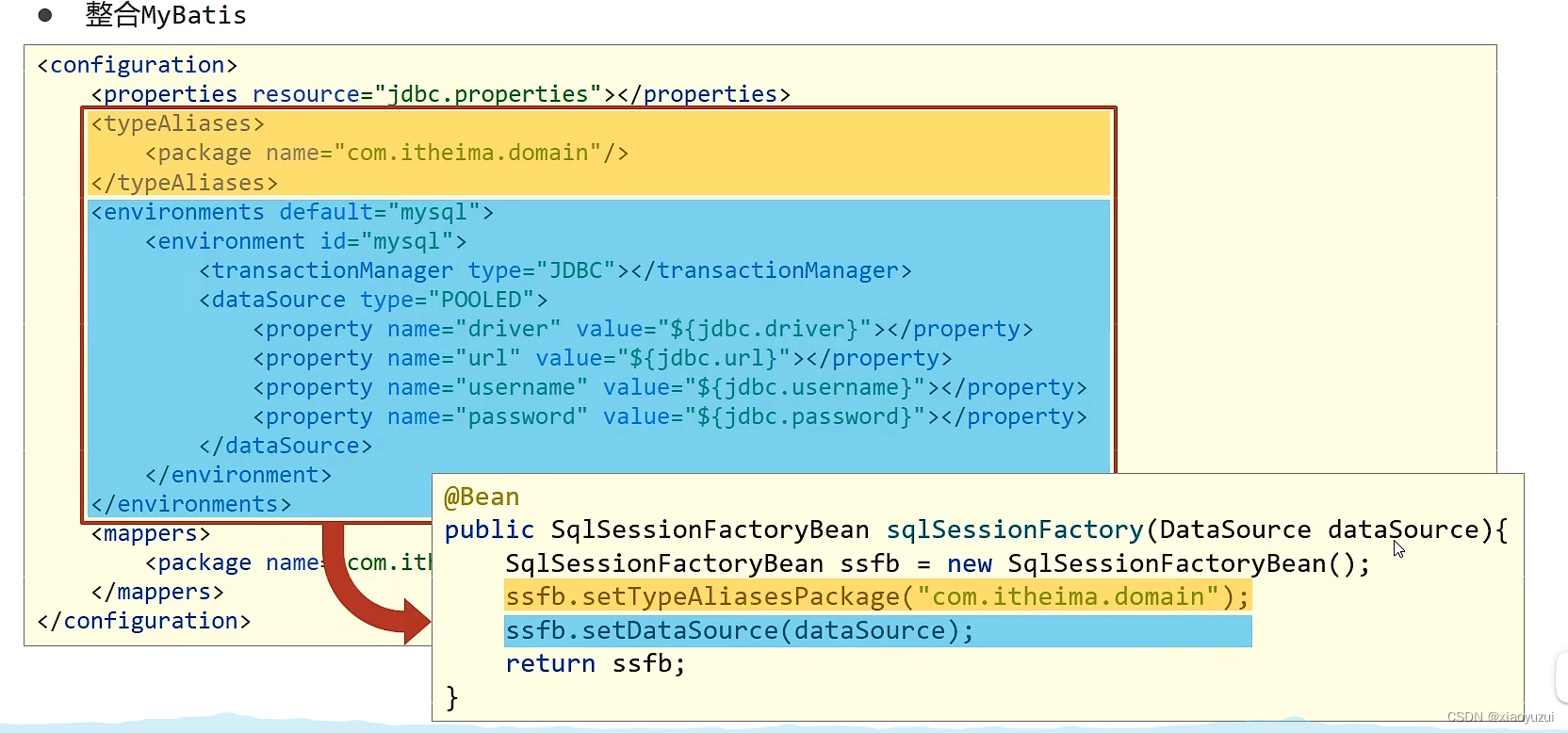
 六、spring整合junit
1.导入junit坐标
        <!--        单元测试-->
        <dependency>
            <groupId>junit</groupId>
            <artifactId>junit</artifactId>
            <version>4.12</version>
            <scope>test</scope>
        </dependency>
2.导入spring整合junit坐标
        <!--        spring整合单元测试-->
        <dependency>
            <groupId>org.springframework</groupId>
            <artifactId>spring-test</artifactId>
            <version>5.2.10.RELEASE</version>
        </dependency>
3.创建测试类
package com.itheima.service;

import com.itheima.config.SpringConfig;
import com.itheima.domain.Account;
import org.junit.Test;
import org.junit.runner.RunWith;
import org.springframework.beans.factory.annotation.Autowired;
import org.springframework.test.context.ContextConfiguration;
import org.springframework.test.context.junit4.SpringJUnit4ClassRunner;

//1.指定类运行器
@RunWith(SpringJUnit4ClassRunner.class)
//2.指定spring配置类
@ContextConfiguration(classes = SpringConfig.class)
public class AccountServiceTest {
    @Autowired
    private AccountService accountService;

    @Test
    public void testFindById(){
        Account accountServiceById = accountService.findById(1);
        System.out.println(accountServiceById);
    }
}
4.指定类运行器
//1.指定类运行器
@RunWith(SpringJUnit4ClassRunner.class)
5.指定spring配置文件
//2.指定spring配置类
@ContextConfiguration(classes = SpringConfig.class)
6.编写自动装配注入
    @Autowired
    private AccountService accountService;
7.测试方法
@Test
    public void testFindById(){
        Account accountServiceById = accountService.findById(1);
        System.out.println(accountServiceById);
    }
七、AOP面向切面编程
7.1入门案例
1.导入aop坐标(该坐标被包含于spring-context做坐标,不用重复导入)和aspectjweaver坐标
        <dependency>
            <groupId>org.springframework</groupId>
            <artifactId>spring-context</artifactId>
            <version>5.2.10.RELEASE</version>
        </dependency>

        <!--    sapectjweaver坐标-->
        <dependency>
            <groupId>org.aspectj</groupId>
            <artifactId>aspectjweaver</artifactId>
            <version>1.9.4</version>
        </dependency>
2.定义接口和实现类
接口
package com.itheima.dao;

public interface BookDao {
    public void save();
    public void update();
}
实现类
package com.itheima.dao.impl;

import com.itheima.dao.BookDao;
import org.springframework.stereotype.Repository;

@Repository
public class BookDaoImpl implements BookDao {

    public void save() {
        System.out.println(System.currentTimeMillis());
        System.out.println("book dao save ...");
    }

    public void update(){
        System.out.println("book dao update ...");
    }
}
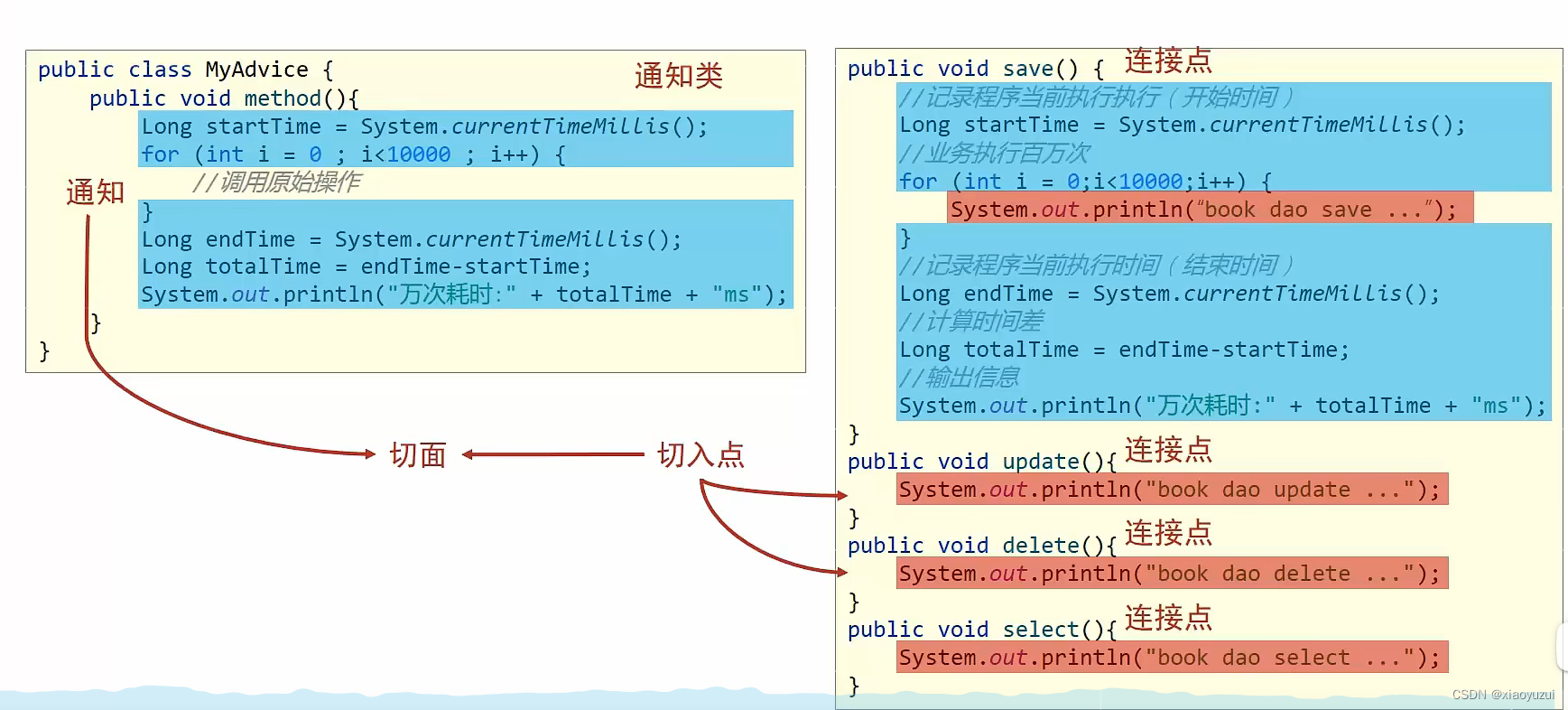
3.定义通知类Advice和通知
通知类
package com.itheima.aop;

/*
通知类
 */
public class Advice {
}
通知
//通知
    public void method(){
        System.out.println(System.currentTimeMillis());
    }
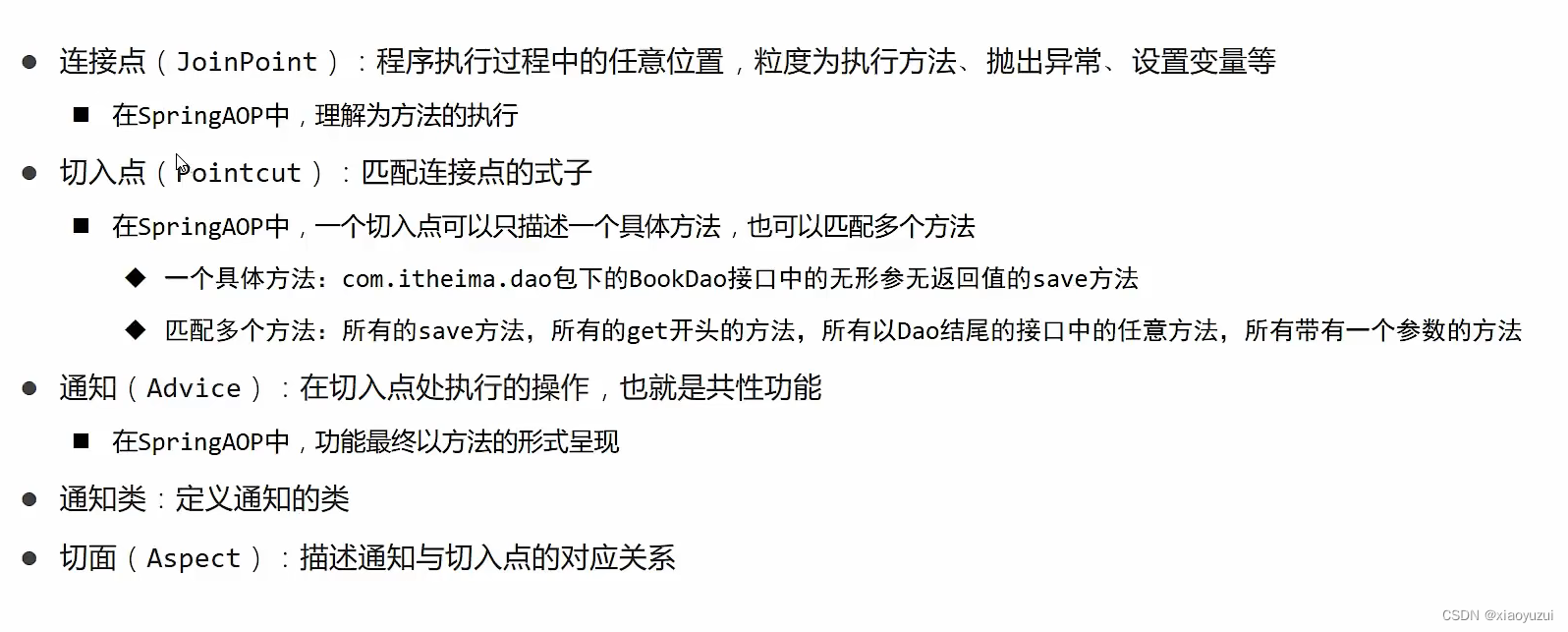
4.定义切入点
    //定义切入点
    @Pointcut("execution(void com.itheima.dao.BookDao.update())")   //第一个参数为该方法的返回类型,第二个参数为该方法的具体位置和名称
    private void pointCut(){}   //运行到该方法时给该方法加功能
5.绑定切入点和通知的关系(定义切面)
 //绑定关系(编写切面)
    @Before("pointCut()")
    public void method(){           //编写通知
        System.out.println(System.currentTimeMillis());
    }
6.通知类受ioc容器管理并定义通知类为切面类
@Component      //给ioc容器管理
@Aspect     //定义当前类为切面类
7.开启spring对aop注解驱动支持
package com.itheima.config;

import org.springframework.context.annotation.ComponentScan;
import org.springframework.context.annotation.Configuration;
import org.springframework.context.annotation.EnableAspectJAutoProxy;

@Configuration
@ComponentScan("com.itheima")
@EnableAspectJAutoProxy    //开启spring对aop注解驱动支持
public class SpringConfig {
}
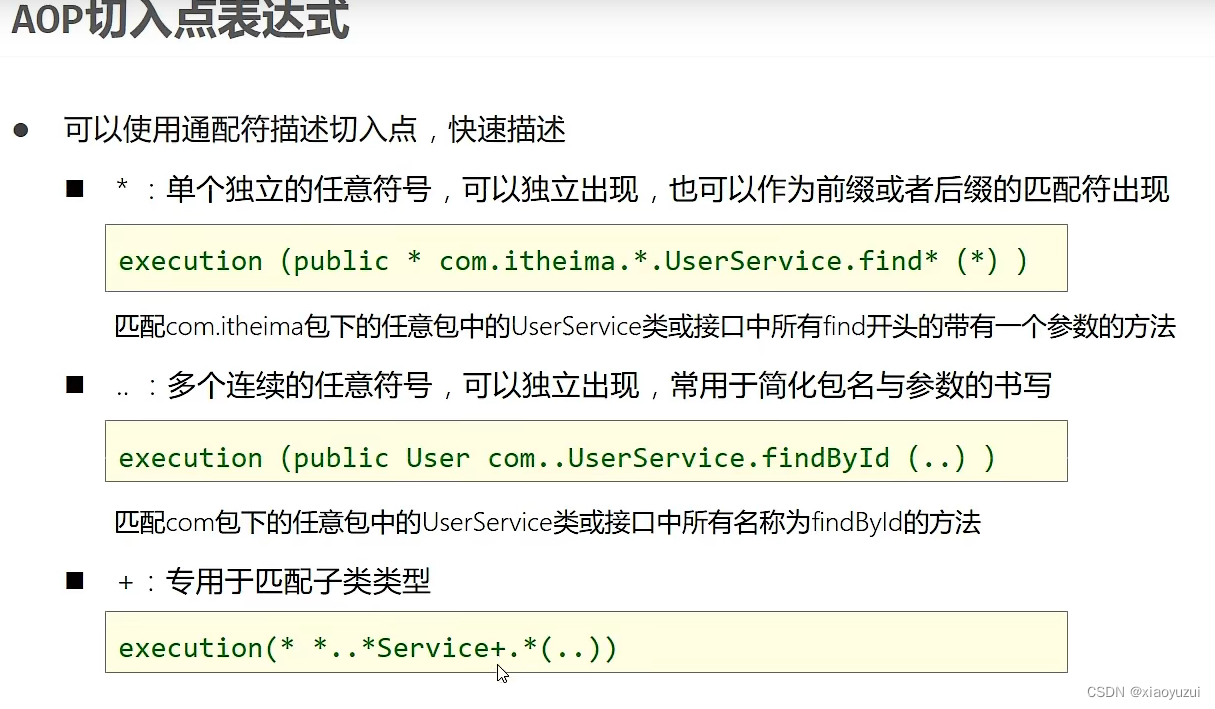
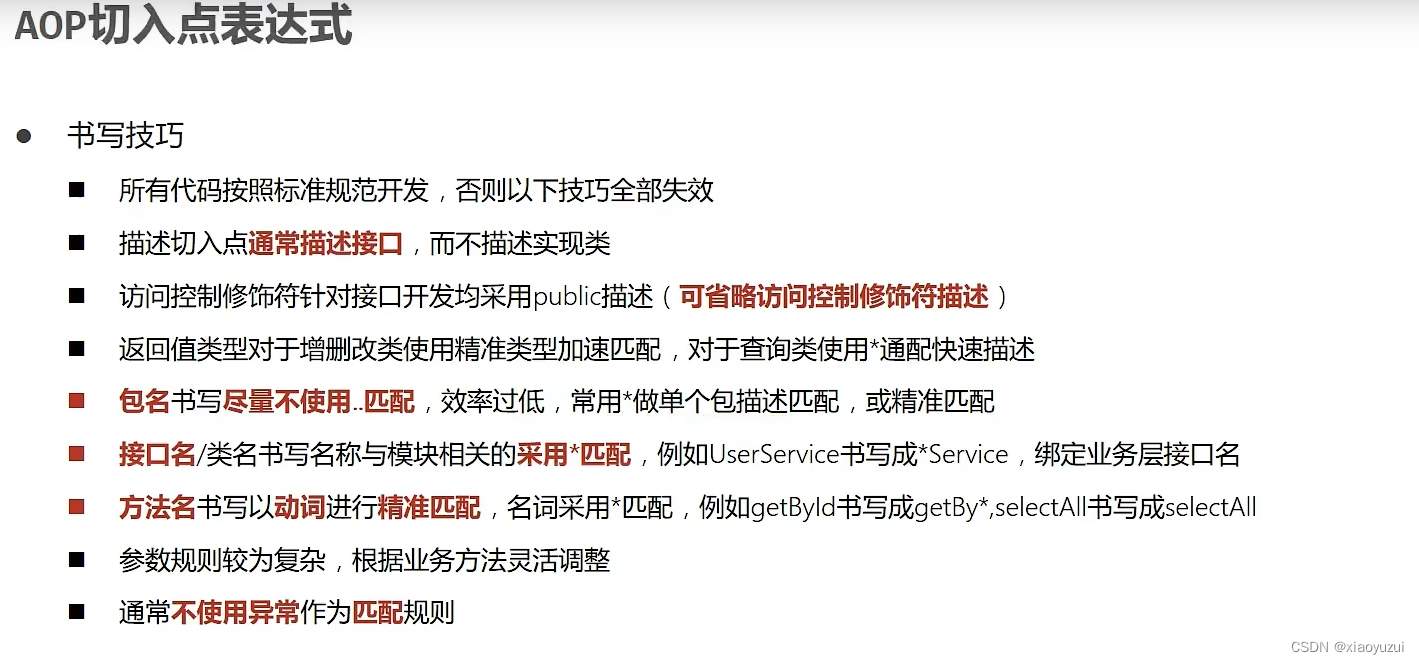
7.2切入点表达式
7.3aop通知类型
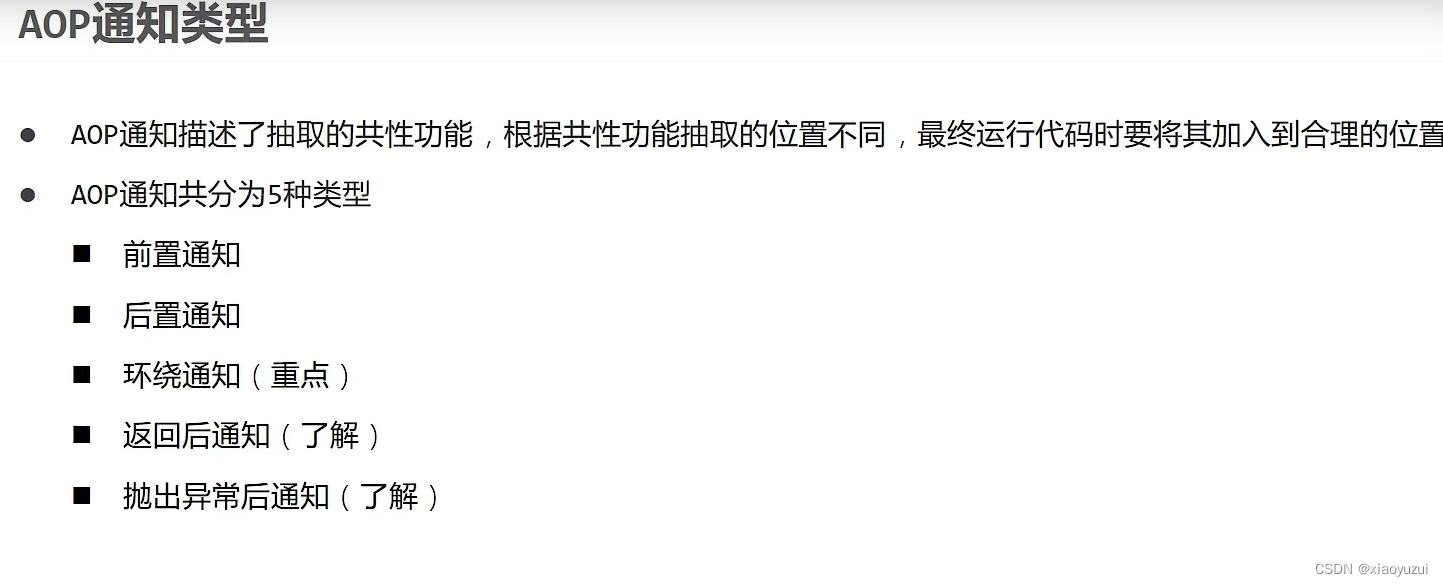
1.前置通知
//前置通知
    @Before("pt()")
    public void before() {
        System.out.println("before advice ...");
    }
2.后置通知
//后置通知
    @After("pt()")
    public void after() {
        System.out.println("after advice ...");
    }
3.环绕通知
//编写切入点
    @Pointcut("execution(int com.itheima.dao.BookDao.select())")
    private void pt2(){}
//环绕通知,绑定关系(编写切面)
    @Around("pt2()")
    //环绕通知的返回值类型均为Object,参数类型为ProceedingJoinPoint
    public Object around(ProceedingJoinPoint proceedingJoinPoint) throws Throwable {
        System.out.println("around before advice ...");

        //该部分为目标方法的内容,被环绕执行,编写后抛出异常
        Integer proceed = (Integer) proceedingJoinPoint.proceed();

        System.out.println(proceed);
        System.out.println("around after advice ...");

        //返回目标函数的返回值,如果目标函数的返回值类型为void返回的内容为null,否则返回相应类型
        return proceed;
    }
4.返回后通知
//返回后通知,和后置通知的区别:如果目标函数执行返回之前抛出异常返回后通知无法执行,但是后置通知可以执行
    @AfterReturning("pt2()")
    public void afterReturning() {
        System.out.println("afterReturning advice ...");
    }
5.抛出异常后通知
//遇到异常后执行
    @AfterThrowing("pt2()")
    public void afterThrowing() {
        System.out.println("afterThrowing advice ...");
    }
7.4Aop通知获取数据
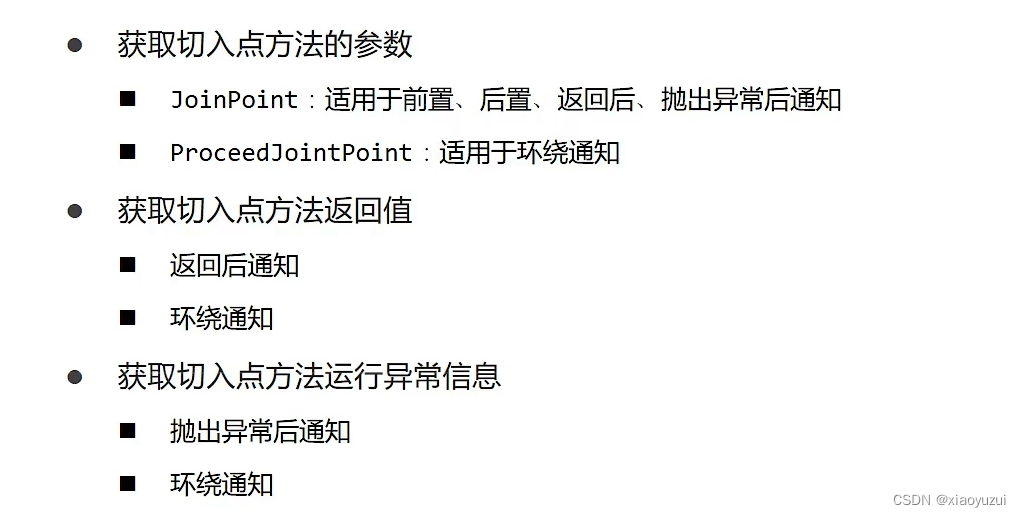
7.4.1.获取参数
JoinPoint:适用于前置、后置、返回后、抛出异常后通知
1.在通知中添加JoinPoint类型参数
public void before(JoinPoint joinPoint)2.用参数调用getArgs()方法获取参数
Object[] args = joinPoint.getArgs();3.把对象数组转换为String类型数组输出
//2.把对象数组参数转换为string类型数组输出
System.out.println(Arrays.toString(args));
ProceedJointPoint:适用于环绕通知
1.在通知类中添加ProceedJointPoint类型参数
public Object around(ProceedingJoinPoint proceedingJoinPoint)2.获取参数
//1.获取参数
Object[] args = proceedingJoinPoint.getArgs();
3.可以根据需求更改参数
//3.根据需要可以刚改参数的值
args[0] = 666;
4.把更改后的参数传递给目标方法
//4.调用运行目标方法,并把修改后的参数传递给目标函数
Object proceed = proceedingJoinPoint.proceed(args);
7.4.2目标方法返回值(适用于返回后通知和环绕通知)
返回后通知
1.在通知中定义形参用来接收目标方法的返回值并且形参中也要定义多一个returning="形参名"变量,如果需要JoinPoint的参数需要把JoinPoint参数放在前面。
    @AfterReturning(value = "pt()",returning = "ret")
    public void afterReturning(JoinPoint jp,String ret)
环绕通知
7.4.3目标方法所属类型和目标方法名称
目标方法类型
1.获取Signature类型的对象
//1.获取Signature
Signature signature=jp.getSignature();
2.获取包名和类名
//2.获取目标方法包名和类名
Class declaringType = signature.getDeclaringType();
3.获取目标方法名
        //3.获取目标方法名
        String name = signature.getName();
八、事务管理
8.1入门案例
1.在业务层接口添加spring事务管理(不写在实现类可以降低耦合性)
在接口上添加就表示该接口所有方法都开启事务,在方法上添加就表示只在该接口上添加事务管理
@Transactional(rollbackFor = IOException.class)         //开启事务,里面的参数表示遇到该类型异常时使事务回滚,可不写
    void transfer(String outName,String inName,double money);
2.在jdbc配置文件中设置事务管理器
    //设置事务管理器给ioc容器管理
    @Bean
    //设置形参来传递DataSource
    public PlatformTransactionManager getTransactionManager(DataSource dataSource){
        //创建对象DataSourceTransactionManager对象
        DataSourceTransactionManager dataSourceTransactionManager=new DataSourceTransactionManager();

        //设置DataSource
        dataSourceTransactionManager.setDataSource(dataSource);

        //返回对象
        return dataSourceTransactionManager;
    }
3.在spring配置文件中开启注解使事务驱动
@EnableTransactionManagement //开启注解式事务驱动





 扫一扫
扫一扫


 806
806

 被折叠的 条评论
为什么被折叠?
被折叠的 条评论
为什么被折叠?
 到【灌水乐园】发言





