



 该博客详细介绍了基于FCN的语义分割网络结构,包括全卷积、上采样和跳接特点。通过TensorFlow实现模型训练,并提供了代码示例,展示了如何进行单张和批量图像的预测、统计和保存。模型在预处理过的数据集上进行训练,使用VGG16作为基础网络,最后进行上采样和融合以得到分割结果。
参考明课程,特此感谢:
论文下载地址:https://blog.youkuaiyun.com/mieleizhi0522/article/details/81914000
FCN
1FCN网络结构
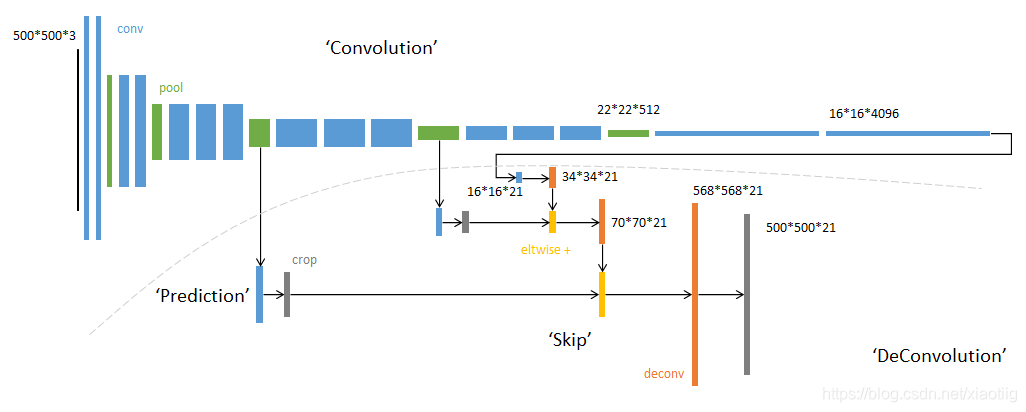
1.1 结构详解
https://www.cnblogs.com/xiaoboge/p/10502697.html
https://www.sohu.com/a/270896638_633698
1.2 三大特点
(1)全卷积
(2)上采样
(3)跳接结构
2代码实现
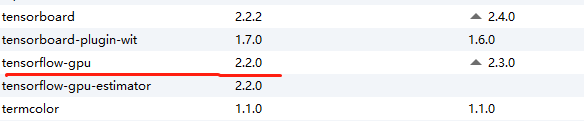
2.1开发环境
2.2主干网络
import  tensorflow as tf
import matplotlib.pyplot as plt
import numpy as np
import os
import glob

"""
下面2行代码是解决这个问题的Failed to get convolution algorithm. This is probably because cuDNN failed to initialize, so try looking to see if a warning log message was printed above.
[[node model_1/model/block1_conv1/Conv2D (defined at G:/XiaoMa/Bursxylophilus/310FCN/app.py:44) ]] [Op:__inference_predict_function_1613]
"""
physical_device = tf.config.experimental.list_physical_devices("GPU")
tf.config.experimental.set_memory_growth(physical_device[0], True)

# 获取所有图像路径
images = glob.glob(r'G:\XiaoMa\08OwnWork\zhongxian\语义分割数据\target\JPEGImages\*.jpg')
len(images)

anno = glob.glob(r'G:\XiaoMa\08OwnWork\zhongxian\语义分割数据\target\SegmentationClassPNG\*.png')

print(anno[-5:])
print(images[-5:])


# 进行乱序,inages和anno必须保持一致
np.random.seed(2019)   # 随机数种子
index = np.random.permutation(len(images))  # 随机数的索引,随机排列序列,https://blog.youkuaiyun.com/weixin_44188264/article/details/93752505
images = np.array(images)[index]
anno = np.array(anno)[index]
print(anno[-5:])
print(images[-5:])       # 查看标签和影像是否是一一对应

# 将读取的图片转换为数据集
dataset = tf.data.Dataset.from_tensor_slices((images,anno))
test_count = int(len(images)*0.2)             # 一部分为测试集
train_count = len(images)-test_count          # 一部分为训练集
print("测试和训练数据集数量:")
print(test_count,train_count)

data_train = dataset.skip(test_count)       # 跳过多少个进行选取
data_test = dataset.take(test_count)        # 选取多少个


def read_jpg(path):
    """读取并解码jpg图像"""
    img_de = tf.io.read_file(path)
    img_de = tf.image.decode_jpeg(img_de,channels=3)
    return img_de

def read_png(path):
    """读取并解码png图像"""
    img_de_png = tf.io.read_file(path)
    img_de_png = tf.image.decode_png(img_de_png,channels=1)
    return img_de_png


def normal_img(input_images,input_anno):
    """数据归一化"""
    input_images = tf.cast(input_images,tf.float32)
    input_images = input_images/127.5-1
    input_anno = tf.cast(input_anno, tf.float32)
    return input_images,input_anno


def load_images(input_images_path,input_anno_path):
    """加载图片并改变图像大小"""
    input_image = read_jpg(input_images_path)
    input_anno = read_png(input_anno_path)
    input_image = tf.image.resize(input_image,(224,224))    # 这个resize()的原理
    input_anno = tf.image.resize(input_anno,(224,224))
    return normal_img(input_image,input_anno)


# 对图像进行预处理
data_train = data_train.map(load_images)     # map()函数是,对所有数据用某个函数进行处理
data_test = data_test.map(load_images)

BATCH_SIZE = 8
#  repeat()函数就是对数据集进行重复,防止将数据读取完 https://blog.youkuaiyun.com/seuzhouchenglong/article/details/104047784
#  shuffle()函数就是将数据打乱
data_train = data_train.repeat().shuffle(30).batch(BATCH_SIZE)
data_test = data_test.batch(BATCH_SIZE)

####   上面已经加预处理好了数据

#  基本卷积,使用imagenet上训练好的vgg16,不包括全连接层
conv_base = tf.keras.applications.vgg16.VGG16(weights='imagenet',
                                        input_shape=(224,224,3),
                                        include_top=False
                                        )


layer_names = [
    'block5_conv3',
    'block4_conv3',
    'block3_conv3',
    'block5_pool'
]

# 列表推导式,根据名字获取每一层的输出
layers_output = [conv_base.get_layer(layer_name).output for layer_name in layer_names]

# 多输出模型,获取各个中间层的输出
multi_out_model = tf.keras.models.Model(inputs=conv_base.input,
                                  outputs=layers_output
                                  )

# 不可训练,设置到目前位置的权重都不可训练
multi_out_model.trainable = False

# 设置输入,通过输入获取输出,输出每个输出的大小
inputs = tf.keras.layers.Input(shape=(224,224,3))
out_block5_conv3,out_block4_conv3,out_block3_conv3,out = multi_out_model(inputs)
print()
print(out_block3_conv3.shape)
print(out_block4_conv3.shape)
print(out_block5_conv3.shape)
print(out.shape)


# 对out层进行上采用
x1 = tf.keras.layers.Conv2DTranspose(512,
                                     3,
                                     strides=2,
                                     padding='same',
                                     activation='relu')(out)
# 上采样后再加一个卷积层
x1 = tf.keras.layers.Conv2D(512,3,padding='same',activation='relu')(x1)

# 元素相加
x2 = tf.add(x1,out_block5_conv3)

# 对x2进行上采样,14*14变成28*28
x2 = tf.keras.layers.Conv2DTranspose(512,
                                     3,
                                     strides=2,
                                     padding='same',
                                     activation='relu')(x2)

x2 = tf.keras.layers.Conv2D(512,3,padding='same',activation='relu')(x2)

# 进行值相加,而不是concat,https://blog.youkuaiyun.com/xys430381_1/article/details/88355956
x3 = tf.add(x2,out_block4_conv3)

x3 = tf.keras.layers.Conv2DTranspose(256,
                                     3,
                                     strides=2,
                                     padding='same',
                                     activation='relu')(x3)

x3 = tf.keras.layers.Conv2D(256,3,padding='same',activation='relu')(x3)

x4 = tf.add(x3,out_block3_conv3)


x4 = tf.keras.layers.Conv2DTranspose(128,
                                     3,
                                     strides=2,
                                     padding='same',
                                     activation='relu')(x4)

x4 = tf.keras.layers.Conv2D(128,3,padding='same',activation='relu')(x4)


# 结果是3通道,原因就是你这里最后的输出就是3类,把3通道改成
prediction = tf.keras.layers.Conv2DTranspose(3,
                                     3,
                                     strides=2,
                                     padding='same',
                                     activation='softmax')(x4)

# 激活函数用softmax试一试,效果不如sigmoid
# 得到最后的模型
model = tf.keras.models.Model(
    inputs=inputs,
    outputs=prediction
)

model.summary()


# 编译
model.compile(
    optimizer='adam',
    loss='sparse_categorical_crossentropy',
    metrics=['acc']
)

model.fit(
    data_train,
    epochs=1000,
    steps_per_epoch=train_count//BATCH_SIZE,
    validation_data=data_test,
    validation_steps=100,
)


# 保存模型结构和权重
model.save('001_model.h5')

# 加载模型
# new_model = tf.keras.models.load_model('fcn_model.h5')
2.3进行预测
2.3.1 进行单张图像的预测
#  这个模块实现模型的加载和应用

import  tensorflow as tf
import matplotlib.pyplot as plt

"""
下面2行代码是解决这个问题的Failed to get convolution algorithm. This is probably because cuDNN failed to initialize, so try looking to see if a warning log message was printed above.
[[node model_1/model/block1_conv1/Conv2D (defined at G:/XiaoMa/Bursxylophilus/310FCN/app.py:44) ]] [Op:__inference_predict_function_1613]
"""

physical_device = tf.config.experimental.list_physical_devices("GPU")
tf.config.experimental.set_memory_growth(physical_device[0], True)


def read_jpg(path):
    """读取并解码jpg图像"""
    img_de = tf.io.read_file(path)
    img_de = tf.image.decode_jpeg(img_de,channels=3)
    return img_de


def normal_img(input_images):
    """数据归一化"""
    input_images = tf.cast(input_images,tf.float32)
    input_images = input_images/127.5-1
    return input_images


def load_images(input_images_path):
    """加载并resize模型"""
    input_image = read_jpg(input_images_path)
    input_image = tf.image.resize(input_image,(224,224))
    return normal_img(input_image)


while 1:
    input_images_path = input("请输入文件路径:")

    print('文件路径:',input_images_path)

    test_img = load_images(input_images_path)
    print("输入图像形状:",test_img.shape)

    # 给图像增加维度
    test_img = tf.expand_dims(test_img, 0)
    print("增加维度后的图像形状:",test_img.shape)

    # 加载模型
    FCN_model = tf.keras.models.load_model('001_model.h5')

    pred_img =FCN_model.predict(test_img)   # 预测

    print("输出图像形状:",pred_img.shape)

    #  压缩图像维度并显示图像
    test_img = tf.squeeze(test_img)
    pred_img = tf.squeeze(pred_img)

    plt.figure()
    plt.subplot(1,2,1)
    plt.imshow(test_img)
    plt.subplot(1,2,2)
    plt.imshow(pred_img)
    plt.show()

#  G:\XiaoMa\Bursxylophilus\dataset\SemSegdataset\images\1_1zx53.jpg
#  1_40zx30.jpg
#  E:\语义分割\zx1\6_92zx13.jpg
#  G:\XiaoMa\07AllDataset\004VOCdevkit\VOC2007\JPEGImages\000032.jpg
2.3.2 进行单张图像的预测并改变输出颜色和保存图像
#  这个模块实现模型的加载和应用与保存

import  tensorflow as tf
import matplotlib.pyplot as plt
from PIL import Image
import numpy as np

"""
下面2行代码是解决这个问题的Failed to get convolution algorithm. This is probably because cuDNN failed to initialize, so try looking to see if a warning log message was printed above.
[[node model_1/model/block1_conv1/Conv2D (defined at G:/XiaoMa/Bursxylophilus/310FCN/app.py:44) ]] [Op:__inference_predict_function_1613]
"""

physical_device = tf.config.experimental.list_physical_devices("GPU")
tf.config.experimental.set_memory_growth(physical_device[0], True)


def read_jpg(path):
    """读取并解码jpg图像"""
    img_de = tf.io.read_file(path)
    img_de = tf.image.decode_jpeg(img_de,channels=3)
    return img_de


def normal_img(input_images):
    """数据归一化"""
    input_images = tf.cast(input_images,tf.float32)
    input_images = input_images/127.5-1
    return input_images


def load_images(input_images_path):
    """加载并resize模型"""
    input_image = read_jpg(input_images_path)
    input_image = tf.image.resize(input_image,(608,608))
    return normal_img(input_image)


while 1:
    input_images_path = input("请输入文件路径:")

    print('文件路径:',input_images_path)

    test_img = load_images(input_images_path)
    print("输入图像形状:",test_img.shape)

    # 给图像增加维度
    test_img = tf.expand_dims(test_img, 0)
    print("增加维度后的图像形状:",test_img.shape)

    # 加载模型
    FCN_model = tf.keras.models.load_model('001_model.h5')

    pred_img =FCN_model.predict(test_img)   # 预测


    print("输出图像形状:",pred_img.shape)

    #  压缩图像维度并显示图像
    test_img = tf.squeeze(test_img)
    pred_img = tf.squeeze(pred_img)

    # 转换成numpy格式
    pred_img = pred_img.numpy()
    # 转换图像的输出颜色
    pred_img[:,:,0],pred_img[:,:,1],pred_img[:,:,2] = pred_img[:,:,1],pred_img[:,:,2],pred_img[:,:,0]

    # 实现图像的保存,这是扩大255倍
    # print("扩大255倍:")
    pred_img1 = pred_img * 255
    # print("最大值:",pred_img1.max())
    # print("最小值:",pred_img1.min())
    im = Image.fromarray(np.uint8(pred_img1))
    im.save("./图像/PIL_out2.jpg")


    plt.figure()
    plt.subplot(1,2,1)
    plt.imshow(test_img)
    plt.subplot(1,2,2)
    plt.imshow(pred_img)
    plt.show()

#  G:\XiaoMa\Bursxylophilus\dataset\SemSegdataset\images\1_1zx53.jpg
#  1_40zx30.jpg

#  G:\XiaoMa\07AllDataset\004VOCdevkit\VOC2007\JPEGImages\000032.jpg

# G:\XiaoMa\08OwnWork\zhongxian\语义分割数据\images\z1.jpg
2.3.3 进行批量图像的预测和统计和保存
#  这个模块实现模型的加载和应用

# 存在一个问题,无论输入多大都转成了608*608,输出计算时没有给resize成原来的形状,是不对的,除非输入就是608*608

import  tensorflow as tf
import matplotlib.pyplot as plt
import numpy as np
import os
import time
from PIL import Image
os.environ['CUDA_VISIBLE_DEVICES'] = '-1'

# physical_device = tf.config.experimental.list_physical_devices("GPU")
# tf.config.experimental.set_memory_growth(physical_device[0], True)


"""
下面2行代码是解决这个问题的Failed to get convolution algorithm. This is probably because cuDNN failed to initialize, so try looking to see if a warning log message was printed above.
[[node model_1/model/block1_conv1/Conv2D (defined at G:/XiaoMa/Bursxylophilus/310FCN/app.py:44) ]] [Op:__inference_predict_function_1613]


physical_device = tf.config.experimental.list_physical_devices("GPU")
tf.config.experimental.set_memory_growth(physical_device[0], True)

os.environ["CUDA_VISIBLE_DEVICES"] = '0'   #指定第一块GPU可用
config=tf.compat.v1.ConfigProto()
config.gpu_options.per_process_gpu_memory_fraction = 0.5  # 程序最多只能占用指定gpu50%的显存
config.gpu_options.allow_growth = True      #程序按需申请内存
sess = tf.compat.v1.Session(config=config)
"""


# 开始计时
time_start=time.time()

def read_jpg(path):
    """读取并解码jpg图像"""
    img_de = tf.io.read_file(path)
    img_de = tf.image.decode_jpeg(img_de,channels=3)
    return img_de


def normal_img(input_images):
    """数据归一化"""
    input_images = tf.cast(input_images,tf.float32)
    input_images = input_images/127.5-1
    return input_images


def load_images(input_images_path):
    """加载并resize模型"""
    input_image = read_jpg(input_images_path)
    input_image = tf.image.resize(input_image,(608,608))
    return normal_img(input_image)

# 定义统计变量,用于像素统计个数和枯死木个数
totle = 0
kusimu_totle = 0
i = 0

# 输入图像的路径
path = r'G:\zhongxian\裁剪图像\101FCN\实验原始图像'
filenames = os.listdir(path)
print("目录:",path)
print("图像的总个数:",len(filenames))
print('开始执行:')

# 加载模型
FCN_model = tf.keras.models.load_model('001_model.h5')

for filename in filenames:
    i +=1
    # if (i % 10) == 0:
    print("第%d张"%i)
    # print(filename)
    # print(os.path.join(path, filename))
    test_img = load_images(os.path.join(path, filename))
    # print("输入图像形状:",test_img.shape)

    # 给图像增加维度
    test_img = tf.expand_dims(test_img, 0)
    # print("增加维度后的图像形状:",test_img.shape)

    pred_img =FCN_model.predict(test_img)   # 预测


    # print("输出图像形状:",pred_img.shape)

    #  压缩图像维度并显示图像
    test_img = tf.squeeze(test_img)
    pred_img = tf.squeeze(pred_img)

    # 1 数量统计,从这里开始

    # print("输出图像:")
    # print(pred_img)

    # 输出图像的最大值,608*608
    # print("输出图像的最大值")
    # max_axis0 = np.argmax(pred_img, axis = 0)
    # max_axis1 = np.argmax(pred_img, axis = 1)
    max_axis2 = np.argmax(pred_img, axis = 2)
    # print(max_axis0.shape)
    # print(max_axis1.shape)
    # print(max_axis2.shape)
    # print(max_axis2)
    # 输出唯一值
    # print("输出元素的唯一值:")
    # print(np.unique(max_axis2))
    # 输出1出现的次数,就是松材线虫病枯死木像素点的个数
    kusimu = np.sum(max_axis2 == 1)
    # beijing = np.sum(max_axis2 == 0)
    # print("松材线虫病枯死木的像素个数:",kusimu)
    # print("背景的像素个数:", beijing)
    # print("本来的像素总数",max_axis2.size)
    # print("统计1和0的个数",kusimu+beijing)

    ## 统计像素总数和松材线虫病枯死木总数
    totle += max_axis2.size
    kusimu_totle += kusimu

    # 1 数量统计的到此为止

    ### 2 图像颜色转换和保存开始
    # 2转换成numpy格式
    pred_img = pred_img.numpy()
    # 转换图像的输出颜色
    pred_img[:, :, 0], pred_img[:, :, 1], pred_img[:, :, 2] = pred_img[:, :, 1], pred_img[:, :, 2], pred_img[:, :, 0]

    # 实现图像的保存,这是扩大255倍
    # print("扩大255倍:")
    pred_img1 = pred_img * 255
    # print("最大值:",pred_img1.max())
    # print("最小值:",pred_img1.min())
    im = Image.fromarray(np.uint8(pred_img1))
    im.save("./输出图像/"+filename)

    ### 2 图像颜色转换和保存结束


print("图像的总个数:",len(filenames))
print("本来应该输出的总像素",len(filenames)*608*608)
print(" 统 计 的 总 像 素:",totle)
print("松材线虫病枯死木总像素:",kusimu_totle)
# 统计计算时长
time_end=time.time()
print('总耗时',time_end-time_start)

######################################### 能处理475张,超过475张就会报错  ################################################
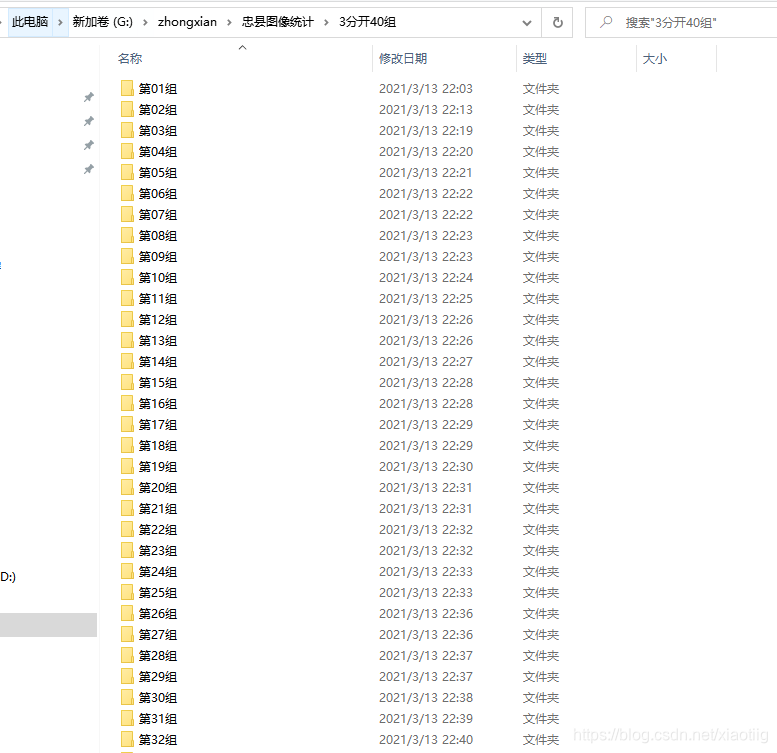
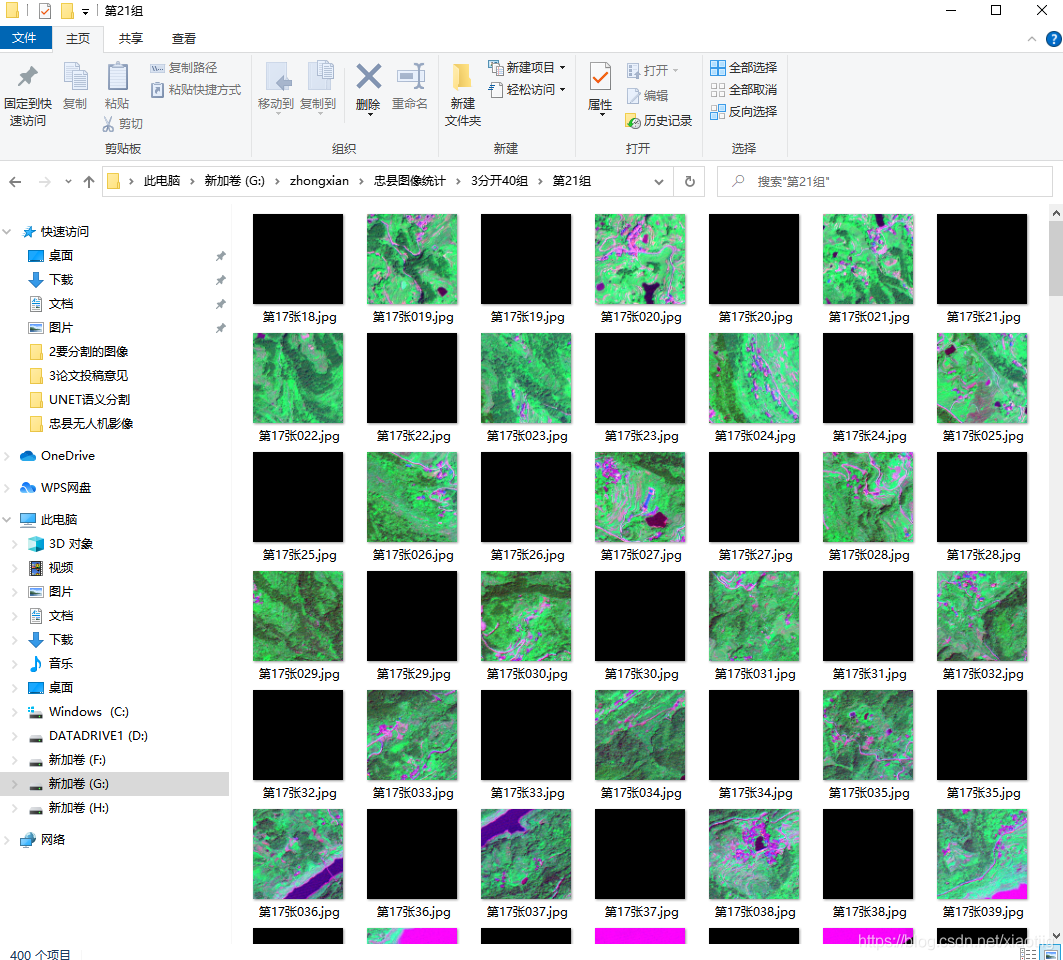
2.3.4 进行文件夹文件夹文件批量图像的预测和统计和保存
目录是这样的
#  这个模块实现模型的加载和应用

# 存在一个问题,无论输入多大都转成了608*608,输出计算时没有给resize成原来的形状,是不对的,除非输入就是608*608

import  tensorflow as tf
import matplotlib.pyplot as plt
import numpy as np
import os
import time
from PIL import Image
os.environ['CUDA_VISIBLE_DEVICES'] = '-1'

# physical_device = tf.config.experimental.list_physical_devices("GPU")
# tf.config.experimental.set_memory_growth(physical_device[0], True)


"""
下面2行代码是解决这个问题的Failed to get convolution algorithm. This is probably because cuDNN failed to initialize, so try looking to see if a warning log message was printed above.
[[node model_1/model/block1_conv1/Conv2D (defined at G:/XiaoMa/Bursxylophilus/310FCN/app.py:44) ]] [Op:__inference_predict_function_1613]


physical_device = tf.config.experimental.list_physical_devices("GPU")
tf.config.experimental.set_memory_growth(physical_device[0], True)

os.environ["CUDA_VISIBLE_DEVICES"] = '0'   #指定第一块GPU可用
config=tf.compat.v1.ConfigProto()
config.gpu_options.per_process_gpu_memory_fraction = 0.5  # 程序最多只能占用指定gpu50%的显存
config.gpu_options.allow_growth = True      #程序按需申请内存
sess = tf.compat.v1.Session(config=config)
"""


# 开始计时
time_start=time.time()

def read_jpg(path):
    """读取并解码jpg图像"""
    img_de = tf.io.read_file(path)
    img_de = tf.image.decode_jpeg(img_de,channels=3)
    return img_de


def normal_img(input_images):
    """数据归一化"""
    input_images = tf.cast(input_images,tf.float32)
    input_images = input_images/127.5-1
    return input_images


def load_images(input_images_path):
    """加载并resize模型"""
    input_image = read_jpg(input_images_path)
    input_image = tf.image.resize(input_image,(608,608))
    return normal_img(input_image)

# 定义统计变量,用于像素统计个数和枯死木个数
totle = 0
kusimu_totle = 0
# i = 0

# 输入图像的路径
path = r'G:\zhongxian\忠县图像统计\3分开40组'
filenames = os.listdir(path)
print("目录:",path)
print("内容:")
t = 0
# 加载模型
FCN_model = tf.keras.models.load_model('001_model.h5')

for filename in filenames:
    path1 = os.path.join(path, filename)       # G:\zhongxian\忠县图像统计\3分开40组\第01组
    files = os.listdir(path1)
    for file in files:
        t +=1
        if (t % 100) == 0:
            print("第%d张:"%t)
        test_img = load_images(os.path.join(path1, file))
        # 给图像增加维度
        test_img = tf.expand_dims(test_img, 0)
        # print("增加维度后的图像形状:",test_img.shape)

        pred_img = FCN_model.predict(test_img)  # 预测

        # print("输出图像形状:",pred_img.shape)

        #  压缩图像维度并显示图像
        test_img = tf.squeeze(test_img)
        pred_img = tf.squeeze(pred_img)

        # 1 数量统计,从这里开始

        # print("输出图像:")
        # print(pred_img)

        # 输出图像的最大值,608*608
        # print("输出图像的最大值")
        # max_axis0 = np.argmax(pred_img, axis = 0)
        # max_axis1 = np.argmax(pred_img, axis = 1)
        max_axis2 = np.argmax(pred_img, axis=2)
        # print(max_axis0.shape)
        # print(max_axis1.shape)
        # print(max_axis2.shape)
        # print(max_axis2)
        # 输出唯一值
        # print("输出元素的唯一值:")
        # print(np.unique(max_axis2))
        # 输出1出现的次数,就是松材线虫病枯死木像素点的个数
        kusimu = np.sum(max_axis2 == 1)
        # beijing = np.sum(max_axis2 == 0)
        # print("松材线虫病枯死木的像素个数:",kusimu)
        # print("背景的像素个数:", beijing)
        # print("本来的像素总数",max_axis2.size)
        # print("统计1和0的个数",kusimu+beijing)

        ## 统计像素总数和松材线虫病枯死木总数
        totle += max_axis2.size
        kusimu_totle += kusimu

        # 1 数量统计的到此为止

        ### 2 图像颜色转换和保存开始
        # 2转换成numpy格式
        pred_img = pred_img.numpy()
        # 转换图像的输出颜色
        pred_img[:, :, 0], pred_img[:, :, 1], pred_img[:, :, 2] = pred_img[:, :, 1], pred_img[:, :, 2], pred_img[:, :,
                                                                                                        0]

        # 实现图像的保存,这是扩大255倍
        # print("扩大255倍:")
        pred_img1 = pred_img * 255
        # print("最大值:",pred_img1.max())
        # print("最小值:",pred_img1.min())
        im = Image.fromarray(np.uint8(pred_img1))
        im.save("G:/zhongxian/忠县图像统计/5语义分割后/" + file)

        ### 2 图像颜色转换和保存结束

print("图像的总个数:", t)
print("本来应该输出的总像素", t * 608 * 608)
print(" 统 计 的 总 像 素:", totle)
print("松材线虫病枯死木总像素:", kusimu_totle)
# 统计计算时长
time_end = time.time()
print('总耗时', time_end - time_start)
3训练自己的模型
只需要将上面的代码
images = glob.glob(r'G:\XiaoMa\08OwnWork\zhongxian\语义分割数据\target\JPEGImages\*.jpg')
len(images)

anno = glob.glob(r'G:\XiaoMa\08OwnWork\zhongxian\语义分割数据\target\SegmentationClassPNG\*.png')
换成自己的路径
然后有几类,最后的这个参数就改为几个通道的输出
prediction = tf.keras.layers.Conv2DTranspose(3,
                                     3,
                                     strides=2,
                                     padding='same',
                                     activation='softmax')(x4)





 扫一扫
扫一扫


 2338
2338


 到【灌水乐园】发言



