



 本文介绍了一个简单的游戏场景中,如何实现导弹与目标之间的碰撞检测及碰撞后的处理逻辑,包括目标消失、导弹销毁和添加爆炸效果等。
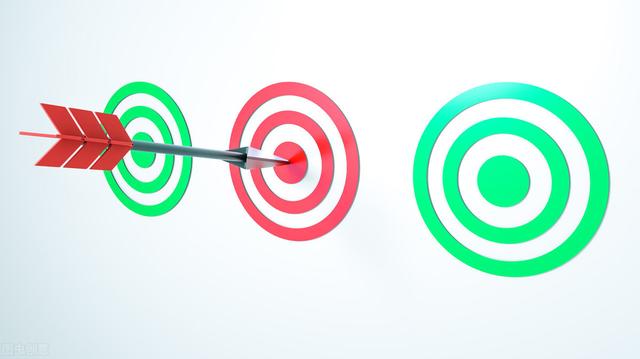
导弹击中靶子,这里涉及到精灵的碰撞检测;之后,靶子和这枚导弹都应当消失,这是精灵的删除。另外,我们希望看到一个靶子爆炸的效果。爆炸效果是另外一个动画精灵,它在自己的动画完成后自动删除。
碰撞逻辑与之后的动作
碰撞检测的逻辑放在靶子中:
- 从场景中找到所有导弹对象
- 判断导弹对象与自己的距离(图片中点距离)
- 如果距离小于自己尺寸的1/2,则说明碰撞了
检测到碰撞后做三件事:
- 删除自己
- 删除导弹
- 在自己原来的位置上放一个爆炸精灵
class Target(ppb.Sprite):

    image = ppb.Image("resources/Target.png")

    speed= 50

    layer= 1

    def on_update(self, event, signal):

       self.rotation-=self.speed* event.time_delta

       for p in event.scene.get(kind=Projectile):

           if (p.position - self.position).length <= self.size/ 2:

               event.scene.add(BombImg(position=self.position))

               event.scene.remove(self)

               event.scene.remove(p)
因为导弹的碰撞是随时有可能发生的,所以这个逻辑就放在on_update事件中。
枚举所有导弹对象:
for p in event.scene.get(kind=Projectile)
距离计算:
if (p.position - self.position).length <= self.size/ 2:
这里又使用了简洁的向量计算,位置的差代表距离向量,它的length即模长,代表距离的绝对值。
由于导弹的攻击点就在图片的中间,靶子又是圆形的(size/2正好是半径),所以两个位置之间的距离可以完美表明碰撞。如果是图片是更加复杂的形状,这个碰撞逻辑就显得粗糙了。如果想做得漂亮,就得使用专门物理引擎。
删除精灵:
event.scene.remove(self)

event.scene.remove(p)
爆炸精灵
爆炸精灵是一个动画精灵,它的图片有16张:


当我们采用指定图片的时候,精灵的类名与图片的命名就无须一致。
精灵类代码如下:
class BombImg(ppb.Sprite):

    layer= 1

    image = Animation("resources/bomb_{0..15}.png", 16)

    def on_update(self, update_event, signal):

        if self.image.current_frame==15:

            update_event.scene.remove(self)
这里设置动态的时候,帧数设置为16,意思是希望整个爆炸过程在1秒中完成。
self.image.current_frame标志着当前动画精灵所显示的帧号。我们希望显示一次爆炸后,精灵本身就消失,所以当它的帧号等于15时,我们就删除它。
完整代码
现在的运行效果,看起来已经差不多了,下节课我们将加入声音和文字,让游戏的观感更完整。
目前为止的代码如下:
import ppb

from ppb.features.animation import Animation


class Blob(ppb.Sprite):

    image = Animation("resources/blob_{0..6}.png", 10)

    layer= 3


    def on_button_pressed(self, event, signal):

        if event.button== ppb.buttons.Primary:

           p1= (event.position- self.position).normalize()

           event.scene.add(Projectile(position=self.position, direction= p1))


    def on_mouse_motion(self, event, signal):

        p1= (event.position- self.position).normalize()

        self.rotation= 270-p1.angle(ppb.Vector(1,0))


class Target(ppb.Sprite):

    image = ppb.Image("resources/Target.png")

    speed= 50

    layer= 1

    def on_update(self, update_event, signal):

       self.rotation-=self.speed* update_event.time_delta

       for p in update_event.scene.get(kind=Projectile):

           if (p.position - self.position).length <= self.size/ 2:

               update_event.scene.add(BombImg(position=self.position))

               update_event.scene.remove(self)

               update_event.scene.remove(p)

               break


class BombImg(ppb.Sprite):

    layer= 1

    image = Animation("resources/bomb_{0..15}.png", 16)

    def on_update(self, update_event, signal):

        if self.image.current_frame==15:

            update_event.scene.remove(self)


class Projectile(ppb.Sprite):

    image = ppb.Image("resources/Projectile.png")

    speed = 6

    layer= 2


    def on_update(self, update_event, signal):

       self._rotation= 90- self.direction.angle(ppb.Vector(1,0))

       self.position += self.direction * self.speed * update_event.time_delta


def setup(scene):

    scene.add(Blob(pos=(0, -3.5)))

    for x in range(-4, 5, 2):

       scene.add(Target(position=ppb.Vector(x, 3)))


ppb.run(setup=setup,resolution=(800, 600))





 扫一扫
扫一扫


 728
728

 被折叠的 条评论
为什么被折叠?
被折叠的 条评论
为什么被折叠?
 到【灌水乐园】发言





