






前言
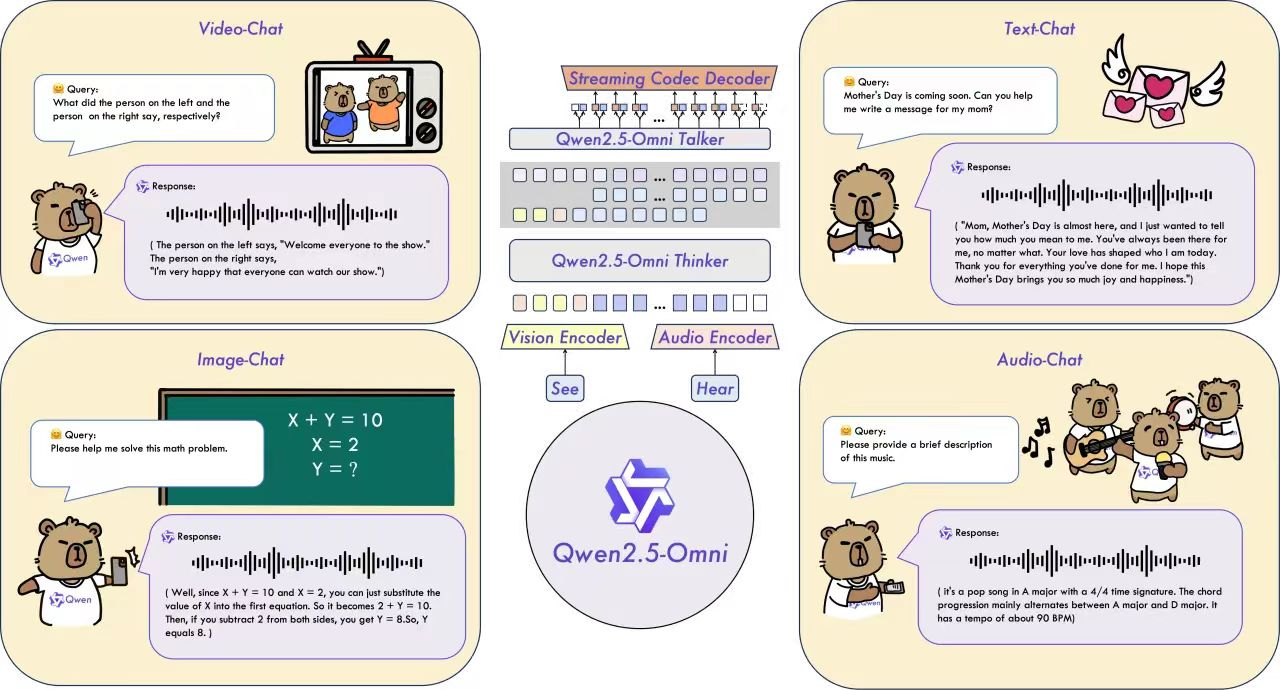
OpenAI 发布 GPT-4V 与 Gemini 1.5-Pro,Google DeepMind 推出 Flamingo 和 Gemini 系列,多模态技术逐渐成为 AI 实用化的关键路径。但多模态大模型往往意味着参数暴增、推理开销剧增、无法实时响应等现实问题。如何构建“轻量化、全模态、强泛化、可部署”的 AI 系统。
在这样的背景下,阿里通义团队开源发布的 Qwen2.5-Omni-7B,无疑是一次重量级突破。它首次在一个 70 亿参数的中小模型上,实现了统一的文本、图像、音频乃至视频输入理解,以及高质量流式语音输出。
一、平台环境选择
镜像选择:pytorch:v24.10-torch2.4.0-torchmlu1.23.1-ubuntu22.04-py310
【请注意仔细查看自己的镜像版本,老版本改法,请查阅之前文章】
卡选择:任意一款MLU3系列及以上卡
二、模型下载
Qwen2.5-Omni-7B
apt install git-lfs -y
git-lfs clone https://www.modelscope.cn/Qwen/Qwen2.5-Omni-7B.git
三、环境安装
pip uninstall transformers
pip install git+https://githubfast.com/huggingface/transformers@f742a644ca32e65758c3adb36225aef1731bd2a8
pip install accelerate
pip install qwen-omni-utils[decord]
四、模型转换
因为开源模型是使用bfloat16精度训练的,所以在使用时我们需要做一下bfloat16转float16的操作
以下是转换代码
import torch
import os
import shutil
from safetensors.torch import load_file, save_file
from safetensors import safe_open

def convert_dataformat(bf16_file,fp16_file):
    if not os.path.exists(bf16_file):
        raise(f"{bf16_file} do not exist!")

    fp16_state_dict = {}
    with safe_open(bf16_file, framework="pt", device='cpu') as f:
        for k in f.keys():
            fp16_state_dict[k] = f.get_tensor(k).to(torch.float16)
    save_file(fp16_state_dict,fp16_file, metadata={"format": "pt"})
    print("convert successed!")

# --- main ---
# modify the bf16_dir and fp16_dir according to your own env.
bf16_dir="/workspace/volume/guojunceshi2/Qwen2.5-Omni-7B"#修改成自己的路径
fp16_dir="/workspace/volume/guojunceshi2/Qwen2.5-Omni-7B_fp16"

if not os.path.exists(fp16_dir):
    os.makedirs(fp16_dir)

for root,dirs,files in os.walk(bf16_dir):
    for item in files:
        if item.endswith("safetensors"):
            bf16_file=os.path.join(root,item)
            fp16_file=os.path.join(fp16_dir,item)
            convert_dataformat(bf16_file, fp16_file)
        else:
            ori_file_path = root+"/"+item
            dst_file_path = fp16_dir+"/"+item
            shutil.copyfile(ori_file_path,dst_file_path)
五、代码修改
import torch###+
import torch_mlu###+
import torch_mlu.utils.gpu_migration###+
from transformers import Qwen2_5OmniModel, AutoProcessor
from qwen_omni_utils import process_mm_info

model_path = "/workspace/volume/guojunceshi2/Qwen2.5-Omni-7B_fp16"
# You can directly insert a local file path, a URL, or a base64-encoded image into the position where you want in the text.
messages = [
    # Image
    ## Local file path
    [{"role": "user", "content": [{"type": "image", "image": "/workspace/volume/guojunceshi2/qwen2omin/pupu.jpg"}, {"type": "text", "text": "Describe this image."}]}],

]

processor = AutoProcessor.from_pretrained(model_path)
model = Qwen2_5OmniModel.from_pretrained(model_path, torch_dtype=torch.float16, device_map="auto") ###+
text = processor.apply_chat_template(messages, tokenize=False, add_generation_prompt=True)
audios, images, videos = process_mm_info(messages,use_audio_in_video=False)
inputs = processor(text=text, images=images, videos=videos, audios=audios, padding=True, return_tensors="pt")
print(inputs)
inputs = inputs.to("mlu") ###+
generated_ids, generate_wav = model.generate(**inputs)
print(generated_ids)
###+是基于源码添加的步骤
接着我们直接运行
(pytorch_infer) root@deepseek14-v1-5bbcd6f65c-2zx2c:/workspace/volume/guojunceshi2/qwen2omin# export MLU_VISIBLE_DEVICES=3 && python demo.py
/torch/venv3/pytorch_infer/lib/python3.10/site-packages/torch_mlu/utils/model_transfer/__init__.py:2: FutureWarning: `torch_mlu.utils.model_transfer` is deprecated. Please use `torch_mlu.utils.gpu_migration` instead.
  warnings.warn("`torch_mlu.utils.model_transfer` is deprecated. "
Qwen2_5OmniToken2WavModel does not support eager attention implementation, fall back to sdpa
/torch/venv3/pytorch_infer/lib/python3.10/site-packages/torch_mlu/mlu/__init__.py:379: UserWarning: Linear memory is not supported on this device. Falling back to common memory. (Triggered internally at /torch_mlu/torch_mlu/csrc/framework/core/caching_allocator.cpp:718.)
  torch_mlu._MLUC._mlu_init()
Loading checkpoint shards: 100%|█████████████████████████████████████████████████████████████████| 5/5 [00:07<00:00,  1.41s/it]
/torch/venv3/pytorch_infer/lib/python3.10/site-packages/torch_mlu/utils/gpu_migration/migration.py:288: FutureWarning: You are using `torch.load` with `weights_only=False` (the current default value), which uses the default pickle module implicitly. It is possible to construct malicious pickle data which will execute arbitrary code during unpickling (See https://github.com/pytorch/pytorch/blob/main/SECURITY.md#untrusted-models for more details). In a future release, the default value for `weights_only` will be flipped to `True`. This limits the functions that could be executed during unpickling. Arbitrary objects will no longer be allowed to be loaded via this mode unless they are explicitly allowlisted by the user via `torch.serialization.add_safe_globals`. We recommend you start setting `weights_only=True` for any use case where you don't have full control of the loaded file. Please open an issue on GitHub for any issues related to this experimental feature.
  return fn(*args, **kwargs)
[WARNING  | root               ]: System prompt modified, audio output may not work as expected. Audio output mode only works when using default system prompt 'You are Qwen, a virtual human developed by the Qwen Team, Alibaba Group, capable of perceiving auditory and visual inputs, as well as generating text and speech.'
{'input_ids': tensor([[151644,   8948,    198,  ..., 151644,  77091,    198]]), 'attention_mask': tensor([[1, 1, 1,  ..., 1, 1, 1]]), 'pixel_values': tensor([[1.3026, 1.3026, 1.3026,  ..., 1.5344, 1.5344, 1.5344],
        [1.3026, 1.3026, 1.3026,  ..., 1.5487, 1.5487, 1.5487],
        [1.2734, 1.2734, 1.2734,  ..., 1.5487, 1.5487, 1.5487],
        ...,
        [0.7479, 0.7187, 0.7187,  ..., 0.3399, 0.3399, 0.3399],
        [0.7917, 0.7917, 0.7917,  ..., 0.4537, 0.4110, 0.4110],
        [0.7771, 0.7771, 0.7771,  ..., 0.3684, 0.3684, 0.3684]]), 'image_grid_thw': tensor([[  1, 128,  78]])}
[2025-03-31 11:20:54.539424][CNNL][WARNING][65583][Card:0]: [cnnlFill_v3] is deprecated and will be removed in the future release, Use [cnnlFill_v4] instead.
[2025-03-31 11:20:54.564059][CNNL][WARNING][65583][Card:0]: [cnnlMasked_v4] is deprecated and will be removed in the future release, Use [cnnlMasked_v5] instead.
/torch/venv3/pytorch_infer/lib/python3.10/site-packages/torch/_tensor.py:1061: UserWarning: Casting input of dtype int64 to int32, maybe overflow! (Triggered internally at /torch_mlu/torch_mlu/csrc/aten/utils/cnnl_util.cpp:128.)
  return torch.floor_divide(self, other)
[2025-03-31 11:20:54.628056][CNNL][WARNING][65583][Card:0]: [cnnlGetConvolutionForwardAlgorithm] is deprecated and will be removed in the future release. See cnnlFindConvolutionForwardAlgo() API for replacement.
Setting `pad_token_id` to `eos_token_id`:8292 for open-end generation.
/torch/venv3/pytorch_infer/lib/python3.10/site-packages/transformers/models/qwen2_5_omni/modeling_qwen2_5_omni.py:4479: UserWarning: The getTensorDesc function with on_chip_type parameter will be deprecated in CNNL v2.0  (Triggered internally at /torch_mlu/torch_mlu/csrc/aten/cnnl/cnnlTensorDesc.cpp:171.)
  time = time.repeat(batch)
tensor([[151644,   8948,    198,  ...,   3550,     13, 151645]],
       device='mlu:0')
/opt/py3.10/lib/python3.10/tempfile.py:860: ResourceWarning: Implicitly cleaning up <TemporaryDirectory '/tmp/tmpu2rp4x2w'>
  _warnings.warn(warn_message, ResourceWarning)
运行完毕






 扫一扫
扫一扫


 3796
3796

 被折叠的 条评论
为什么被折叠?
被折叠的 条评论
为什么被折叠?
 到【灌水乐园】发言





