



介绍
Windows下测试局域网下,两台终端的组播通信是否正常,验证组播的丢包情况。
官方下载地址:https://iperf.fr/iperf-download.php
下载版本:iperf-1.7.0-win32
注意:iperf2 iperf3 都不支持 udp组播测试
使用
测试组播的丢包情况(iperf2 iperf3 都不支持 udp组播测试),建议开启测试后,关闭防火墙测试。
-
参数说明
C:\Users\Administrator\Downloads\iperf-1.7.0-win32 (1)>iperf --help Usage: iperf [-s|-c host] [options] iperf [-h|--help] [-v|--version] Client/Server: -f, --format [kmKM] format to report: Kbits, Mbits, KBytes, MBytes -i, --interval # seconds between periodic bandwidth reports -l, --len #[KM] length of buffer to read or write (default 8 KB) -m, --print_mss print TCP maximum segment size (MTU - TCP/IP header) -o, --output <filename> output the report or error message to this specified file -p, --port # server port to listen on/connect to -u, --udp use UDP rather than TCP -w, --window #[KM] TCP window size (socket buffer size) -B, --bind <host> bind to <host>, an interface or multicast address -C, --compatibility for use with older versions does not sent extra msgs -M, --mss # set TCP maximum segment size (MTU - 40 bytes) -N, --nodelay set TCP no delay, disabling Nagle's Algorithm -V, --IPv6Version Set the domain to IPv6 Server specific: -s, --server run in server mode -D, --daemon run the server as a daemon -R, --remove remove service in win32 Client specific: -b, --bandwidth #[KM] for UDP, bandwidth to send at in bits/sec (default 1 Mbit/sec, implies -u) -c, --client <host> run in client mode, connecting to <host> -d, --dualtest Do a bidirectional test simultaneously -n, --num #[KM] number of bytes to transmit (instead of -t) -r, --tradeoff Do a bidirectional test individually -t, --time # time in seconds to transmit for (default 10 secs) -F, --fileinput <name> input the data to be transmitted from a file -I, --stdin input the data to be transmitted from stdin -L, --listenport # port to recieve bidirectional tests back on -P, --parallel # number of parallel client threads to run -T, --ttl # time-to-live, for multicast (default 1) Miscellaneous: -h, --help print this message and quit -v, --version print version information and quit -
客户端发送组播包
# -c 客户端模式,指定服务端地址 # -u 使用UDP # -t 发送时间 # -b 发送速率 # -i 报告间隔时间 iperf -c 239.0.0.67 -u --ttl 5 -t 3600 -b 1M -i 1 -
服务端接收组播包
# -s 服务端模式运行
# -u 使用UDP
# -B 绑定组播地址
# -i 报告间隔时间
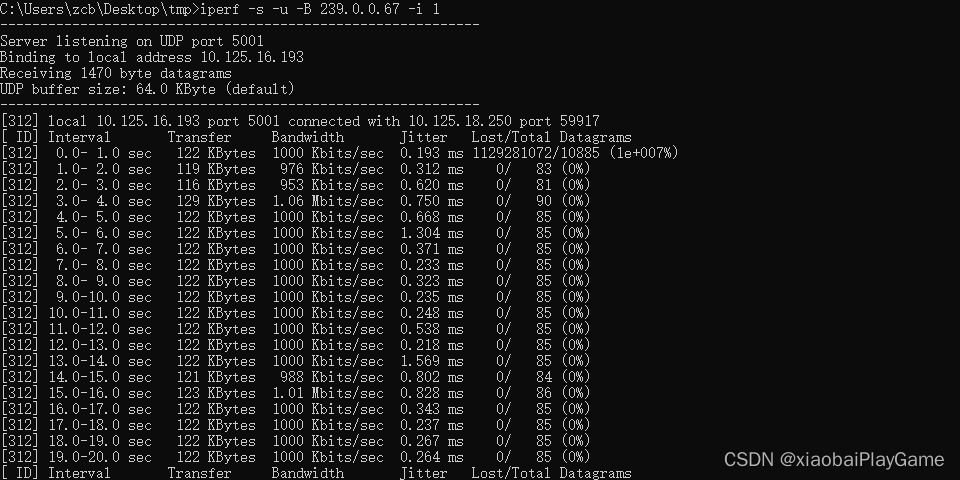
iperf -s -u -B 239.0.0.67 -i 1
服务端接收数据统计:
介绍
Windows下测试局域网下,两台终端的组播通信是否正常,验证组播的丢包情况。
官方下载地址:https://iperf.fr/iperf-download.php
下载版本:iperf-1.7.0-win32
注意:iperf2 iperf3 都不支持 udp组播测试
使用
测试组播的丢包情况(iperf2 iperf3 都不支持 udp组播测试),建议开启测试后,关闭防火墙测试。
-
参数说明
C:\Users\Administrator\Downloads\iperf-1.7.0-win32 (1)>iperf --help Usage: iperf [-s|-c host] [options] iperf [-h|--help] [-v|--version] Client/Server: -f, --format [kmKM] format to report: Kbits, Mbits, KBytes, MBytes -i, --interval # seconds between periodic bandwidth reports -l, --len #[KM] length of buffer to read or write (default 8 KB) -m, --print_mss print TCP maximum segment size (MTU - TCP/IP header) -o, --output <filename> output the report or error message to this specified file -p, --port # server port to listen on/connect to -u, --udp use UDP rather than TCP -w, --window #[KM] TCP window size (socket buffer size) -B, --bind <host> bind to <host>, an interface or multicast address -C, --compatibility for use with older versions does not sent extra msgs -M, --mss # set TCP maximum segment size (MTU - 40 bytes) -N, --nodelay set TCP no delay, disabling Nagle's Algorithm -V, --IPv6Version Set the domain to IPv6 Server specific: -s, --server run in server mode -D, --daemon run the server as a daemon -R, --remove remove service in win32 Client specific: -b, --bandwidth #[KM] for UDP, bandwidth to send at in bits/sec (default 1 Mbit/sec, implies -u) -c, --client <host> run in client mode, connecting to <host> -d, --dualtest Do a bidirectional test simultaneously -n, --num #[KM] number of bytes to transmit (instead of -t) -r, --tradeoff Do a bidirectional test individually -t, --time # time in seconds to transmit for (default 10 secs) -F, --fileinput <name> input the data to be transmitted from a file -I, --stdin input the data to be transmitted from stdin -L, --listenport # port to recieve bidirectional tests back on -P, --parallel # number of parallel client threads to run -T, --ttl # time-to-live, for multicast (default 1) Miscellaneous: -h, --help print this message and quit -v, --version print version information and quit -
客户端发送组播包
# -c 客户端模式,指定服务端地址 # -u 使用UDP # -t 发送时间 # -b 发送速率 # -i 报告间隔时间 iperf -c 239.0.0.67 -u --ttl 5 -t 3600 -b 1M -i 1 -
服务端接收组播包
# -s 服务端模式运行
# -u 使用UDP
# -B 绑定组播地址
# -i 报告间隔时间
iperf -s -u -B 239.0.0.67 -i 1
服务端接收数据统计:





 扫一扫
扫一扫


 1931
1931

 被折叠的 条评论
为什么被折叠?
被折叠的 条评论
为什么被折叠?
 到【灌水乐园】发言





