



提示:文章写完后,目录可以自动生成,如何生成可参考右边的帮助文档
前言
CommonAPI是本次学习的终极目的,vsomeip学习是前提
一、Ubuntu 20.04安装
1.Recommended Ubuntu system OS is 20.04, link is:
https://releases.ubuntu.com/20.04/ubuntu-20.04.6-desktop-amd64.iso.torrent
2.After download, the system OS file is .ISO format, which can’t be used for booting from USB, we should use anther tool to convert it. The tool name is one free tool rufus-4.3.exe.
https://github.com/pbatard/rufus/releases/download/v4.3/rufus-4.3.exe
3.Install Ubuntu system OS to PC.(略)
4.Modify the source.list ahead, tsinghua server is prefer and aliyun server has some bug.
# 默认注释了源码镜像以提高 apt update 速度,如有需要可自行取消注释
deb https://mirrors.tuna.tsinghua.edu.cn/ubuntu/ focal main restricted universe multiverse
# deb-src https://mirrors.tuna.tsinghua.edu.cn/ubuntu/ focal main restricted universe multiverse
deb https://mirrors.tuna.tsinghua.edu.cn/ubuntu/ focal-updates main restricted universe multiverse
# deb-src https://mirrors.tuna.tsinghua.edu.cn/ubuntu/ focal-updates main restricted universe multiverse
deb https://mirrors.tuna.tsinghua.edu.cn/ubuntu/ focal-backports main restricted universe multiverse
# deb-src https://mirrors.tuna.tsinghua.edu.cn/ubuntu/ focal-backports main restricted universe multiverse
deb https://mirrors.tuna.tsinghua.edu.cn/ubuntu/ focal-security main restricted universe multiverse
# deb-src https://mirrors.tuna.tsinghua.edu.cn/ubuntu/ focal-security main restricted universe multiverse

# 预发布软件源,不建议启用
# deb https://mirrors.tuna.tsinghua.edu.cn/ubuntu/ focal-proposed main restricted universe multiverse
# deb-src https://mirrors.tuna.tsinghua.edu.cn/ubuntu/ focal-proposed main restricted universe multiverse
二、vsomeip 源码下载
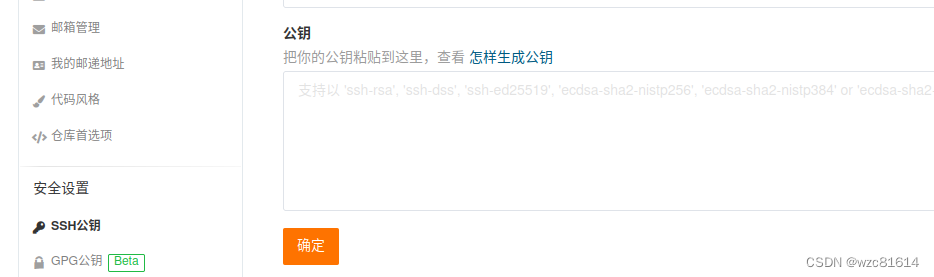
1.add your public key to gitee.com, if your PC is a new one and need below command to generate public key.
will@will-OptiPlex-7050:~/work$ ssh-keygen -t rsa
Generating public/private rsa key pair.
Enter file in which to save the key (/home/will/.ssh/id_rsa):
Created directory '/home/will/.ssh'.
Enter passphrase (empty for no passphrase):
Enter same passphrase again:
Your identification has been saved in /home/will/.ssh/id_rsa
Your public key has been saved in /home/will/.ssh/id_rsa.pub
The key fingerprint is:
SHA256:k4hdnffthtB0n3c96lnH/Thcex9hN5tFwWSHp80jgAc will@will-OptiPlex-7050
The key's randomart image is:
+---[RSA 3072]----+
|         Eo   o=.|
|         o +  o.+|
|        . + o .=o|
|     o o . . =.=*|
|    . o S   . +*X|s
|         .   .o+&|
|             o.*B|
|            . =+=|
|             o..=|
+----[SHA256]-----+
will@will-OptiPlex-7050:~/work$ cd ~/.ssh
will@will-OptiPlex-7050:~/.ssh$ cat id_rsa.pub
ssh-rsa AAAAB3NzaC1yc2EAAAADAQABAAABgQD0a9HbOSgld8pFLlkBG+47tebjP+lvV4UhLFZLdYihbsjx3dPZAva4ATSfh8fQkSMp4fLjiZfEqcS9ZGn82Ewd/M1S9P6ozb0ny3NqUxP20RuSH/vKhc84kghiMD64pgEzUh+fsqyfQgcg5OfVP83mJDNZmwn7cprM95YA5wLTxbmqisYZJEiBZ3WoIokaEdfdsfaxZtZ06XGiAgzpHjbNGYLaBfft0P9IRQCI0KzYAjELbEc1z5zYrbgDhI4xe3ETgR6FSIw3wsVvfafjCxT49KqpllbUQqbbcBuDmPBWg/6ULc7FNF95uM2Tf3wu87kl89JHgYFcU/0eY9CdfeCC767YCFcqVbfqjdw0qDYO7owc37tP75IuXvpT/TCSevErG4qBohPByod3GZtf5Kb5MBDUEYblhuS/tp+DppWGUaNbNRZkseEuf3b9sPBoFrNwQkHG+7/i+sDDqHFl3flmCiDjdSiYTXvyzN9Rjt0MutIYr4s= will@will-OptiPlex-7050
2.add the public key gitee.com to allow us download source code conveniently.
3. download vsomeip source code from gitee.com
will@will-OptiPlex-7050:~/work$ git clone git@gitee.com:mirrors/vsomeip.git
Cloning into 'vsomeip'...
The authenticity of host 'gitee.com (180.76.198.77)' can't be established.
ECDSA key fingerprint is SHA256:FQGC9Kn/eye1W8icdBgrQp+KkGYoFgbVr17bmjey0Wc.
Are you sure you want to continue connecting (yes/no/[fingerprint])? yes
Warning: Permanently added 'gitee.com,180.76.198.77' (ECDSA) to the list of known hosts.
remote: Enumerating objects: 11627, done.
remote: Counting objects: 100% (11627/11627), done.
remote: Compressing objects: 100% (3280/3280), done.
remote: Total 11627 (delta 8689), reused 10891 (delta 8065), pack-reused 0
Receiving objects: 100% (11627/11627), 12.94 MiB | 3.98 MiB/s, done.
Resolving deltas: 100% (8689/8689), done.
will@will-OptiPlex-7050:~/work$
- Several libs need installed ahead
will@will-OptiPlex-7050:~/work$ sudo apt-get install libboost-system-dev libboost-thread-dev libboost-log-dev
will@will-OptiPlex-7050:~/work$ sudo apt-get install asciidoc source-highlight doxygen graphviz
will@will-OptiPlex-7050:~/work$ sudo apt-get install gcc g++ make
- Build vsomeip source code using follow commands
will@will-OptiPlex-7050:~/work/vsomeip$ mkdir build
will@will-OptiPlex-7050:~/work/vsomeip$ cd build
will@will-OptiPlex-7050:~/work/vsomeip/build$ cmake ..

Command 'cmake' not found, but can be installed with:

sudo snap install cmake  # version 3.27.7, or
sudo apt  install cmake  # version 3.16.3-1ubuntu1.20.04.1

See 'snap info cmake' for additional versions.

will@will-OptiPlex-7050:~/work/vsomeip/build$ sudo apt install cmake=3.16.3-1ubuntu1.20.04.1
will@will-OptiPlex-7050:~/work/vsomeip/build$ cmake ..
will@will-OptiPlex-7050:~/work/vsomeip/build$ make
will@will-OptiPlex-7050:~/work/vsomeip/build$ sudo make install
三、vsomeip example source code build
will@will-OptiPlex-7050:~/work/vsomeip/build$ cd ..
will@will-OptiPlex-7050:~/work/vsomeip$ cd examples/hello_world/
will@will-OptiPlex-7050:~/work/vsomeip/examples/hello_world$ mkdir build
will@will-OptiPlex-7050:~/work/vsomeip/examples/hello_world$ cd build/
will@will-OptiPlex-7050:~/work/vsomeip/examples/hello_world/build$ cmake ..
-- The C compiler identification is GNU 9.4.0
-- The CXX compiler identification is GNU 9.4.0
-- Check for working C compiler: /usr/bin/cc
-- Check for working C compiler: /usr/bin/cc -- works
-- Detecting C compiler ABI info
-- Detecting C compiler ABI info - done
-- Detecting C compile features
-- Detecting C compile features - done
-- Check for working CXX compiler: /usr/bin/c++
-- Check for working CXX compiler: /usr/bin/c++ -- works
-- Detecting CXX compiler ABI info
-- Detecting CXX compiler ABI info - done
-- Detecting CXX compile features
-- Detecting CXX compile features - done
-- Looking for pthread.h
-- Looking for pthread.h - found
-- Performing Test CMAKE_HAVE_LIBC_PTHREAD
-- Performing Test CMAKE_HAVE_LIBC_PTHREAD - Failed
-- Looking for pthread_create in pthreads
-- Looking for pthread_create in pthreads - not found
-- Looking for pthread_create in pthread
-- Looking for pthread_create in pthread - found
-- Found Threads: TRUE
-- Configuring done
-- Generating done
-- Build files have been written to: /home/will/work/vsomeip/examples/hello_world/build
Start to make it.
will@will-OptiPlex-7050:~/work/vsomeip/examples/hello_world/build$ make
Scanning dependencies of target hello_world_client
[ 25%] Building CXX object CMakeFiles/hello_world_client.dir/hello_world_client_main.cpp.o
[ 50%] Linking CXX executable hello_world_client
[ 50%] Built target hello_world_client
Scanning dependencies of target hello_world_service
[ 75%] Building CXX object CMakeFiles/hello_world_service.dir/hello_world_service_main.cpp.o
[100%] Linking CXX executable hello_world_service
[100%] Built target hello_world_service
will@will-OptiPlex-7050:~/work/vsomeip/examples/hello_world/build
总结
Ubuntu 版本太多,但是网上大多资源都是基于20.04的,建议用这个版本。
Source list建议用清华的镜像,阿里云的会有问题,光解决错误就麻烦大了。
vsomeip编译没什么难的,但是那些libraries都需要安装正确先。





 扫一扫
扫一扫


 1822
1822


 到【灌水乐园】发言



