





 在JavaWeb项目中,初次加载登录界面时,由于Session中的验证码文本为空导致验证码验证失败,但刷新页面后正常。问题源于ImageAction执行时Session未正确设置。解决方案包括在页面加载时主动调用后台验证码生成方法,确保Session填充。该问题仅在MyEclipse环境下出现,直接通过浏览器访问则无此问题。
问题描述:在写一个登陆界面的时候用到了验证码,产生的问题在于使用myeclipse第一次加载index.jsp(我的登陆界面)的时候验证总是失败,刷新一次后验证成功,或者在第一次进入index.jsp页面手动刷新。这就很让人讨厌了。
问题的原因:经过调试后发现,第一从打开index.jsp页面成功的显示出来了验证码图片,但是服务器在生成图片时候保存在Session的验证码文本为空。导致与用户输入的验证码匹配不成功。
验证码部分的具体代码
index.jsp。(前端用到了bootstrap框架,可以忽略,重点在红色部分)
<html>
<head>
<script src="https://cdn.bootcss.com/bootstrap/3.3.7/js/bootstrap.min.js"></script>
<link rel="stylesheet" href="http://cdn.static.runoob.com/libs/bootstrap/3.3.7/css/bootstrap.min.css">

<!-- 点击刷新页面 -->
<script type="text/javascript">
	function refreshImage(obj) {
		obj.src = "image?randNum=" + Math.random();
	}
</script>
</head>
<body>
<div>
<div class="col-md-12">
<div class="form-bg">
form action="login" class="form-horizontal">
<!-- <span class="heading">用户登录</span> -->
<div class="form-group">
<input type="text" class="form-control" name="userName" id="userName" placeholder="用户名">
</div>
<div class="form-group help">
<input type="password" class="form-control" name="password" id="password" placeholder="密 码">
</div>
<div class="form-group">
<!-- 验证码验证 -->
<span> <input type="text" class="userCode" name="userCode" id="userCode" placeholder="验证码 " style="float:left;width:90px">
<img alt="看不清,点击更换" src="image" onclick="refreshImage(this)" style="cursor:hand;background-color:#999;right;margin-right:10px;width:80px;height:30px">
</span>
</div>
<div class="form-group">
<div class="main-checkbox">
<input type="checkbox" value="None" id="checkbox1" name="check" /> <label for="checkbox1"></label>
</div>
<span class="text">Remember me</span>
<button type="submit" class="btn btn-default">登录</button>
</div>
<div style="font-size: 12"> <a href="">忘记密码?</a><a href="student/register.jsp"> 注册</a>
</div>
</form>
</div>
</div>
</div></body>运行结果:
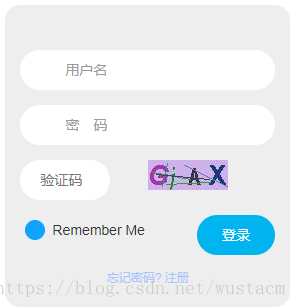
后端使用struts2,如果你没有使用框架直接使用servlet处理。那么ImageAction的execute()对应servletdepost()或者get()方法就行。
其中红色的 <img src="image">中的image为action的name,用于匹配后台ImageAction.java。
对应strutx.xml
<struts>
	<!-- 在这里设置字符编码,防止乱码 -->
	<constant name="struts.i18n.encoding" value="UTF-8" />
	<package name="default" extends="struts-default">
		<!--其他省略-->
		<action name="image" class="com.liang.action.ImageAction">
		</action>
	</package>
</struts>
com.liang.action包下的ImageAction.java文件,处理验证码事务
public class ImageAction extends ActionSupport {

	public String execute() {

		HttpServletRequest request = ServletActionContext.getRequest();
		HttpServletResponse response = ServletActionContext.getResponse();

		//生成一个验证码类,包括图片以及文本
		VerificationCodeDao vc = new VerificationCodeDao();
		BufferedImage image = vc.getImage(); // 获取验证码图片
		request.getSession().setAttribute("verificationCode", vc.getText()); // 将验证码的文本存在session中。用于验证
		try {
			VerificationCodeDao.output(image, response.getOutputStream());// 将验证码图片响应给客户端
		} catch (IOException e) {
			// TODO Auto-generated catch block
			e.printStackTrace();
		}
		/*必须设成null返回,不能使用常规的String类型,否则虽然能正常输出显示但是后台报错会*/
		return null;
	}

}
顺便提一下:这里有之前遇到的另一个问题,就是首次加载或者点击刷新调用后台的action处理时返回值不能使用String类型,否则后台会报 getOutputStream() has already been called for this response的错误。因为没有返回值,可以看到我的strts.xml文件中<action>标签下面没有<result name="...">...jsp</result>标签
ImageAction.java中的验证码类VerifivationCodeDao.java。生成验证码的代码很多,这段代码是在网上copy的。
public class VerificationCodeDao {
	private int weight = 80; // 验证码图片的长和宽
	private int height = 30;
	private String text; // 用来保存验证码的文本内容
	private Random random = new Random(); // 获取随机数对象
	private String[] fontNames = { "宋体", "华文楷体", "黑体", "微软雅黑", "楷体_GB2312" }; // 字体数组
	private String codes = "23456789abcdefghjkmnopqrstuvwxyzABCDEFGHJKMNPQRSTUVWXYZ"; // 验证码数组

	/**
	 * 获取随机的颜色
	 * @return Color(r,g,b)
	 */
	private Color randomColor() {
		int r = this.random.nextInt(200); // 这里为什么是150,因为当r,g,b都为255时,即为白色,为了好辨认,需要颜色深一点。
		int g = this.random.nextInt(200);
		int b = this.random.nextInt(200);
		return new Color(r, g, b); // 返回一个随机颜色
	}

	/**
	 * @param start:
	 * @param end:
	 * @return
	 */
	private Color getColor(int start,int end){

		int r=start+this.random.nextInt(end-start);
		int g=start+this.random.nextInt(end-start);
		int b=start+this.random.nextInt(end-start);

		return new Color(r,g,b);
	}

	private Font randomFont() // 获取随机字体
	{
		int index = random.nextInt(fontNames.length); // 获取随机的字体
		String fontName = fontNames[index];
		int style = random.nextInt(4); // 随机获取字体的样式,0是无样式,1是加粗,2是斜体,3是加粗加斜体
		int size = random.nextInt(5) + 24; // 随机获取字体的大小
		return new Font(fontName, style, size); // 返回一个随机的字体
	}

	private char randomChar() // 获取随机字符
	{
		int index = random.nextInt(codes.length());
		return codes.charAt(index);
	}

	private void drawLine(BufferedImage image) // 画干扰线,验证码干扰线用来防止计算机解析图片
	{
		int num = 5; // 定义干扰线的数量
		//获取指向该图像上的Graphic画笔
		Graphics2D g = (Graphics2D) image.getGraphics();
		for (int i = 0; i < num; i++) {
			int x1 = random.nextInt(weight);
			int y1 = random.nextInt(height);
			int x2 = random.nextInt(weight);
			int y2 = random.nextInt(height);
			g.setColor(getColor(0,180));
			g.drawLine(x1, y1, x2, y2);
		}
	}

	private BufferedImage createImage() // 创建图片
	{
		BufferedImage image = new BufferedImage(weight, height, BufferedImage.TYPE_INT_RGB); // 创建图片缓冲区
		Graphics2D g = (Graphics2D) image.getGraphics(); // 获取画笔
		g.setColor(getColor(150, 255)); // 设置背景色
		g.fillRect(0, 0, weight, height);
		return image; // 返回一个图片
	}

	public BufferedImage getImage() // 获取验证码图片的方法
	{
		BufferedImage image = createImage();
		Graphics2D g = (Graphics2D) image.getGraphics(); // 获取画笔
		StringBuilder sb = new StringBuilder();
		for (int i = 0; i < 4; i++) // 画四个字符即可
		{
			String s = randomChar() + ""; // 随机生成字符,因为只有画字符串的方法,没有画字符的方法,所以需要将字符变成字符串再画
			sb.append(s); // 添加到StringBuilder里面
			float x = i * 1.0F * weight / 4; // 定义字符的x坐标
			g.setFont(randomFont()); // 设置字体,随机
			g.setColor(getColor(0,180)); // 设置颜色,随机
			g.drawString(s, x, height - 5);
		}
		this.text = sb.toString();
		drawLine(image);
		return image;
	}

	public String getText() // 获取验证码文本的方法
	{
		return text;
	}

	public static void output(BufferedImage image, OutputStream out) throws IOException // 将验证码图片写出的方法
	{
		ImageIO.write(image, "JPEG", out);
	}
}
关于验证码第一次加载的时候session中的验证码文本为空的解决办法,就是加载页面的时候主动调用y一次后台的imageAction.java来刷新一下session中的验证码。这里给大家找了一个链接参考http://younglibin.iteye.com/blog/469470
不过后来惊奇的发现第一次session为空 只是在myeclipse下打开网页会出现。
如果是使用浏览器打开。如第一次在chrome下面输入http://localhost/TestSystem/index.jsp(我的本地链接)打开,session内容不为空。不会有问题。具体为什么myeclipse下面会有这种问题还没弄清楚。希望了解的人能教一教。





 扫一扫
扫一扫


 475
475

 被折叠的 条评论
为什么被折叠?
被折叠的 条评论
为什么被折叠?
 到【灌水乐园】发言





