ubuntu22.04 安装 nvidia gpu显卡、cuda、pytorch

部署运行你感兴趣的模型镜像

1nvidia-driver 安装

Bash
#修改 apt 源 为 阿里云
cp /etc/apt/sources.list /etc/apt/sources.list.bak

cat > /etc/apt/sources.list <<end
deb https://mirrors.aliyun.com/ubuntu/ jammy main restricted universe multiverse
deb-src https://mirrors.aliyun.com/ubuntu/ jammy main restricted universe multiverse
deb https://mirrors.aliyun.com/ubuntu/ jammy-security main restricted universe multiverse
deb-src https://mirrors.aliyun.com/ubuntu/ jammy-security main restricted universe multiverse
deb https://mirrors.aliyun.com/ubuntu/ jammy-updates main restricted universe multiverse
deb-src https://mirrors.aliyun.com/ubuntu/ jammy-updates main restricted universe multiverse
# deb https://mirrors.aliyun.com/ubuntu/ jammy-proposed main restricted universe multiverse
# deb-src https://mirrors.aliyun.com/ubuntu/ jammy-proposed main restricted universe multiverse
deb https://mirrors.aliyun.com/ubuntu/ jammy-backports main restricted universe multiverse
deb-src https://mirrors.aliyun.com/ubuntu/ jammy-backports main restricted universe multiverse
end

# 修改 dns
cat > /etc/resolv.conf <<end
nameserver 223.6.6.6
end

# 更新 apt 源及依赖包
apt-get update
apt-get upgrade
apt --fix-broken install
apt install -y gedit

# 禁用ubuntu自带驱动
vim /etc/modprobe.d/blacklist-nouveau.conf
blacklist nouveau
options nouveau modeset=0

# 更新系统镜像
update-initramfs -u
apt-get remove nvidia-*
reboot

# 安装驱动
ubuntu-drivers devices
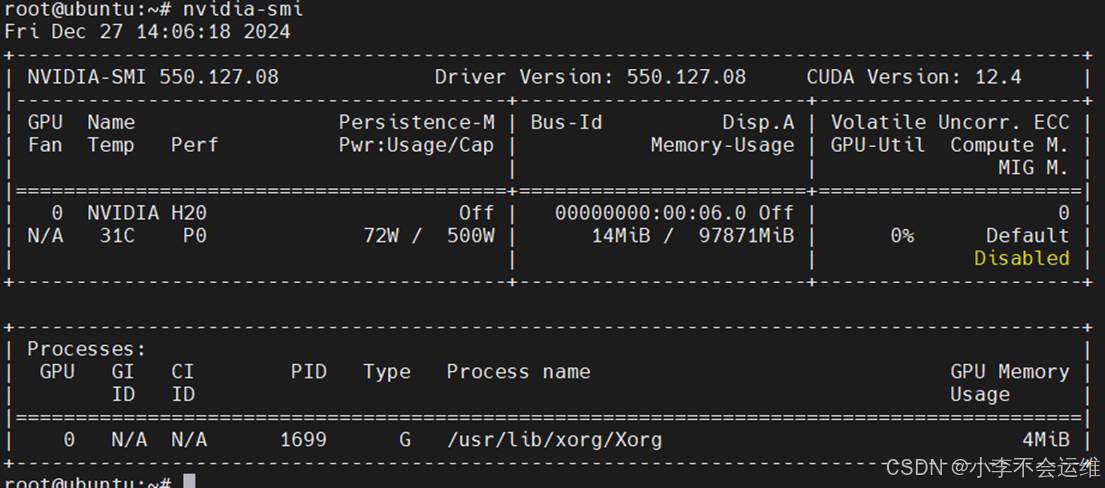
apt install -y nvidia-driver-550
nvidia-smi

2cuda 安装配置、测试

Bash
# 安装cuda12.4
wget https://developer.download.nvidia.com/compute/cuda/repos/ubuntu2204/x86_64/cuda-keyring_1.1-1_all.deb
sudo dpkg -i cuda-keyring_1.1-1_all.deb
sudo apt-get update
sudo apt-get -y install cuda-toolkit-12-4

# 配置cuda 环境变量
echo 'export PATH=/usr/local/cuda/bin:$PATH' >> ~/.bashrc
echo 'export LD_LIBRARY_PATH=/usr/local/cuda/lib64:$LD_LIBRARY_PATH' >> ~/.bashrc
source ~/.bashrc

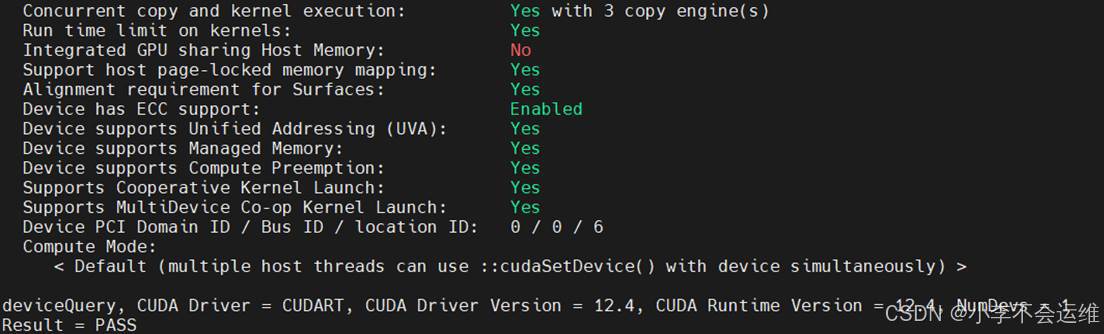
# 安装cuda示例代码测试cuda是否可用
git clone https://github.com/NVIDIA/cuda-samples.git
cd cuda-samples/Samples/1_Utilities/deviceQuery
make
./deviceQuery

3pytorch安装配置、测试

Bash
# 安装pytorch
apt install python3 python3-pip python3-dev
apt install build-essential cmake git libpython3-dev
pip3 install torch torchvision torchaudio --index-url https://download.pytorch.org/whl/cu124

# 测试pytorch是否可用
cat > gputest.py << END
import torch
def list_all_gpus():
    # 检查是否有可用的 GPU
    if torch.cuda.is_available():
        num_gpus = torch.cuda.device_count()
        print(f"Total number of GPUs available: {num_gpus}")

        for device_id in range(num_gpus):
            device_name = torch.cuda.get_device_name(device_id)
            print(f"GPU ID {device_id}: {device_name}")
    else:
        print("CUDA is not available. Using CPU.")

if __name__ == "__main__":
    list_all_gpus()
END

# 调用成功会有输出
root@cuda-test:~# python3 ./gputest.py
Total number of GPUs available: 2
GPU ID 0: NVIDIA H20
GPU ID 1: NVIDIA H20

您可能感兴趣的与本文相关的镜像

PyTorch 2.5

PyTorch 2.5

PyTorch
Cuda

PyTorch 是一个开源的 Python 机器学习库,基于 Torch 库,底层由 C++ 实现,应用于人工智能领域,如计算机视觉和自然语言处理

评论
添加红包

请填写红包祝福语或标题

红包个数最小为10个

红包金额最低5元

当前余额3.43前往充值 >
需支付:10.00
成就一亿技术人!
领取后你会自动成为博主和红包主的粉丝 规则
hope_wisdom
发出的红包
实付
使用余额支付
点击重新获取
扫码支付
钱包余额 0

抵扣说明:

1.余额是钱包充值的虚拟货币,按照1:1的比例进行支付金额的抵扣。
2.余额无法直接购买下载,可以购买VIP、付费专栏及课程。

余额充值