


 本文介绍了一个基于Java的爬虫项目,使用HttpClient库实现GET和POST请求,通过设置User-Agent绕过服务器对爬虫的检测,成功抓取了某瓣网的主页内容。
项目地址:https://github.com/wenrongyao/java_crawler
1、导入httpclient依赖
<dependency>
            <groupId>org.apache.httpcomponents</groupId>
            <artifactId>httpclient</artifactId>
            <version>4.3</version>
        </dependency>
        <dependency>
            <groupId>org.apache.httpcomponents</groupId>
            <artifactId>httpclient-cache</artifactId>
            <version>4.3</version>
        </dependency>
        <dependency>
            <groupId>org.apache.httpcomponents</groupId>
            <artifactId>httpmime</artifactId>
            <version>4.3</version>
        </dependency>
2、封装请求对象
/**
 * Created by rongyaowen on 2018/10/4.
 * 请求封装,get请求,post请求。
 */
public class Request {
    private static CloseableHttpClient closeableHttpClient = HttpClientBuilder.create().build();

    /**
     * get 请求
     *
     * @param url
     * @param headerParams 请求头
     * @return
     */
    public static Map<String, Object> get(String url, Map<String, Object> headerParams) {
        HttpGet httpGet = new HttpGet(url);
        Map<String, Object> logMap = new HashMap<>();
        logMap.put("请求链接", url);
        return response(httpGet, headerParams, logMap);
    }

    /**
     * post 请求
     *
     * @param url
     * @param headerParams  请求头
     * @param requestParams 请求数据
     * @return
     */
    public static Map<String, Object> post(String url, Map<String, Object> headerParams, Map<String, Object> requestParams) {
        HttpPost httpPost = new HttpPost(url);
        StringEntity entity = null;
        try {
            String requestParamsStr = null;
            if (!requestParams.isEmpty() && !StringUtils.isEmpty(requestParamsStr = requestParams.get(P.REQUEST.REQUEST_PARAMS).toString())) {
                entity = new StringEntity(requestParamsStr);
            }
            String contentTypeStr = null;
            if (!requestParams.isEmpty() && !StringUtils.isEmpty(contentTypeStr = requestParams.get(P.REQUEST.CONTENT_TYPE).toString())) {
                // 表单格式数据
                entity.setContentType(contentTypeStr);
            }
            httpPost.setEntity(entity);
        } catch (UnsupportedEncodingException e) {
            e.printStackTrace();
        }
        Map<String, Object> logMap = new HashMap<>();
        logMap.put("亲求链接", url);
        logMap.put("请求参数", requestParams);

        return response(httpPost, headerParams, logMap);
    }

    /**
     * 请求
     *
     * @param httpRequestBase
     * @param headerParams    请求头
     * @param logMap          日志map
     * @return
     */
    private static Map<String, Object> response(HttpRequestBase httpRequestBase, Map<String, Object> headerParams, Map<String, Object> logMap) {
        Map<String, Object> resMap = new HashMap<>();
        RequestConfig config = RequestConfig.custom().setConnectionRequestTimeout(5000).setConnectTimeout(5000)
                .setSocketTimeout(5000).build();
        httpRequestBase.setConfig(config);
        // 拼装请求头
        if (!headerParams.isEmpty()) {
            for (Map.Entry<String, Object> entry : headerParams.entrySet()) {
                httpRequestBase.addHeader(entry.getKey(), entry.getValue().toString());
            }
        }

        try {
            HttpResponse httpResponse = closeableHttpClient.execute(httpRequestBase);
            // 状态码
            int statusCode = httpResponse.getStatusLine().getStatusCode();
            logMap.put("请求头", headerParams);
            logMap.put("状态码", statusCode);
            logMap.put("请求方法", httpRequestBase.getMethod());
            LogUtil.debug(LogUtil.mapToStr(logMap));

            // 返回响应body数据
            HttpEntity entity = httpResponse.getEntity();
            String resBody = EntityUtils.toString(entity, "utf-8");
            // 响应头
            Header[] headers = httpResponse.getAllHeaders();

            // 组装响应
            resMap.put(P.REQUEST.RES_BODY, resBody);
            resMap.put(P.REQUEST.HEADERS, headers);
        } catch (IOException e) {
            e.printStackTrace();
        }
        return resMap;
    }

    /**
     * 获取请求流
     *
     * @param url
     * @param headerParams
     * @return
     */
    public static InputStream getAuthCode(String url, Map<String, Object> headerParams) {
        RequestConfig config = RequestConfig.custom().setConnectionRequestTimeout(5000).setConnectTimeout(5000)
                .setSocketTimeout(5000).build();
        HttpGet httpGet = new HttpGet(url);
        httpGet.setConfig(config);
        // 拼装请求头
        if (!headerParams.isEmpty()) {
            for (Map.Entry<String, Object> entry : headerParams.entrySet()) {
                httpGet.addHeader(entry.getKey(), entry.getValue().toString());
            }
        }
        HttpResponse httpResponse = null;
        try {
            httpResponse = closeableHttpClient.execute(httpGet);
            int statusCode = httpResponse.getStatusLine().getStatusCode();
            Map<String, Object> logMap = new HashMap<>();
            logMap.put("请求链接", url);
            logMap.put("请求头", headerParams);
            logMap.put("请求方法", httpGet.getMethod());
            logMap.put("请求状态", statusCode);
            LogUtil.debug(LogUtil.mapToStr(logMap));

            if (statusCode == HttpStatus.SC_OK) {
                HttpEntity entity = httpResponse.getEntity();
                return entity.getContent();
            }
        } catch (IOException e) {
            e.printStackTrace();
        }
        return null;
    }
}
3、获取某瓣网未登录主页内容
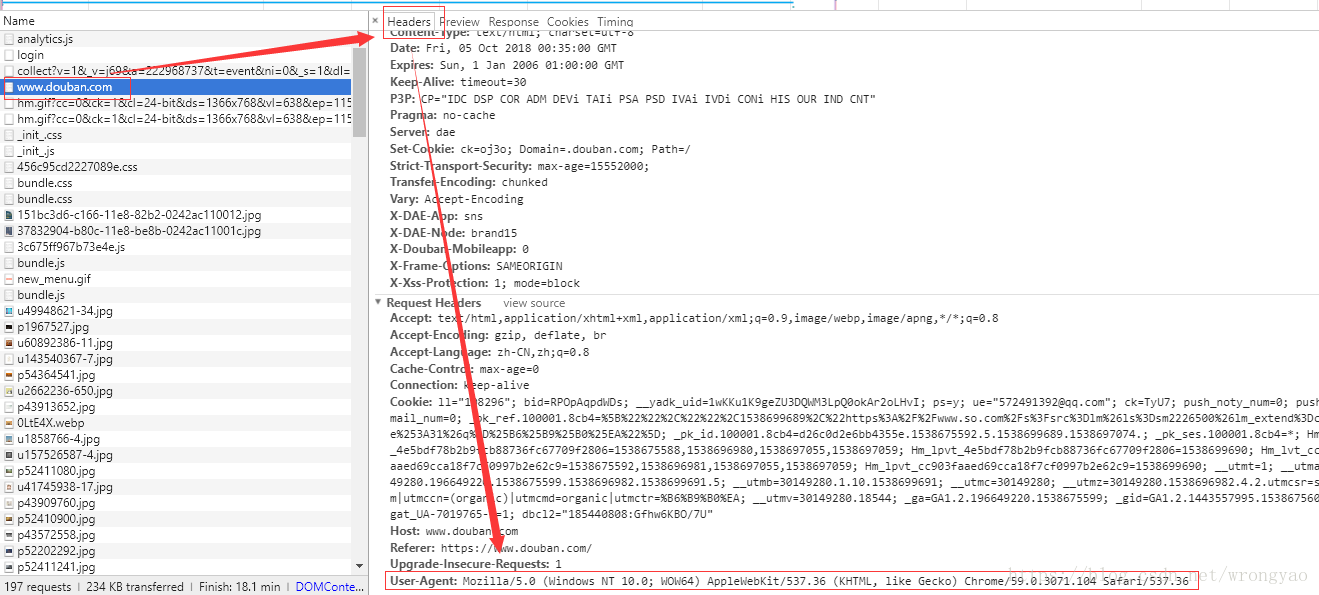
首页在谷歌的开发者工具中,拿到User-Agent的头信息(没有这个信息,会被服务器判定为爬虫)
4、模拟发送请求获取主页内容
 /**
     * 第一个爬虫程序,获取源码,注意需要带上User_Agetn
     */
    @Test
    public void crawlerClient_01() {
        String url = "https://www.douban.com";
        Map<String, Object> headerParams = new HashMap<>();
        headerParams.put(P.REQUEST.USER_AGENT, P.USER_AGENT);
        Map<String, Object> resMap = Request.get(url, headerParams);
        System.out.println(resMap.get(P.REQUEST.RES_BODY));
    }
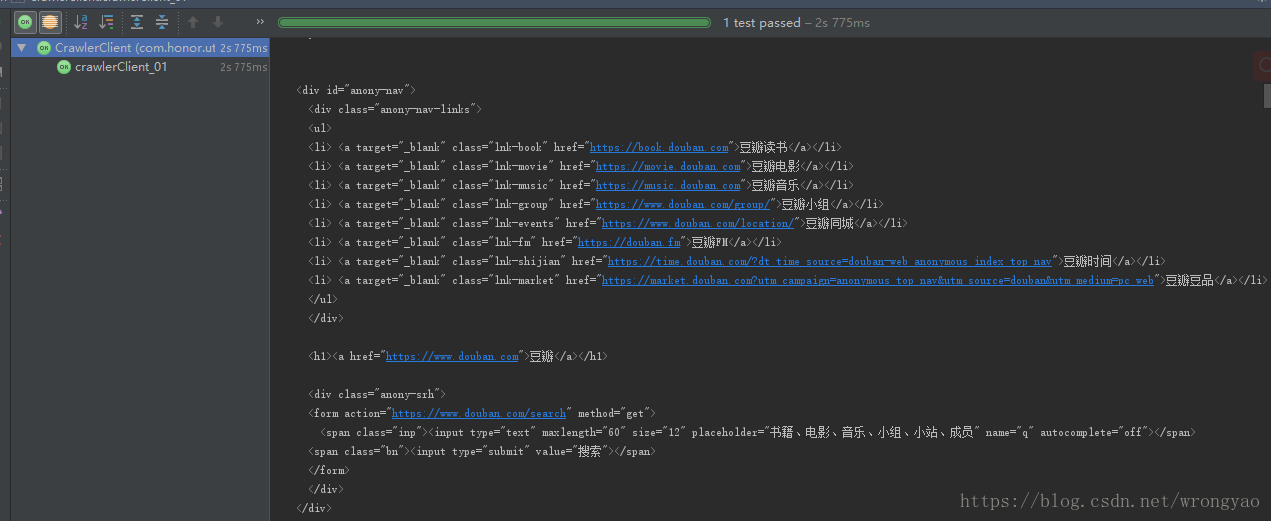
5、效果展示





 扫一扫
扫一扫


 944
944

 被折叠的 条评论
为什么被折叠?
被折叠的 条评论
为什么被折叠?
 到【灌水乐园】发言





