


 博主在阿里云 CentOS 7.7 服务器上尝试通过 yum 安装 Nginx 时遇到错误,发现问题出在 yum 源文件中缺失 x86_64 版本。经过更换源、修复yum配置及手动安装,记录了整个过程。
yum源中无nginx.x86_64文件,一系列换yum源,还是没能通过yum来安装。最后压缩包安装的。
出现这个错误的原因是因为本地yum源中没有我们想要的nginx.x86_64。
最后也没能通过yum安装nginx.x86_64,但清楚了问题在/etc/yum.repos.dCentOS-Base.repo这个文件上,这是yum源文件。
最后通过手动下载安装包解压安装的。
下面是一系列试错。
环境
阿里云服务器centos7.7
报错
[root@wu1 ~]# cd /
[root@wu1 /]# yum list nginx*
Loaded plugins: fastestmirror
Loading mirror speeds from cached hostfile
 * centos-sclo-rh: mirrors.aliyun.com
Available Packages
nginx-all-modules.noarch                     1:1.16.1-3.el7            epel
nginx-filesystem.noarch                      1:1.16.1-3.el7            epel
nginx-mod-http-image-filter.x86_64           1:1.16.1-3.el7            epel
nginx-mod-http-perl.x86_64                   1:1.16.1-3.el7            epel
nginx-mod-http-xslt-filter.x86_64            1:1.16.1-3.el7            epel
nginx-mod-mail.x86_64                        1:1.16.1-3.el7            epel
nginx-mod-stream.x86_64                      1:1.16.1-3.el7            epel
[root@wu1 /]# yum install -y nginx.x86_64
。。。
No package nginx.x86_64 available.
Error: Nothing to do
尝试一:失败
【CentOS6.5】安装nginx报错:No package nginx available. Error: Nothing to do - PHP急先锋 - 博客园
EPEL/zh-cn - Fedora Project Wiki
注意:第二个链接里面第二个命令"subscription-manager 。。。“是"在RHEL 7上"的,我是centos7,不用使用。我当时使用了这个命令,然后报-bash: subscription-manager: command not found,然后用Centos 6 can’t found command subscription-manager - 薏米* - 博客园的方法不报该错了,回头才发现centos系统不用输入命令"subscription-manager 。。。”,而此时,输入yum makecache会报This system is not registered with an entitlement server. You can use subscription-manager to register.,于是用订阅插件提示:This system is not registered with an entitlement server. You can use subscription-manager to_oraoharu的博客-优快云博客的方法解决了。总之,绕了个大圈子。
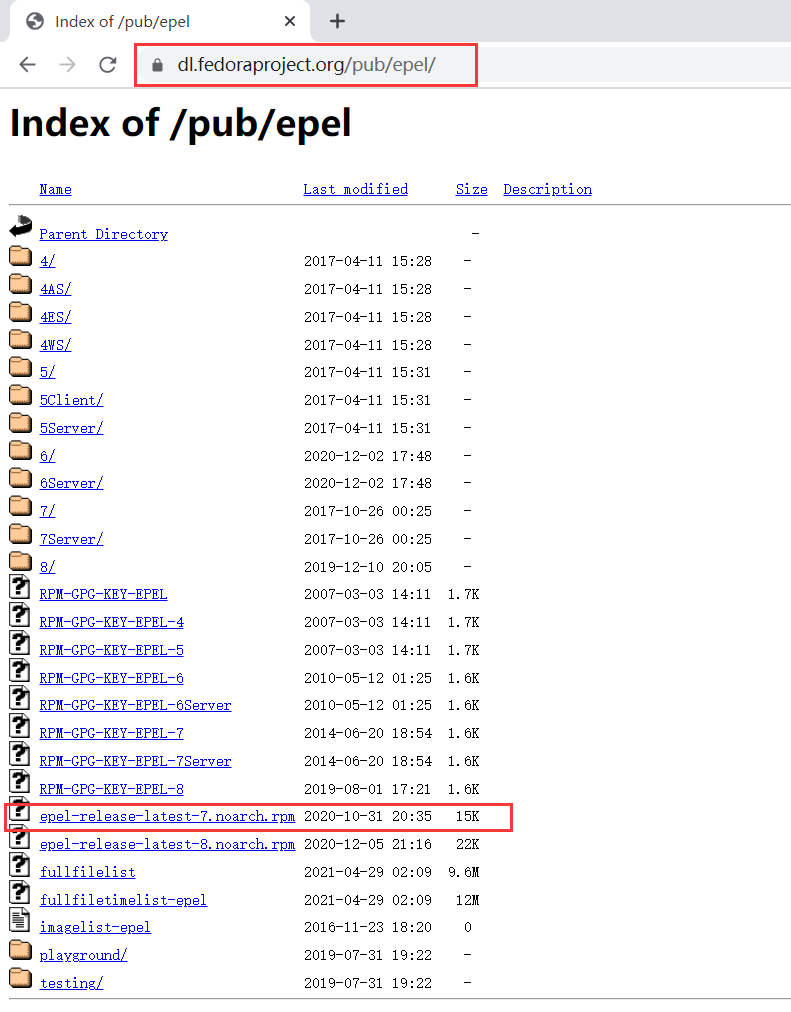
[root@wu1 home]# wget https://dl.fedoraproject.org/pub/epel/epel-release-latest-7.noarch.rpm
[root@wu1 home]# rpm -ivh epel-release-latest-7.noarch.rpm
# 上方两句也可以并为一句 [root@wu1 home]# yum install https://dl.fedoraproject.org/pub/epel/epel-release-latest-7.noarch.rpm
[root@wu1 home]# cd /
[root@wu1 /]# yum list nginx*
Loaded plugins: fastestmirror
Loading mirror speeds from cached hostfile
 * centos-sclo-rh: mirrors.aliyun.com
Available Packages
nginx-all-modules.noarch                               1:1.16.1-3.el7                     epel
nginx-filesystem.noarch                                1:1.16.1-3.el7                     epel
nginx-mod-http-image-filter.x86_64                     1:1.16.1-3.el7                     epel
nginx-mod-http-perl.x86_64                             1:1.16.1-3.el7                     epel
nginx-mod-http-xslt-filter.x86_64                      1:1.16.1-3.el7                     epel
nginx-mod-mail.x86_64                                  1:1.16.1-3.el7                     epel
nginx-mod-stream.x86_64                                1:1.16.1-3.el7                     epel
[root@wu1 /]# yum install -y nginx.x86_64
Loaded plugins: fastestmirror
Loading mirror speeds from cached hostfile
 * centos-sclo-rh: mirrors.aliyun.com
No package nginx.x86_64 available.
Error: Nothing to do
尝试二:失败
yum安装nginx时报错:No package nginx available. Error: Nothing to do_liangkk的博客-优快云博客
尝试三:失败
安装nginx时报错:No package nginx available. Error: Nothing to do_snow_small的博客-优快云博客
[root@wu1 /]# vim /etc/yum.repos.d/nginx.repo	# 新建文件/etc/yum.repos.d/nginx.repo,并写入下方内容
[nginx]
name=nginx repo
baseurl=http://nginx.org/packages/centos/$releasever/$basearch/
gpgcheck=0
enabled=1
[root@wu1 /]# yum list nginx*
Loaded plugins: fastestmirror
Loading mirror speeds from cached hostfile
 * base: mirrors.cloud.aliyuncs.com
 * centos-sclo-rh: mirrors.aliyun.com
 * extras: mirrors.cloud.aliyuncs.com
 * updates: mirrors.cloud.aliyuncs.com
nginx                                                                  | 2.9 kB  00:00:00
nginx/7/x86_64/primary_db                                              |  63 kB  00:00:02
Available Packages
nginx-all-modules.noarch                             1:1.16.1-3.el7                      epel
nginx-debug.x86_64                                   1:1.8.0-1.el7.ngx                   nginx
nginx-debuginfo.x86_64                               1:1.20.0-1.el7.ngx                  nginx
nginx-filesystem.noarch                              1:1.16.1-3.el7                      epel
nginx-mod-http-image-filter.x86_64                   1:1.16.1-3.el7                      epel
nginx-mod-http-perl.x86_64                           1:1.16.1-3.el7                      epel
nginx-mod-http-xslt-filter.x86_64                    1:1.16.1-3.el7                      epel
nginx-mod-mail.x86_64                                1:1.16.1-3.el7                      epel
nginx-mod-stream.x86_64                              1:1.16.1-3.el7                      epel
nginx-module-geoip.x86_64                            1:1.20.0-1.el7.ngx                  nginx
nginx-module-geoip-debuginfo.x86_64                  1:1.20.0-1.el7.ngx                  nginx
nginx-module-image-filter.x86_64                     1:1.20.0-1.el7.ngx                  nginx
nginx-module-image-filter-debuginfo.x86_64           1:1.20.0-1.el7.ngx                  nginx
nginx-module-njs.x86_64                              1:1.20.0+0.5.3-1.el7.ngx            nginx
nginx-module-njs-debuginfo.x86_64                    1:1.20.0+0.5.3-1.el7.ngx            nginx
nginx-module-perl.x86_64                             1:1.20.0-1.el7.ngx                  nginx
nginx-module-perl-debuginfo.x86_64                   1:1.20.0-1.el7.ngx                  nginx
nginx-module-xslt.x86_64                             1:1.20.0-1.el7.ngx                  nginx
nginx-module-xslt-debuginfo.x86_64                   1:1.20.0-1.el7.ngx                  nginx
nginx-nr-agent.noarch                                2.0.0-12.el7.ngx                    nginx
疑惑
明明改了yum源,但貌似每次下载,都还是用的* centos-sclo-rh: mirrors.aliyun.com。





 扫一扫
扫一扫


 6141
6141

 被折叠的 条评论
为什么被折叠?
被折叠的 条评论
为什么被折叠?
 到【灌水乐园】发言





