



 本文详细介绍了OkHttp的基本使用方法,包括同步与异步请求的处理流程,以及内部拦截器的工作原理。
1 使用
首先从一个简单使用例子开始入手,下面的是源码中的一个例子:
 OkHttpClient client = new OkHttpClient();//步骤1

    // Create request for remote resource.
    Request request = new Request.Builder()
        .url(ENDPOINT)
        .build();//步骤2

    // Execute the request and retrieve the response.
    try (Response response = client.newCall(request).execute()) {//步骤3
      // Deserialize HTTP response to concrete type.
      ResponseBody body = response.body();
      List<Contributor> contributors = CONTRIBUTORS_JSON_ADAPTER.fromJson(body.source());

      // Sort list by the most contributions.
      Collections.sort(contributors, (c1, c2) -> c2.contributions - c1.contributions);

      // Output list of contributors.
      for (Contributor contributor : contributors) {
        System.out.println(contributor.login + ": " + contributor.contributions);
      }
    }
步骤1: 创建一个OkHttpClient对象。
步骤2:通过建造者模式创建一个请求,这边可以配置Url等数据。
步骤3:加载请求并执行等待响应。
至此一个基本的请求过程编写完成。
2 同步与异步请求
Call对象由client的newCall生成,其中有两种方式。第一种是execute(),它会阻塞当前线程。第二种是enqueue,它并不会阻塞线程,而是将任务交给线程池去处理,处理完再将结果 返回回来。那么接下来看看client.newCall(request)是怎么一回事:
@Override public Call newCall(Request request) {
    return RealCall.newRealCall(this, request, false /* for web socket */);
  }
可见它是通过OKHttpClient,Request等创建了一个新的RealCall对象。那么这个实际执行请求回调操作的也就是RealCall对象。先看看它的同步方式:
@Override public Response execute() throws IOException {
    synchronized (this) {
      if (executed) throw new IllegalStateException("Already Executed");
      executed = true;
    }
    transmitter.timeoutEnter();
    transmitter.callStart();
    try {
      client.dispatcher().executed(this);
      return getResponseWithInterceptorChain();
    } finally {
      client.dispatcher().finished(this);
    }
  }

synchronized void executed(RealCall call) {
    runningSyncCalls.add(call);
  }
流程如下:execute() --> client.dispatcher().executed(this) --> runningSyncCalls.add(call) --> getResponseWithInterceptorChain() --> client.dispatcher().finished(this)
首先是将该call加入runningSyncCalls,这表示该任务已经子啊执行了。然后调用getResponseWithInterceptorChain方法也就是开始请求了。这都是发生在当前线程所以会阻塞线程。最后会调用dispatcher的finish方法,该方法会去通知线程池开始去运行等待任务,这个finish方法方法后面会分析。
@Override public void enqueue (Callback responseCallback) {
    。。。
    client.dispatcher().enqueue(new AsyncCall(responseCallback));
  }

void enqueue(AsyncCall call) {
    synchronized (this) {
      readyAsyncCalls.add(call);

      // Mutate the AsyncCall so that it shares the AtomicInt2 同步与异步请求eger of an existing running call to
      // the same host.
      if (!call.get().forWebSocket) {
        AsyncCall existingCall = findExistingCallWithHost(call.host());
        if (existingCall != null) call.reuseCallsPerHostFrom(existingCall);
      }
    }
    promoteAndExecute();
  }
流程如下:client.dispatcher().enqueue --> readyAsyncCalls.add(call) --> promoteAndExecute()
解释一下,就是先把call加入到readyAsyncCalls中去,然后promoteAndExecute()通知线程池去取出一个call来处理。
那么就有必要看下promoteAndExecute()方法是如何实现的:
private boolean promoteAndExecute() {
    assert (!Thread.holdsLock(this));

    List<AsyncCall> executableCalls = new ArrayList<>();
    boolean isRunning;
    synchronized (this) {
      for (Iterator<AsyncCall> i = readyAsyncCalls.iterator(); i.hasNext(); ) {//步骤1
        AsyncCall asyncCall = i.next();

        if (runningAsyncCalls.size() >= maxRequests) break; // Max capacity.
        if (asyncCall.callsPerHost().get() >= maxRequestsPerHost) continue; // Host max capacity.

        i.remove();
        asyncCall.callsPerHost().incrementAndGet();
        executableCalls.add(asyncCall);
        runningAsyncCalls.add(asyncCall);
      }
      isRunning = runningCallsCount() > 0;
    }

    for (int i = 0, size = executableCalls.size(); i < size; i++) {//步骤2
      AsyncCall asyncCall = executableCalls.get(i);
      asyncCall.executeOn(executorService());
    }

    return isRunning;
  }
步骤1:遍历readyAsyncCalls,有两种特殊情况会停止或者继续循环。
- 当runningAsyncCalls超过maxRequests的话说明线程要处理的任务已经满了直接跳出循环。
- 当asyncCall.callsPerHost().get()也就是当前call所对应的host已经接收了足够过的call请求,那么循环继续。
如果这两个都不满足执行下面的步骤,主要是往executableCalls中添加要执行的请求以及往runningAsyncCalls里添加要执行的请求。
步骤2:遍历刚才的得到的executableCalls,并用调用线程池执行任务。具体是调用AsyncCall的executeOn(executorService())方法实现的。
现在看看异步回调AsyncCall的源码:
final class AsyncCall extends NamedRunnable {
    private final Callback responseCallback;
    private volatile AtomicInteger callsPerHost = new AtomicInteger(0);

    。。。

    /**
     * Attempt to enqueue this async call on {@code executorService}. This will attempt to clean up
     * if the executor has been shut down by reporting the call as failed.
     */
    void executeOn(ExecutorService executorService) {
      assert (!Thread.holdsLock(client.dispatcher()));
      boolean success = false;
      try {
        executorService.execute(this);
        success = true;
      } catch (RejectedExecutionException e) {
        InterruptedIOException ioException = new InterruptedIOException("executor rejected");
        ioException.initCause(e);
        transmitter.noMoreExchanges(ioException);
        responseCallback.onFailure(RealCall.this, ioException);
      } finally {
        if (!success) {
          client.dispatcher().finished(this); // This call is no longer running!
        }
      }
    }

    @Override protected void execute() {
      boolean signalledCallback = false;
      transmitter.timeoutEnter();
      try {
        Response response = getResponseWithInterceptorChain();
        signalledCallback = true;
        responseCallback.onResponse(RealCall.this, response);
      } catch (IOException e) {
        。。。
      } catch (Throwable t) {
        。。。
      } finally {
        client.dispatcher().finished(this);
      }
    }
  }

  public abstract class NamedRunnable implements Runnable {
  protected final String name;

  public NamedRunnable(String format, Object... args) {
    this.name = Util.format(format, args);
  }

  @Override public final void run() {
    String oldName = Thread.currentThread().getName();
    Thread.currentThread().setName(name);
    try {
      execute();
    } finally {
      Thread.currentThread().setName(oldName);
    }
  }

  protected abstract void execute();
}
AsyncCall继承自NamedRunnable。所以调用流程如下所示:
executeOn --> executorService.execute(this) --> run() --> execute()
此时就开始在线程池中取一个线程执行,先调用getResponseWithInterceptorChain()执行请求,再调用responseCallback.onResponse(RealCall.this, response)将的到的响应数据回调回去。
和同步execute一样最后都会执行finished(this),那么看下finished里面是怎么操作的:
/** Used by {@code AsyncCall#run} to signal completion. */
  void finished(AsyncCall call) {//步骤1
    call.callsPerHost().decrementAndGet();
    finished(runningAsyncCalls, call);
  }

  /** Used by {@code Call#execute} to signal completion. */
  void finished(RealCall call) {//步骤2
    finished(runningSyncCalls, call);
  }

  private <T> void finished(Deque<T> calls, T call) {//步骤3
    Runnable idleCallback;
    synchronized (this) {
      if (!calls.remove(call)) throw new AssertionError("Call wasn't in-flight!");
      idleCallback = this.idleCallback;
    }

    boolean isRunning = promoteAndExecute();

    if (!isRunning && idleCallback != null) {
      idleCallback.run();
    }
  }
不管是步骤1还是步骤2,最后都会跳到步骤3.而步骤3最主要的一步就是 promoteAndExecute()。也就是说每个任务完成之后都会执行promoteAndExecute(),以确保等待列表中的任务会被不断的执行。
3 拦截器原理
从上面的分析可知,getResponseWithInterceptorChain()方法用于获取网络数据,那么看看源码:
Response getResponseWithInterceptorChain() throws IOException {
    // Build a full stack of interceptors.
    List<Interceptor> interceptors = new ArrayList<>();
    interceptors.addAll(client.interceptors());
    interceptors.add(new RetryAndFollowUpInterceptor(client));
    interceptors.add(new BridgeInterceptor(client.cookieJar()));
    interceptors.add(new CacheInterceptor(client.internalCache()));
    interceptors.add(new ConnectInterceptor(client));
    if (!forWebSocket) {
      interceptors.addAll(client.networkInterceptors());
    }
    interceptors.add(new CallServerInterceptor(forWebSocket));

    Interceptor.Chain chain = new RealInterceptorChain(interceptors, transmitter, null, 0,
        originalRequest, this, client.connectTimeoutMillis(),
        client.readTimeoutMillis(), client.writeTimeoutMillis());//步骤1

    boolean calledNoMoreExchanges = false;
    try {
      Response response = chain.proceed(originalRequest);//步骤2
      if (transmitter.isCanceled()) {
        closeQuietly(response);
        throw new IOException("Canceled");
      }
      return response;
    } catch (IOException e) {
      calledNoMoreExchanges = true;
      throw transmitter.noMoreExchanges(e);
    } finally {
      if (!calledNoMoreExchanges) {
        transmitter.noMoreExchanges(null);
      }
    }
  }
用户定义的拦截器再加上系统自带的6个拦截器一共有全部塞如interceptors中去。
步骤1 直观的比喻就是将这些拦截器用链条连接起来,这个是链条的第一个节点他的 index = 0。
步骤2 开始往链条上传递请求参数。层层传递过去获取到数据之后层层传递回来:
那么就看看proceed是怎么处理的:
@Override public Response proceed(Request request) throws IOException {
    return proceed(request, transmitter, exchange);
  }

  public Response proceed(Request request, Transmitter transmitter, @Nullable Exchange exchange)
      throws IOException {
    。。。

    // Call the next interceptor in the chain.
    RealInterceptorChain next = new RealInterceptorChain(interceptors, transmitter, exchange,
        index + 1, request, call, connectTimeout, readTimeout, writeTimeout);//步骤1
    Interceptor interceptor = interceptors.get(index);//步骤2
    Response response = interceptor.intercept(next);//步骤3

   。。。

    return response;
  }
步骤1:封装index,RealInterceptorChain对象next的indext在每次递归调用之后都会加1
步骤2:这边的index是指当前Interceptor对应的下一个Interceptor。
步骤3:将包含当前Interceptor对应的下下个Interceptor的index以及请求等参数封装成next对象,让下一个interceptor处理next中的请求并继续递归。
比如说RetryAndFollowUpInterceptor。如果没有用户自定义的拦截器,那么这将是第一个拦截器,看看它的intercept方法:
@Override public Response intercept(Chain chain) throws IOException {
     。。。//步骤1
         RealInterceptorChain realChain = (RealInterceptorChain) chain;
        response = realChain.proceed(request, transmitter, null);//步骤2
      。。。//步骤3
  }
步骤1:对请求的数据进行处理
步骤2:将请求抛给下个拦截器。此时realChain的index是1。它调用RealInterceptorChain的proceed方法,此时去看下是怎么变化的:
@Override public Response proceed(Request request) throws IOException {
    return proceed(request, transmitter, exchange);
  }

  public Response proceed(Request request, Transmitter transmitter, @Nullable Exchange exchange)
      throws IOException {
    。。。

    RealInterceptorChain next = new RealInterceptorChain(interceptors, transmitter, exchange,
        index + 1, request, call, connectTimeout, readTimeout, writeTimeout);//此时的next对应的index是2,他对应的是CacheInterceptor拦截器
    Interceptor interceptor = interceptors.get(index );//此时的值是1,他对应的是BridgeInterceptor拦截器
    Response response = interceptor.intercept(next);

   。。。

    return response;
  }
可以看到此时interceptor.intercept(next)方法的功能是执行BridgeInterceptor拦截器,并且下一个递归到的是CacheInterceptor拦截
步骤3:对响应的数据进行处理
这种递归到最后肯定是直接返回的,看看最后一个拦截器是怎么操作的:
@Override public Response intercept(Chain chain) throws IOException {
    。。。

    Response response = responseBuilder
        .request(request)
        .handshake(exchange.connection().handshake())
        .sentRequestAtMillis(sentRequestMillis)
        .receivedResponseAtMillis(System.currentTimeMillis())
        .build();

   。。。

    return response;
  }
可见proceed没有被调用它直接处理了请求并将响应反馈回来(并没有执行proceed操作也就是说没有递归了),那么接下来响应也会层层的递归回来。最终反馈到getResponseWithInterceptorChain()得到结果。
整体流程如下图所示:
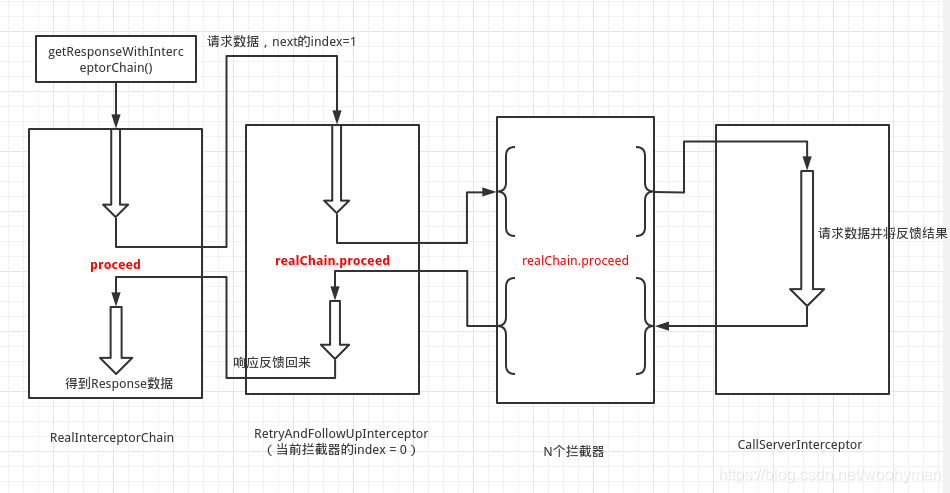
先是将请求数据层层递归下去,最后在RealInterceptorChain做最终的处理,得到结果后又层层递归回来。





 扫一扫
扫一扫


 2842
2842

 被折叠的 条评论
为什么被折叠?
被折叠的 条评论
为什么被折叠?
 到【灌水乐园】发言





