



和你一起终身学习,这里是程序员Android
经典好文推荐,通过阅读本文,您将收获以下知识点:
一、Camera CTS 调试笔记
1.1 CTS兼容包下载
下载对应版本最新的CTS 兼容性测试包,
注意:
网页切换成英文下载的工具会比中文的新,比如: 现在英文网页有15 R4 ,中文网页只有15 R3
Google 官网CTS 兼容套件下载地址:
https://source.android.google.cn/docs/compatibility/cts/downloads
CTS Google 官网
https://source.android.google.cn/docs/compatibility/cts?hl=zh-cn
1.2 进入CTS 兼容性工具包 ,开启CTS测试
- 下载后,打开终端,进入 cts 包 tools目录下
- 执行
./cts-tradefed进入cts测试
~/XTS/CTS/15/android-cts-15_r4-linux_x86-arm/android-cts/tools$ ./cts-tradefed
==================
Notice:
We collect anonymous usage statistics in accordance with our Content Licenses (https://source.android.com/setup/start/licenses), Contributor License Agreement (https://opensource.google.com/docs/cla/), Privacy Policy (https://policies.google.com/privacy) and Terms of Service (https://policies.google.com/terms).
==================
Android Compatibility Test Suite 15_r4 (13449817)
OmniLab lab-4.314.0 github-35bede2eb45412b21afc9122addc25200f15e074
Use "help" to get more information on running commands. Use "dump bugreport" to generate a debug info file. Log dirs: [/tmp/olc_server_log, /tmp/ats_console_log]
06-17 06:02:35 PDT I/ServerPreparer: Connected to existing OLC server, version=[lab_version: "4.314.0" github_version: "35bede2eb45412b21afc9122addc25200f15e074" process_id: 3141893 client_version: "4.32.0"]
06-17 06:02:35 PDT I/ServerPreparer: Using existing OLC server
cts-console >
cts-console >
1.3 常用CTS测试命令
1.3.1. adb devices 获取当前挂测设备ID
首先通过 adb devices 获取当前挂测设备ID,方便后续添加 -s 挂测多台机器
C:\Users\>adb devices
List of devices attached
33b9232239991 device
1.3.2. 执行整测 CTS 方法
全跑整机所有模块(Camera、Audio、USB、指纹等)CTS 测试命令如下
run cts --plan CTS -s "devices id”1.3.3. 单独跑某个模块
单独跑某个模块
通用命令语法:run cts -m module
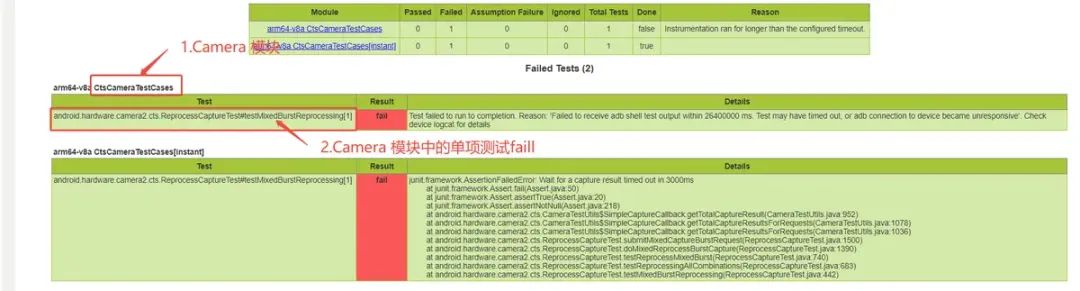
Camera 单项CTS 测试Fail 举例
比如 Camera CTS 模块:
run cts -m CtsCameraTestCases -s "devices id”1.3.4. 单独跑某个测试fail单项
单跑某个单独的测试fail 项
通用命令语法:run cts -m module -t 测试fail项
比如 Camera CTS android.hardware.camera2.cts.ReprocessCaptureTest#testMixedBurstReprocessing[1] 单项命令:
 最低0.47元/天 解锁文章






 扫一扫
扫一扫


 6040
6040

 被折叠的 条评论
为什么被折叠?
被折叠的 条评论
为什么被折叠?
 到【灌水乐园】发言





