



 本文详细介绍了Snort3的规则编写,包括规则基础、规则头中的操作、协议、IP地址、端口信息,以及规则选项如动作、协议、IP、端口、方向操作符等。特别强调了规则动作的种类,如alert、log、pass、drop等,并展示了如何通过内容、pcre、byte_test等选项来匹配数据包。同时,文章还提供了多个规则选项的示例,帮助读者理解和应用Snort3规则。
Snort3 IPS规则编写
1.规则基础
Snort规则被分为两个逻辑部分,规则头和规则选项。
规则头包含规则的操作、协议、源和目标IP地址,以及源和目标端口信息。
规则选项部分包含警报消息和应该检查数据包的哪些部分的信息,以确定是否应该采取规则操作。

规则举例:

注:第一个括号之前的文本是规则标题,括号中包含的部分包含规则选项。规则选项部分中冒号前的单词称为选项关键字。选项部分关键字可选。
2.规则头
规则头包含规则的操作、协议、源和目标IP地址和网掩码,以及源和目标端口信息。规则中的第一项是该规则。
Eg:alert tcp any any -> 192.168.1.0/24 111 (content:"|00 01 86 a5|"; msg:"mountd access";)
2.1规则动作
规则动作告诉Snort,当它找到匹配规则条件的数据包时,该做什么。在Snort、警报、日志、传递中有3个可用的默认操作。此外,在内联模式下运行Snort,还有其他选项,包括删除、拒绝和删除。
2.1.1 内置规则动作
1)alert - 生成一个警报,然后记录日志
2)log - 记录日志
3)pass - 忽略
4)drop - 阻止并记录日志
5)reject - 阻止数据并记录日志,如果协议是TCP,则发送TCP重置,如果协议是UDP,则发送ICMP端口不可访问的消息。
6)react 向客户端发送响应,并终止会话
7)block ??
8)reset ??
2.1.2 自定义规则动作
定义自己的规则类型,并将一个或多个输出插件与它们关联起来。然后将规则类型作为Snort规则中的操作。
示例将创建一个类型,它将日志记录到tcpdump:
ruletype suspicious
{
type log
output log_tcpdump: suspicious.log
}
示例将创建一个规则类型,它将日志到syslog和tcpdump:数据库
ruletype redalert
{
type alert
output alert_syslog: LOG_AUTH LOG_ALERT
output log_tcpdump: suspicious.log
}
2.2 规则协议
规则中的下一个字段是协议。Snort目前有五种协议:ip, icmp, tcp, udp, http。
2.3 规则IP
1)单个IP格式:
Alert tcp 10.0.116.56 any -> 10.0.116.58 any ( msg:”ip any” )
2)IP组格式:
alert tcp [10.0.116.1,10.0.116.56,10.0.116.60] any -> any any ( msg:"test pcre and content!"; )
alert tcp 192.168.1.0/24 any -> any any ( msg:"test pcre and content!"; )
alert tcp [192.168.1.0/10, 192.168.1.15/20] any -> [ 192.168.1.20/30] any ( msg:"test pcre and content!"; )
3)IP取反格式: !
Alert tcp !10.0.116.56 any -> 10.0.116.58 any ( msg:”ip any” )
alert tcp ![10.0.116.1,10.0.116.56,10.0.116.60] any -> any any ( msg:"test pcre and content!"; )
alert tcp ![192.168.1.0/10, 192.168.1.15/120] any -> any any ( msg:"test pcre and content!"; )
4)IP组使用变量
alert tcp $HOME_NET any -> any any ( msg:"test pcre and content!"; )
5)表示所有IP
alert tcp any any -> any any ( msg:"test pcre and content!"; )
2.4 规则端口
1)单个端口
alert tcp any 90-> any 80 ( msg:"test pcre and content!"; )
2)多个端口
alert tcp any 90:100-> any 80:100 ( msg:"test pcre and content!"; )
alert tcp any 90: -> any :100 ( msg:"test pcre and content!"; )
alert tcp any [90,9090,80,443] -> any :100 ( msg:"test pcre and content!"; )
alert tcp any ![90:100]-> any 80:100 ( msg:"test pcre and content!"; )
alert tcp any !90: -> any :100 ( msg:"test pcre and content!"; )
alert tcp any !443 -> any :100 ( msg:"test pcre and content!"; )
alert tcp any ![90,9090,80,443] -> any :100 ( msg:"test pcre and content!"; )
3)使用变量
alert tcp any $HTTP_PORTS -> any :100 ( msg:"test pcre and content!"; )
2.5 规则方向操作符
Eg1:->
alert tcp any 90 -> any 80 ( msg:"test pcre and content!"; )
Eg2:<-
alert tcp any 90 <- any 80 ( msg:"test pcre and content!"; )
Eg3:<>
alert tcp any 90 <> any 80 ( msg:"test pcre and content!"; )
3 规则选项
规则选项构成了Snort入侵检测引擎的核心,结合了易用性、通用和灵活性。所有的Snort规则选项都使用分号(;)字符相互分隔。规则选项关键字与具有冒号(:)字符的参数分隔。规则选项主要有四类。
General 提供了有关该规则的信息,但在检测过程中没有任何影响
Payload 查找数据包有效负载中的数据,并且可以相互关联
non-payload 非有效负载数据
post-detection 是在规则“触发”后发生的特定于规则的触发器。
3.1 一般规则选项
3.1.1 msg
msg规则选项告诉日志记录和警报引擎打印消息。它是一个简单的文本字符串,它使用\作为转义字符来指示一个离散字符,否则可能会混淆Snort的规则解析符(例如分号字符)
Format
msg:"<message text>";
Eg:alert tcp any 90 <> any 80 ( msg:"test pcre and content!"; )
3.1.2 reference
包含对外部攻击识别系统的引用。该插件目前支持几个特定的系统以及唯一的url。此插件将被输出插件用来提供一个指向有关所产生的警报的其他信息的链接
Format
reference:<id system>, <id>; [reference:<id system>, <id>;]
Eg:
alert tcp any any -> any 7070 (msg:"IDS411/dos-realaudio"; flags:AP; content:"|fff4 fffd 06|"; reference:arachnids,IDS411;)
alert tcp any any -> any 21 (msg:"IDS287/ftp-wuftp260-venglin-linux"; flags:AP; content:"|31c031db 31c9b046 cd80 31c031db|"; reference:arachnids,IDS287; reference:bugtraq,1387; reference:cve,CAN-2000-1574;)

3.1.3 gid
gid关键字(生成器id)用于识别当特定规则触发时,Snort的哪个组件生成事件。例如,gid与规则子系统相关联,超过100的都是为特定的预处理器和解码器指定的各种gid。
gid关键字是可选的,如果在规则中没有指定它,它将默认为0,并且该规则将是通用规则子系统的一部分。为了避免与Snort中定义的gid(由于某些原因没有注意到它等)的潜在冲突,建议使用从100万开始的值。此选项应该与sid关键字一起使用。
Format
gid:<generator id>;
Example
alert tcp any any -> any 80 (content:"BOB"; gid:1000001; sid:1; rev:1;)
注:内置规则的gid查询:

3.1.4 sid
sid关键字用于唯一标识Snort规则。通常与rev一起使用
<100 snort预留的
Format
sid:<snort rules id>;
Example
alert tcp any any -> any 80 (content:"BOB"; sid:1000983; rev:1;)
3.1.5 rev
rev关键字用于唯一标识Snort规则的修订版本。通常与sid一起使用
Format
rev:<revision integer>;
Example
alert tcp any any -> any 80 (content:"BOB"; sid:1000983; rev:1;)
3.1.6 classtype
classtype关键字用于将规则分类。Snort提供了一组默认的攻击类,它提供的默认规则集使用。
Format
classtype:<class name>;
Example
alert tcp any any -> any 25 (msg:"SMTP expn root"; flags:A+; \ content:"expn root"; nocase; classtype:attempted-recon;)

3.1.7 priority
优先级关键字将为规则分配一个严重性级别。
Format
priority:<priority integer>;
Examples
alert tcp any any -> any 80 (msg:"WEB-MISC phf attempt"; flags:A+; content:"/cgi-bin/phf"; priority:10;)
alert tcp any any -> any 80 (msg:"EXPLOIT ntpdx overflow"; dsize:>128; classtype:attempted-admin; priority:10 );
3.1.8 metadata
元数据标记允许规则写入器嵌入有关规则的附加信息,通常以键值格式嵌入。

Format
metadata:key1 value1;
metadata:key1 value1, key2 value2;
Examples
alert tcp any any -> any 80 (msg:"Shared Library Rule Example";metadata:engine shared; metadata:soid 3|12345;)
alert tcp any any -> any 80 (msg:"Shared Library Rule Example"; metadata:engine shared, soid 3|12345;)
alert tcp any any -> any 80 (msg:"HTTP Service Rule Example"; metadata:service http;)
3.2 Payload检测选项
3.2.1 content
content关键字是Snort最重要的特性之一。它允许用户设置搜索数据包有效载荷中的特定内容的规则,并基于该数据触发响应.
1) 一条规则中支持多个content关键字,它们之间是 && 的关系
2) 支持字符串和十六进制混合
3) 匹配采用boyer-moore算法
Format
content:[!]"<content string>";
Examples
alert tcp any any -> any 139 (content:"|5c 00|P|00|I|00|P|00|E|00 5c|";)
alert tcp any any -> any 80 (content:!"GET";)
alert tcp any any -> any 80 (content:!"GET|5c 00 5c|URL";)
Content的修饰符
|
修饰符 |
作用 |
用例 |
|
Nocase |
匹配忽略大小写 |
content:"xxxx", nocase; |
|
rawbytes |
匹配原始字节 |
content:"xxxx", rawbytes; |
|
depth |
匹配深度,与offset一起使用 |
content:"xxxx", depth 10; |
|
offset |
起始匹配偏移 |
content:"xxxx", offset 10; |
|
distance |
匹配相对于上个模式偏移的距离,与within一起使用 |
content:"xxxx", distance 10; |
|
within |
匹配相对于上个模式之后匹配深度 |
content:"xxxx", within 10; |
|
http _client _ body |
匹配限制到HTTP客户端请求的主体中.不能和rawbytes一起使用 |
http_client_body ; content:"xxxx" |
|
http_ cookie |
匹配限制到HTTP cookie 字段。不能和rawbytes、fast pattern一起使用 | |
|
http_ raw_ cookie |
匹配限制为HTTP客户端请求或HTTP服务器响应的提取的未规范化Cookie头字段.。不能和rawbytes, http cookie or fast pattern | |
|
http_ header |
限制在HTTP客户端请求或HTTP服务器响应的提取头字段.不能和rawbytes一起使用 | |
|
http _raw _header |
限制在HTTP客户端请求或HTTP服务器响应的提取的非规范化标头字段。不能和rawbytes, http header or fast pattern 一起使用 | |
|
http_ method |
限制为从HTTP客户端请求中提取的方法。不能和rawbytes or fast pattern 一起使用 | |
|
http_ uri |
限制URI字段。不能和rawbytes一起使用 | |
|
http_ raw_ uri |
限制为未规范化的请求URI字段。不能和rawbytes, http uri or fast pattern 一起使用 | |
|
http_stat_code |
限制为从HTTP服务器响应中提取的状态代码字段。不能和rawbytes or fast pattern 一起使用。 | |
|
http_stat_msg |
它将搜索限制为从HTTP服务器响应中提取的状态消息字段。不能和rawbytes or fast pattern 一起使用 | |
|
fast_ pattern |
设置为要与快速模式匹配器一起使用。默认匹配是不区分大小写,但不能和http_cookie, http_raw_uri, http_raw_header, http_raw_cookie, http_method, http_stat_code, http_stat_ msg,offset, depth, distance or within. 一起使用 |
3.2.2 isdataat
验证有效负载在指定位置有数据,可选择查找相对于先前内容匹配的结尾的数据。
Format
isdataat:[!]<int>[, relative|rawbytes];
Example
alert tcp any any -> any 111 (content:"PASS"; isdataat:50,relative; content:!"|0a|"; within:50;)
此规则查找数据包中存在的字符串PASS,然后验证字符串PASS末尾后至少有50个字节,然后验证PASS字符串末尾后50个字节内没有换行符
Example
alert tcp any any -> any 111 (isdataat:50; content:"PASS";)
此规则查找数据包的负载至少有50个字节,在这负载中存在字符串PASS
alert tcp any any -> any 111 (isdataat:!50; content:"PASS";)
此规则查找数据包的负载字节,在这50个字节中存在字符串PASS
3.2.3 pcre
pcre关键字允许使用与perl兼容的正则表达式来编写规则。有关pcre正则表达式的细节,请查看PCRE网站http://www.pcre.org
Format
pcre:[!]"(/<regex>/|m<delim><regex><delim>)[ismxAEGRUBPHMCOIDKYS]";
Example
alert tcp any any -> any 80 (content:"/foo.php?id="; pcre:"/\/foo.php?id=[0-9]{1,10}/iU";)
注:在使用pcre的规则中至少有一个内容关键字是明确的的。这允许快速模式匹配器过滤掉不匹配的数据包。
3.2.3 pkt_data
检测原始传输有效负载
Format
pkt_data;
Example
alert tcp any any -> any any(msg:"Absolute Match"; pkt_data; content:"BLAH"; offset:0; depth:10;)
alert tcp any any -> any any(msg:"PKT DATA"; pkt_data; content:"foo"; within:10;)
alert tcp any any -> any any(msg:"PKT DATA"; pkt_data; content:"foo";)
alert tcp any any -> any any(msg:"PKT DATA"; pkt_data; pcre:"/foo/i";)
3.2.4 fifile_data
Format
file_data;
Example
alert tcp any any -> any any(msg:"Absolute Match"; file_data; content:"BLAH"; offset:0; depth:10;)
alert tcp any any -> any any(msg:"FILE DATA"; file_data; content:"foo"; within:10;)
alert tcp any any -> any any(msg:"FILE DATA"; file_data; content:"foo";)
alert tcp any any -> any any(msg:"FILE DATA"; file_data; pcre:"/foo/i";)
alert tcp any any -> any any(msg:"FILE DATA"; file_data; content:"foo"; pkt_data; content:"bar";)
3.2.5 base64_decode
用于解码base64编码的数据。
Format
base64_decode[:[bytes <bytes_to_decode>][, ][offset <offset>[, relative]]];
|
bytes |
要解码的字节数 | |
|
offset |
要解码时的字节偏移 | |
|
relative |
编码数据的检查相对于doe_ptr |
Examples
alert tcp $EXTERNAL_NET any -> $HOME_NET any (msg:"Base64 Encoded Data"; base64_decode; base64_data; content:"foo bar"; within:20;)
alert tcp $EXTERNAL_NET any -> $HOME_NET any (msg:"Authorization NTLM"; content:"Authorization: NTLM"; base64_decode:relative; base64_data; content:"NTLMSSP"; )
alert tcp any any -> any any (msg:"Authorization NTLM"; content:"Authorization:"; http_header;
base64_decode:bytes 12, offset 6, relative; base64_data; content:"NTLMSSP"; within:8;)
3.2.6 base64_data
此规则选项类似file_data,用于将用于检测的光标设置为base64解码缓冲区的开始.此选项不接受任何参数。在base64_decode选项之前,需要指定规则选项base64_data
Format
base64_data;
Example
alert tcp any any -> any any (msg:"Authorization NTLM"; content:"Authorization:"; http_header; base64_decode:bytes 12, offset 6, relative; base64_data; content:"NTLMSSP"; within:8;
注:此选项不允许与快速模式选项一起使用,当有base64数据区才有效。
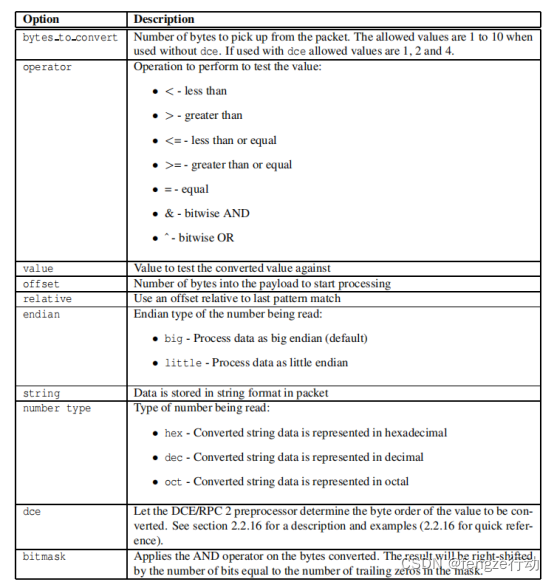
3.2.7 byte_test
针对特定值(使用字符)测试字节字段
Format
byte_test:<bytes to convert>, [!]<operator>, <value>, <offset> [, relative][, <endian>][, string, <number type>][, dce] [, bitmask <bitmask_value>];
bytes = 1 - 10
operator = ’<’ | ’=’ | ’>’ | ’<=’ | ’>=’ | ’&’ | ’ˆ’
value = 0 - 4294967295
offset = -65535 to 65535
bitmask_value = 1 to 4 byte 十六进制值
Example
alert udp $EXTERNAL_NET any -> $HOME_NET any (msg:"AMD procedure 7 plog overflow";
content:"|00 04 93 F3|"; content:"|00 00 00 07|"; distance:4; within:4; byte_test:4, >, 1000, 20, relative;)
alert tcp $EXTERNAL_NET any -> $HOME_NET any (msg:"AMD procedure 7 plog overflow"; content:"|00 04 93 F3|"; content:"|00 00 00 07|"; distance:4; within:4; byte_test:4, >, 1000, 20, relative;)
alert udp any any -> any 1234 (byte_test:4, =, 1234, 0, string, dec; msg:"got 1234!";)
alert udp any any -> any 1235 (byte_test:3, =, 123, 0, string, dec; msg:"got 123!";)
alert udp any any -> any 1236 (byte_test:2, =, 12, 0, string, dec; msg:"got 12!";)
alert udp any any -> any 1237 (byte_test:10, =, 1234567890, 0, string, dec; msg:"got 1234567890!";)
alert udp any any -> any 1238 (byte_test:8, =, 0xdeadbeef, 0, string, hex; msg:"got DEADBEEF!";)
alert tcp any any -> any any (byte_test:2, =, 568, 0, bitmask 0x3FF0; msg:"got 568 after applying bitmask 0x3FF0 on 2 bytes extracted";)
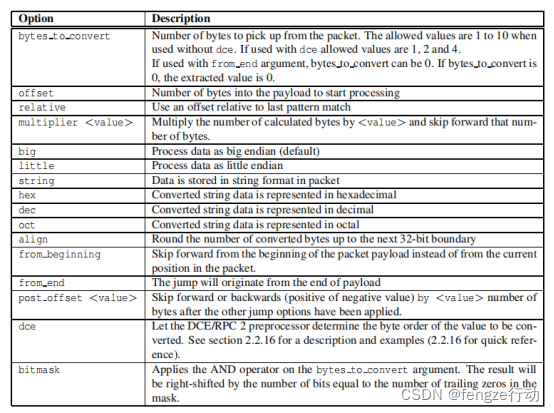
3.2.8 byte_jump
Format
byte_jump:<bytes_to_convert>, <offset> [, relative][, multiplier <mult_value>] \
[, <endian>][, string, <number_type>][, align][, from_beginning][, from_end] \
[, post_offset <adjustment value>][, dce][, bitmask <bitmask_value>];
bytes = 1 - 10
offset = -65535 to 65535
mult_value = 0 - 65535
post_offset = -65535 to 65535
bitmask_value = 1 to 4 bytes hexadecimal value
Example
alert udp any any -> any 32770:34000 (content:"|00 01 86 B8|"; content:"|00 00 00 01|"; distance:4; within:4; byte_jump:4, 12, relative, align; byte_test:4, >, 900, 20, relative; msg:"statd format string buffer overflow";)
alert tcp any any -> any any (content:"Begin"; byte_jump:0, 0, from_end, post_offset -6; content:"end.."; distance:0; within:5; msg:"Content match from end of the payload";)
alert tcp any any -> any any (content:"catalog"; byte_jump:2, 1, relative, post_offset 2, bitmask 0x03f0; byte_test:2, =, 968, 0, relative; msg:"Bitmask applied on the 2 bytes extracted for byte_jump";)
alert tcp any any -> any any (content:"catalog"; byte_jump:1, 2, from_end, post_offset -5, bitmask 0x3c; byte_test:1, =, 106, 0, relative; msg:"Byte jump calculated from end of payload after bitmask applied";)
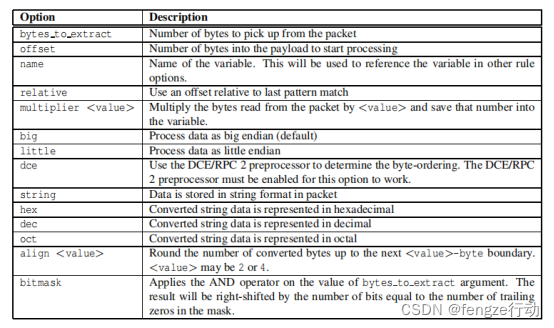
3.2.9 byte_extract
它从数据包有效负载中读取一些字节,并将其保存到一个变量中。这些变量可以在规则中引用,而不是使用硬编码的值。每个规则只能创建两个字节提取变量。它们可以在相同的规则中被重复使用任何次数。
Format
byte_extract:<bytes_to_extract>, <offset>, <name> [, relative] \
[, multiplier <multiplier value>][, <endian>][, string][, hex][, dec][, oct] \
[, align <align value>][, dce][, bitmask <bitmask>];
bytes_to_extract = 1 - 10
operator = ’<’ | ’=’ | ’>’ | ’<=’ | ’>=’ | ’&’ | ’ˆ’
value = 0 - 4294967295
offset = -65535 to 65535
bitmask_value = 1 to 4 byte hexadecimal value
其他使用字节提取变量的选项.字节提取规则选项本身不检测任何内容。它的用途是提取数据包数据,以便用于其他规则选项。下面是一个可以使用字节提取变量的位置列表:

本示例使用两个变量来:
从偏移量为0的字节中读取一个字符串的偏移量
从偏移量为1的字节中读取字符串的深度
使用这些值可以将模式匹配约束到较小的区域
alert tcp any any -> any any (byte_extract:1, 0, str_offset; byte_extract:1, 1, str_depth;
content:"bad stuff"; offset:str_offset; depth:str_depth; msg:"Bad Stuff detected within field";)
alert tcp any any -> any any (content:"|04 63 34 35|"; offset:4; depth:4; byte_extract: 2, 0, var_match, relative, bitmask 0x03ff; byte_test: 2, =, var_match, 2, relative; msg:"Byte test value matches bitmask applied on bytes extracted";)
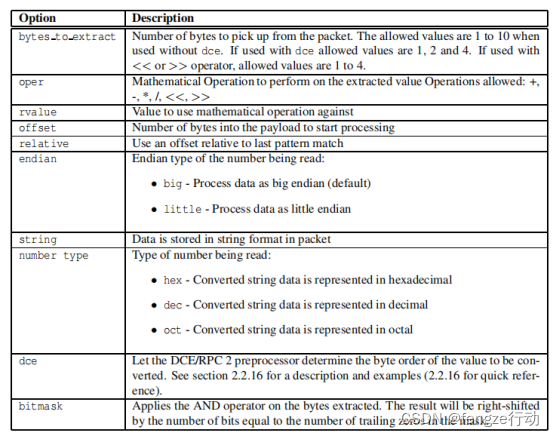
3.2.10 byte math
对提取的值和指定的值或现有变量执行数学运算,并将结果存储在新的结果变量中。这些结果变量可以在规则的后面引用,而不是使用硬编码的值。
Format
byte_math:bytes <bytes_to_extract>, offset <offset_value>, oper <operator>,
rvalue <r_value>, result <result_variable> [, relative]
[, endian <endian>] [, string <number type>][, dce]
[, bitmask <bitmask_value>];
bytes_to_extract = 1 - 10
operator = ’+’ | ’-’ | ’*’ | ’/’ | ’<<’ | ’>>’
r_value = 0 - 4294967295 | byte extract variable
offset_value = -65535 to 65535
bitmask_value = 1 to 4 byte hexadecimal value
result_variable = Result Variable name
其他使用字节数学结果变量的规则选项

Examples
alert udp $EXTERNAL_NET any -> $HOME_NET any \
(msg:"Perform Arithmetic Operation on the extracted bytes"; \
content:"|00 04 93 F3|"; \
content:"|00 00 00 07|"; distance:4; within:4; \
byte_math:bytes 4, offset 0, oper +, rvalue 248, result var, relative; \
byte_test:4, >, var, 2, relative;)
alert tcp $EXTERNAL_NET any -> $HOME_NET any \
(msg:"Bitwise shift operator"; \
content:"|00 00 00 07|"; distance:4; within:4; \
byte_extract: 1, 0, extracted_val, relative; \
byte_math: bytes 1, offset 2, oper >>, rvalue extracted_val, result var, relative; \
byte_test:2, =, var, 0, relative;)
alert udp any any -> any 1234 \
(content: "Packets start"; \
byte_math: bytes 2, offset 0, oper -, rvalue 100, result var, relative, bitmask 0x7FF0; \
214content: "Packets end"; distance: 2; within var; \
msg:"Content match with bitmask applied to the bytes extracted";)
alert udp any any -> any 1235 \
(byte_extract: 4, 3, extracted_val, relative; \
byte_math: bytes 5, offset 0, oper +, rvalue extracted_val, result var, string hex; \
byte_test:5, =, var, 4, string, hex; \
msg:"String operator used with math rule option";)
3.2.11 asn1
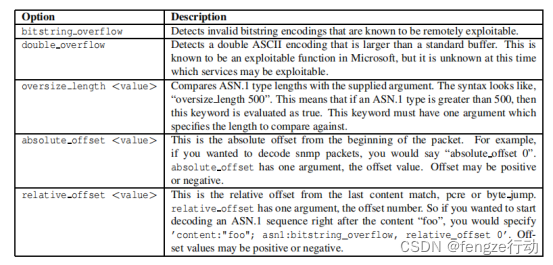
ASN。1检测插件解码一个包或一个包的一部分,并寻找各种恶意编码。在一个“asn1”选项中可以使用多个选项,且隐含逻辑为布尔OR。因此,如果任何参数计算为true,则整个选项计算为true。
使用的ASN。1个选项提供了编程检测功能以及一些更动态的类型检测。如果选项有参数,则选项和参数将用空格或逗号分隔。首选的用法是在选项和参数之间使用一个空格
Format
asn1:[bitstring_overflow][, double_overflow][, oversize_length <value>][, absolute_offset <value>|relat
Examples
alert udp any any -> any 161 (msg:"Oversize SNMP Length"; \
asn1:oversize_length 10000, absolute_offset 0;)
alert tcp any any -> any 80 (msg:"ASN1 Relative Foo"; content:"foo"; \
asn1:bitstring_overflow, relative_offset 0;)
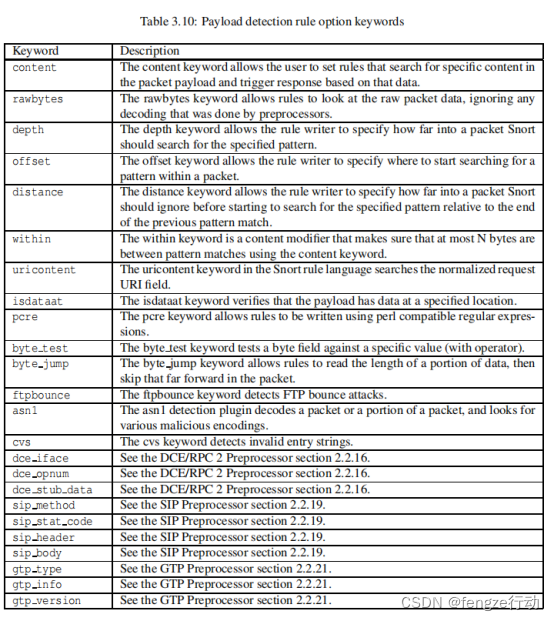
有效负载检测的快速参考
3.3 无负载规则选项
3.3.1 ttl
ttl关键字用于检查IP的生存时间值。此选项关键字旨在用于检测示踪剂尝试。这个关键字取的数字从0到255。
Format
ttl:[<, >, =, <=, >=]<number>;
ttl:[<number>]-[<number>];
|
ttl:<3; |
检查的运行时间值是否小于3。 |
|
ttl:3-5; |
检查从3到5之间的生存时间值。 |
|
ttl:-5; |
检查在0到5之间的生存时间值。 |
|
ttl:5-; |
检查从5到255之间的生存时间值 |
|
ttl:<=5; ttl:>=5; ttl:=5; |
其它 |
|
ttl:=>5; ttl:=<5; ttl:5-3; |
ttl关键字不允许使用以下例子: |
3.3.2 id
ID关键字用于检查特定值的IPID字段。一些工具(利用、扫描仪和其他奇怪的程序)专门为各种目的设置了这个字段,例如,值31337非常受一些黑客的欢迎。
Format
id:<number>;
Example
本例查找的IPID为31337
id:31337;
3.3.3 ipopts
ipopts关键字用于检查是否存在特定的IP选项。可以检查以下选项:
rr - Record Route
eol - End of list
nop - No Op
ts - Time Stamp
sec - IP Security
esec - IP Extended Security
lsrr - Loose Source Routing
lsrre - Loose Source Routing (For MS99-038 and CVE-1999-0909)
ssrr - Strict Source Routing
satid - Stream identififier
any - any IP options are set
Format
ipopts:<rr|eol|nop|ts|sec|esec|lsrr|lsrre|ssrr|satid|any>;
Example
查找松散源路由的IP选项
ipopts:lsrr;
注:每个规则只能指定一个ipopts关键字
3.3.4 fragbits
检查IP标头中是否设置了碎片位和保留位。
M - More Fragments
D - Don’t Fragment
R - Reserved Bit
The following modififiers can be set to change the match criteria:
+ 匹配指定的位,以及任何其他位
* 如果设置了任何指定的位,则进行匹配
! 如果没有设置指定的位,则进行匹配
Format
fragbits:[+*!]<[MDR]>;
Example
此示例检查是否设置了“更多片段”位和“不使用片段”位。
fragbits:MD+;
3.3.5 dsize
dsize关键字用于测试数据包的有效负载大小。这可用于检查可能导致缓冲区溢出的异常大小的数据包。
Format
dsize:min<>max;
dsize:[<|>]<number>;
Example
找在300到400字节(包括)之间的数据大小。
dsize:300<>400;
注:对于HTTP等基于TCP的协议,分割使数据大小更不可靠。此外,无论有效负载的大小如何,流重建的数据包的数据大小都会失败,除非协议感知刷新(PAF)将该数据包标记为消息的开始。
3.3.6 flags
用于检查是否存在特定的TCP标志位。
F - FIN - Finish (LSB in TCP Flags byte)
S - SYN - Synchronize sequence numbers
R - RST - Reset
P - PSH - Push
A - ACK - Acknowledgment
U - URG - Urgent
C - CWR - Congestion Window Reduced (MSB in TCP Flags byte)
E - ECE - ECN-Echo (If SYN, then ECN capable. Else, CE flflag in IP header is set)
0 - No TCP Flags Set
可以设置以下修改符以更改匹配条件:
+ 匹配指定的位,以及任何其他位
* 如果设置了任何指定的位,则进行匹配
! 如果没有设置指定的位,则进行匹配
为了处理会话启动包的写入规则,如ECN,SYN包发送了CWR和ECE集,可以在前面用逗码指定选项掩码。如果您希望找到只有syn位的数据包,而不管保留位的值如何,那么规则都可以检查S,CE的标志值。
Format
flags:[!|*|+]<FSRPAUCE0>[,<FSRPAUCE>];
Example
本示例检查是否只设置了SYN和FIN位,而忽略了CWR(保留位1)和ECN(保留位).
alert tcp any any -> any any (flags:SF,CE;)
3.3.6 flow
流关键字与会话跟踪一起使用。它允许规则只适用于交通流的特定方向。这将允许规则仅适用于客户机或服务器。这允许与$HOMENET客户端查看网页相关的数据包与在$HOMENET中运行的服务器区分开来。已建立的关键字将替换在许多地方用于显示已建立的TCP连接的标志:+A。
|
to client |
触发服务器从A到B的响应 | |
|
to client |
触发器从A到B的客户端请求 | |
|
from client |
触发器从A到B的客户端请求 | |
|
from server |
触发服务器从A到B的响应 | |
|
established |
仅在已建立的TCP连接上使用触发器 | |
|
not established |
只有在没有建立TCP连接时才会触发 | |
|
stateless |
触发器与流处理器的状态无关(对于旨在导致机器崩溃的数据包很有用) | |
|
No_stream |
不要触发重新构建的流数据包 | |
|
Only_stream |
仅触发重建的流数据包 | |
|
No_frag |
不要对重新构建的碎片数据包进行触发 | |
|
Only_frag |
只触发了重建的碎片数据包 |
Format
flow:[(established|not_established|stateless)]
[,(to_client|to_server|from_client|from_server)]
[,(no_stream|only_stream)]
[,(no_frag|only_frag)];
Examples
alert tcp !$HOME_NET any -> $HOME_NET 21 (msg:"cd incoming detected";
flow:from_client; content:"CWD incoming"; nocase;)
alert tcp !$HOME_NET 0 -> $HOME_NET 0 (msg:"Port 0 TCP traffic";
flow:stateless;)
3.3.7 flowbits
流位关键字与会话预处理器中进行的会话跟踪一起使用。它允许规则在传输协议会话期间跟踪状态。流位选项对于TCP会话最有用,因为它允许规则通用地跟踪应用程序协议的状态。有几个关键字与流程位相关联。大多数选项需要要检查的特定状态的用户定义的名称。某些关键字使用组名称。当没有指定组名称时,流位将属于一个默认组。一个特定的流位可以属于多个组。流位名和组名应仅限于任何字母数字字符串,包括句点、破折号和下划线。
General Format
flowbits:[set|setx|unset|toggle|isset|isnotset|noalert|reset][, <bits/bats>][, <GROUP_NAME>];
bits ::= bit[|bits]
bats ::= bit[&bats]
|
Option |
Description | |
|
set |
设置当前流的指定状态,并在指定组NAME时将其分配给组 | |
|
setx |
设置当前流的指定状态,并清除组中的其他状态 | |
|
unset |
取消设置当前流的指定状态 | |
|
toggle |
对于指定的每个状态,如果未设置该状态,则设置指定状态,如果设置该状态,则取消设置指定状态。 | |
|
isset |
检查是否设置了指定的状态。 | |
|
isnotset |
检查是否没有设置指定的状态。 | |
|
noalert |
导致规则不生成警报,而不管其他检测选项如何。 | |
|
reset |
重置给定流上的所有状态。 |
Set
此关键字将位设置为特定流的分组。当未指定任何组时,请设置默认组。这个关键字总是返回true
Syntax:
flowbits:set,bats[,group]
Usage:
flowbits:set,bit1,doc;
flowbits:set,bit2&bit3,doc;
第一规则设置文档组中的第1位,第二规则设置文档组中的第2位和第3位。所以doc组设置了第1位,第2位和第3位
Setx
此关键字将位设置为专门的组。这可以清除组中的其他部分。组必须存在。这个关键字总是返回true。
Syntax:
flowbits:setx,bats,group
Usage:
flowbits: setx, bit1, doc
flowbits: setx, bit2&bit3, doc
第一规则设置文档组中的第1位,第二规则设置文档组中的第2位和第3位。所以doc组设置了第2位和第3位,因为第1位被规则2清除了。
Unset
此关键字可清除为特定流指定的位,或清除组中的所有位(组必须存在)。这个关键字总是返回true。
Syntax:
flowbits:unset,bats
flowbits:unset,all,group
Usage:
flowbits: unset, bit1
这将清除bit1.
flowbits: unset, bit1&bit2
这将清除bit1 and bit2
flowbits: unset, all, doc =>这将清除文档组中的所有位元。
toggle
如果设置了流位,请取消设置它。如果它是未设置的,请设置它。切换指定的每个位,或切换组中的所有位(组必须存在)。这个关键字总是返回true。
Syntax:
flowbits:toggle,bats
flowbits:toggle,all,group
Usage:
flowbits: toggle, bit1&bit2
If bit1 is 0 and bit2 is 1 before, after this rule, bit1 is 1 and bit2 is 0.
如果位1是0,位2是1之前,在这个规则之后,位1是1,位2是0。
flowbits:toggle,all,doc
如上所述,切换组文档中的所有位。
Isset
这个关键字检查一点或几位,看看是否设置。它根据以下语法返回真或假。
Syntax:
flowbits:isset, bits => Check whether any bit is set
flowbits:isset, bats => Check whether all bits are set
flowbits:isset, any, group => Check whether any bit in the group is set.
flowbits:isset, all, group => Check whether all bits in the group are set.
Usage
flowbits:isset, bit1|bit2 => If either bit1 or bit2 is set, return true
flowbits:isset, bit1&bit2 => If both bit1 and bit2 are set, return true, otherwise false
flowbits:isset, any, doc => If any bit in group doc is set, return true
flowbits:isset, all, doc => If all the bits in doc group are set, return true
Isnotset
这个关键字是isset的反面。如果isset为false,则返回true,如果isset为真,则返回false。Isnotset用的是最终结果,而不是单个位。
Syntax:
flowbits:isnotset, bits => Check whether not any bit is set
flowbits:isnotset, bats => Check whether not all bits are set
flowbits:isnotset, any, group => Check whether not bit in the group is set.
flowbits:isnotset, all, group => Check whether not all bits in the group are set.
Usage
flowbits:isnotset, bit1|bit2 => If either bit1 or bit2 is set, return true
flowbits:isnotset, bit1&bit2 => If both bit1 and bit2 are set, return true, otherwise false
flowbits:isnotset, any, doc => If any bit in group doc is set, return true
flowbits:isnotset, all, doc => If all the bits in doc group are set, return true
Noalert
这个关键字总是返回false。它允许用户编写设置、取消设置和切换位的规则,而不生成警报。这对于编写对正常流量设置位的流位规则并显著减少不必要的警报最有用。此关键字没有指定任何位。
flowbits:noalert;
Reset
如果没有指定组,则此关键字将重置给定流上的所有状态,否则,将重置组中的所有位。这总是真实的。此关键字没有指定任何位。
Syntax:
flowbits:reset[,group]
Usage:
flowbits:reset => reset all the bits in the flow
flowbits: reset, doc => reset all the bits in the doc group
Examples
alert tcp any 143 -> any any (msg:"IMAP login";
content:"OK LOGIN"; flowbits:set,logged_in;
flowbits:noalert;)
alert tcp any any -> any 143 (msg:"IMAP LIST"; content:"LIST";
flowbits:isset,logged_in;)
3.3.8 seq
seq关键字用于检查特定的TCP序列号。
Format
seq:<number>;
Example
查找一个TCP序列号为0。
seq:0;
3.3.9 ack
检查特定的TCP确认号。
Format
ack:<number>;
Example
查找TCP确认号为0。
ack:0;
3.3.10 window
用于检查特定的TCP窗口大小
Format
window:[!]<number>;
Example
查找一个TCP窗口大小为55808
window:55808;
3.3.11 Itype
itype关键字用于检查特定的ICMP类型值
Format
itype:min<>max;
itype:[<|>]<number>;
Example
找大于30的ICMP类型。itype:>30;
3.3.12 icode
用于检查特定的ICMP代码值。
Format
icode:min<>max;
icode:[<|>]<number>;
第一格式的<>操作符检查指定范围内的ICMP代码。即,严格大于最小值,并严格小于最大值。注意,最小值a-1允许ICMP代码。
数值根据允许的0到255之间的ICMP代码值和其他标准进行验证。
icode:min<>max
-1 <= min <= 254
1 <= max <= 256
(max - min) > 1
icode:number
0 <= number <= 255
icode:<number
1 <= number <= 256
icode:>number
0 <= number <= 254
Examples
查找大于30的ICMP代码。
icode:>30;
查找大于零和小于30的ICMP代码。
icode:-1<>30;
3.3.12 icmp_id
用于检查特定的ICMP ID值。这很有用,因为一些隐蔽的信道程序在通信时使用静态的ICMP字段。这个特殊的插件是为了检测stacheldraht(斯塔赫德拉赫特) DDoS代理而开发的。
Format
icmp_id:<number>;
Example
查找ICMP ID为0。
icmp_id:0;
3.3.13 icmp_seq
用于检查特定的ICMP序列值。这很有用,因为一些隐蔽的信道程序在通信时使用静态的ICMP字段。这个特殊的插件是为了检测stacheldraht(斯塔赫德拉赫特) DDoS代理而开发的。
Format
icmp_seq:<number>;
Example
查找的ICMP序列为0。
icmp_seq:0;
3.3.14 ip_proto
允许对IP协议标头进行检查。有关可以按名称指定的协议的列表.
Format
ip_proto:[!|>|<] <name or number>;
Example
查找IGMP流量。
alert ip any any -> any any (ip_proto:igmp;)
3.3.15 sameip
允许规则检查源Ip是否与目标IP相同
Format
sameip;
Example
查找源IP和目标IP相同的任何流量。
alert ip any any -> any any (sameip;)
3.3.16 stream_size
允许一个规则根据观察到的字节数,由TCP序列号决定,来匹配流量。流大小选项只有在流预处理器启用了流预处理器时才可用
Format
stream_size:<server|client|both|either>, <operator>, <number>;
Where the operator is one of the following:
• < - less than
• > - greater than
• = - equal
• != - not equal
• <= - less than or equal
• >= - greater than or equal
Example
从客户端查找小于6字节的会话:
alert tcp any any -> any any (stream_size:client,<,6;)
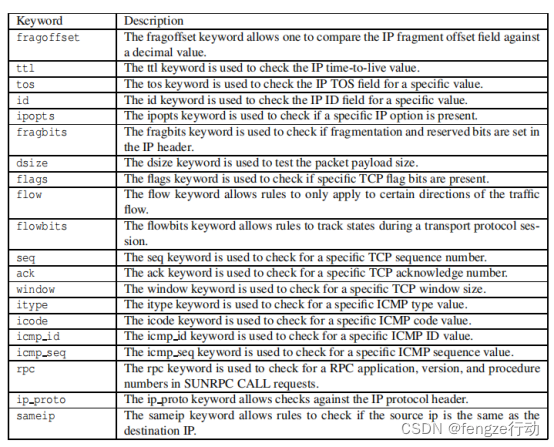
非有效负载检测的快速参考





 扫一扫
扫一扫


 8406
8406

 被折叠的 条评论
为什么被折叠?
被折叠的 条评论
为什么被折叠?
 到【灌水乐园】发言





