





在编程的世界里,有一种神秘而又强大的工具,它能用短短几行字符完成复杂的文本匹配和处理任务,这就是正则表达式(Regular Expression)。对于很多初学者来说,正则表达式就像是一串难以理解的符号密码,但对于经验丰富的开发者而言,它却是提高工作效率的秘密武器。
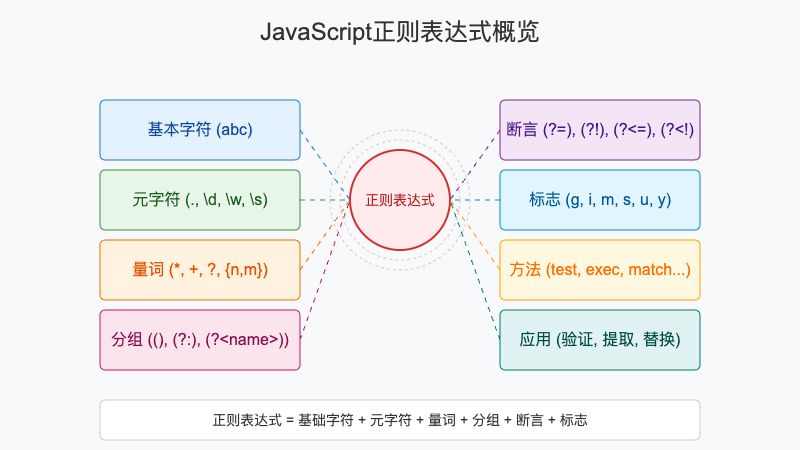
前言
正则表达式是一种用于匹配字符串中字符组合的模式。在JavaScript中,正则表达式是一个强大的特性,可以用来验证表单输入、解析文本数据、进行搜索替换等各种文本处理任务。本文将带你深入了解JavaScript正则表达式的各个方面,从基础语法到高级技巧,再到实际应用场景,让你真正掌握这一强大工具。
什么是正则表达式
正则表达式是一种特殊的字符串,它定义了一个搜索模式。这个模式可以用来检查一个字符串是否包含某个子串,将匹配的子串替换,或者从某个字符串中提取符合特定条件的子串。
正则表达式广泛应用于各种编程语言中,虽然不同语言的实现细节可能略有差异,但基本概念是相同的。
JavaScript中的正则表达式
在JavaScript中,正则表达式可以通过两种方式创建:
字面量语法
const regex = /pattern/flags;
构造函数语法
const regex = new RegExp('pattern', 'flags');
这两种方式的主要区别在于字面量语法在代码编译时就会创建正则表达式对象,而构造函数语法在运行时才会创建。此外,如果模式是动态生成的,则只能使用构造函数语法。
基础语法
正则表达式由普通字符和特殊字符(元字符)组成。普通字符包括字母、数字等,它们会按照字面意思进行匹配。元字符具有特殊含义,用于定义匹配规则。
最基本的匹配就是直接使用普通字符:
const regex = /hello/;
console.log(regex.test('hello world')); // true
console.log(regex.test('Hello world')); // false (区分大小写)
元字符详解
元字符是正则表达式的核心,它们赋予了正则表达式强大的匹配能力。以下是一些常用的元字符:
点号 (.)
点号匹配除换行符外的任意单个字符:
const regex = /h.llo/;
console.log(regex.test('hello')); // true
console.log(regex.test('hallo')); // true
console.log(regex.test('hillo')); // true
console.log(regex.test('hllo'));  // false (缺少一个字符)
字符类 []
字符类用于匹配方括号内的任意一个字符:
const regex = /[aeiou]/;
console.log(regex.test('hello')); // true (匹配到了'e')
console.log(regex.test('sky'));   // false (没有元音字母)
可以使用连字符(-)来表示范围:
const digitRegex = /[0-9]/;
const letterRegex = /[a-z]/;
const upperLetterRegex = /[A-Z]/;

console.log(digitRegex.test('year 2023')); // true
console.log(letterRegex.test('Hello'));    // true
console.log(upperLetterRegex.test('Hello')); // true
反向字符类 [^]
在字符类的第一个字符使用插入符号(^)表示否定,匹配除了方括号内字符之外的任意字符:
const regex = /[^0-9]/;
console.log(regex.test('hello')); // true
console.log(regex.test('12345')); // false
常用预定义字符类
JavaScript提供了一些预定义的字符类来简化常见的匹配需求:
\d匹配任意数字,等价于[0-9]\D匹配任意非数字,等价于[^0-9]\w匹配任意单词字符(字母、数字、下划线),等价于[a-zA-Z0-9_]\W匹配任意非单词字符\s匹配任意空白字符(空格、制表符、换行符等)\S匹配任意非空白字符
const phoneRegex = /\d{3}-\d{3}-\d{4}/;
console.log(phoneRegex.test('123-456-7890')); // true

const emailRegex = /\w+@\w+\.\w+/;
console.log(emailRegex.test('user@example.com')); // true
量词
量词用于指定前面的元素应该匹配多少次:
基本量词
*匹配前面的元素0次或多次+匹配前面的元素1次或多次?匹配前面的元素0次或1次
const zeroOrMore = /go*d/;  // 匹配gd, god, good, goood等
const oneOrMore = /go+d/;   // 匹配god, good, goood等,但不匹配gd
const zeroOrOne = /go?d/;   // 匹配gd和god

console.log(zeroOrMore.test('gd'));    // true
console.log(zeroOrMore.test('good'));  // true
console.log(oneOrMore.test('gd'));     // false
console.log(oneOrMore.test('good'));   // true
console.log(zeroOrOne.test('gd'));     // true
console.log(zeroOrOne.test('god'));    // true
console.log(zeroOrOne.test('good'));   // false
精确量词
{n}匹配前面的元素恰好n次{n,}匹配前面的元素至少n次{n,m}匹配前面的元素至少n次,至多m次
const exactlyThree = /\d{3}/;      // 匹配恰好3个数字
const atLeastThree = /\d{3,}/;     // 匹配至少3个数字
const threeToFive = /\d{3,5}/;     // 匹配3到5个数字

console.log(exactlyThree.test('123'));   // true
console.log(exactlyThree.test('1234'));  // true (包含3个数字)
console.log(atLeastThree.test('12'));    // false
console.log(atLeastThree.test('12345')); // true
console.log(threeToFive.test('123456'));// true (匹配前5个数字)
分组和捕获
使用圆括号()可以创建分组,这有两个主要用途:
- 将多个元素作为一个整体应用量词
- 捕获匹配的内容以便后续使用
基本分组
const regex = /(hello\s)world/;
const result = 'hello world'.match(regex);
console.log(result[0]); // "hello world" (整个匹配)
console.log(result[1]); // "hello " (第一个捕获组)
非捕获分组
有时我们只想将元素分组但不想捕获匹配的内容,可以使用(?:…)语法:
const regex = /(?:hello\s)world/;
const result = 'hello world'.match(regex);
console.log(result.length); // 1 (只有整个匹配,没有捕获组)
命名捕获组
ES2018引入了命名捕获组,使代码更具可读性:
const regex = /(?<year>\d{4})-(?<month>\d{2})-(?<day>\d{2})/;
const result = '2023-10-26'.match(regex);
console.log(result.groups.year);  // "2023"
console.log(result.groups.month); // "10"
console.log(result.groups.day);   // "26"
前瞻和后顾
前瞻(lookahead)和后顾(lookbehind)是零宽断言,用于检查某个位置前后是否存在某种模式,但不消耗字符。
正向前瞻
正向前瞻(?=…)确保当前位置后面匹配某个模式:
// 匹配后面跟着数字的单词
const regex = /\w+(?=\d)/;
console.log('word1 word2'.match(regex)); // ["word"]
负向前瞻
负向前瞻(?!..)确保当前位置后面不匹配某个模式:
// 匹配后面不跟数字的单词
const regex = /\w+(?!\d)/;
console.log('word1 word2 text'.match(regex)); // ["word", "text"]
正向后顾
正向后顾(?<=…)确保当前位置前面匹配某个模式(ES2018新增):
// 匹配前面有美元符号的数字
const regex = /(?<=\$)\d+/;
console.log('$100 price'.match(regex)); // ["100"]
负向后顾
负向后顾(?<!..)确保当前位置前面不匹配某个模式(ES2018新增):
// 匹配前面没有美元符号的数字
const regex = /(?<!\$)\d+/;
console.log('price 100 $200'.match(regex)); // ["100"]
标志(flags)
正则表达式的标志用于改变匹配的行为:
g (全局匹配)
默认情况下,正则表达式只匹配第一个符合条件的子串。使用g标志可以匹配所有符合条件的子串:
const text = 'hello world hello universe';
const regex1 = /hello/;
const regex2 = /hello/g;

console.log(text.match(regex1)); // ["hello"]
console.log(text.match(regex2)); // ["hello", "hello"]
i (忽略大小写)
使用i标志可以让匹配忽略大小写:
const regex = /hello/i;
console.log(regex.test('Hello')); // true
console.log(regex.test('HELLO')); // true
console.log(regex.test('HeLLo')); // true
m (多行模式)
在多行模式下,^和$分别匹配每一行的开始和结束,而不是整个字符串的开始和结束:
const text = `line1
line2
line3`;
const regex1 = /^line/m;
const regex2 = /^line/;

console.log(text.match(regex1)); // ["line", "line", "line"]
console.log(text.match(regex2)); // ["line"]
s (dotAll模式)
在dotAll模式下,点号(.)可以匹配包括换行符在内的任意字符:
const text = `line1
line2`;
const regex1 = /line1.line2/s;
const regex2 = /line1.line2/;

console.log(regex1.test(text)); // true
console.log(regex2.test(text)); // false
u (Unicode模式)
Unicode模式启用Unicode相关的特性,比如正确处理Unicode字符:
const regex = /\u{1F600}/u; // 匹配笑脸表情符号
console.log(regex.test('😀')); // true
y (粘性模式)
粘性模式要求匹配必须从lastIndex属性指定的位置开始:
const regex = /hello/y;
const text = 'hello world hello';

regex.lastIndex = 0;
console.log(regex.test(text)); // true

regex.lastIndex = 6;
console.log(regex.test(text)); // false (位置6是'w')

regex.lastIndex = 12;
console.log(regex.test(text)); // true
常用方法
JavaScript提供了多种使用正则表达式的方法:
test()
test()方法用于检测字符串是否匹配正则表达式:
const regex = /hello/;
console.log(regex.test('hello world')); // true
console.log(regex.test('goodbye'));     // false
exec()
exec()方法用于查找匹配项并返回详细信息:
const regex = /(\d{4})-(\d{2})-(\d{2})/;
const result = regex.exec('Today is 2023-10-26');

console.log(result[0]); // "2023-10-26" (完整匹配)
console.log(result[1]); // "2023" (第一个捕获组)
console.log(result[2]); // "10" (第二个捕获组)
console.log(result[3]); // "26" (第三个捕获组)
console.log(result.index); // 9 (匹配开始位置)
console.log(result.input); // "Today is 2023-10-26" (原始字符串)
match()
String.prototype.match()方法用于查找匹配项:
const text = 'Contact us at support@example.com or admin@test.org';
const emailRegex = /\w+@\w+\.\w+/g;
const emails = text.match(emailRegex);

console.log(emails); // ["support@example.com", "admin@test.org"]
matchAll()
matchAll()方法返回所有匹配项的迭代器(ES2020新增):
const text = 'Contact us at support@example.com or admin@test.org';
const emailRegex = /\w+@\w+\.\w+/g;
const matches = [...text.matchAll(emailRegex)];

matches.forEach(match => {
  console.log(`Found email: ${match[0]}`);
});
replace()
String.prototype.replace()方法可以使用正则表达式进行替换:
const text = 'The year is 2023';
const result = text.replace(/\d{4}/, '2024');
console.log(result); // "The year is 2024"

// 使用捕获组
const date = '2023-10-26';
const formatted = date.replace(/(\d{4})-(\d{2})-(\d{2})/, '$2/$3/$1');
console.log(formatted); // "10/26/2023"

// 使用函数
const result2 = date.replace(/(\d{4})-(\d{2})-(\d{2})/, (match, year, month, day) => {
  return `${month}/${day}/${year}`;
});
console.log(result2); // "10/26/2023"
search()
String.prototype.search()方法返回第一个匹配项的索引:
const text = 'Hello world';
const index = text.search(/world/);
console.log(index); // 6
split()
String.prototype.split()方法可以使用正则表达式分割字符串:
const text = 'apple,banana;orange:grape';
const fruits = text.split(/[,;:]/);
console.log(fruits); // ["apple", "banana", "orange", "grape"]
正则表达式处理流程
在实际使用JavaScript正则表达式时,通常会遵循一定的处理流程。下面的流程图展示了从创建正则表达式到执行操作再到处理结果的完整过程:
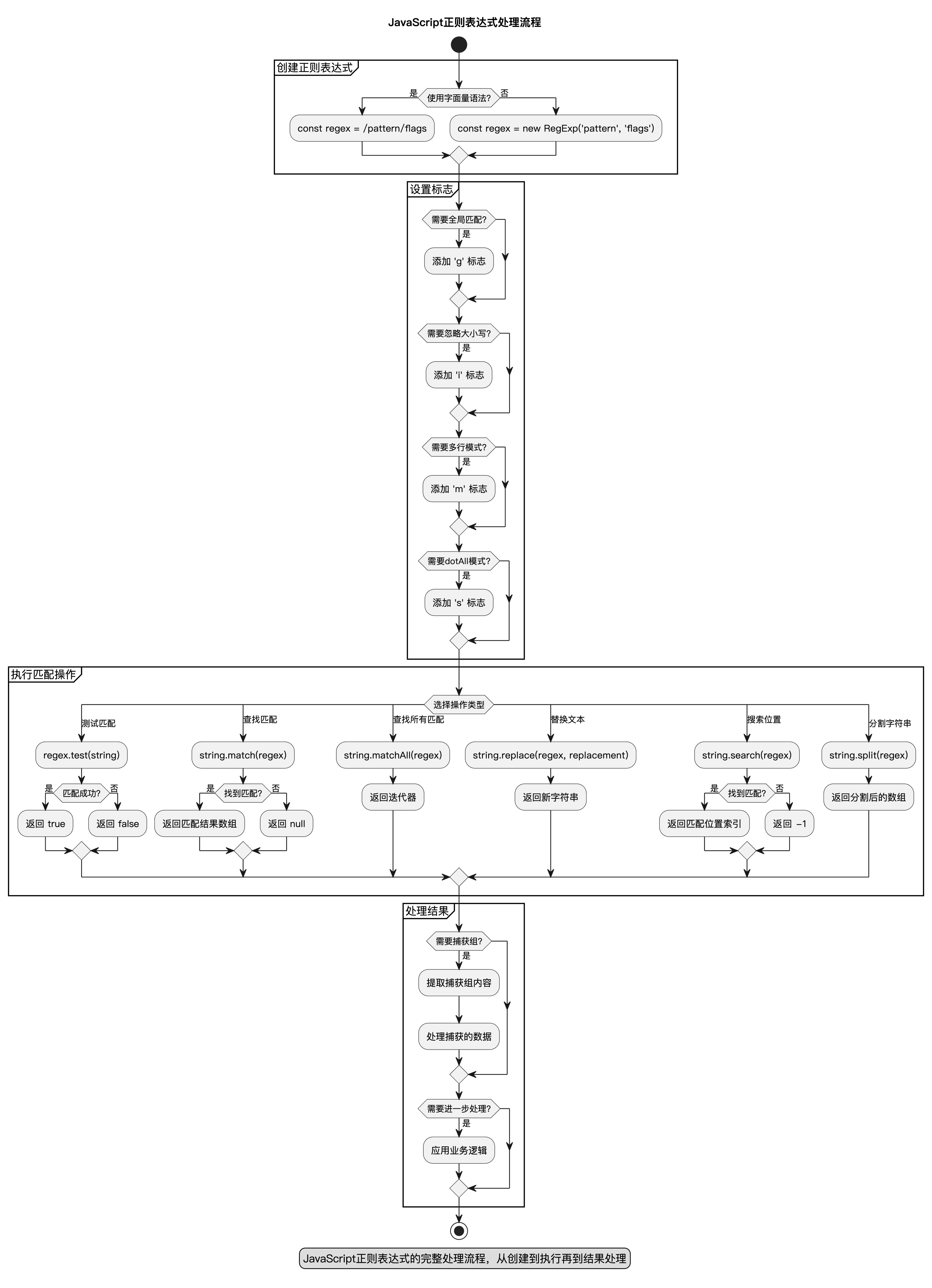
这个流程图清晰地展示了JavaScript正则表达式的处理过程,包括创建、设置标志、执行匹配操作和处理结果等步骤。
实际应用案例
让我们通过一些实际应用案例来加深理解:
表单验证
// 邮箱验证
function validateEmail(email) {
  const regex = /^[^\s@]+@[^\s@]+\.[^\s@]+$/;
  return regex.test(email);
}

// 密码强度验证
function validatePassword(password) {
  // 至少8位,包含大小写字母、数字和特殊字符
  const regex = /^(?=.*[a-z])(?=.*[A-Z])(?=.*\d)(?=.*[@$!%*?&])[A-Za-z\d@$!%*?&]{8,}$/;
  return regex.test(password);
}

// 手机号验证(中国)
function validatePhone(phone) {
  const regex = /^1[3-9]\d{9}$/;
  return regex.test(phone);
}

console.log(validateEmail('user@example.com')); // true
console.log(validatePassword('MyPass123!'));    // true
console.log(validatePhone('13812345678'));      // true
数据清洗
// 移除多余的空白字符
function cleanWhitespace(text) {
  return text.replace(/\s+/g, ' ').trim();
}

// 提取电话号码
function extractPhones(text) {
  const regex = /(\+86[-\s]?)?1[3-9]\d{9}/g;
  return text.match(regex) || [];
}

// 格式化数字
function formatNumbers(text) {
  return text.replace(/\d+/g, match => parseInt(match).toLocaleString());
}

const messyText = '  Hello    world  \n\n  ';
console.log(cleanWhitespace(messyText)); // "Hello world"

const textWithPhones = 'Call me at 13812345678 or +86-13987654321';
console.log(extractPhones(textWithPhones)); // ["13812345678", "+86-13987654321"]
URL解析
function parseUrl(url) {
  const regex = /^(https?):\/\/([^\/]+)(\/.*)?$/;
  const match = url.match(regex);

  if (!match) return null;

  return {
    protocol: match[1],
    host: match[2],
    path: match[3] || '/'
  };
}

const urlInfo = parseUrl('https://example.com/path/to/page');
console.log(urlInfo);
// {
//   protocol: 'https',
//   host: 'example.com',
//   path: '/path/to/page'
// }
代码高亮模拟
function highlightComments(code) {
  // 简单的单行注释高亮
  return code.replace(/(\/\/.*)/g, '<span class="comment">$1</span>');
}

function highlightStrings(code) {
  // 简单的字符串高亮
  return code.replace(/(".*?"|'.*?')/g, '<span class="string">$1</span>');
}

const jsCode = `
// 这是一个注释
const message = "Hello world";
console.log(message);
`;

let highlighted = highlightComments(jsCode);
highlighted = highlightStrings(highlighted);
console.log(highlighted);
性能优化
正则表达式虽然强大,但如果使用不当可能会导致性能问题:
避免回溯灾难
某些正则表达式可能导致指数级的时间复杂度,这被称为"回溯灾难":
// 危险的正则表达式
const badRegex = /(a+)+b/;

// 对于像"aaaaaaaaaaaaaaaaaaaaaaaaaaaaa"这样的字符串,
// 这个正则表达式会导致严重的性能问题

// 更好的写法
const goodRegex = /a+b/;
使用具体量词
尽可能使用具体的量词而不是贪婪匹配:
// 不够具体
const vagueRegex = /".*"/;

// 更具体
const specificRegex = /"[^"]*"/;
缓存正则表达式
在循环中重复使用的正则表达式应该缓存起来:
// 不好的做法
function validateEmails(emails) {
  return emails.filter(email => /^[^\s@]+@[^\s@]+\.[^\s@]+$/.test(email));
}

// 更好的做法
const emailRegex = /^[^\s@]+@[^\s@]+\.[^\s@]+$/;
function validateEmails(emails) {
  return emails.filter(email => emailRegex.test(email));
}
使用非捕获分组
如果不需要捕获内容,使用非捕获分组:
// 如果只需要分组而不需要捕获
const regex = /(?:https?:\/\/)?example\.com/;
调试技巧
调试正则表达式可能很困难,以下是一些有用的技巧:
使用在线工具
有许多在线正则表达式测试工具可以帮助你实时查看匹配结果,例如regex101.com。
逐步构建
从简单的模式开始,逐步添加复杂性:
// 第一步:匹配基本邮箱格式
let regex = /\w+@\w+\.\w+/;

// 第二步:允许点号在用户名中
regex = /[\w.]+@\w+\.\w+/;

// 第三步:允许域名中的点号
regex = /[\w.]+@[\w.]+\.\w+/;

// 第四步:更完整的邮箱验证
regex = /^[^\s@]+@[^\s@]+\.[^\s@]+$/;
添加注释
对于复杂的正则表达式,可以使用注释来解释各部分的作用:
const emailRegex = /^
  [^\s@]+           # 用户名部分:非空白字符和@符号
  @                 # @ 符号
  [^\s@]+           # 域名部分:非空白字符和@符号
  \.                # 点号
  [^\s@]+           # 顶级域名:非空白字符和@符号
$/x; // 注意:JavaScript不原生支持/x标志,这里仅作演示
分解复杂模式
将复杂模式分解为多个简单模式:
// 复杂的一次性匹配
const complexRegex = /^(?=.*[a-z])(?=.*[A-Z])(?=.*\d)(?=.*[@$!%*?&])[A-Za-z\d@$!%*?&]{8,}$/;

// 分解为多个简单检查
function validatePassword(password) {
  const checks = [
    /[a-z]/,           // 小写字母
    /[A-Z]/,           // 大写字母
    /\d/,              // 数字
    /[@$!%*?&]/,       // 特殊字符
    /.{8,}/            // 至少8位
  ];

  return checks.every(check => check.test(password));
}
总结
正则表达式是JavaScript中一个强大而灵活的工具,掌握它可以极大地提高文本处理的效率。在本文中,我们学习了:
- 正则表达式的基本概念和语法
- 元字符、量词、分组等核心特性
- 各种标志及其作用
- JavaScript中使用正则表达式的方法
- 实际应用案例
- 性能优化和调试技巧
虽然正则表达式的语法看起来复杂,但通过不断的练习和实践,你会发现它其实非常有用。记住,在使用正则表达式时要考虑可读性和维护性,过于复杂的正则表达式可能不如简单的字符串操作清晰明了。
随着ECMAScript标准的不断更新,JavaScript的正则表达式功能也在不断增强,比如命名捕获组、前瞻后顾等功能让正则表达式的使用更加便捷和强大。希望本文能帮助你更好地理解和使用JavaScript正则表达式!
最后,创作不易请允许我插播一则自己开发的“数规规-排五助手”(有各种趋势分析)小程序广告,感兴趣可以微信小程序体验放松放松,程序员也要有点娱乐生活,搞不好就中个排列五了呢?
感兴趣的可以微信搜索小程序“数规规-排五助手”体验体验!或直接浏览器打开如下链接:
https://www.luoshu.online/jumptomp.html
可以直接跳转到对应小程序
如果觉得本文有用,欢迎点个赞👍+收藏🔖+关注支持我吧!





 扫一扫
扫一扫


 7426
7426

 被折叠的 条评论
为什么被折叠?
被折叠的 条评论
为什么被折叠?
 到【灌水乐园】发言





