


函数cv::add()用于实现两个Mat类矩阵相加,或者矩阵和标量相加。
函数add()的原型如下:
void cv::add(InputArray src1,
             InputArray src2,
             OutputArray dst,
             InputArray mask = noArray(),
             int dtype = -1)
前四个参数没什么好说的,这里说下最后一个参数dtype,它用于设置输出矩阵的数据类型,具体情况如下:
The input arrays and the output array can all have the same or different depths.
For example, you can add a 16-bit unsigned array to a 8-bit signed array and store the sum as a 32-bit floating-point array. Depth of the output array is determined by the dtype parameter.
In the second and third cases above, as well as in the first case, when src1.depth() == src2.depth(), dtype can be set to the default -1. In this case, the output array will have the same depth as the input array, be it src1, src2 or both.
上面这段话简单明了,就不翻译了。需要说明的是,当两个相加的矩阵数据类型相同时,参数dtype可以用默认值-1。当两个相加的矩阵数据类型不一致时,是必须要设置输出矩阵的数据类型的,否则程序运行时会报错,比如下面的报错:
OpenCV Error: Bad argument (When the input arrays in add/subtract/multiply/divide functions have different types, the output array type must be explicitly specified) in cv::arithm_op, file C:\builds\master_PackSlave-win32-vc12-shared\opencv\modules\core\src\arithm.cpp, line 2011

函数cv::add()的运算公式及使用时需要注意的地方,
请参看本博文原文,
本博文原文链接 https://www.hhai.cc/thread-140-1-1.html
接下来,上各种情况的示例代码:
示例代码1(相同数据类型的矩阵与矩阵相加)
//出处:昊虹AI笔记网(hhai.cc)
//用心记录计算机视觉和AI技术

//博主微信/QQ 2487872782
//QQ群 271891601
//欢迎技术交流与咨询

//OpenCV版本 OpenCV3.0

#include <opencv2/opencv.hpp>

#include <iostream>
using namespace std;


int main()
{

	cv::Mat A1 = (cv::Mat_<uchar>(2, 3) << 1, 2, 3, 4, 5, 6);
	cout << "A1中的数据为:\n" << A1 << endl << endl;


	cv::Mat B1 = (cv::Mat_<uchar>(2, 3) << 2, 3, 4, 5, 6, 250);
	cout << "B1中的数据为:\n" << B1 << endl << endl;


	//相同数据类型的矩阵与矩阵相加
	cv::Mat C1;
	cv::add(A1, B1, C1);
	cout << "C1中的数据为:\n" << C1 << endl << endl;

	return(0);
}
运行结果如下:
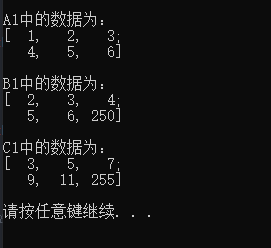
注意:C1中的最后一个元素因为饱和操作,值从256变成了255。
示例代码2(不同数据类型的矩阵与矩阵相加)
//出处:昊虹AI笔记网(hhai.cc)
//用心记录计算机视觉和AI技术

//博主微信/QQ 2487872782
//QQ群 271891601
//欢迎技术交流与咨询

//OpenCV版本 OpenCV3.0

#include <opencv2/opencv.hpp>

#include <iostream>
using namespace std;

int main()
{

	cv::Mat A1 = (cv::Mat_<uchar>(2, 3) << 1, 2, 3, 4, 5, 6);
	cout << "A1中的数据为:\n" << A1 << endl << endl;


	cv::Mat B1 = (cv::Mat_<int>(2, 3) << 2, 3, 4, 5, 6, 250);
	cout << "B1中的数据为:\n" << B1 << endl << endl;


	//不同数据类型的矩阵与矩阵相加
	cv::Mat C1;
	cv::InputArray mask1 = cv::noArray();
	cv::add(A1, B1, C1, mask1, CV_16U);
	cout << "C1中的数据为:\n" << C1 << endl << endl;

	return(0);
}
运行结果如下:
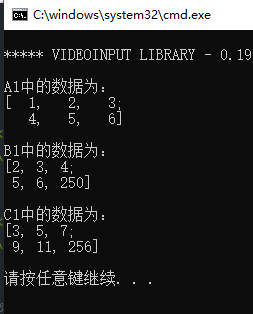
注意,如果下面这条语句:
cv::add(A1, B1, C1, mask1, CV_16U);
如果写成了下面这样:
cv::add(A1, B1, C1);
则程序在运行时会因为A1与B1的数据类型不一样而报错,如下图所示:
示例代码3(矩阵与标量相加)
这里给一个单通道图像与标量相加的例子,
要注意,如果图像为多通道,
那么要求标量的数据类型为cv::Scalar,
关于cv::Scalar的详细介绍,
请参见博文:https://www.hhai.cc/thread-144-1-1.html
//出处:昊虹AI笔记网(hhai.cc)
//用心记录计算机视觉和AI技术

//博主微信/QQ 2487872782
//QQ群 271891601
//欢迎技术交流与咨询

//OpenCV版本 OpenCV3.0

#include <opencv2/opencv.hpp>

#include <iostream>
using namespace std;


int main()
{

	cv::Mat A1 = (cv::Mat_<uchar>(2, 3) << 1, 2, 3, 4, 5, 6);
	cout << "A1中的数据为:\n" << A1 << endl << endl;


	uchar b1 = 1;
	int b2 = 2;

	cv::Mat C1, C2;
	cv::InputArray mask1 = cv::noArray();
	cv::add(A1, b1, C1);//两个加数的数据类型相同
	cv::add(A1, b2, C2, mask1, CV_8U);//两个加数的数据类型不同
	cout << "C1中的数据为:\n" << C1 << endl << endl;
	cout << "C2中的数据为:\n" << C2 << endl << endl;


	return(0);
}
运行结果如下:
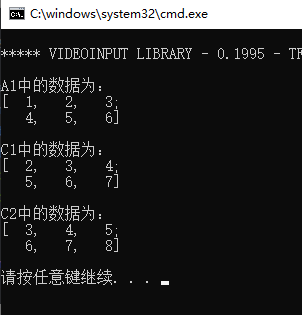
要注意:
此时当两个加数的数据类型不一致时,函数会自动处理,不会报错,但是为了程序的健壮性和可控性,昊虹君还是建议大家按上面的示例代码把结果数据类型控制好。
比如下面的例子:
函数自动根据数据的情况进行类型转换的示例代码和运行结果如下:
//OpenCV版本:3.0.0
//VS版本:2013

#include <opencv2/opencv.hpp>

#include <iostream>
using namespace std;


int main()
{

	cv::Mat A1 = (cv::Mat_<float>(2, 3) << 1, 2, 3, 4, 5, 6);
	cout << "A1中的数据为:\n" << A1 << endl << endl;


	uchar b1 = 1;
	double b2 = 2.3;

	cv::Mat C1, C2;
	cv::add(A1, b1, C1);
	cv::add(A1, b2, C2);
	cout << "C1中的数据为:\n" << C1 << endl << endl;
	cout << "C2中的数据为:\n" << C2 << endl << endl;


	return(0);
}

上面的这个示例代码的结果是我们预期的,但我们把A1中的元素的数据类型改为uchar型,可能就不是我们想要的结果了:
//OpenCV版本:3.0.0
//VS版本:2013

#include <opencv2/opencv.hpp>

#include <iostream>
using namespace std;


int main()
{

	cv::Mat A1 = (cv::Mat_<uchar>(2, 3) << 1, 2, 3, 4, 5, 6);
	cout << "A1中的数据为:\n" << A1 << endl << endl;

	uchar b1 = 1;
	double b2 = 2.3;

	cv::Mat C1, C2;
	cv::add(A1, b1, C1);
	cv::add(A1, b2, C2);
	cout << "C1中的数据为:\n" << C1 << endl << endl;
	cout << "C2中的数据为:\n" << C2 << endl << endl;


	return(0);
}
运行结果如下:
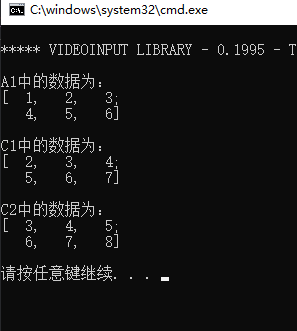
按照我们的思维习惯,输出矩阵C2中的数据应该都有小数位,但是事实上却没有,这就是函数自动处理的结果,有些自动处理并不是我们想要的结果,所以我们最好还是手动控制。
示例代码4(带掩码操作的矩阵加法)
示例代码如下:
//出处:昊虹AI笔记网(hhai.cc)
//用心记录计算机视觉和AI技术

//博主微信/QQ 2487872782
//QQ群 271891601
//欢迎技术交流与咨询

//OpenCV版本 OpenCV3.0

#include <opencv2/opencv.hpp>

#include <iostream>
using namespace std;


int main()
{

	cv::Mat A1 = (cv::Mat_<uchar>(2, 3) << 1, 2, 3, 4, 5, 6);
	cout << "A1中的数据为:\n" << A1 << endl << endl;

	cv::Mat B1 = (cv::Mat_<uchar>(2, 3) << 2, 3, 4, 5, 6, 250);
	cout << "B1中的数据为:\n" << B1 << endl << endl;

	cv::Mat mask1(2, 3, CV_8UC1, cv::Scalar(1));
	mask1.at<uchar>(0, 1) = 0;

	cv::Mat C1;
	cv::add(A1, B1, C1, mask1);
	cout << "C1中的数据为:\n" << C1 << endl << endl;

	return(0);
}
运行结果如下:
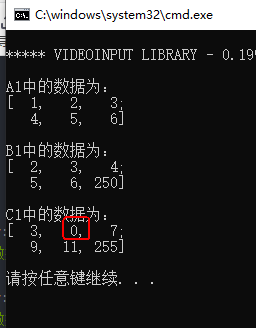
上面的第0行,第1列的元素是没有被掩盖了加法操作的,所以其结果为0。





 扫一扫
扫一扫


 1785
1785

 被折叠的 条评论
为什么被折叠?
被折叠的 条评论
为什么被折叠?
 到【灌水乐园】发言





