



 本文详细解析了一个文本编辑器的各项功能实现,包括文件操作(如打开、保存、另存为)、编辑功能(如撤销、剪切、复制、粘贴、查找、替换)、格式设置(如自动换行、字体、颜色)、查看选项(如状态栏)以及帮助功能。通过具体的代码示例,展示了如何使用C#和WinForms实现这些功能。
项目地址:https://github.com/lianghowe/My_editor
项目效果:
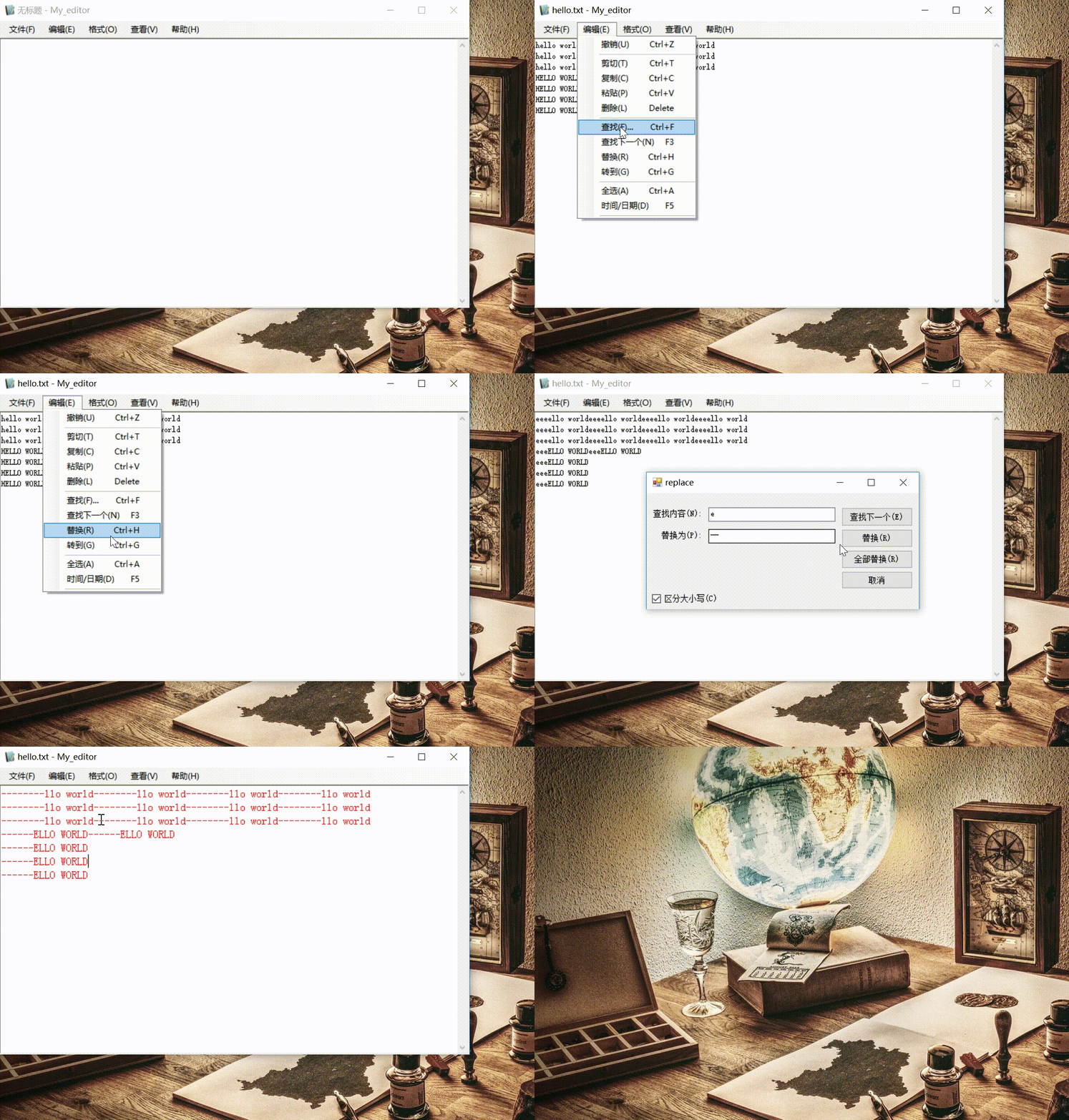
- 文件
新建
保存
打开
另存为
页面设置
打印
退出 - 编辑功能
撤销
剪切
复制
粘帖
删除
查找
查找下一个
替换
转到
全选
时间/日期 - 格式
自动换行
字体
颜色 - 查看
状态栏 - 帮助
关于
帮助
- 打开文件,保存文件
        //打开
        private void toolStripMenuItem3_Click(object sender, EventArgs e)
        {
            //过滤器
            openFileDialog1.Filter = "文本文件|*.txt|所有文件|*.*";
            if(openFileDialog1.ShowDialog()== DialogResult.OK)
            {
                filename = openFileDialog1.FileName;

                //加载文件
                richTextBox1.LoadFile(filename, RichTextBoxStreamType.PlainText);
                // 路径只剩文件名
                this.Text = filename.Substring(filename.LastIndexOf("\\") + 1) + " - My_editor";
            }
        }

        //保存
        private void toolStripMenuItem4_Click(object sender, EventArgs e)
        {
            if (filename.Length > 0)
                richTextBox1.SaveFile(filename, RichTextBoxStreamType.PlainText);

            //新文件另存
            else
                toolStripMenuItem5_Click(sender, e);
        }

        //另存为
        private void toolStripMenuItem5_Click(object sender, EventArgs e)
        {
            saveFileDialog1.Filter = "文本文件|*.txt|所有文件|*.*";
            if(saveFileDialog1.ShowDialog()==DialogResult.OK)
            {

                filename = saveFileDialog1.FileName;
                // 路径只剩文件名
                filename = filename.Substring(filename.LastIndexOf("\\") + 1);
                richTextBox1.SaveFile(filename, RichTextBoxStreamType.PlainText);

                this.Text = filename + " - My_editor";
            }
        }
- 查找
        //查找_click
        private void toolStripMenuItem16_Click(object sender, EventArgs e)
        {
            new find(this).Show();
        }

        //查找功能
        public void find(string find_string, bool is_up, bool is_upper)
        {
            //已经查找到文本底部,弹出用户提示
            if (position>=richTextBox1.Text.Length)
            {
                MessageBox.Show("已到文本底部,再次查找将回到顶部", "提示");
                position = 0;
                return;
            }

            //向上
            if(is_up)
            {
                // 此处反转一下 0 为终点,position 为起点
                position = richTextBox1.Find(find_string, 0, position, RichTextBoxFinds.Reverse);

                //找不到
                if (position == -1)
                {
                    MessageBox.Show("找不到 " + find_string);
                    position = richTextBox1.TextLength;
                }

                else
                {
                    richTextBox1.Focus();
                }
            }

            //向下
            else
            {
                //区分大小写
                if(is_upper)
                {
                    position = richTextBox1.Find(find_string, position, RichTextBoxFinds.MatchCase);
                }

                // 不分大小写
                else
                {
                    position = richTextBox1.Find(find_string, position, RichTextBoxFinds.None);
                }

                //找不到
                if (position == -1)
                {
                    MessageBox.Show("找不到 " + find_string);
                    position = 0;
                }

                else
                {
                    richTextBox1.Focus();
                    position += find_string.Length;
                }
            }
        }
- 替换
        //替换-click
        private void toolStripMenuItem17_Click(object sender, EventArgs e)
        {
            new replace(this).Show();
        }

        //替换功能
        public void replace(string replace_string)
        {
            if (richTextBox1.SelectedText.Length != 0)
            {
                richTextBox1.SelectedText = replace_string;
            }
        }

        //全部替换
        public void replace_all(string find_string,string replace_string,bool is_upper_lower)
        {
            // 此处用 Regex 进行替换,RegexOptions.None 为不忽略大小写,RegexOptions.IgnoreCase 为忽略大小写
            if(is_upper_lower)
                richTextBox1.Text=Regex.Replace(richTextBox1.Text, find_string, replace_string, RegexOptions.None);
            else
                richTextBox1.Text=Regex.Replace(richTextBox1.Text, find_string, replace_string, RegexOptions.IgnoreCase);
        }
- 插入时间日期
        //时间/日期
        private void 时间日期DToolStripMenuItem_Click(object sender, EventArgs e)
        {
            richTextBox1.SelectedText = DateTime.Now.ToString();
        }
- 获得行列
        //获得行列
        private void row_line(object sender, EventArgs e)
        {
            // richTextBox 对所有内容建立了索引。
            int index = richTextBox1.GetFirstCharIndexOfCurrentLine();

            int line = richTextBox1.GetLineFromCharIndex(index) + 1;

            int column = richTextBox1.SelectionStart - index + 1;
            this.label2.Text = string.Format("第 {0}行, {1}列", line.ToString(), column.ToString());
        }
- 帮助
        //帮助
        private void toolStripMenuItem24_Click(object sender, EventArgs e)
        {
            // 浏览器打开链接
            System.Diagnostics.Process.Start("https://blog.youkuaiyun.com/welcom_/article/details/84898056");
        }





 扫一扫
扫一扫


 381
381

 被折叠的 条评论
为什么被折叠?
被折叠的 条评论
为什么被折叠?
 到【灌水乐园】发言





