


本系统基于Java Web技术栈开发,采用前后端分离架构,后端通过Servlet实现业务逻辑,前端使用HTML/CSS/JavaScript构建交互界面。本文将详细解析系统设计思路、技术实现与核心代码,助您快速掌握留言系统开发精髓。
一、项目简介
本留言系统主要实现用户注册登录、留言发布/编辑/删除、留言列表展示等核心功能,技术架构包含:
-
后端:Servlet 3.1 + MySQL 5.0 + Tomcat 8
-
前端:HTML5 + CSS3 + AJAX
-
构建工具:Maven 3.6
-
数据交互:JSON格式通信
系统演示地址:登录页
二、核心功能与页面展示
2.1 功能模块
| 模块 | 功能描述 | 技术实现 |
|---|---|---|
| 用户管理 | 登录/退出 | Servlet会话管理 + MySQL用户表存储 |
| 留言发布 | Markdown格式输入与实时预览 | SimpleMDE编辑器集成 + Servlet文件上传处理 |
| 留言管理 | 列表展示/编辑/删除 | AJAX异步加载 + DOM动态渲染 |
| 权限控制 | 用户操作鉴权 | Filter拦截器 + Session状态验证 |
2.2 页面效果
-
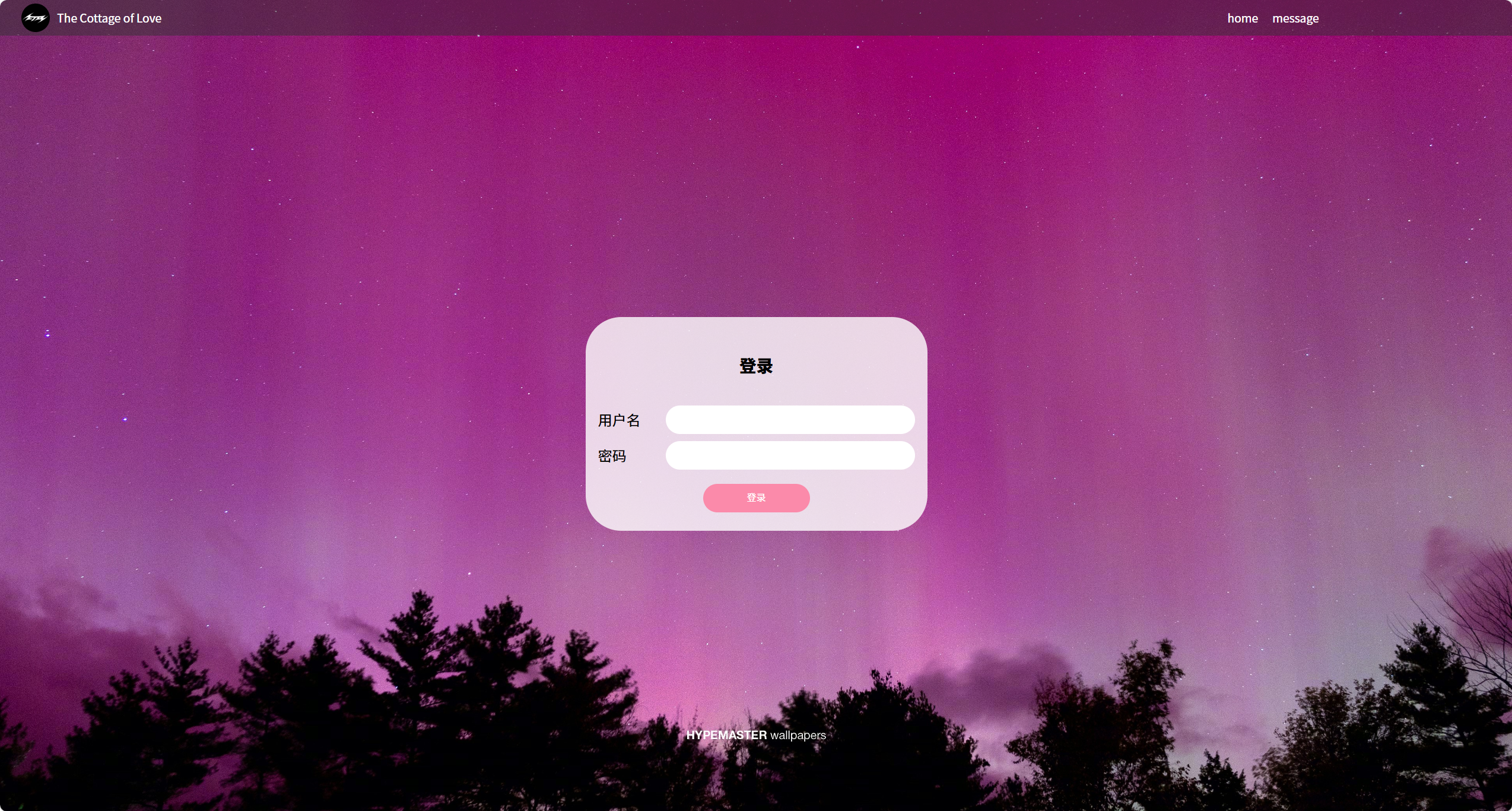
登录页
-
表单验证与错误提示
-
记住密码功能(Cookie存储)
-
-
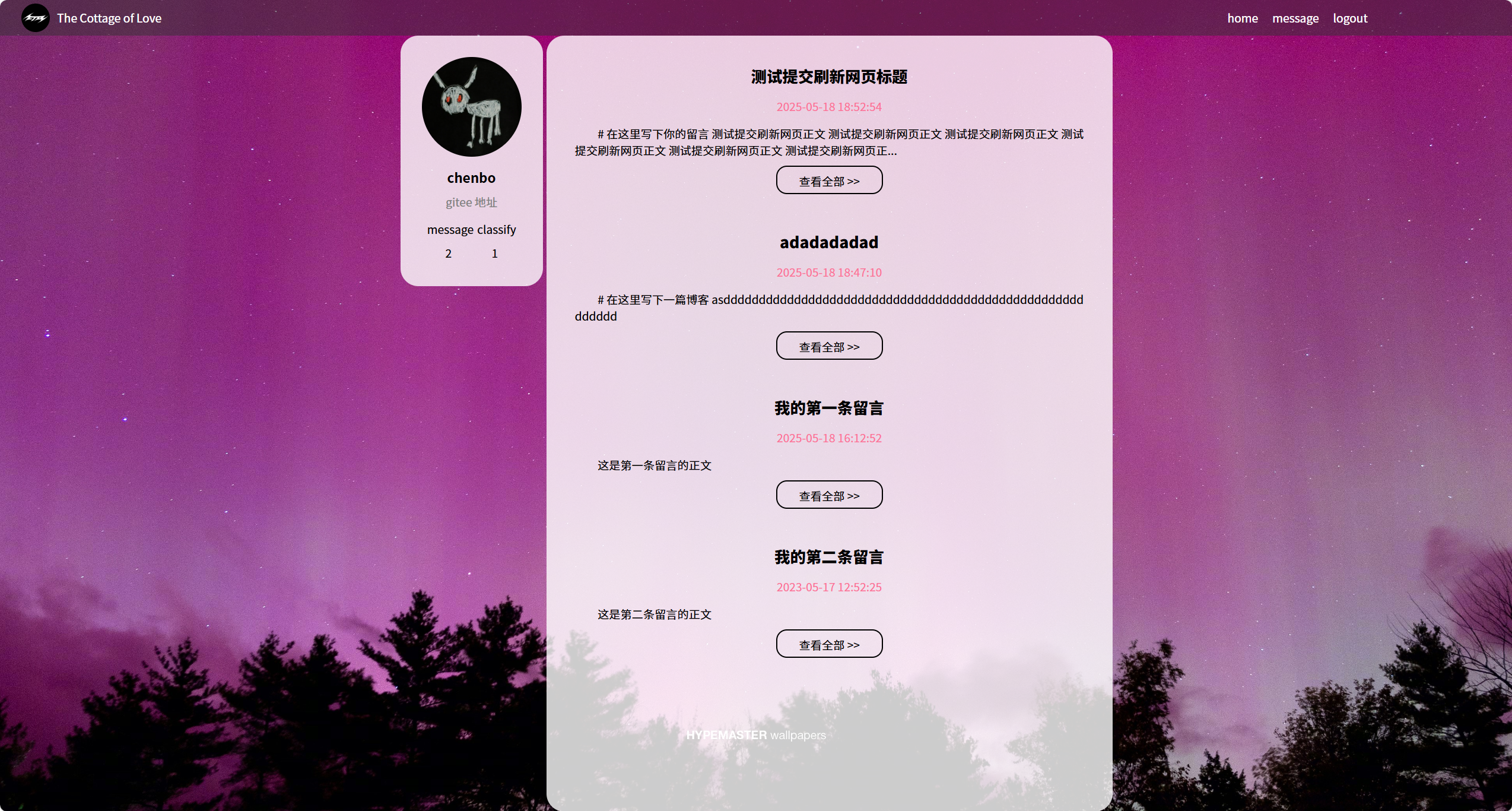
留言列表页
-
分页加载(每页10条)
-
实时排序(按时间/热度)
-
-
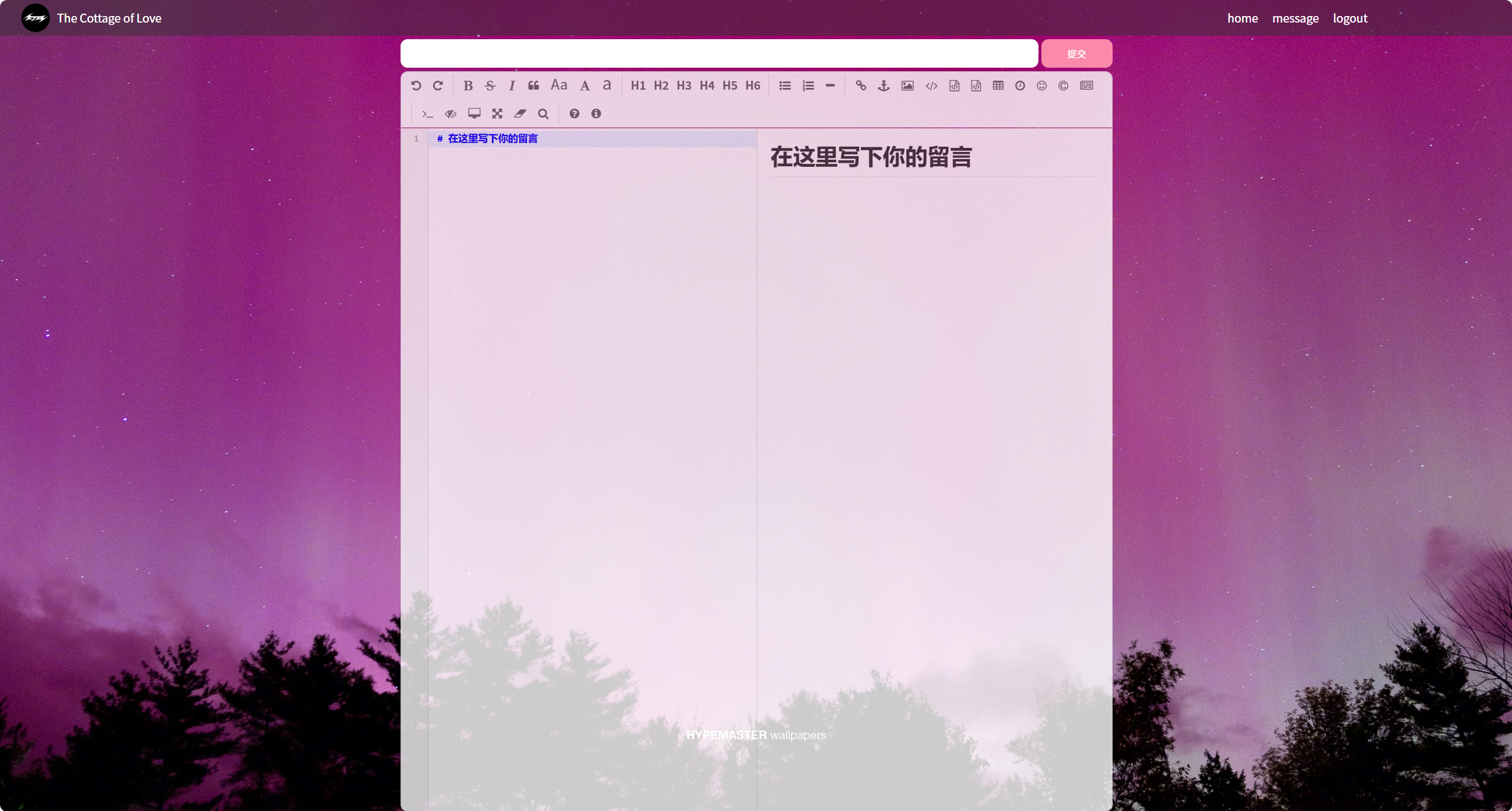
留言编辑页
-
Markdown与富文本双模式切换
-
三、关键技术解析
3.1 前后端交互模式
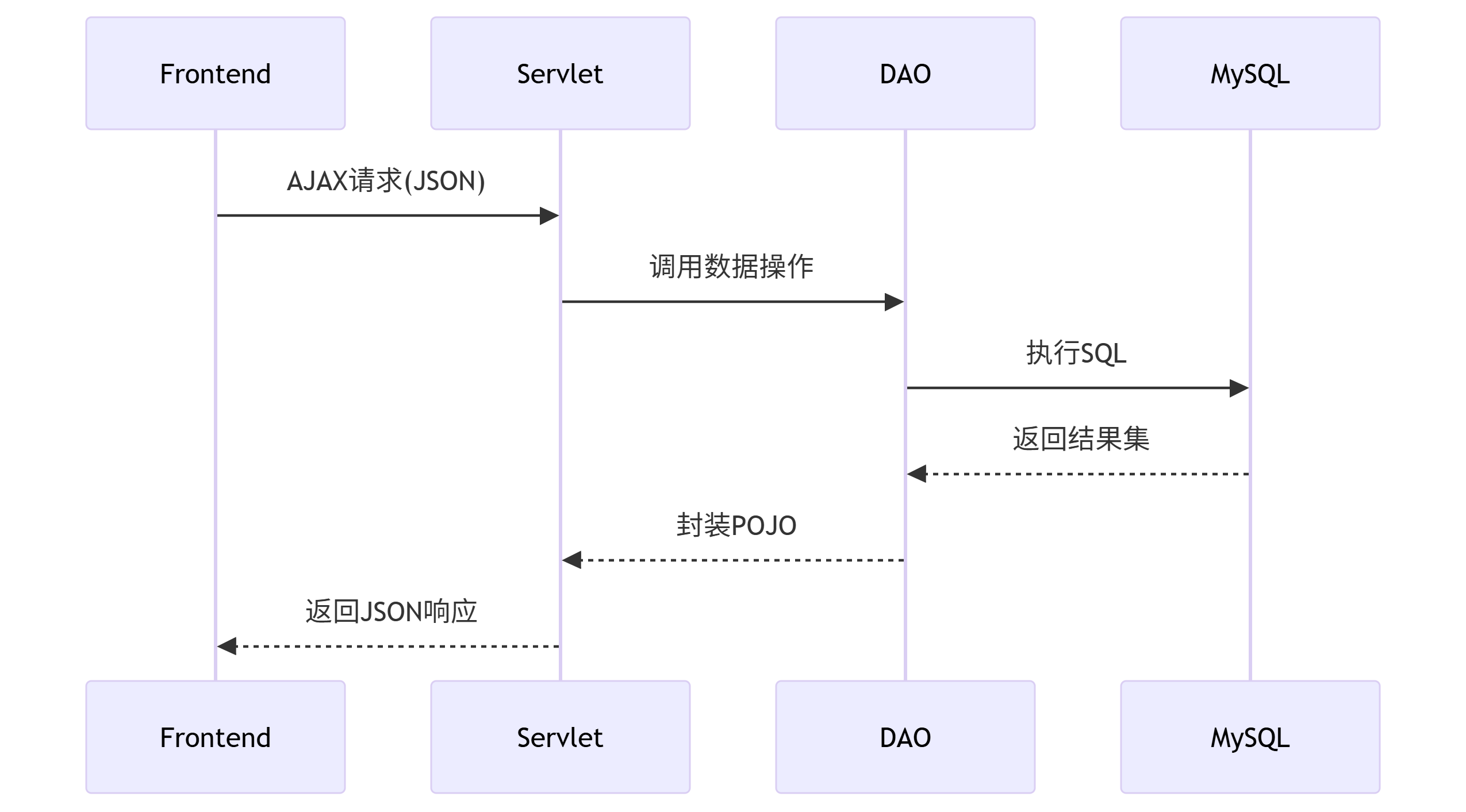
技术对比 110
| 交互方式 | 优势 | 适用场景 |
|---|---|---|
| 表单提交 | 开发简单,兼容性好 | 传统页面跳转场景 |
| AJAX | 局部刷新,用户体验佳 | 实时交互场景 |
| WebSocket | 双向实时通信 | 在线聊天等高实时性场景 |
四、数据库设计与实现
4.1 表结构设计
-- 一般对于建表的 sql 都会单独搞个 .sql 文件来保存.
-- 后续程序可能需要在不同的主机上部署. 部署的时候就需要在对应的主机上把数据库也给创建好.
-- 把建表 sql 保存好, 方便在不同的机器上进行建库建表.
drop database java107_blog_system;

create database java107_blog_system charset utf8mb4;

use java107_blog_system;

drop table if exists blog;
create table blog (
    blogId int primary key auto_increment,
    title varchar(128),
    content varchar(4096),
    userId int,
    postTime datetime
);

drop table if exists user;
create table user (
    userId int primary key auto_increment,
    username varchar(50) unique,
    password varchar(50)
);

insert into user values(null, 'wangying', '030807'), (null, 'chenbo', '216039');

insert into blog values(null, '我的第一条留言', '这是第一条留言的正文', 1, '2025-05-18 16:12:52');
insert into blog values(null, '我的第二条留言', '这是第二条留言的正文', 1, '2023-05-17 12:52:25');
4.2 数据库连接池
封装DBUtil类实现连接复用:
/*
 * 通过这个类, 封装数据库的连接操作.
 */
public class DBUtil {
    // 这个类中要提供 DataSource. DataSource 对于一个项目来说, 有一个就行了. (单例)
    private static volatile DataSource dataSource = null;

    private static DataSource getDataSource() {
        if (dataSource == null) {
            synchronized (DBUtil.class) {
                if (dataSource == null) {
                    dataSource = new MysqlDataSource();
                    ((MysqlDataSource)dataSource).setUrl("jdbc:mysql://127.0.0.1:3306/java107_blog_system?characterEncoding=utf8&useSSL=false");
                    ((MysqlDataSource)dataSource).setUser("root");
                    ((MysqlDataSource)dataSource).setPassword("");
                }
            }
        }
        return dataSource;
    }

    public static Connection getConnection() throws SQLException {
        return getDataSource().getConnection();
    }

    public static void close(Connection connection, PreparedStatement statement, ResultSet resultSet) {
        if (resultSet != null) {
            try {
                resultSet.close();
            } catch (SQLException e) {
                e.printStackTrace();
            }
        }
        if (statement != null) {
            try {
                statement.close();
            } catch (SQLException e) {
                e.printStackTrace();
            }
        }
        if (connection != null) {
            try {
                connection.close();
            } catch (SQLException e) {
                e.printStackTrace();
            }
        }
    }
}
五、核心功能实现
5.1 Servlet消息处理
/*
 * 通过这个类, 来实现一些后端提供的接口
 */
@WebServlet("/blog")
public class BlogServlet extends HttpServlet {
    private ObjectMapper objectMapper = new ObjectMapper();

    @Override
    protected void doGet(HttpServletRequest req, HttpServletResponse resp) throws ServletException, IOException {
        // 从 query string 中查询一下看是否有 blogId. 如果有就认为是查询指定博客; 如果没有就是查询所有博客.
        BlogDao blogDao = new BlogDao();
        String blogId = req.getParameter("blogId");
        if (blogId == null) {
            List<Blog> blogs = blogDao.selectAll();
            String respString = objectMapper.writeValueAsString(blogs);
            resp.setContentType("application/json;charset=utf8");
            resp.getWriter().write(respString);
        } else {
            Blog blog = blogDao.selectOne(Integer.parseInt(blogId));
            String respString = objectMapper.writeValueAsString(blog);
            resp.setContentType("application/json;charset=utf8");
            resp.getWriter().write(respString);
        }
    }

    @Override
    protected void doPost(HttpServletRequest req, HttpServletResponse resp) throws ServletException, IOException {
        req.setCharacterEncoding("utf8");
        // 1. 先从请求中拿到 标题 和 正文.
        String title = req.getParameter("title");
        String content = req.getParameter("content");
        if (title == null || title.equals("") || content == null || content.equals("")) {
            String html = "<h3>title 或者 content 为空! 新增博客失败!</h3>";
            resp.setContentType("text/html; charset=utf8");
            resp.getWriter().write(html);
            return;
        }
        // 2. 从会话中拿到作者的 id
        HttpSession session = req.getSession(false);
        if (session == null) {
            String html = "<h3>当前用户未登录! 新增博客失败!</h3>";
            resp.setContentType("text/html; charset=utf8");
            resp.getWriter().write(html);
            return;
        }
        User user = (User) session.getAttribute("user");
        if (user == null) {
            String html = "<h3>当前用户未登录! 新增博客失败!</h3>";
            resp.setContentType("text/html; charset=utf8");
            resp.getWriter().write(html);
            return;
        }
        // 3. 构造 Blog 对象.
        Blog blog = new Blog();
        blog.setUserId(user.getUserId());
        blog.setTitle(title);
        blog.setContent(content);
        blog.setPostTime(new Timestamp(System.currentTimeMillis()));
        // 4. 插入 blog 对象到数据库中
        BlogDao blogDao = new BlogDao();
        blogDao.insert(blog);
        // 5. 跳转到博客列表页
        resp.sendRedirect("blog_list.html");
    }
}
5.2 前端AJAX交互
// 加载留言列表
function loadMessages(page = 1) {
    fetch(`/message?page=${page}`)
        .then(res => res.json())
        .then(data => renderMessages(data))
        .catch(err => showError('加载失败'));
}

// 提交留言
document.getElementById('msg-form').addEventListener('submit', e => {
    e.preventDefault();
    const content = editor.value();
    fetch('/message', {
        method: 'POST',
        headers: {'Content-Type': 'application/json'},
        body: JSON.stringify({content})
    }).then(() => {
        editor.value('');
        loadMessages();
    });
});
六、项目部署与优化
6.1 Maven依赖配置
<?xml version="1.0" encoding="UTF-8"?>
<project xmlns="http://maven.apache.org/POM/4.0.0"
         xmlns:xsi="http://www.w3.org/2001/XMLSchema-instance"
         xsi:schemaLocation="http://maven.apache.org/POM/4.0.0 http://maven.apache.org/xsd/maven-4.0.0.xsd">
    <modelVersion>4.0.0</modelVersion>

    <groupId>org.example</groupId>
    <artifactId>BlogSystem</artifactId>
    <version>1.0-SNAPSHOT</version>

    <properties>
        <maven.compiler.source>8</maven.compiler.source>
        <maven.compiler.target>8</maven.compiler.target>
        <project.build.sourceEncoding>UTF-8</project.build.sourceEncoding>
    </properties>

    <dependencies>
        <!-- https://mvnrepository.com/artifact/mysql/mysql-connector-java -->
        <dependency>
            <groupId>mysql</groupId>
            <artifactId>mysql-connector-java</artifactId>
            <version>5.1.49</version>
        </dependency>

        <!-- https://mvnrepository.com/artifact/javax.servlet/javax.servlet-api -->
        <dependency>
            <groupId>javax.servlet</groupId>
            <artifactId>javax.servlet-api</artifactId>
            <version>3.1.0</version>
            <scope>provided</scope>
        </dependency>

        <!-- https://mvnrepository.com/artifact/com.fasterxml.jackson.core/jackson-databind -->
        <dependency>
            <groupId>com.fasterxml.jackson.core</groupId>
            <artifactId>jackson-databind</artifactId>
            <version>2.15.0</version>
        </dependency>
    </dependencies>
    <packaging>war</packaging>
    <build>
        <finalName>java107_blog_system</finalName>
    </build>
</project>
6.2 性能优化策略
-
缓存机制:使用Redis缓存热点留言数据
-
异步处理:耗时操作(如邮件通知)放入线程池
-
SQL优化:为
create_time字段添加索引 -
前端优化:实现虚拟滚动加载长列表
七、项目总结与扩展
本系统完整实现了基础留言功能,具备以下扩展方向:
-
社交功能扩展:添加点赞/评论/分享功能
-
内容安全:集成文本敏感词过滤
-
多媒体支持:支持图片/视频附件上传
-
微服务改造:拆分为用户服务/消息服务等独立模块
开发过程中需特别注意:
-
使用PreparedStatement防止SQL注入
-
XSS过滤保障内容安全
-
定期备份数据库(可通过crontab实现)9
完整源码已托管至Github:phaseless (phaselessX) - Gitee.com
欢迎访问在线演示系统体验功能,期待您的Star与贡献!
上述博客介绍不够完整,完整源代码在gitee中!!!





 扫一扫
扫一扫


 1188
1188

 被折叠的 条评论
为什么被折叠?
被折叠的 条评论
为什么被折叠?
 到【灌水乐园】发言





