


前言
本内容较为基础,适合新手朋友观看,如需直接使用可以跳转至第三章代码实现部分。
如有不足欢迎指导交流。
一、触底原理
认识触底加载前需要理解的三个属性:scrollTop、scrollHeight、clientHeight
scrollTop:距离顶部高度,通俗来讲就是浏览器窗口到页面最顶端的距离。
clientHeight:可视高度,就是咱浏览器的窗口的高度。
scrollHeight:完整高度,就是整个dom元素的高度
用一张图来表示更加清晰
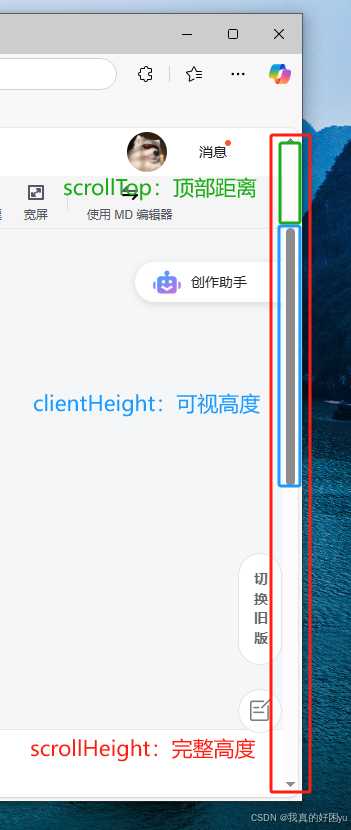
我们拿平时使用的浏览器的滚动条举例:
完整的一整根滚动框就是我们的scrollHeight,相当于是整个页面的高度。
滚动时候移动的深色部分的滚动条就是clientHeight,及我们所在的位置和我们所能到的范围高度。
滚动条的头部到滚动框顶部的距离就说scrollTop,相当于我们已经浏览过的内容高度。
可以简易理解为:
滚动框是scrollHeight
滚动条是clientHeight
滚动条上方到滚动框顶部的距离就scrollTop
我们可以试想一下,如果我们滑动到页面的底部,滚动条+滚动条上方的区域 刚好是整个滚动框高度大小。及clientHeight+scrollTop = scrollHeight 这就是所谓的触底。

二、页面搭建
创建一个Vue3的页面,模板代码如下:
<template>
    <div id="BottomOutLoading">
        <ul>
            <li v-for="item in dataList" :key="item.id">{{ item.text }}</li>
        </ul>
    </div>
</template>
Css代码如下:
<style lang="scss" scoped>
li {
    list-style: none;
}

#BottomOutLoading {
    width: 80%;
    height: auto;
    margin: 0 auto;
    background-color: #ccc;
    border: 3px solid #000;

    ul {
        display: grid;
        grid-template-columns: repeat(3, 1fr);
        grid-template-rows: repeat(3, 1fr);
        gap: 20px;
        padding: 10px;

        li {
            width: 100%;
            height: 100px;
            background-color: skyblue;
            line-height: 100px;
            text-align: center;
            font-size: 24px;
            font-weight: 700;
        }
    }
}
</style>
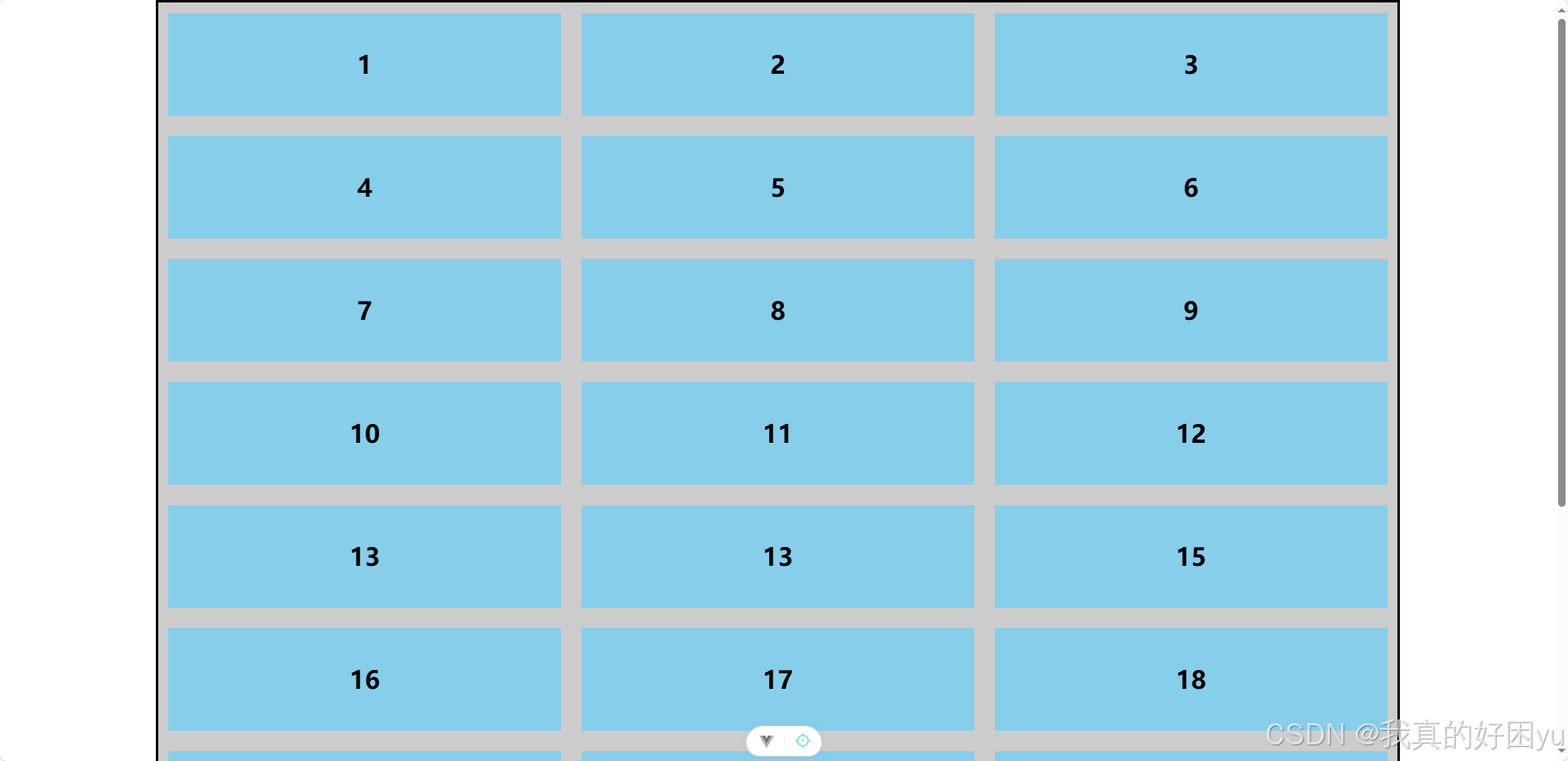
构建出基本的页面结构,并且通过虚拟数据的形式渲染数据,这里简便展示:
//虚拟数据列表
var dataList = reactive([
    { id: 1, text: 1 },
    { id: 2, text: 2 },
    { id: 3, text: 3 },
    { id: 4, text: 4 },
    { id: 5, text: 5 },
    { id: 6, text: 6 },
    { id: 7, text: 7 },
    { id: 8, text: 8 },
    { id: 9, text: 9 },
    { id: 10, text: 10 },
    { id: 11, text: 11 },
    { id: 12, text: 12 },
    { id: 13, text: 13 },
    { id: 14, text: 13 },
    { id: 15, text: 15 },
    { id: 16, text: 16 },
    { id: 17, text: 17 },
    { id: 18, text: 18 },
    { id: 19, text: 19 },
    { id: 20, text: 20 },
    { id: 21, text: 21 },
    { id: 22, text: 22 },
    { id: 23, text: 23 },
    { id: 24, text: 24 },
    { id: 25, text: 25 },
    { id: 26, text: 26 },
    { id: 27, text: 27 },
])
//页码
var page = ref(2)
//每页数据个数
var pageValueNumber = 9
页面效果如下:
三、代码实现
1.添加监听事件
在onMounted生命周期中为window添加scroll滚动监听事件
onMounted(() => {
    //为window添加滚动监听事件        注意这样要引用函数而不是使用handleScroll()直接调用
    window.addEventListener('scroll', handleScroll, true)
})
2.判断触底条件
通过document.documentElement来获取html元素
并获取他的三个高度属性:scrollTop,scrollHeight,clientHeight(如果不理解属性含义可以去文章开题查看)
const handleScroll = () => {
    //距离顶部的高度
    var scrollTop = document.documentElement.scrollTop
    //完整高度
    var scrollHeight = document.documentElement.scrollHeight
    //可视高度
    var clientHeight = document.documentElement.clientHeight
    //设置一个参数为可视高度+距离顶部高度
    var Height = scrollTop + clientHeight
    //判断是否触底:当可视高度+距离顶部高度 = 完整高度时即为触底
    //这里做了一点小优化使得马上触底时就执行加载
    if (Height >= scrollHeight - 10) {
        //触底后调用触发加载数据
        getMoreData()
    }
}
3.节流、处理数据
//节流判断 判断是否正在加载数据
var isLoading = false
//定义定时器,先为其赋值null
var Timer = null
const getMoreData = () => {
    //如果正在加载数据直接退出
    if (isLoading) return
    //如果定时器存在就清除,防止定时器错乱
    if (Timer) {
        clearTimeout(Timer)
    }
    //将加载数据状态改为true,无法再次使用此函数
    isLoading = true
    Timer = setTimeout(() => {
        //简单处理数据
        page.value++
        var newDataList = []
        for (let i = 0; i < pageValueNumber; i++) {
            newDataList.push({ id: page.value * 9 + i, text: page.value * 9 + i })
        }
        dataList.push(...newDataList)
        //将状态改为false
        isLoading = false
    }, 500)
}
四、完整代码
<template>
    <div id="BottomOutLoading">
        <ul>
            <li v-for="item in dataList" :key="item.id">{{ item.text }}</li>
        </ul>
    </div>
</template>

<script setup>
import { onUnmounted } from 'vue';
import { onMounted, reactive, ref } from 'vue';
//虚拟数据列表
var dataList = reactive([
    { id: 1, text: 1 },
    { id: 2, text: 2 },
    { id: 3, text: 3 },
    { id: 4, text: 4 },
    { id: 5, text: 5 },
    { id: 6, text: 6 },
    { id: 7, text: 7 },
    { id: 8, text: 8 },
    { id: 9, text: 9 },
    { id: 10, text: 10 },
    { id: 11, text: 11 },
    { id: 12, text: 12 },
    { id: 13, text: 13 },
    { id: 14, text: 13 },
    { id: 15, text: 15 },
    { id: 16, text: 16 },
    { id: 17, text: 17 },
    { id: 18, text: 18 },
    { id: 19, text: 19 },
    { id: 20, text: 20 },
    { id: 21, text: 21 },
    { id: 22, text: 22 },
    { id: 23, text: 23 },
    { id: 24, text: 24 },
    { id: 25, text: 25 },
    { id: 26, text: 26 },
    { id: 27, text: 27 },
])
//页码
var page = ref(2)
//每页数据个数
var pageValueNumber = 9

onMounted(() => {
    //为window添加滚动监听事件        注意这样要引用函数而不是使用handleScroll()直接调用
    window.addEventListener('scroll', handleScroll, true)
})
onUnmounted(() => {
    //页面销毁时消除监听事件增加性能
    window.removeEventListener('scroll', handleScroll, true)
})
const handleScroll = () => {
    //距离顶部的高度
    var scrollTop = document.documentElement.scrollTop
    //完整高度
    var scrollHeight = document.documentElement.scrollHeight
    //可视高度
    var clientHeight = document.documentElement.clientHeight
    //设置一个参数为可视高度+距离顶部高度
    var Height = scrollTop + clientHeight
    //判断是否触底:当可视高度+距离顶部高度 = 完整高度时即为触底
    //这里做了一点小优化使得马上触底时就执行加载
    if (Height >= scrollHeight - 10) {
        //触底后调用触发加载数据
        getMoreData()
    }
}

//节流判断 判断是否正在加载数据
var isLoading = false
//定义定时器,先为其赋值null
var Timer = null
const getMoreData = () => {
    //如果正在加载数据直接退出
    if (isLoading) return
    //如果定时器存在就清除,防止定时器错乱
    if (Timer) {
        clearTimeout(Timer)
    }
    //将加载数据状态改为true,无法再次使用此函数
    isLoading = true
    Timer = setTimeout(() => {
        //简单处理数据
        page.value++
        var newDataList = []
        for (let i = 0; i < pageValueNumber; i++) {
            newDataList.push({ id: page.value * 9 + i, text: page.value * 9 + i })
        }
        dataList.push(...newDataList)
        //将状态改为false
        isLoading = false
    }, 500)
}

</script>

<style lang="scss" scoped>
li {
    list-style: none;
}

#BottomOutLoading {
    width: 80%;
    height: auto;
    margin: 0 auto;
    background-color: #ccc;
    border: 3px solid #000;

    ul {
        display: grid;
        grid-template-columns: repeat(3, 1fr);
        grid-template-rows: repeat(3, 1fr);
        gap: 20px;
        padding: 10px;

        li {
            width: 100%;
            height: 100px;
            background-color: skyblue;
            line-height: 100px;
            text-align: center;
            font-size: 24px;
            font-weight: 700;
        }
    }
}
</style>





 扫一扫
扫一扫


 2252
2252

 被折叠的 条评论
为什么被折叠?
被折叠的 条评论
为什么被折叠?
 到【灌水乐园】发言





