



 这篇博客介绍了HTML中的常用表单元素,并通过代码展示了简单的实例,帮助读者理解并应用到实际的前端开发中。
常用表单介绍
show code:
<!DOCTYPE html>
<html lang="zh-CN">

<head>
    <meta charset="UTF-8">
    <meta http-equiv="X-UA-Compatible" content="IE=edge">
    <meta name="viewport" content="width=device-width, initial-scale=1.0">
    <title>常用表单</title>
</head>

<body>
    <fieldset>
        <form action="" method="get">
            性别:
            <label for="male">男</label>
            <input type="radio" name="gender" id="male" value="1">
            <label for="female">女</label>
            <input type="radio" name="gender" id="female" value="0" checked>
            <br>
            爱好:
            <label for="swimming">游泳</label>
            <input type="checkbox" name="hobby" id="swimming" value="swimming">
            <label for="running">跑步</label>
            <input type="checkbox" name="hobby" id="running" value="running" checked>
            <label for="playing">玩</label>
            <input type="checkbox" name="hobby" id="playing" value="playing">
            <br>
            籍贯:
            <select name="hometown" id="hometown">
                <option value="bj">北京</option>
                <option value="sh" selected>上海</option>
                <option value="gz">广州</option>
            </select>
            <br>
            水果:
            <select name="fruits" id="fruits" multiple>
                <option value="apple">苹果</option>
                <option value="banana" selected>香蕉</option>
                <option value="pear">梨</option>
            </select>
            <br>
            slogan:
            <textarea name="slogan" id="slogan" cols="30" rows="10"></textarea>
            <br>
            年龄:
            <input type="number" name="age" id="age">
            <br>
            时间:
            <input type="time" name="time" id="time">
            <br>
            周:
            <input type="week" name="week" id="week">
            <br>
            日期:
            <input type="date" name="date" id="date">
            <br>
            datetime-local:
            <input type="datetime-local" name="datetime-local" id="datetime-local">
            <br>
            URL:
            <input type="url" name="url" id="url">
            <br>
            邮箱:
            <input type="email" name="email" id="email">
            <br>
            电话:
            <input type="tel" name="tel" id="tel">
            <br>
            文件:
            <input type="file" name="file" id="file">
            <br>
            预定义控件:
            <input list="browers" name="brower">
            <datalist id="browers">
                <option value="Internet Explorer">
                <option value="Firefox">
                <option value="Chrome">
                <option value="Opera">
                <option value="Safari">
            </datalist>
        </form>
    </fieldset>
</body>

</html>
实际效果如下: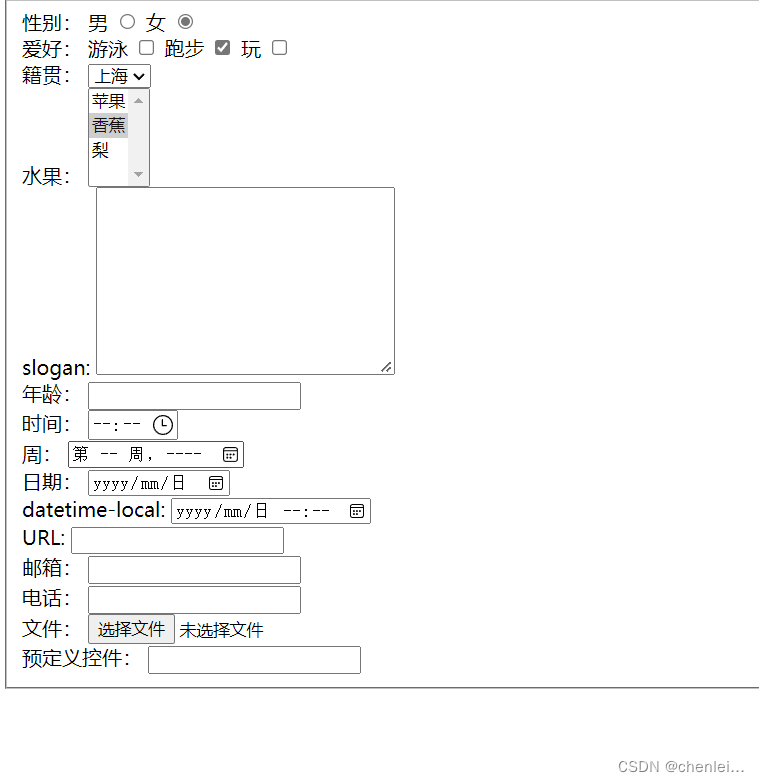
简单实例
show code:
<!DOCTYPE html>
<html lang="zh-CN">

<head>
    <meta charset="UTF-8">
    <meta http-equiv="X-UA-Compatible" content="IE=edge">
    <meta name="viewport" content="width=device-width, initial-scale=1.0">
    <title>kgc登录页面</title>
    <style>
        div {
            float: left;
        }

        .one {
            padding-left: 200px;
            width: 400px;
            height: 700px;
            margin-top: 100px;
        }

        .two {
            width: 500px;
            height: 700px;
            margin-top: 100px;
        }

        .title {
            margin-top: 100px;
            font-size: medium;
        }

        .account {
            padding-left: 120px;
        }

        .phone {
            padding-left: 60px;
        }

        .form {
            text-align: center;
            margin-top: 30px;
        }

        .input {
            width: 250px;
            height: 40px;
            margin-top: 20px;
            border-radius: 5px 5px 5px 5px;
        }

        .value {
            background-color: green;
            font-size: larger;
            color: azure;
            width: 250px;
            height: 40px;
            margin-top: 20px;
            border-radius: 10px 10px 10px 10px;
        }

        .other {
            text-align: center;
            margin-top: 70px;
        }

        .img {
            padding-left: 175px;
            width: 150px;
        }

        a {
            line-height: 150px;
            text-decoration: none;
            color: green;
        }

        .find {
            padding-left: 150px;
        }
    </style>
</head>

<body>
    <div class="one">
        <img src="./img/03.png" alt="" width="400px">
    </div>
    <div class="two">
        <p class="title">
            <span class="account">账号密码登录</span>
            <span class="phone">手机快捷登录</span>
        </p>
        <form action="https://www.kgc.cn/" method="get" class="form">
            <input type="text" name="account" id="account" placeholder="请输入账号" class="input">
            <br>
            <input type="password" name="password" id="password" placeholder="请输入密码" class="input">
            <br>
            <input type="submit" value="登录" class="value">
        </form>
        <p class="other">其他登录方式</p>
        <img src="./img/04.png" alt="" class="img">
        <br>
        <span class="find">
            登录代表已同意
            <a href="https://www.ekgc.cn/help/service.shtml">用户服务条款</a>
        </span>
    </div>
</body>

</html>
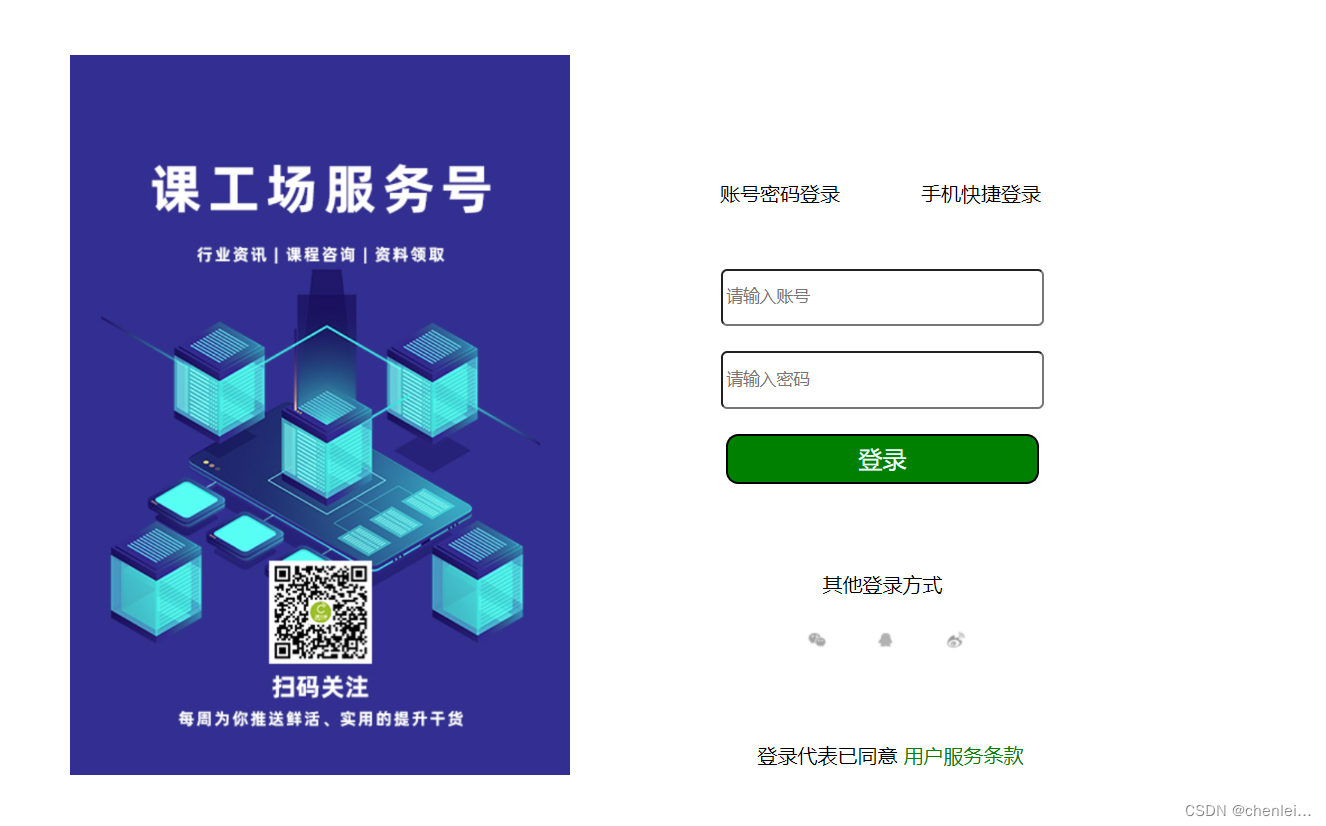
效果如下:
查看更多表单标签及实例应用请点击!!!!





 扫一扫
扫一扫


 1万+
1万+

 被折叠的 条评论
为什么被折叠?
被折叠的 条评论
为什么被折叠?
 到【灌水乐园】发言





