


 本文介绍了一种在使用Element UI时遇到的关于两个级联下拉框的实现问题及其解决方案。具体讨论了如何避免因快速选择而导致的页面卡死问题,并提供了一种通过失去焦点来延迟加载数据的有效方法。
最近在开发项目问题的时候遇到的问题
有两个下拉搜索框 当第一个有选择的值时 第二个根据第一个的值进行过滤除对应的数据
类似于这种
这个是可输入的下拉多选框是 element
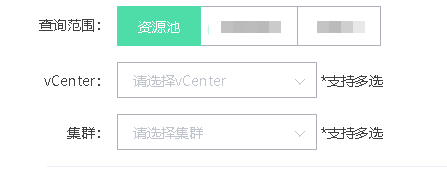
刚开始在第一个下拉框中的@change事件中 写的第一个框有值然后第二框会调用 但是因为是下拉多选框 他会选择一个 第二框的接口就会调用一次 本地环境和线上环境都没问题,但是到了生产环境 可能因为一只调用第二个框的列表 点击速度跟不上渲染速度 所以会报错导致页面卡死
       第一个框的change事件里面的 代码
      // const vcIds = { vcList: this.form.vcIds.toString() }
      // clusterListApi(vcIds).then(res => {
      //   if (res.code == 200) {
      //     if (res.data.length > 0) {
      //       this.clusterList = res.data
      //       console.log(this.clusterList)
      //     } else {
      //       this.clusterList = []
      //       console.log('无数据')
      //     }
      //   }
      // })
为了解决这个问题 我用了另一个思路 就是在第一个框失去焦点的时候再去调用第二个框的方法 但是element 上失去焦点的方法@blur 在这上面是没有作用的 后来加了.native也没有触发
所以有了以下方法
 <el-select
                ref="reqMsgRef"
                v-model="form.vcIds"
                multiple
                filterable
                collapse-tags
                placeholder="请选择vCenter"
                @blur.native.capture="selectChange('request_msg', 'reqMsgRef')"
              >
                <el-option
                  v-for="item in vcList"
                  :key="item.vc_ip"
                  :label="item.vc_alias"
                  :value="item.vc_ip"
                />
              </el-select>
selectChange(flag, ref) {
      this.$refs[ref].$refs.input.blur = () => {
        const vcIds = { vcList: this.form.vcIds.toString() }
        clusterListApi(vcIds).then(res => {
          if (res.code == 200) {
            if (res.data.length > 0) {
              this.clusterList = res.data
              console.log(this.clusterList)
            } else {
              this.clusterList = []
              console.log('无数据')
            }
          }
        })
      }

    },





 扫一扫
扫一扫


 1613
1613


 到【灌水乐园】发言



