


1.绑定到元素——ElementName
简单绑定写法:
Value="{Binding ElementName=slider,Path=Value,Mode=TwoWay}"
//ElementName:绑定源对象控件
//Path:绑定源对象控件的属性值
//Mode:绑定模式
双向绑定(Twoway):图片透明度与滑块的Value属性相互影响,一端改变时另一端也改变。
代码:
    <StackPanel>
        <Image Source="/images/dog.png" Opacity="{Binding ElementName=slider,Path=Value,Mode=TwoWay}" Height="416" Margin="10"/>
        <Slider x:Name="slider" Minimum="0" Maximum="1" Value="0.5"/>
    </StackPanel>
绑定更新:当目标属性发生变化时立刻更新源。(UpdateSourceTrigger)
UpdateSourceTrigger=PropertyChanged
绑定延迟:当目标属性发生变化时延迟更新源。(Delay)
Delay=5000(ms)
    <StackPanel>
        <Image Source="/images/dog.png" Opacity="{Binding Value, ElementName=slider,Mode=TwoWay,UpdateSourceTrigger=PropertyChanged,Delay=5000}" Height="416" Margin="10"/>
        <Slider x:Name="slider" Minimum="0" Maximum="1" Value="0.5" Background="Black"/>
    </StackPanel>
2.绑定到非元素——Source
    <Window.Resources>
        <FontFamily x:Key="ff">micorsoft yahei</FontFamily>
    </Window.Resources>

    <StackPanel>
        <TextBlock Text="{Binding Source={x:Static SystemFonts.IconFontFamily},Path=Source}"/>
        <TextBlock Margin="0,10" Text="{Binding Source={StaticResource ff},Path=Source}"/>
    </StackPanel>
</Window>
3.绑定到非元素——RelativeSrouce
    <Grid Background="Blue">
        <TextBlock Height="50" Width="90" Background="{Binding Path=Background,RelativeSource={RelativeSource Mode=FindAncestor,AncestorType=Grid}}"/>
    </Grid>
4.绑定到非元素——DataContext(数据上下文)
//Window.Xaml.cs

namespace Chapter08
{
    public partial class MainWindow : Window
    {
        public MainWindow()
        {
            InitializeComponent();
            //绑定到数据上下文
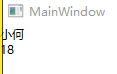
            this.DataContext = new student { Name = "小何", Age = 18 };
        }
    }

    class student
    {
        public string Name { get; set; }
        public int Age { get; set; }
    }
}
    //已经在窗体引用了数据上下文,可以直接binding,不需要source
    <StackPanel>
        <TextBlock Text="{Binding Name}"/>
        <TextBlock Text="{Binding Age}"/>
    </StackPanel>
运行结果:





 扫一扫
扫一扫


 1766
1766

 被折叠的 条评论
为什么被折叠?
被折叠的 条评论
为什么被折叠?
 到【灌水乐园】发言





