 Java执行AndroidSDK命令与截图测试


 文章讲述了如何在Java程序中使用CommandPrompt执行adb命令,如cd、adbshell、screencap等,以及进行设备控制(如解锁屏幕、截图和安装APK)的示例。
操作具体代码如下:
须注意的是commandStr0里面如果不加 cmd /的话会报
java.io.IOException: Cannot run program "cd": CreateProcess error=2, 系统找不到指定的文件。
的错误
package com.znzdh.until;

import java.io.BufferedReader;
import java.io.InputStreamReader;
import java.nio.charset.Charset;

public class Cmd {

    public static void main(String[] args) throws InterruptedException {
        System.out.println("开始");
        String commandStr0 = "cmd /cd E:\\appium\\android-sdk\\platform-tools";//进入该文件夹下面
        Cmd.exeCmd(commandStr0);
        System.out.println("进入tools");
        Thread.sleep(200);
        String commandStr1 = "adb -s 192.168.31.00:5555 shell am start -a android.media.action.IMAGE_CAPTURE --ei android.intent.extras.CAMERA_FACING 1";
        Cmd.exeCmd(commandStr1);
        System.out.println("打开相机");
        Thread.sleep(500);
        String commandStr2 ="adb -s 192.168.31.00:5555 shell screencap /sdcard/screen1.png";
        Cmd.exeCmd(commandStr2);
        System.out.println("截图保存相册");
        Thread.sleep(200);
        String commandStr3="adb -s 192.168.31.00:5555 pull /sdcard/screen1.png E:\\需求";
        Cmd.exeCmd(commandStr3);
        System.out.println("保存到E盘需求");
        Thread.sleep(200);
        String commandStr4="adb -s 192.168.31.00:5555 shell input keyevent 4";
        Cmd.exeCmd(commandStr4);
        System.out.println("退出相机");
        Thread.sleep(200);
        System.out.println("结束");
    }

    public static void exeCmd(String commandStr) {
        BufferedReader br = null;
        try {
            //执行cmd命令
            Process p = Runtime.getRuntime().exec(commandStr);
            //返回值是流,以便读取。
            br = new BufferedReader(new InputStreamReader(p.getInputStream(), Charset.forName("GBK")));
            String line = null;
            StringBuilder sb = new StringBuilder();
            while ((line = br.readLine()) != null) {
                sb.append(line + "\n");
            }
            System.out.println(sb.toString());
        } catch (Exception e) {
            e.printStackTrace();
        } finally {
            if (br != null){
                try {
                    br.close();
                } catch (Exception e) {
                    e.printStackTrace();
                }
            }
        }
    }

}
操作结果:
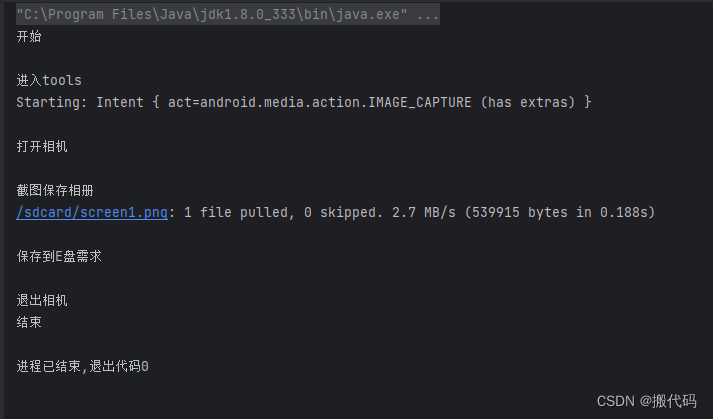
package com.znzdh.until;

import org.springframework.web.bind.annotation.RequestMapping;
import org.testng.annotations.Test;

import java.io.BufferedReader;
import java.io.InputStreamReader;
import java.nio.charset.Charset;
import java.util.Scanner;
import java.util.logging.Logger;
import com.znzdh.until.TimesUntil.*;
public class Cmd {
    public static  String ips="192.188.31.14:5551";
    public static Logger log=Logger.getLogger("日志");
    //拍照
    @Test
    public static void main1() throws InterruptedException {
        //Thread.sleep(20000);
        String times = TimesUntil.times();
        System.out.println("开始");
        String commandStr0 = "cmd /cd E:\\appium\\android-sdk\\platform-tools";//进入该文件夹下面
        Cmd.exeCmd(commandStr0);
        System.out.println("进入tools");
        Thread.sleep(200);
        //=============
        System.out.println("点亮屏幕");
        String com1 = "adb -s "+ips+" shell input keyevent 224";
        Cmd.exeCmd(com1);
        Thread.sleep(100);
        System.out.println("解锁屏幕");
       // String com2 = "adb -s "+ips+" shell input keyevent 82";
       // Cmd.exeCmd(com2);
       // Thread.sleep(200);
        System.out.println("向上滑屏屏幕");
        //String com3 = "adb -s "+ips+" shell input swipe 300 500 300 50";
        //Cmd.exeCmd(com3);
        //Thread.sleep(200);
        //=============
        String commandStr1 = "adb -s "+ips+" shell am start -a android.media.action.IMAGE_CAPTURE --ei android.intent.extras.CAMERA_FACING 1";
        Cmd.exeCmd(commandStr1);
        System.out.println("打开相机");
        Thread.sleep(900);
        String commandStr2 ="adb -s "+ips+" shell screencap /sdcard/"+times+".png";
        Cmd.exeCmd(commandStr2);
        System.out.println("截图保存相册");
        Thread.sleep(100);
        String commandStr3="adb -s "+ips+" pull /sdcard/"+times+".png E:\\需求\\jietu";
        Cmd.exeCmd(commandStr3);
        System.out.println("保存到E盘需求");
        Thread.sleep(200);
        String commandStr4="adb -s "+ips+" shell input keyevent 4";
        Cmd.exeCmd(commandStr4);
        System.out.println("退出相机");
        Thread.sleep(200);
        System.out.println("结束");
    }
    public static String apk1="E:\\1A\\Dapk\\__UNI__008143827.apk";//安装包位置
    //安装apk
    @Test
    public void anzhuang() throws InterruptedException {
        Logger anzhuang = Logger.getLogger("anzhuang");
        System.out.println("开始");
        System.out.println("进入tools");
        String commandStr0 = "cmd /cd E:\\appium\\android-sdk\\platform-tools";//进入该文件夹下面
        Cmd.exeCmd(commandStr0);
        System.out.println("查看是否有ip");
        String sip="adb devices";
        String s = Cmd.exeCmd(sip);
        System.out.println("s:"+s);
        //判断其中是否含有192.168.31.124ip地址
        //String adbip1=ips;
        boolean contains = s.contains(ips);
        if (contains){//是
            Thread.sleep(200);
            //判断手机是否安装过该

            //=============uni.UNI0B57D31
            //System.out.println("卸载源apk");
            //String com1 = "adb -s "+ips+"uninstall uni.UNI9D801DD";
           // Cmd.exeCmd(com1);
            Thread.sleep(600);
            System.out.println("安装apk");
            String com2 = "adb -s "+ips+" install -r "+apk1;
            String s1 = Cmd.exeCmd(com2);
            System.out.println("s1:"+s1);
            System.out.println("安装完成");
            System.out.println("结束");
        }else {//否
           // System.out.println("adb devices 没有查询到"+adbip1);
            anzhuang.info("adb devices 没有查询到"+ips+"的ip");
        }
    }

    public static void main(String[] args) {
        Scanner scanner = new Scanner(System.in);
        System.out.print("请输入文本ip: ");
        String inputText = scanner.nextLine();
        System.out.println("您输入的文本是: " + inputText);
        //String ping1="ping "+inputText;
        String ping1="tracert "+inputText;
        Cmd.exeCmd(ping1);
        System.out.println(ping1);
    }
    public static String exeCmd(String commandStr) {
        log.info("进入exeCmd");
        BufferedReader br = null;
        String line = null;
        StringBuilder sb = new StringBuilder();
        try {
            //执行cmd命令
            log.info("执行cmd命令");
            Process p = Runtime.getRuntime().exec(commandStr);
            //返回值是流,以便读取。
            log.info("返回值是流,以便读取。");
            br = new BufferedReader(new InputStreamReader(p.getInputStream(), Charset.forName("GBK")));

            while ((line = br.readLine()) != null) {
                sb.append(line + "\n");
            }
            System.out.println(sb);
        } catch (Exception e) {
            e.printStackTrace();
        } finally {
            if (br != null){
                try {
                    br.close();
                } catch (Exception e) {
                    e.printStackTrace();
                }
            }
        }
        return sb.toString();
    }

    //查找apk的package name安装包名字
    @Test
    public static void findadb() throws InterruptedException {
        String apkip="E:\\需求\\2023\\新需求\\SIM卡返现\\__UNI__D.apk";
        String findname1="cmd /c cd E:\\appium\\android-sdk\\build-tools\\27.0.2";
        String s1 = Cmd.exeCmd(findname1);
        System.out.println("s1"+s1);
        Thread.sleep(500);
        String findname2="aapt dump badging "+apkip;
        String finds = Cmd.exeCmd(findname2);
        try{
            String substring = finds.substring(finds.indexOf("package: name='") + 15, finds.lastIndexOf("' versionCode="));
            System.out.println("substring package name:"+substring);
        }catch (Exception e){
            e.printStackTrace();
        }
    }

    //截图
    @Test
    public  static  void  jietu() throws InterruptedException {
        String times = TimesUntil.times();
        System.out.println("开始");
        System.out.println("进入该文件夹下面");
        String jt1="cmd /cd E:\\appium\\android-sdk\\platform-tools";//进入该文件夹下面
        Cmd.exeCmd(jt1);
        System.out.println(jt1);
        Thread.sleep(500);
        System.out.println("开始截图");
        String jt2 ="adb -s "+ips+" shell screencap /sdcard/"+times+".png";
        Cmd.exeCmd(jt2);
        System.out.println(jt2);
        System.out.println("截图保存相册");
        Thread.sleep(500);
        String jt3="adb -s "+ips+" pull /sdcard/"+times+".png E:\\Screen";
        Cmd.exeCmd(jt3);
        System.out.println(jt3);
        System.out.println("退出");

    }

	//录制视频
    @Test
    public static void Rvideo() throws InterruptedException {
        String times = TimesUntil.times();
        System.out.println("times:"+times);
        System.out.println("判断是否链接");
        String adb1="adb devices";
        String s1 = Cmd.exeCmd(adb1);
        if (s1.contains(ips)){
            System.out.println("开始执行");
            System.out.println("进入adb文件下打开cmd");
            String jt1="cmd /cd E::\\appium\\android-sdk\\platform-tools";
            Cmd.exeCmd(jt1);
            System.out.println(jt1);
            Thread.sleep(500);
            System.out.println("开始进行录制时评");
            //adb shell screenrecord --time-limit 10 /sdcard/demo.mp4
            String vid="adb -s "+ips+" shell screenrecord --time-limit 5 /sdcard/"+times+".mp4";
            String s = Cmd.exeCmd(vid);
            System.out.println("录制完成:"+s);
            System.out.println("将录制的视频放到本地文件中");
            String jtt2="adb -s "+ips+" pull /sdcard/"+times+".mp4 E:\\Screen";
            String s2 = Cmd.exeCmd(jtt2);
            System.out.println("s2:"+s2);
            System.out.println("以放到本地文件中 E:\\Screen");
        }else {
            System.out.println("请链接手机");

        }

    }

}






 扫一扫
扫一扫


 2207
2207

 被折叠的 条评论
为什么被折叠?
被折叠的 条评论
为什么被折叠?
 到【灌水乐园】发言





