视频倍速快进<搬代码>

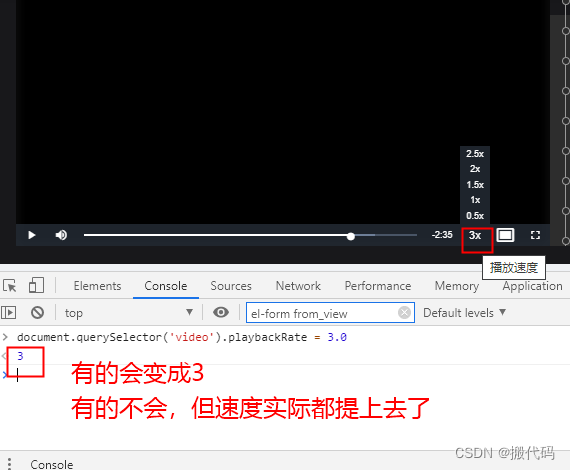
我们在看视频学习的时候想快进,但是,快进倍速中只有2,老师讲的课太慢,浪费时间
怎么办?
操作如下
1.进入网页,按F12弹出如下
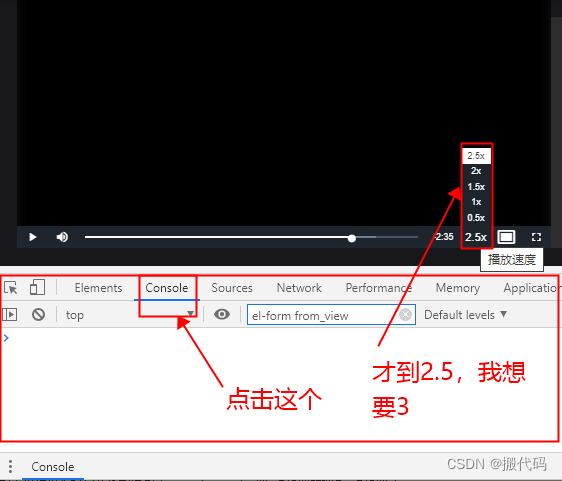
1

document.querySelector('video').playbackRate = 3.0
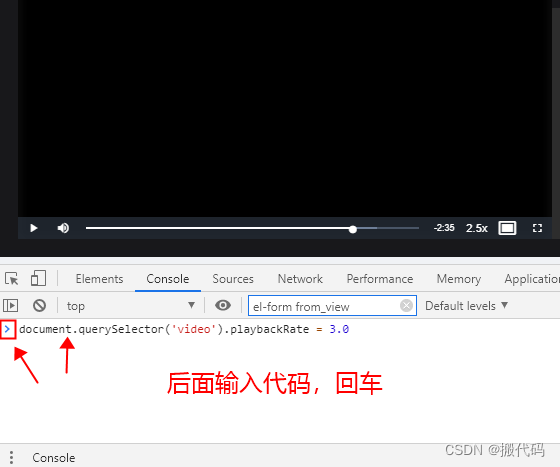
2
3

代码解释 ```html <!DOCTYPE html> <html lang="zh-CN"> <head> <meta charset="UTF-8"> <meta name="viewport" content="width=device-width, initial-scale=1.0"> <title>视频倍速限制解除工具</title> <style> body { font-family: 'Segoe UI', Tahoma, Geneva, Verdana, sans-serif; max-width: 1000px; margin: 0 auto; padding: 20px; background-color: #f5f7fa; color: #333; line-height: 1.6; } header { background: linear-gradient(135deg, #1a6dcc, #0d47a1); color: white; padding: 30px 20px; border-radius: 10px; margin-bottom: 30px; text-align: center; box-shadow: 0 4px 15px rgba(0,0,0,0.1); } h1 { margin: 0; font-size: 2.5rem; } .subtitle { font-size: 1.2rem; opacity: 0.9; margin-top: 10px; } .card { background: white; border-radius: 10px; padding: 25px; margin-bottom: 25px; box-shadow: 0 4px 10px rgba(0,0,0,0.05); border-left: 4px solid #1a6dcc; } h2 { color: #1a6dcc; margin-top: 0; border-bottom: 2px solid #f0f4f8; padding-bottom: 10px; } .code-block { background: #2d2d2d; color: #f8f8f2; padding: 15px; border-radius: 8px; overflow-x: auto; margin: 15px 0; font-family: 'Fira Code', 'Courier New', monospace; } .step { display: flex; margin-bottom: 20px; align-items: flex-start; } .step-number { background: #1a6dcc; color: white; width: 36px; height: 36px; border-radius: 50%; display: flex; align-items: center; justify-content: center; font-weight: bold; flex-shrink: 0; margin-right: 15px; margin-top: 3px; } .note { background: #fff8e1; border-left: 4px solid #ffc107; padding: 15px; border-radius: 0 8px 8px 0; margin: 20px 0; } .browser-logos { display: flex; justify-content: center; gap: 30px; margin: 20px 0; } .browser-logo { text-align: center; font-size: 3rem; } .browser-name { margin-top: 10px; font-weight: bold; } .btn { display: inline-block; background: #1a6dcc; color: white; padding: 12px 25px; border-radius: 5px; text-decoration: none; font-weight: bold; transition: all 0.3s; border: none; cursor: pointer; margin: 10px 5px; } .btn:hover { background: #0d47a1; transform: translateY(-2px); box-shadow: 0 4px 8px rgba(0,0,0,0.1); } .btn-container { text-align: center; margin: 30px 0; } footer { text-align: center; margin-top: 40px; padding: 20px; color: #666; font-size: 0.9rem; border-top: 1px solid #eee; } .video-container { background: #2d2d2d; border-radius: 8px; padding: 20px; margin: 20px 0; text-align: center; } .video-placeholder { background: #1a6dcc; height: 200px; border-radius: 5px; display: flex; align-items: center; justify-content: center; color: white; font-size: 1.2rem; } .speed-controls { display: flex; justify-content: center; gap: 15px; margin-top: 15px; } .speed-btn { background: #4a6fa5; color: white; border: none; padding: 8px 15px; border-radius: 4px; cursor: pointer; } .speed-btn:hover { background: #1a6dcc; } </style> </head> <body> <header> <h1>视频倍速限制解除工具</h1> <div class="subtitle">适用于湖南开放大学国家级专业技术人员继续教育基地等在线学习平台</div> </header> <div class="card"> <h2>问题描述</h2> <p>许多在线学习平台(包括湖南开放大学国家级专业技术人员继续教育基地)的视频播放器限制了播放速度(通常限制在1.0-2.0倍速),这影响了学习效率。本解决方案提供通用方法解除此类限制。</p> <div class="video-container"> <div class="video-placeholder"> 视频播放器演示区域(实际网站中此处为视频) </div> <div class="speed-controls"> <button class="speed-btn">1.0x</button> <button class="speed-btn">1.5x</button> <button class="speed-btn">2.0x</button> <button class="speed-btn" style="background:#e74c3c;">3.0x (已解除限制)</button> <button class="speed-btn" style="background:#e74c3c;">4.0x (已解除限制)</button> </div> </div> </div> <div class="card"> <h2>解决方案:使用Tampermonkey脚本</h2> <div class="step"> <div class="step-number">1</div> <div> <h3>安装Tampermonkey扩展</h3> <p>Tampermonkey是一款流行的用户脚本管理器,支持Chrome、Firefox、Safari等浏览器。</p> <div class="browser-logos"> <div class="browser-logo">🦊</div> <div class="browser-logo">🚀</div> <div class="browser-logo">🍎</div> </div> <div class="btn-container"> <a href="https://www.tampermonkey.net/" class="btn" target="_blank">下载Tampermonkey</a> </div> </div> </div> <div class="step"> <div class="step-number">2</div> <div> <h3>安装用户脚本</h3> <p>创建新的用户脚本并复制以下代码:</p> <div class="code-block"> // ==UserScript== // @name 湖南开放大学视频倍速解锁 // @namespace http://tampermonkey.net/ // @version 1.0 // @description 解除湖南开放大学国家级专业技术人员继续教育基地视频播放倍速限制 // @author CodingExpert // @match *://hnou.edu.cn/* // @match *://*.hnou.edu.cn/* // @grant none // ==/UserScript== (function() { 'use strict'; // 主解除函数 function unlockSpeed() { // 查找页面上的所有video元素 const videos = document.querySelectorAll('video'); videos.forEach(video => { // 解除播放速率限制 if (video.playbackRate <= 2) { video.playbackRate = 2.5; // 设置初始倍速 } // 移除事件监听器(防止网站重置倍速) const clone = video.cloneNode(true); video.parentNode.replaceChild(clone, video); // 添加自定义倍速控制 addCustomSpeedControls(clone); }); // 针对使用JavaScript框架的播放器 overridePlayerSpeedLimit(); } // 添加自定义倍速控制 function addCustomSpeedControls(video) { const controls = document.createElement('div'); controls.style.position = 'absolute'; controls.style.bottom = '50px'; controls.style.right = '10px'; controls.style.zIndex = '9999'; controls.style.backgroundColor = 'rgba(0,0,0,0.7)'; controls.style.padding = '5px'; controls.style.borderRadius = '5px'; const speeds = [1.0, 1.5, 2.0, 2.5, 3.0, 4.0]; speeds.forEach(speed => { const btn = document.createElement('button'); btn.innerText = `${speed}x`; btn.style.margin = '0 3px'; btn.style.padding = '3px 6px'; btn.style.cursor = 'pointer'; btn.style.backgroundColor = speed > 2 ? '#e74c3c' : '#3498db'; btn.style.color = 'white'; btn.style.border = 'none'; btn.style.borderRadius = '3px'; btn.addEventListener('click', () => { video.playbackRate = speed; }); controls.appendChild(btn); }); video.parentNode.style.position = 'relative'; video.parentNode.appendChild(controls); } // 覆盖播放器内置的倍速限制 function overridePlayerSpeedLimit() { const originalFn = HTMLMediaElement.prototype.playbackRate; Object.defineProperty(HTMLMediaElement.prototype, 'playbackRate', { set: function(value) { // 允许设置任意倍速 return originalFn.call(this, value); }, get: function() { return originalFn.call(this); } }); } // 页面加载完成后执行 window.addEventListener('load', unlockSpeed); // 监听SPA路由变化 let lastUrl = location.href; setInterval(() => { if (location.href !== lastUrl) { lastUrl = location.href; setTimeout(unlockSpeed, 2000); // 等待新内容加载 } }, 500); })(); </div> </div> </div> <div class="step"> <div class="step-number">3</div> <div> <h3>使用脚本</h3> <p>安装脚本后,访问湖南开放大学学习平台,脚本会自动解除视频倍速限制,并添加自定义倍速控制按钮。</p> <div class="note"> <strong>注意:</strong> 如果网站结构发生变化,可能需要更新脚本选择器。请确保遵守网站使用条款,本脚本仅用于学习目的。 </div> </div> </div> </div> <div class="card"> <h2>备选方案:浏览器控制台命令</h2> <p>如果不想安装扩展,可以在视频播放页面按F12打开开发者工具,在Console面板输入以下命令:</p> <div class="code-block"> // 解除所有视频元素倍速限制 document.querySelectorAll('video').forEach(v => { v.playbackRate = 3.0; // 设置想要的倍速 v.defaultPlaybackRate = 3.0; }); // 覆盖播放器限制 Object.defineProperty(HTMLMediaElement.prototype, 'playbackRate', { set: function(value) { return Object.getOwnPropertyDescriptor(HTMLMediaElement.prototype, 'playbackRate').set.call(this, value); }, get: function() { return Object.getOwnPropertyDescriptor(HTMLMediaElement.prototype, 'playbackRate').get.call(this); } }); </div> <p>此方法在每次页面刷新后需要重新执行。</p> </div> <div class="btn-container"> <button class="btn" onclick="alert('脚本已执行!请刷新学习平台页面。')">模拟执行脚本</button> <a href="#video-controls" class="btn">查看效果演示</a> </div> <div class="card" id="video-controls"> <h2>效果演示</h2> <p>脚本执行后,视频播放器将添加额外的倍速控制按钮:</p> <div class="video-container"> <div class="video-placeholder"> 视频播放器(已解除倍速限制) </div> <div class="speed-controls"> <button class="speed-btn">1.0x</button> <button class="speed-btn">1.5x</button> <button class="speed-btn">2.0x</button> <button class="speed-btn" style="background:#e74c3c;">2.5x</button> <button class="speed-btn" style="background:#e74c3c;">3.0x</button> <button class="speed-btn" style="background:#e74c3c;">4.0x</button> </div> </div> <p>红色按钮表示已解除限制的倍速选项(2.5x以上)。</p> </div> <div class="card"> <h2>技术原理</h2> <p>此解决方案通过以下方式解除倍速限制:</p> <div class="step"> <div class="step-number">1</div> <div> <h3>直接操作video元素</h3> <p>通过JavaScript直接设置HTML5 video元素的playbackRate属性</p> </div> </div> <div class="step"> <div class="step-number">2</div> <div> <h3>覆盖原型方法</h3> <p>修改HTMLMediaElement.prototype.playbackRate的setter方法,绕过网站的限制逻辑</p> </div> </div> <div class="step"> <div class="step-number">3</div> <div> <h3>克隆替换元素</h3> <p>通过克隆video元素并替换原元素,移除网站添加的事件监听器</p> </div> </div> <div class="step"> <div class="step-number">4</div> <div> <h3>添加自定义控制</h3> <p>在播放器上添加自定义的倍速控制按钮,提供更多倍速选项</p> </div> </div> </div> <footer> <p>免责声明:本工具仅用于教育目的,请遵守学习平台的使用条款。过度使用倍速功能可能影响学习效果。</p> <p>© 2023 编程专家解决方案 | 湖南开放大学学习辅助工具</p> </footer> <script> // 模拟脚本执行效果 document.querySelectorAll('.speed-btn').forEach(btn => { btn.addEventListener('click', function() { const speed = this.innerText.replace('x', ''); alert(`已设置视频倍速为: ${speed}x`); }); }); </script> </body> </html> ```
08-22
评论
成就一亿技术人!
拼手气红包6.0元
还能输入1000个字符
 
红包 添加红包
表情包 插入表情
 条评论被折叠 查看
添加红包

请填写红包祝福语或标题

红包个数最小为10个

红包金额最低5元

当前余额3.43前往充值 >
需支付:10.00
成就一亿技术人!
领取后你会自动成为博主和红包主的粉丝 规则
hope_wisdom
发出的红包
实付
使用余额支付
点击重新获取
扫码支付
钱包余额 0

抵扣说明:

1.余额是钱包充值的虚拟货币,按照1:1的比例进行支付金额的抵扣。
2.余额无法直接购买下载,可以购买VIP、付费专栏及课程。

余额充值