


三维地形如何实现坡向分析
一、介绍
MapGIS Objects SDK : 是一款组件式地理信息开发平台,提供全空间数据存储、管理、显示、编辑、查询、分析、制图输出等二三维一体化核心 GIS 功能,提供 C++、.NET、Java、Python 等开发资源,接口简单易用,性能优越,具备跨平台开发能力。
本篇内容将知道您如何使用 MapGIS Objects SDK 、MapGIS Desktop SDK实现在三维场景中如何实现模型的捕捉功能。
二、开发环境
| 软件 | 版本 | 下载地址 | 说明 |
|---|---|---|---|
| MapGIS 10 x64 All In One SDK for Windows | 10.7 | 开发包下载地址 | MapGIS 提供的一款地理信息开发平台,包含 MapGIS Objects Java 面向 Java 开发环境的跨平台组件式 GIS 开发资源。 |
| MapGIS 开发授权 | \ | 开发授权下载地址 | MapGIS 针对开发者提供开发授权,下载开发包并安装后,还需要获取开发授权才能正常使用。 |
| IntelliJ IDEA | 2020.3 以上版本 | IDEA 下载地址 | 一款适用于 Java 专业开发的集成开发环境(IDE)。 |
| JDK | 1.8 | JDK 下载地址 | JDK 是 Java 语言的软件开发工具包,JDK 是整个 java 开发的核心,它包含了 JAVA 的运行环境(JVM+Java 系统类库)和 JAVA 工具。 |
三、应用场景及功能实现
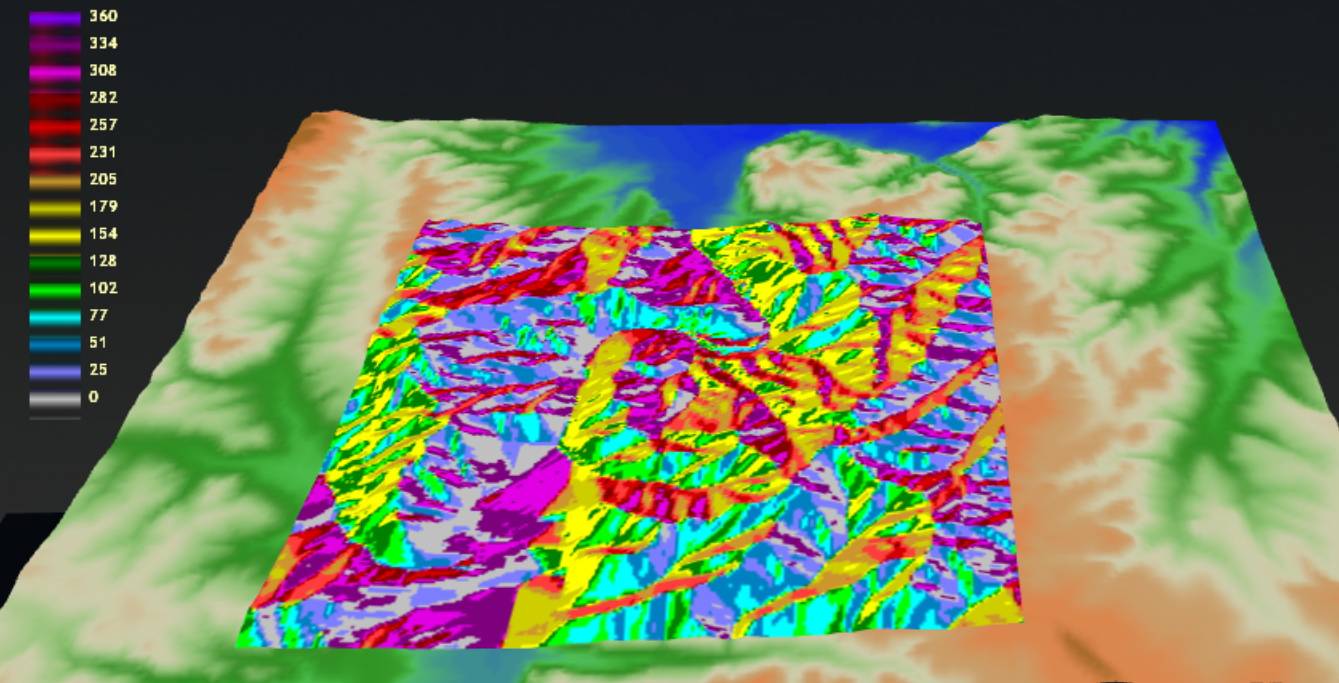
坡向是指地形坡面法线在水平面上的投影与正北方向之间的夹角,用于描述坡面朝向的一个地理参数,通常以 0° 至 360° 的角度表示。基于 DEM 在坡向分析在地形分析、土地分类及环境监测中具有广泛应用价值。本文将利用 MapGIS 二次开发库提供的 PolygonProjector 和 G3DBaseTool 对象实现交互工具在三维场景对 DEM 数据进行坡向分析功能。相关 API 的详细说明可参考MapGIS Objects Java 的开发入门文档,api 文档参考 MapGIS Objects Java API。
1、构建坡度坡向分析工具类(继承自 G3DTool)
    public class SlopeAspectAnalysisTool extends G3DBaseTool {
    private int toolType = 1;//1-坡度;2-坡向
    private PolygonProjector pp;
    /**
     * @param sceneControl
     * @param type         1-坡度分析;2-坡向分析
     */
    public SlopeAspectAnalysisTool(SceneControl sceneControl, int type) {
        super(sceneControl);

        Scene scene = sceneControl.getMapGISScene();
        Rect3D rect3D = new Rect3D();
        scene.getExtent(rect3D);
        this.pp = new PolygonProjector(this.sceneControl.getNativeHandle(), (float) rect3D.getZMax());
        this.toolType = type;
    }

    @Override
    public void start() {
        super.start();
    }

    @Override
    public void stop() {
        super.stop();
    }

    @Override
    public boolean onMouseDown(MouseEvent e) {
        return super.onMouseDown(e);
    }

    @Override
    public boolean onMouseUp(MouseEvent e) {
        return super.onMouseUp(e);
    }

    @Override
    public boolean onMouseDragged(MouseEvent e) {
        return super.onMouseDragged(e);
    }
}
2、重载实现 G3DTool 相关方法
    public class SlopeAspectAnalysisTool extends G3DBaseTool {
    private int toolType = 1;//1-坡度;2-坡向
    private PolygonProjector pp;
    /**
     * @param sceneControl
     * @param type         1-坡度分析;2-坡向分析
     */
    public SlopeAspectAnalysisTool(SceneControl sceneControl, int type) {
        super(sceneControl);

        Scene scene = sceneControl.getMapGISScene();
        Rect3D rect3D = new Rect3D();
        scene.getExtent(rect3D);
        this.pp = new PolygonProjector(this.sceneControl.getNativeHandle(), (float) rect3D.getZMax());
        this.toolType = type;
    }
        @Override
    public void start() {
        this.pp.startSlopeAspec(this.toolType == 2, SelectOperateType.Rectangle);
        super.start();
    }

    @Override
    public void stop() {
        super.stop();
        this.pp.stopSlopeAspec();
    }

    @Override
    public boolean onMouseDown(MouseEvent e) {
        this.sceneControl.enableInputTool(false);

        if (e.getButton() == MouseButton.PRIMARY) {
            this.pp.slopeOperate(MouseOperateType.LButtonDown, e.getX(), e.getY());
        } else if (e.getButton() == MouseButton.SECONDARY) {
            this.pp.slopeOperate(MouseOperateType.RButtonDown, e.getX(), e.getY());
        }

        return super.onMouseDown(e);
    }

    @Override
    public boolean onMouseUp(MouseEvent e) {
        this.sceneControl.enableInputTool(true);

        if (e.getButton() == MouseButton.PRIMARY) {
            this.pp.slopeOperate(MouseOperateType.LButtonUp, e.getX(), e.getY());
        }

        return super.onMouseUp(e);
    }

    @Override
    public boolean onMouseDragged(MouseEvent e) {

        this.pp.slopeOperate(MouseOperateType.MouseMove, e.getX(), e.getY());

        return super.onMouseDragged(e);
    }
}
3、启动坡度坡向分析工具
   SlopeAspectAnalysisTool tool = new SlopeAspectAnalysisTool(sceneControl, 2);
   sceneControl.setActiveTool(tool);
   tool.start();
MouseButton.PRIMARY) {
this.pp.slopeOperate(MouseOperateType.LButtonDown, e.getX(), e.getY());
} else if (e.getButton() == MouseButton.SECONDARY) {
this.pp.slopeOperate(MouseOperateType.RButtonDown, e.getX(), e.getY());
}
    return super.onMouseDown(e);
}

@Override
public boolean onMouseUp(MouseEvent e) {
    this.sceneControl.enableInputTool(true);

    if (e.getButton() == MouseButton.PRIMARY) {
        this.pp.slopeOperate(MouseOperateType.LBut





 扫一扫
扫一扫


 669
669

 被折叠的 条评论
为什么被折叠?
被折叠的 条评论
为什么被折叠?
 到【灌水乐园】发言





