目标检测-YOLOv4训练报错问题(RuntimeError: indices should be either on cpu or on the same device as the indexe)

文章讲述了在使用PyTorchYOLOv4时遇到的错误,涉及设备(CPUvsGPU)转换问题。作者发现新版本的torch不再自动转换数据类型,导致了RuntimeError。通过调整代码将数据类型从float转换为long,解决了这个问题,使训练得以继续。

首先定位到报错的位置

File "/home/zhangh/project1/pytorch-YOLOv4-master/PyTorch_YOLOv4-master/PyTorch_YOLOv4-master/utils/loss.py", line 148
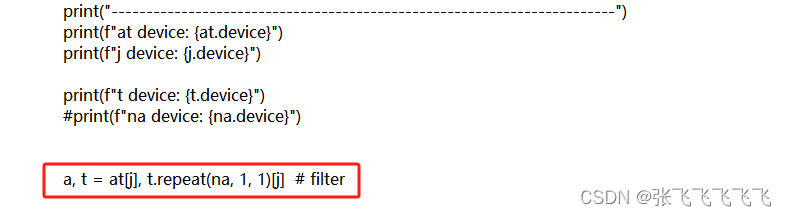
通过

            print("------------------------------------------------------------------------")
            print(f"at device: {at.device}")
            print(f"j device: {j.device}")

            print(f"t device: {t.device}")

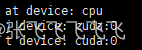
输出得知

at device居然在CPU上,然后用

### YOLOv7中解决RuntimeError: indices should be either on cpu or on the same device as the indexed tensor (cpu)的方案 在使用YOLOv7时,如果遇到`RuntimeError: indices should be either on cpu or on the same device as the indexed tensor (cpu)`错误,通常是因为索引张量与被索引张量所在的设备不一致。以下是一些具体的解决方案[^2]。 #### 修改`loss.py`文件 在`loss.py`文件中,需要确保所有涉及张量操作的部分都明确指定设备。具体修改如下: 1. **添加设备初始化代码** 在文件顶部导入包后,添加以下代码以初始化设备: ```python device = torch.device("cuda" if torch.cuda.is_available() else "cpu") ``` 2. **修改`from_which_layer`部分** 将以下代码: ```python from_which_layer.append(torch.ones(size=(len(b),)) * i) ``` 修改为: ```python from_which_layer.append((torch.ones(size=(len(b),)) * i).to(device)) ``` 3. **修改`matching_matrix`初始化部分** 将以下代码: ```python matching_matrix = torch.zeros_like(cost) ``` 修改为: ```python matching_matrix = torch.zeros_like(cost, device=device) ``` #### 修改`yolo_training.py`文件 在`yolo_training.py`文件中,大约第288行处,将以下代码: ```python from_which_layer.append((torch.ones(size=(len(b),)) * i) ``` 修改为: ```python from_which_layer.append((torch.ones(size=(len(b),)) * i).to('cuda')) ``` #### 调试设备一致性问题 为了进一步确认设备一致性问题,可以在代码中添加调试信息,打印出相关张量的设备信息[^4]: ```python print("------------------------------------------------------------------------") print(f"at device: {at.device}") print(f"j device: {j.device}") ``` 通过上述修改,可以确保所有张量操作都在同一设备上进行,从而避免设备不匹配的问题。 ```python # 示例代码片段 device = torch.device("cuda" if torch.cuda.is_available() else "cpu") # 修改 from_which_layer 部分 from_which_layer.append((torch.ones(size=(len(b),)) * i).to(device)) # 修改 matching_matrix 初始化部分 matching_matrix = torch.zeros_like(cost, device=device) # 调试设备一致性问题 print("------------------------------------------------------------------------") print(f"at device: {at.device}") print(f"j device: {j.device}") ``` ### 注意事项 - 确保所有涉及张量操作的部分都明确指定了设备。 - 如果模型运行在GPU上,请确保所有张量均被显式移动到GPU。 - 调试过程中,可以打印张量的设备信息以确认一致性。
评论
添加红包

请填写红包祝福语或标题

红包个数最小为10个

红包金额最低5元

当前余额3.43前往充值 >
需支付:10.00
成就一亿技术人!
领取后你会自动成为博主和红包主的粉丝 规则
hope_wisdom
发出的红包

打赏作者

张飞飞飞飞飞

你的鼓励将是我创作的最大动力

¥1 ¥2 ¥4 ¥6 ¥10 ¥20
扫码支付:¥1
获取中
扫码支付

您的余额不足,请更换扫码支付或充值

打赏作者

实付
使用余额支付
点击重新获取
扫码支付
钱包余额 0

抵扣说明:

1.余额是钱包充值的虚拟货币,按照1:1的比例进行支付金额的抵扣。
2.余额无法直接购买下载,可以购买VIP、付费专栏及课程。

余额充值