


前面使用了第一种的三个方法,1、<h2>{{$store.state.count}}</h2> 2、...mapState(['count']) 3、...mapState({a:'count' }),这是设置别名,后两种使用计算属性,前面的直接使用标签调用state。
后续补充
mutations部分
mutations使用来改变state数据的,相当于使用页面的methods方法。
1.2.在页面中如果要操作页面上的mutations里面的方法,就要用到$store下的commit方法
<template>
	<div>
		<h2>home</h2>
		<!-- 方法一 -->
		<!-- <h2>{{$store.state.count}}</h2> -->
		<!-- 方法2 -->
		<!-- <h2>{{count}}</h2> -->
		<!-- 方法3 -->
		<h2>{{a}}</h2>
		<button @click="handelClick">增加+1</button>

	</div>
</template>

<script>
	// 可以借助辅助函数
	import {mapState} from'vuex'//要加上大括号

	export default {
		name:'HomeView',
		mounted(){
			console.log(this)
			console.log(this.$store)
		},
		computed:{
			//...mapState(['count'])//方法2  不管传多少数据都会通过mapState来进行接受,还要加上三点--数组写法
			...mapState({
				a:'count'//方法三,注意count要加上引号,若a命名为count不能使用同名省略的方法,因为有引号
			})

		},
		methods:{
			handelClick(){
				// this.a++
				//直接按照原来的写法是错误的,缺少setter,只能在store文件中的mutations中改变对state进行改变

				//store里index.js中的mutations设置方法后要传到这里---mutations方法一
				this.$store.commit('add')//this.$store中有commit,可以用来解决mutations的问题


			}
		}
	}
</script>

<style>
</style>
import Vue from 'vue'
import Vuex from 'vuex'

Vue.use(Vuex)

export default new Vuex.Store({
  state: {
	  count:4
  },
  getters: {
  },
  mutations: {
	  add(state){
		  state.count++
	  }

  },
  actions: {
  },
  modules: {
  }
})
实现了点击加一的操作。
mutations中方法内有连个参数,第一个state是必须的,第二个是载荷preload
所以mutations中的方法相当于派发给handelClick来执行。来触发add方法
2.辅助函数使用
store问价夹内的index不用变化,点击的标签需要更改。
<template>
	<div>
		<h2>home</h2>
		<!-- 方法一 -->
		<!-- <h2>{{$store.state.count}}</h2> -->
		<!-- 方法2 -->
		<!-- <h2>{{count}}</h2> -->
		<!-- 方法3 -->
		<h2>{{a}}</h2>
		<!-- <button @click="handelClick">增加+1</button>方法一 -->
		<button @click="add">增加</button>

	</div>
</template>

<script>
	// 可以借助辅助函数
	import {mapState,mapMutations} from'vuex'//要加上大括号

	export default {
		name:'HomeView',
		mounted(){
			console.log(this)
			console.log(this.$store)
		},
		computed:{
			//...mapState(['count'])//方法2  不管传多少数据都会通过mapState来进行接受,还要加上三点--数组写法
			...mapState({
				a:'count'//方法三,注意count要加上引号,若a命名为count不能使用同名省略的方法,因为有引号
			})

		},
		methods:{
			// handelClick(){
			// 	// this.a++
			// 	//直接按照原来的写法是错误的,缺少setter,只能在store文件中的mutations中改变对state进行改变
			// 	//store里index.js中的mutations设置方法后要传到这里---mutations方法一
			// 	//this.$store.commit('add')//this.$store中有commit,可以用来解决mutations的问题
			// },
			//方法二,使用辅助函数,引入
				...mapMutations(['add'])
		}
	}
</script>

<style>
</style>
3.另一种辅助函数的用法
按钮点击事件名称改为对象中的别名
<template>
	<div>
		<h2>home</h2>
		<!-- 方法一 -->
		<!-- <h2>{{$store.state.count}}</h2> -->
		<!-- 方法2 -->
		<!-- <h2>{{count}}</h2> -->
		<!-- 方法3 -->
		<h2>{{a}}</h2>
		<!-- <button @click="handelClick">增加+1</button>方法一 -->
		<!-- <button @click="add">增加</button>方法二 -->
		<button @click="aaa">增加</button>方法三

	</div>
</template>

<script>
	// 可以借助辅助函数
	import {mapState,mapMutations} from'vuex'//要加上大括号

	export default {
		name:'HomeView',
		mounted(){
			console.log(this)
			console.log(this.$store)
		},
		computed:{
			//...mapState(['count'])//方法2  不管传多少数据都会通过mapState来进行接受,还要加上三点--数组写法
			...mapState({
				a:'count'//方法三,注意count要加上引号,若a命名为count不能使用同名省略的方法,因为有引号
			})

		},
		methods:{
			// handelClick(){
			// 	// this.a++
			// 	//直接按照原来的写法是错误的,缺少setter,只能在store文件中的mutations中改变对state进行改变
			// 	//store里index.js中的mutations设置方法后要传到这里---mutations方法一
			// 	//this.$store.commit('add')//this.$store中有commit,可以用来解决mutations的问题
			// },
			//方法二,使用辅助函数,引入
			//	...mapMutations(['add'])
			//方法三
			...mapMutations({
				aaa:'add'
			})
		}
	}
</script>

<style>
</style>
复杂数据操作
显示:和简单数据一样{{$store.state.list}}
增加数据:传递复杂数据作为参数。
<template>
	<div>
		<h2>home</h2>
		<!-- 方法一 -->
		<!-- <h2>{{$store.state.count}}</h2> -->
		<!-- 方法2 -->
		<!-- <h2>{{count}}</h2> -->
		<!-- 方法3 -->
		<h2>{{a}}</h2>
		<!-- <button @click="handelClick">增加+1</button>方法一 -->
		<!-- <button @click="add">增加</button>方法二 -->
		<!-- <button @click="aaa">增加</button>方法三 -->

		<!-- +5和+10   方法扩充-->
		<button @click="add(5)">+5</button>
		<button @click="add(10)">+10</button>

		<!-- state中复杂数据的显示渲染 -->
		<h3>{{$store.state.list}}</h3>
		<button @click="sum">增加</button>


	</div>
</template>

<script>
	// 可以借助辅助函数
	import {
		mapState,
		mapMutations
	} from 'vuex' //要加上大括号

	export default {
		name: 'HomeView',
		mounted() {
			console.log(this)
			console.log(this.$store)
		},
		computed: {
			//...mapState(['count'])//方法2  不管传多少数据都会通过mapState来进行接受,还要加上三点--数组写法
			...mapState({
				a: 'count' //方法三,注意count要加上引号,若a命名为count不能使用同名省略的方法,因为有引号
			})

		},
		data() {
			return {
				list2 : {
					id: 4,
					name: "商品四",
					status: false
				}
			}
		},
		methods: {
			//不传参的方法
			// handelClick(){
			// 	// this.a++
			// 	//直接按照原来的写法是错误的,缺少setter,只能在store文件中的mutations中改变对state进行改变
			// 	//store里index.js中的mutations设置方法后要传到这里---mutations方法一
			// 	//this.$store.commit('add')//this.$store中有commit,可以用来解决mutations的问题
			// },
			//方法二,使用辅助函数,引入
			//	...mapMutations(['add'])
			//方法三
			// ...mapMutations({
			// 	aaa:'add'
			// })
			//方法扩充,传参
			// add(n){//这个add是上面的点击事件
			// 	this.$store.commit('add',n)//这里的add是store派发的add方法
			// }
			...mapMutations(['add']), //传参也不用在辅助函数中写这些参数

			//传复杂数据的参数
			// 1不适用辅助函数方法,暂时只使用这个
			sum() {
				this.$store.commit('sum', this.list2)
			}
			//第二种,辅助函数
			//...mapMutations(['sum'])//这样直接传递是不行的结果:{ "isTrusted": true }


		}
	}
</script>

<style>
</style>
import Vue from 'vue'
import Vuex from 'vuex'

Vue.use(Vuex)

export default new Vuex.Store({
	state: {
		count: 4,
		list: [{
				id: 1,
				name: "商品一",
				status: false
			},
			{
				id: 2,
				name: "商品二",
				status: true
			},
			{
				id: 3,
				name: "商品三",
				status: false
			}
		]
	},
	getters: {},
	mutations: {
		// add(state){
		//  state.count++
		// }
		add(state, n) { //n就是载荷
			state.count += n
		},
		sum(state, preload) {
			state.list.push(preload)
		}
	},
	actions: {},
	modules: {}
})
数据的筛选过滤使用getters
使用getters筛选数据,就和计算属性类似,所以,页面上在computed中运行
可以筛选更多的条件
还能进行传参,通过传递的参数可以更精确的筛选内容。
state: {
		count: 4,
		list: [{
				id: 1,
				name: "商品一",
				status: false
			},
			{
				id: 2,
				name: "商品二",
				status: true
			},
			{
				id: 3,
				name: "商品三",
				status: false
			}
		]
	},
	getters: {
		activeList : (state)=>{//同样第一个参数state必写,第二参数不是辟邪
			return state.list.filter((v)=>{
				return v.status
			})
		},
		unactiveList:(state)=>{
			return state.list.filter(v=>{
				return !v.status
			})
		}
	},
<template>
	<div>
		<!-- <h2 @click="about">about</h2>
		app.count--{{num}} -->

		<!-- getters过滤使用方法   方法一 -->
		<!-- <h2>{{$store.getters.activeList}}</h2>
		<h2>{{$store.getters.unactiveList}}</h2> -->

		<!-- <h3>{{activeList}}</h3>方法二
		<h3>{{unactiveList}}</h3> -->

		<h3>{{a}}</h3>
		<h3>{{b}}</h3>

	</div>

</template>

<script>
	import {mapGetters} from 'vuex'

	export default {
		name:'AboutView',
		inject:['app'],
		methods:{
			// about(){
			// 	console.log(this.app.userid)
			// 	this.app.changeapp()
			// 	// console.log()
			// }
		},
		computed: {//state和getters放在计算属性中
		//方法二
			//...mapGetters(['activeList','unactiveList'])
		//方法三
		...mapGetters({
			a:'activeList',
			b:'unactiveList
		})


		},
		methods:{//mutations和action放在方法中

		}
	}


</script>

<style>
</style>
actions
处理异步的方法,暂时使用setInterval来代替模拟异步,每个一段时间执行一次
context,上下文环境,全局的运行环境
页面调用actions方法是可以使用dispatch,也能使用commit,但是actions中的方法还是只是用context.commit的方法来调用上面的mutations的方法
在使用Async类似方法中将context结构后使用,就不用context一直点了通过{comit}简单的事件,
结构后不用在通过context来获得commit
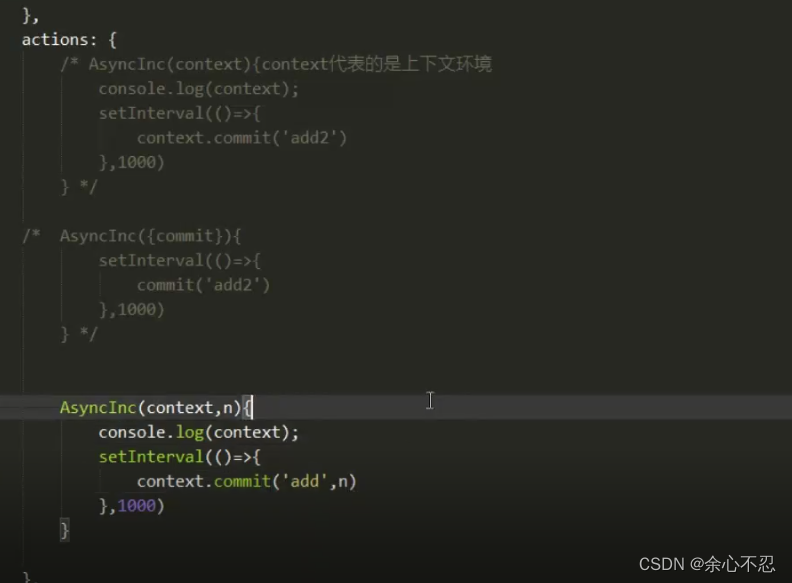
传参数与不传的区别在AsyncInc中第二个参数就是传递的参数。
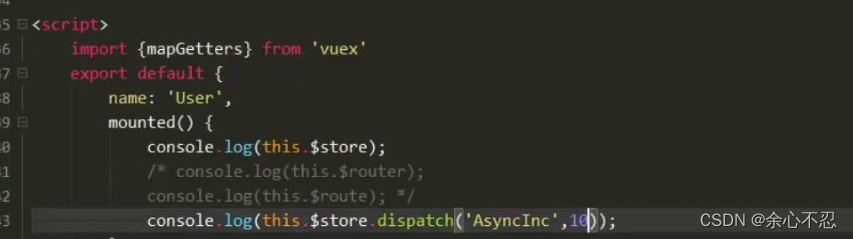
这里是调用了actions里的方法,并进行了传参,这里不用打印也可行
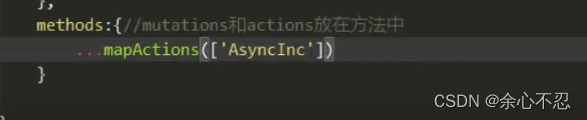
辅助函数方法
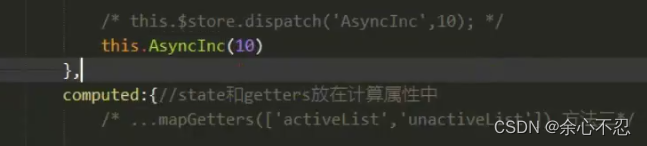
mutations和action放在方法中,使用辅助函数,需要在import中先加入后在直接使用,要在methods中使用
还需要在生命周期总调用,传参
modules模块
暂时一种方法
在store文件夹中设置一个modules文件夹,在之后创建一个js文件,对应文件夹对应不同的页面显示
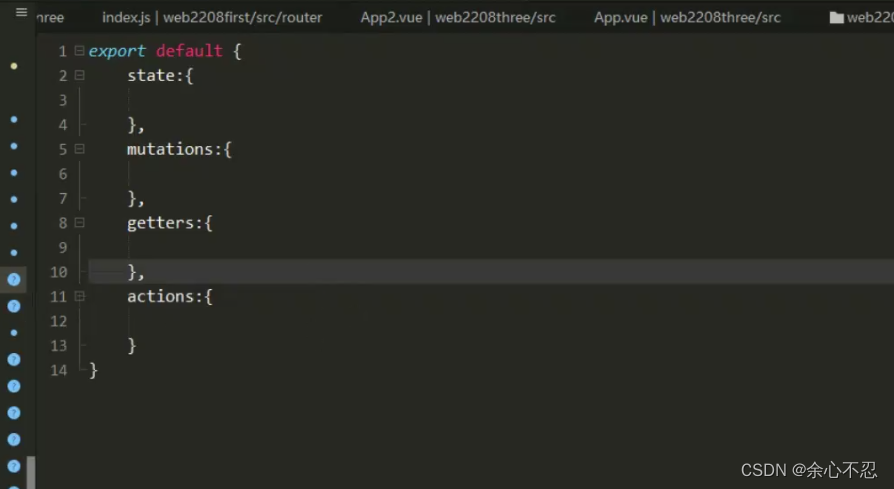
并在store中的index.js中引入该文件,可以将之前写的其他内容全部删除,指保留一个modules,里面是创建的文件引入的名字。
最后在export default store导出。
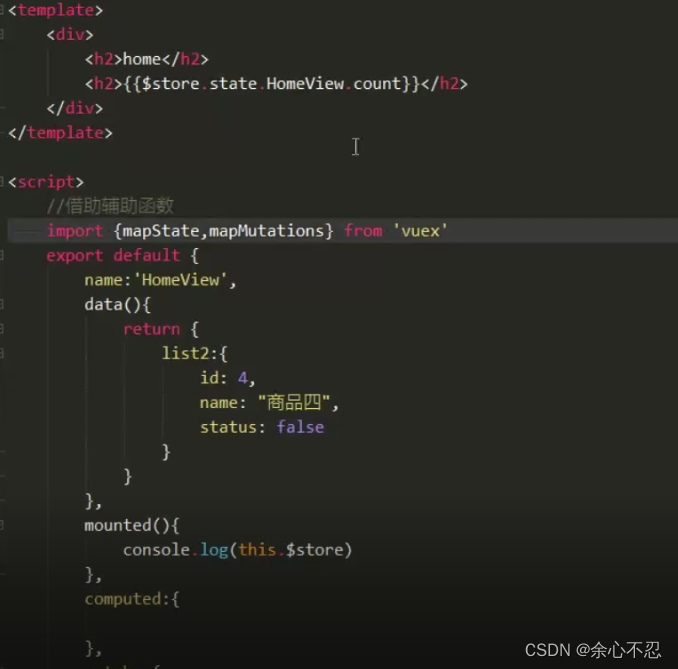
这个时候的调用就不能直接通过$store,还要加上Home View(文件名)。
辅助函数的写法同样改变,不能直接使用辅助函数的格式来调用

但是对于mutations和getters都不影响。





 扫一扫
扫一扫


 5626
5626


 被折叠的 条评论
为什么被折叠?
被折叠的 条评论
为什么被折叠?
 到【灌水乐园】发言




