package cn.bigdata.mapperReducer;
import org.apache.hadoop.conf.Configuration;
import org.apache.hadoop.conf.Configured;
import org.apache.hadoop.fs.*;
import org.apache.hadoop.io.IntWritable;
import org.apache.hadoop.io.Text;
import org.apache.hadoop.mapreduce.Job;
import org.apache.hadoop.mapreduce.lib.input.FileInputFormat;
import org.apache.hadoop.mapreduce.lib.output.FileOutputFormat;
import org.apache.hadoop.util.Tool;
import org.apache.hadoop.util.ToolRunner;
import java.io.BufferedReader;
import java.io.InputStreamReader;
import java.net.URI;
import java.util.*;
public class MultiAnalysisDriver extends Configured implements Tool {
private Map<String, Integer> resultCache = new HashMap<>();
private Map<String, Integer> funnelData = new HashMap<>();
private String repeat(char c, int times) {
StringBuilder sb = new StringBuilder();
for (int i = 0; i < times; i++) sb.append(c);
return sb.toString();
}
@Override
public int run(String[] args) throws Exception {
Configuration conf = getConf();
URI uri = URI.create("hdfs://hadoop01:8020"); // 修改为你自己的HDFS地址
FileSystem fs = FileSystem.get(uri, conf);
Path inputPath = new Path("/user/hive/ecom/ecom_log.1765779320119.log");
Path tempDir = new Path("/temp/multi_analysis");
Path reportOutput = new Path("/report/_final_analysis_report.txt");
if (fs.exists(tempDir)) fs.delete(tempDir, true);
if (fs.exists(reportOutput)) fs.delete(reportOutput, false);
// 执行五项任务
executeJob(fs, conf, inputPath, tempDir, "user_activity", UserActivityMapper.class, "活跃度_");
executeJob(fs, conf, inputPath, tempDir, "region", RegionBehaviorMapper.class, "地域_");
executeJob(fs, conf, inputPath, tempDir, "time_trend", TimeTrendMapper.class, "时段_");
executeJob(fs, conf, inputPath, tempDir, "device", DeviceBehaviorMapper.class, "设备_");
executeJob(fs, conf, inputPath, tempDir, "city_pay", CityPayMapper.class, "城市支付_");
// 输出并写入 HDFS
printFinalReport(fs, reportOutput);
// 清理临时目录
fs.delete(tempDir, true);
return 0;
}
private <T extends org.apache.hadoop.mapreduce.Mapper> void executeJob(
FileSystem fs, Configuration conf, Path input, Path tempDir,
String jobName, Class<T> mapperClass, String prefix) throws Exception {
Job job = Job.getInstance(conf, jobName);
job.setJarByClass(MultiAnalysisDriver.class);
job.setMapperClass(mapperClass);
job.setReducerClass(SumReducer.class);
job.setOutputKeyClass(Text.class);
job.setOutputValueClass(IntWritable.class);
FileInputFormat.addInputPath(job, input);
Path outputPath = new Path(tempDir, jobName);
FileOutputFormat.setOutputPath(job, outputPath);
if (fs.exists(outputPath)) fs.delete(outputPath, true);
boolean success = job.waitForCompletion(true);
if (success) {
readResultToCache(fs, outputPath, prefix);
} else {
System.err.println("❌ Job failed: " + jobName);
}
}
private void readResultToCache(FileSystem fs, Path path, String prefix) throws Exception {
RemoteIterator<LocatedFileStatus> it = fs.listFiles(path, false);
while (it.hasNext()) {
LocatedFileStatus file = it.next();
if (file.getPath().getName().startsWith("part-r-")) {
BufferedReader br = new BufferedReader(
new InputStreamReader(fs.open(file.getPath()))
);
String line;
while ((line = br.readLine()) != null) {
String[] parts = line.split("\t");
if (parts.length == 2) {
try {
String key = parts[0];
int value = Integer.parseInt(parts[1]);
resultCache.put(key, value);
// 提取漏斗数据
if (key.endsWith("_view")) {
funnelData.merge("view", value, Integer::sum);
} else if (key.endsWith("_click")) {
funnelData.merge("click", value, Integer::sum);
} else if (key.endsWith("_cart")) {
funnelData.merge("cart", value, Integer::sum);
} else if (key.endsWith("_order")) {
funnelData.merge("order", value, Integer::sum);
} else if (key.endsWith("_pay")) {
funnelData.merge("pay", value, Integer::sum);
}
} catch (NumberFormatException ignored) {}
}
}
br.close();
}
}
}
private void printFinalReport(FileSystem fs, Path outputPath) throws Exception {
StringBuilder report = new StringBuilder();
report.append(repeat('=', 50)).append("\n");
report.append(" 用户行为多维分析报告\n");
report.append(repeat('=', 50)).append("\n\n");
// Top5 活跃用户(按 view 行为)
report.append("🔥 最活跃用户Top5 (浏览行为):\n");
resultCache.entrySet().stream()
.filter(e -> e.getKey().startsWith("活跃度_") && e.getKey().endsWith("_view"))
.sorted(Map.Entry.<String, Integer>comparingByValue().reversed())
.limit(5)
.forEach(e -> {
String userId = e.getKey().split("_")[1];
report.append(String.format(" %s: %d次\n", userId, e.getValue()));
});
// 地域 Top5
report.append("\n🌐 各省行为总量Top5:\n");
resultCache.entrySet().stream()
.filter(e -> e.getKey().startsWith("地域_"))
.sorted(Map.Entry.<String, Integer>comparingByValue().reversed())
.limit(5)
.forEach(e -> report.append(String.format(" %s: %d次\n",
e.getKey().replace("地域_", ""), e.getValue())));
// 时间趋势 Top5
report.append("\n⏰ 行为高峰时段Top5:\n");
resultCache.entrySet().stream()
.filter(e -> e.getKey().startsWith("时段_"))
.sorted(Map.Entry.<String, Integer>comparingByValue().reversed())
.limit(5)
.forEach(e -> report.append(String.format(" %s: %d次\n",
e.getKey().replace("时段_", ""), e.getValue())));
// 设备偏好
report.append("\n📱 设备偏好:\n");
resultCache.entrySet().stream()
.filter(e -> e.getKey().startsWith("设备_"))
.forEach(e -> report.append(String.format(" %s: %d次\n",
e.getKey().replace("设备_", ""), e.getValue())));
// 城市支付 Top5
report.append("\n🏙️ 支付人数最多城市Top5:\n");
resultCache.entrySet().stream()
.filter(e -> e.getKey().startsWith("城市支付_"))
.sorted(Map.Entry.<String, Integer>comparingByValue().reversed())
.limit(5)
.forEach(e -> report.append(String.format(" %s: %d人\n",
e.getKey().replace("城市支付_", ""), e.getValue())));
// 漏斗转化率
report.append("\n🔁 行为漏斗转化率:\n");
int view = Math.max(funnelData.getOrDefault("view", 0), 1);
int click = funnelData.getOrDefault("click", 0);
int cart = funnelData.getOrDefault("cart", 0);
int order = funnelData.getOrDefault("order", 0);
int pay = funnelData.getOrDefault("pay", 0);
report.append(String.format(" 浏览 → 点击: %.2f%% (%d/%d)\n", (double) click / view * 100, click, view));
report.append(String.format(" 浏览 → 加购: %.2f%% (%d/%d)\n", (double) cart / view * 100, cart, view));
report.append(String.format(" 浏览 → 下单: %.2f%% (%d/%d)\n", (double) order / view * 100, order, view));
report.append(String.format(" 浏览 → 支付: %.2f%% (%d/%d)\n", (double) pay / view * 100, pay, view));
// ✅ 写入 HDFS
FSDataOutputStream out = fs.create(outputPath, true);
out.writeUTF(report.toString());
out.close();
// ✅ 输出到控制台
System.out.println(report.toString());
}
public static void main(String[] args) throws Exception {
int exitCode = ToolRunner.run(new Configuration(), new MultiAnalysisDriver(), args);
System.exit(exitCode);
}
}
在这个基础上修改



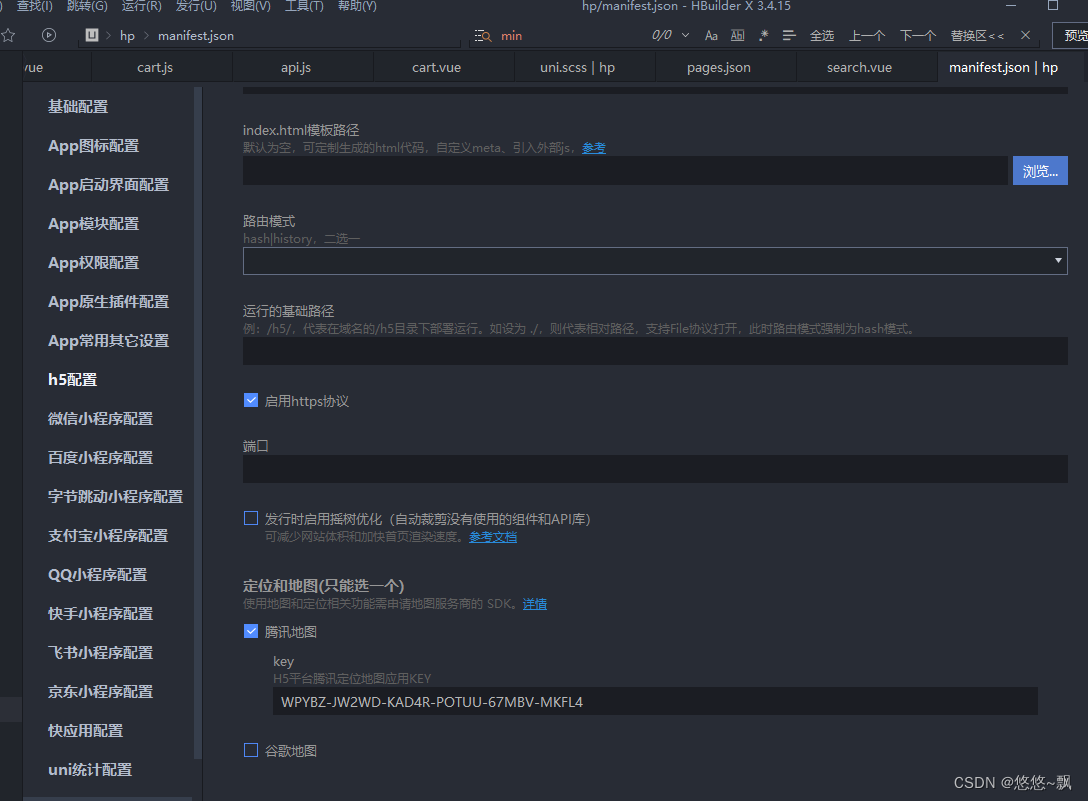
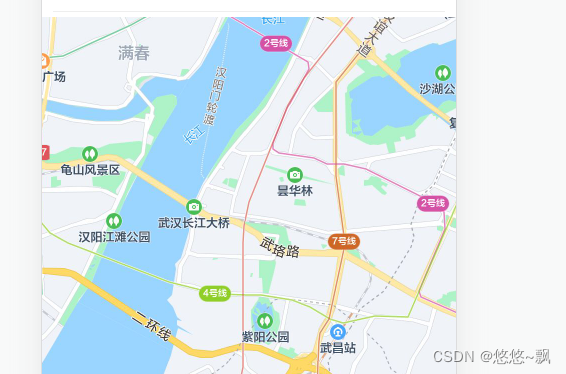
 本文讲述了如何在uniapp项目中配置内置地图组件,解决'Mapkeynotconfigured'错误,包括在manifest.json文件中添加腾讯地图API key的过程,并展示了配置后的使用效果。

 被折叠的 条评论
为什么被折叠?
被折叠的 条评论
为什么被折叠?
 到【灌水乐园】发言








 扫一扫
扫一扫


 3236
3236


