


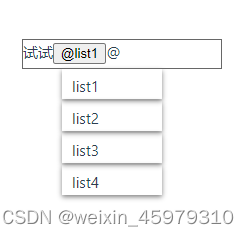
vue
<template>
  <div class="container">
    <div class="text" ref="input" :contenteditable="!flag" />
    <ul class="boxs" v-show="flag">
      <li
        class="box"
        v-for="(item, index) in list"
        :key="index"
        @click="acitveHandle(item)"
      >
        {{ item }}
      </li>
    </ul>
  </div>
</template>

<script setup lang="ts">
import { ref, onMounted } from 'vue'

const input = ref(null)
const flag = ref(false)
const list = ['list1', 'list2', 'list3', 'list4']

onMounted(() => {
  input.value?.addEventListener('input', ({ data, target}) => {
    flag.value = data === '@'
  })
})

const acitveHandle = (item) => {
  flag.value = false
  const str = input.value.innerHTML.slice(0, -1)
  input.value.innerHTML = str + `<button contenteditable="false" οnclick="return false">@${item}</button>`
}

</script>

<style lang="scss" scoped>
ul,
li {
  list-style: none;
}
a {
  text-decoration: none;
  color: #676767;
}
.container {
  position: relative;
  .text {
    width: 200px;
    height: 30px;
    position: absolute;
    border: 1px solid #676767;
  }
  .boxs {
    position: absolute;
    top: 30px;
    left: 0px;
    background-color: rgba(255, 255, 255, 0.1);
    .box {
      height: 30px;
      width: 100px;
      box-shadow: 0 2px 5px gray;
      cursor: pointer;
      padding: 5px 10px;
      margin-bottom: 2px;
    }
  }
}
</style>
react
const [flag, setFlag] = useState(false)
const inputRef = useRef(null)
const list = ['list1', 'list2', 'list3', 'list4']

function render() {

  const aciveHandle = (text) => {
    setFlag(false)
    const str = inputRef.current.innerHTML.slice(0, -1)
    innerHTML.current = str + `<button contenteditable="false" οnclick="return false">@${text}</button>`
  }

  return (
    <div class="container">
      <div
        class="text"
        ref={ref => {
          inputRef.current = ref
        }}
        contenteditable={flag ? 'false' : 'true'}
      />
      {
        flag && (
          <ul class="boxs">
            {
              list.map(it => {
                return (
                  <li class="box" onClick={() => aciveHandle(it)}>{it}</li>
                )
              })
            }
          </ul>
        )
      }
    </div>
  );
}





 扫一扫
扫一扫


 1859
1859

 被折叠的 条评论
为什么被折叠?
被折叠的 条评论
为什么被折叠?
 到【灌水乐园】发言





