


 本文介绍如何在HTML中通过百度地图API实现自定义标注并配置图文信息窗口,包括地图初始化、标记添加、点击事件及图文展示。
在index.html引入,
在需要使用的地方
<div class="maps" id="maps"></div>
配置方法:
    //初始化百度地图,并添加自定义标注
    initMap() {
      const _this = this;
      this.mineMap = new BMapGL.Map("maps");    // 实例化id为maps的元素
      this.mineMap.enableScrollWheelZoom(true); // 启用鼠标滚轮缩放
      let center = new BMapGL.Point(xx, xx); // 设置地图中心点
      this.mineMap.centerAndZoom(center, 16);   // 默认缩放等级
      let markerIcon = new BMapGL.Icon(this.img, new BMapGL.Size(45, 61), {   // 添加图标
        offset: new BMapGL.Size(18, 42), // 图标中央下端的尖角位置
      });
      let markerPoint = new BMapGL.Point(xx, xx);  // 图标中心点
      let marker = new BMapGL.Marker(markerPoint, { icon: markerIcon });
      this.mineMap.addOverlay(marker);
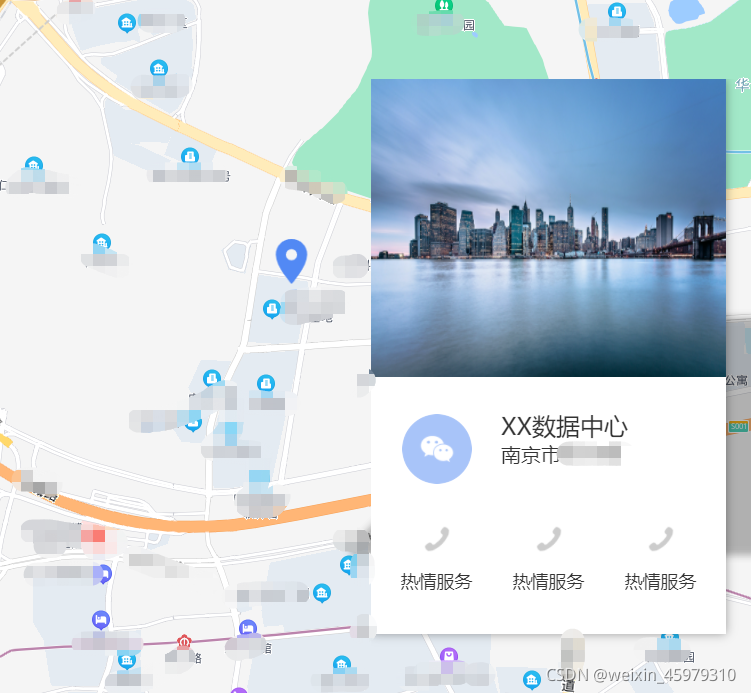
      //添加图文信息窗口
      let str =
        '<div class="company"><img src="./static/007.jpg" alt="" /><div class="tit"><img src="./static/wx.png" alt="" /><div class="names"><span>XX数据中心</span><div>南京市</div></div></div><div class="link"><div id="serve_1"><img src="./static/phone_1.png" alt="" /><span>热情服务</span></div><div id="serve_2"><img src="./static/phone_1.png" alt="" /><span>热情服务</span></div><div id="serve_3"><img src="./static/phone_1.png" alt="" /><span>热情服务</span></div></div></div>';
      var infoWindow = new BMapGL.InfoWindow(str, {
        offset: new BMapGL.Size(250, 300), // 图标中央下端的尖角位置
      });
      marker.openInfoWindow(infoWindow);
      setTimeout(() => {
        this.addClick();
      }, 1000);
      // marker添加点击事件
      marker.addEventListener("click", function() {
        this.openInfoWindow(infoWindow);
        setTimeout(() => {
          _this.addClick();
        }, 1000);
      });
    },
    //为信息窗口里的元素添加事件,每次关闭后再开启需要重新绑定事件
    addClick() {
      let serve_1 = document.getElementById("serve_1");
      serve_1.onclick = () => {
        console.log("serve_1");
      };
      let serve_2 = document.getElementById("serve_2");
      serve_2.onclick = () => {
        console.log("serve_2");
      };
      let serve_3 = document.getElementById("serve_3");
      serve_3.onclick = () => {
        console.log("serve_3");
      };
    },





 扫一扫
扫一扫


 4057
4057

 被折叠的 条评论
为什么被折叠?
被折叠的 条评论
为什么被折叠?
 到【灌水乐园】发言





