


 本文介绍了AspectJ如何实现AOP,相较于Spring的AOP,AspectJ更简单且支持注解开发。AspectJ提供了五种通知类型:前置、后置、环绕、异常和最终通知。同时,文章详细阐述了AspectJ的切入点表达式、开发环境配置以及基于注解的AOP实现步骤,包括定义接口、切面类、目标对象和测试。最后,讲解了各种通知类型的使用,如@Before、@AfterReturning、@Around等。
引言
1.对于AOP编程思想,很多框架都进行了实现,Spring就是其中之一,可以完成面向切面编程。然后,AspectJ也实现了AOP的功能。并且实现的更加简单、方便,并且还支持注解式开发。所以,spring又将AspectJ的对于AOP的实现也引入到了自己的框架中。
2.在Spring中使用AOP开发的时候,一般使用AspectJ的实现方式。
3.AspectJ是一个优秀的面向切面的框架,它扩展了java语言,提供了强大的切面实现,它是Eclipse的一个开源项目。
2.AspectJ的通知类型
AspectJ中常用的通知有五种类型:
1.前置通知@Before
2.后置通知@AfterReturning
3.环绕通知@Arround
4.异常通知@After Throwing
5.最终通知@After
3.AspectJ的切入点表达式


3.准备AspectJ的开发环境
1.加入Maven依赖
```xml

<?xml version="1.0" encoding="UTF-8"?>

<project xmlns="http://maven.apache.org/POM/4.0.0" xmlns:xsi="http://www.w3.org/2001/XMLSchema-instance"
  xsi:schemaLocation="http://maven.apache.org/POM/4.0.0 http://maven.apache.org/xsd/maven-4.0.0.xsd">
  <modelVersion>4.0.0</modelVersion>

  <groupId>com.bjpowernode</groupId>
  <artifactId>ch06-aop-aspectj</artifactId>
  <version>1.0-SNAPSHOT</version>


  <properties>
    <project.build.sourceEncoding>UTF-8</project.build.sourceEncoding>
    <maven.compiler.source>1.8</maven.compiler.source>
    <maven.compiler.target>1.8</maven.compiler.target>
  </properties>

  <dependencies>
    <dependency>
      <groupId>junit</groupId>
      <artifactId>junit</artifactId>
      <version>4.11</version>
      <scope>test</scope>
    </dependency>

    <!--spring依赖-->
    <dependency>
      <groupId>org.springframework</groupId>
      <artifactId>spring-context</artifactId>
      <version>5.2.5.RELEASE</version>
    </dependency>
    <!--aspectj依赖-->
    <dependency>
      <groupId>org.springframework</groupId>
      <artifactId>spring-aspects</artifactId>
      <version>5.2.5.RELEASE</version>
    </dependency>

    <dependency>
      <groupId>org.mybatis</groupId>
      <artifactId>mybatis</artifactId>
      <version>3.5.1</version>
    </dependency>

  </dependencies>

  <build>
    <plugins>
      <plugin>
        <artifactId>maven-compiler-plugin</artifactId>
        <version>3.1</version>
        <configuration>
          <source>1.8</source>
          <target>1.8</target>
        </configuration>
      </plugin>
    </plugins>
  </build>
</project>
2.引入AspectJ依赖

4.AspectJ基于注解的AOP实现
实现步骤
a.定义业务接口和实现类
public interface SomeService {
    void doSome(String name,Integer age);
}
//目标类  厂家
public class SomeServiceImpl implements SomeService {
    @Override
    public void doSome(String name,Integer age) {
        //给doSome方法增加一个功能,在doSome()执行之前, 输出方法的执行时间
        System.out.println("====目标方法doSome()====");
    }

    public void doOther(String name,Integer age) {
        //给doSome方法增加一个功能,在doSome()执行之前, 输出方法的执行时间
        System.out.println("====目标方法doSome()====");
    }
}
b.定义切面类
import org.aspectj.lang.JoinPoint;
import org.aspectj.lang.annotation.Aspect;
import org.aspectj.lang.annotation.Before;

import java.util.Date;

/**
 *  @Aspect : 是aspectj框架中的注解。
 *     作用:表示当前类是切面类。
 *     切面类:是用来给业务方法增加功能的类,在这个类中有切面的功能代码
 *     位置:在类定义的上面
 */
@Aspect
public class MyAspect {
    /**
     * 定义方法,方法是实现切面功能的。
     * 方法的定义要求:
     * 1.公共方法 public
     * 2.方法没有返回值
     * 3.方法名称自定义
     * 4.方法可以有参数,也可以没有参数。
     *   如果有参数,参数不是自定义的,有几个特殊参数类型可以使用。
     */


    /**
     * @Before: 前置通知注解
     *   属性:value ,是切入点表达式,表示切面的功能执行的位置。
     *   位置:在方法的上面
     * 特点:
     *  1.在目标方法之前先执行的
     *  2.不会改变目标方法的执行结果
     *  3.不会影响目标方法的执行。
     */


    @Before(value = "" +
            "execution(" +
            "public void com.bjpowernode.ba01.SomeServiceImpl.doSome(String,Integer))" +
            "")
    public void myBefore(){
        //就是你目标类要增加的功能代码
        System.out.println("前置通知, 切面功能:在目标方法之前输出执行时间:"+ new Date());
    }


    /*@Before(value = "execution(void com.bjpowernode.ba01.SomeServiceImpl.doSome(String,Integer))")
    public void myBefore(){
        //就是你切面要执行的功能代码
        System.out.println("1=====前置通知, 切面功能:在目标方法之前输出执行时间:"+ new Date());
    }*/

  /*  @Before(value = "execution(void *..SomeServiceImpl.doSome(String,Integer))")
    public void myBefore(){
        //就是你切面要执行的功能代码
        System.out.println("2=====前置通知, 切面功能:在目标方法之前输出执行时间:"+ new Date());
    }*/

    /*@Before(value = "execution(* *..SomeServiceImpl.*(..))")
    public void myBefore(){
        //就是你切面要执行的功能代码
        System.out.println("3=====前置通知, 切面功能:在目标方法之前输出执行时间:"+ new Date());
    }*/

    /*@Before(value = "execution(* do*(..))")
    public void myBefore2(){
        //就是你切面要执行的功能代码
        System.out.println("4=====前置通知, 切面功能:在目标方法之前输出执行时间:"+ new Date());
    }*/


    /*@Before(value = "execution(* com.bjpowernode.ba01.*ServiceImpl.*(..))")
    public void myBefore2(){
        //就是你切面要执行的功能代码
        System.out.println("2=====前置通知, 切面功能:在目标方法之前输出执行时间:"+ new Date());
    }*/


    /**
     * 指定通知方法中的参数 : JoinPoint
     * JoinPoint:业务方法,要加入切面功能的业务方法
     *    作用是:可以在通知方法中获取方法执行时的信息, 例如方法名称,方法的实参。
     *    如果你的切面功能中需要用到方法的信息,就加入JoinPoint.
     *    这个JoinPoint参数的值是由框架赋予, 必须是第一个位置的参数
     */
    @Before(value = "execution(void *..SomeServiceImpl.doSome(String,Integer))")
    public void myBefore(JoinPoint jp){  //下面就是切面要执行的功能
        //获取方法的完整定义

        System.out.println("方法的签名(定义)="+jp.getSignature());
        System.out.println("方法的名称="+jp.getSignature().getName());
        //获取方法的实参
        Object args [] = jp.getArgs();
        for (Object arg:args){
            System.out.println("参数="+arg);
        }
        //就是你切面要执行的功能代码
        System.out.println("2=====前置通知, 切面功能:在目标方法之前输出执行时间:"+ new Date());
    }
}
c. 声明目标对和目标类对象
<?xml version="1.0" encoding="UTF-8"?>
<beans xmlns="http://www.springframework.org/schema/beans"
       xmlns:xsi="http://www.w3.org/2001/XMLSchema-instance"
       xmlns:aop="http://www.springframework.org/schema/aop"
       xsi:schemaLocation="http://www.springframework.org/schema/beans
       http://www.springframework.org/schema/beans/spring-beans.xsd
       http://www.springframework.org/schema/aop
       https://www.springframework.org/schema/aop/spring-aop.xsd">

    <!--把对象交给spring容器,由spring容器统一创建,管理对象-->
    <!--声明目标对象-->
    <bean id="someService" class="com.bjpowernode.ba01.SomeServiceImpl" />

    <!--声明切面类对象-->
    <bean id="myAspect" class="com.bjpowernode.ba01.MyAspect" />

    <!--声明自动代理生成器:使用aspectj框架内部的功能,创建目标对象的代理对象。
        创建代理对象是在内存中实现的, 修改目标对象的内存中的结构。 创建为代理对象
        所以目标对象就是被修改后的代理对象.

        aspectj-autoproxy:会把spring容器中的所有的目标对象,一次性都生成代理对象。
    -->
    <aop:aspectj-autoproxy />


    <!--
    有接口也想用cjlib实现动态代理:

       如果你期望目标类有接口,使用cglib代理
       proxy-target-class="true":告诉框架,要使用cglib动态代理
    -->
<!--    <aop:aspectj-autoproxy proxy-target-class="true"/>-->
</beans>
d.测试类中使用目标对象的id(测试前置通知@Before)
import com.bjpowernode.ba01.SomeService;
import org.junit.Test;
import org.springframework.context.ApplicationContext;
import org.springframework.context.support.ClassPathXmlApplicationContext;

public class MyTest01 {

    @Test
    public void test01(){
        String config="applicationContext.xml";
        ApplicationContext ctx = new ClassPathXmlApplicationContext(config);
        //从容器中获取目标对象
        SomeService proxy = (SomeService) ctx.getBean("someService");

        //com.sun.proxy.$Proxy8 :jdk动态代理
        //com.sun.proxy.$Proxy0
        System.out.println("proxy:"+proxy.getClass().getName());
        //通过代理的对象执行方法,实现目标方法执行时,增强了功能

        proxy.doSome("lisi",20);
    }
}
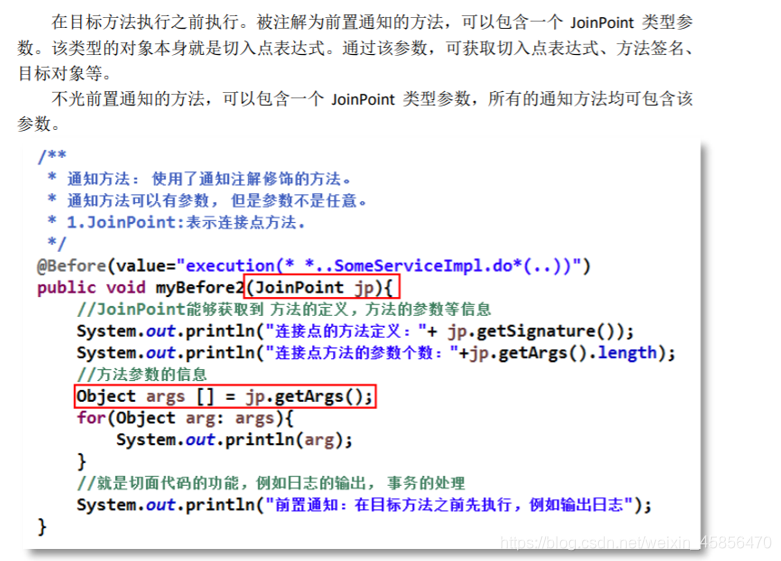
5.@Before前置通知-参数JoinPoint
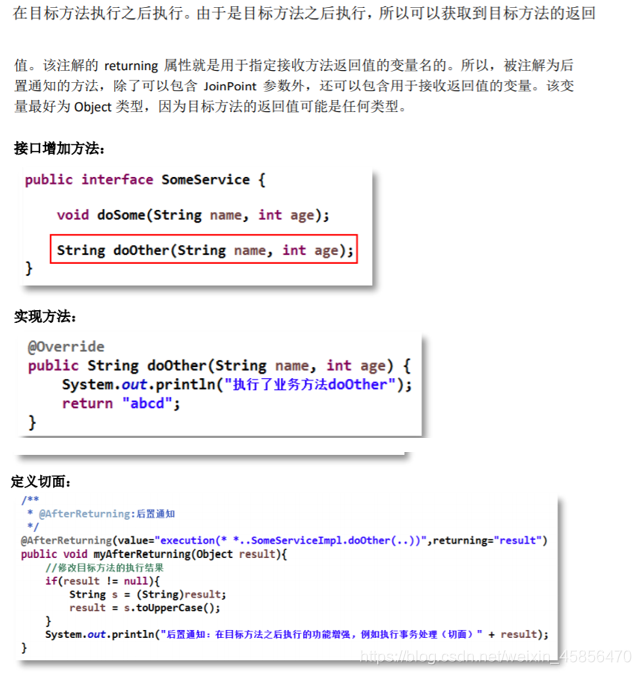
6.@AfterReturning后置通知-returning属性
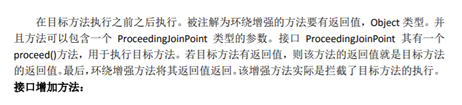
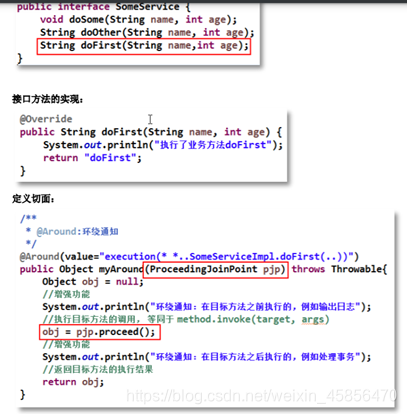
7.@Around环绕通知- ProceedingJoinPoint 参数
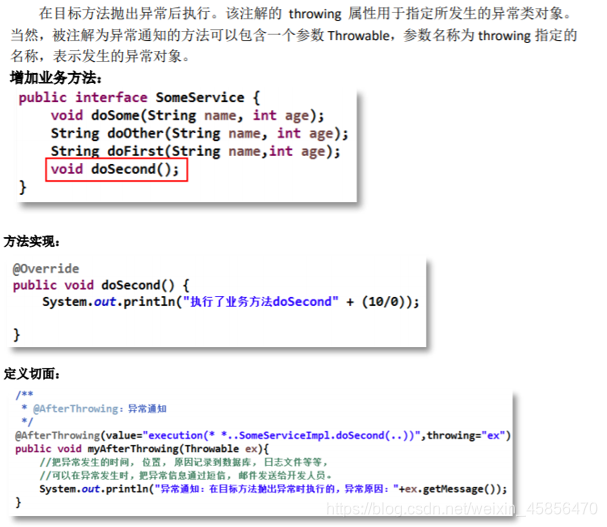
8.AfterThrowing异常通知-throwing属性
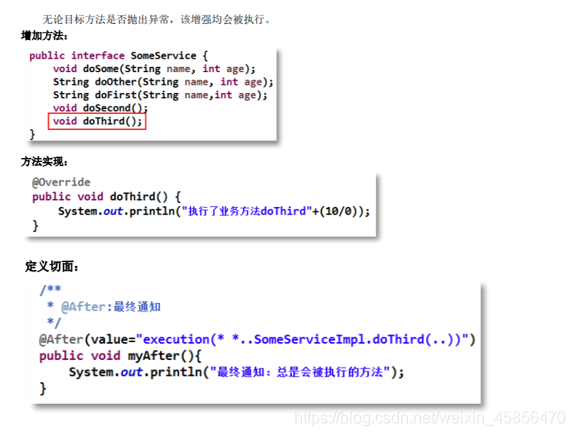
9.@After最终通知
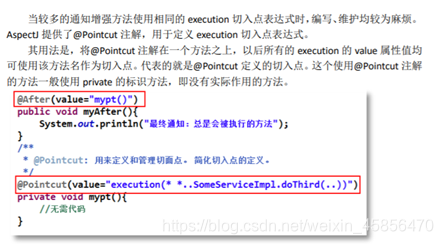
10.@Pointcut定义切入点





 扫一扫
扫一扫


 4769
4769

 被折叠的 条评论
为什么被折叠?
被折叠的 条评论
为什么被折叠?
 到【灌水乐园】发言





