


各位道友好!在下江西软件学院大三码农,江湖人称"Word图片驯兽师",最近在搞UEditor的降龙十八掌——Word一键转存+公式渲染+多格式导入三连击!现将毕生绝学(其实就两周成果)倾囊相授,附赠价值99元的"白嫖攻略"!
一、技术选型篇(穷鬼の智慧)
- 前端:Vue3 + UEditor(百度开源版,别问,问就是免费)
- 后端:PHP 7.4(阿里云ECS学生机跑得飞起)
- 存储:阿里云OSS(学生套餐9.9元/月,真香)
- 公式渲染:MathJax + MathML(开源免费,比某付费库香多了)
- 群友福利:QQ群223813913(加群领红包,内推工作,代理分成,躺着赚钱)
二、前端改造实录(Vue3魔改UEditor)
// src/components/UEditorPlus.vue


import { onMounted, ref } from 'vue'
import '../../../public/ueditor/ueditor.config.js'
import '../../../public/ueditor/ueditor.all.min.js'

const editorId = ref('editor-' + Math.random().toString(36).substr(2))
let ueEditor = null

onMounted(() => {
  ueEditor = UE.getEditor(editorId.value, {
    serverUrl: '/api/ueditor/upload', // 后端接口
    toolbars: [
      // 新增Word导入按钮(需要后端配合)
      ['importword', 'formula']
    ],
    // 公式渲染配置
    formulaConfig: {
      mathml: true,
      latex: true
    }
  })
})

// Word导入核心逻辑(前端粘贴监听)
const importWord = () => {
  const clipboardData = window.clipboardData || event.clipboardData
  if (clipboardData && clipboardData.types.includes('Files')) {
    const file = clipboardData.files[0]
    if (file.name.match(/\.(docx|doc)$/i)) {
      const formData = new FormData()
      formData.append('file', file)

      fetch('/api/word/parse', {
        method: 'POST',
        body: formData
      }).then(res => res.json())
        .then(data => {
          ueEditor.setContent(data.html) // 插入解析后的HTML
          // 特殊处理公式(替换为MathML)
          const formulas = data.formulas || []
          formulas.forEach(formula => {
            ueEditor.execCommand('inserthtml',
              `<math xmlns="http://www.w3.org/1998/Math/MathML">${formula.mathml}</math>`)
          })
        })
    }
  }
}
三、后端PHP暴风实现(99元预算版)
// api/WordParser.php
class WordParser {
    private $ossClient;

    public function __construct() {
        // 阿里云OSS初始化(配置省略,群文件有完整版)
        $this->ossClient = new OSS\OssClient(
            'yourAccessKeyId',
            'yourAccessKeySecret',
            'your-bucket'
        );
    }

    // Word解析核心方法(使用PHPWord库)
    public function parseWord($file) {
        require_once 'PHPWord/autoload.php'; // 群文件提供免费版

        $phpWord = \PhpOffice\PhpWord\IOFactory::load($file);
        $html = '';
        $formulas = [];

        // 遍历所有段落(简化版,实际需要处理表格/图片等)
        foreach ($phpWord->getSections() as $section) {
            foreach ($section->getElementss() as $element) {
                if (method_exists($element, 'getElementss')) {
                    // 处理公式(假设用特定样式标记)
                    if ($element instanceof \PhpOffice\PhpWord\Element\TextRun) {
                        foreach ($element->getElementss() as $text) {
                            if ($text instanceof \PhpOffice\PhpWord\Element\Text) {
                                if (preg_match('/\\$\\$(.*?)\\$\\$/', $text->getText(), $matches)) {
                                    // 简单Latex转MathML(实际需要更复杂处理)
                                    $mathml = $this->latexToMathML($matches[1]);
                                    $formulas[] = ['latex' => $matches[1], 'mathml' => $mathml];
                                    $html .= ''.$mathml.'';
                                } else {
                                    $html .= htmlspecialchars($text->getText());
                                }
                            }
                        }
                    }
                }
            }
        }

        // 处理图片(上传到OSS)
        $zip = new \PhpOffice\PhpWord\Shared\ZipArchive($file);
        if ($zip->open($file) === true) {
            for ($i = 0; $i < $zip->numFiles; $i++) {
                $filename = $zip->getNameIndex($i);
                if (preg_match('/word\/media\/(.*?)/', $filename)) {
                    $imageData = $zip->getFromIndex($i);
                    $ossPath = 'word_images/'.uniqid().'.'.pathinfo($filename, PATHINFO_EXTENSION);
                    $this->ossClient->putObject('your-bucket', $ossPath, $imageData);
                    $html = str_replace($filename, $this->ossClient->getObjectUrl('your-bucket', $ossPath), $html);
                }
            }
            $zip->close();
        }

        return [
            'html' => $html,
            'formulas' => $formulas
        ];
    }

    // 简单Latex转MathML(实际项目建议用专业库)
    private function latexToMathML($latex) {
        // 这里只是示例,实际需要完整转换逻辑
        $replacements = [
            '\\frac' => '',
            '\\sqrt' => ''
        ];
        return str_replace(array_keys($replacements), array_values($replacements), $latex);
    }
}
四、代理分成系统(躺着赚钱版)
// api/AgentSystem.php
class AgentSystem {
    private $db;

    public function __construct() {
        $this->db = new PDO('mysql:host=localhost;dbname=cms', 'root', '');
    }

    // 推荐奖励计算
    public function calculateCommission($orderAmount, $agentLevel) {
        $levels = [
            'bronze' => 0.2,
            'silver' => 0.3,
            'gold' => 0.5 // 黄金会员50%提成,刺激不?
        ];

        return $orderAmount * $levels[$agentLevel];
    }

    // 升级会员(群文件有完整后台)
    public function upgradeMember($userId, $newLevel) {
        $stmt = $this->db->prepare("UPDATE agents SET level = ? WHERE user_id = ?");
        $stmt->execute([$newLevel, $userId]);

        // 群发升级通知(用Swoole实现,群文件有教程)
        $this->sendNotification($userId, "恭喜升级为{$newLevel}会员,提成比例提升至50%!");
    }
}
五、部署指南(学生机优化版)
- 安装PHP扩展:
# CentOS/Ubuntu通用
sudo yum install php-zip php-xml php-gd  # CentOS
sudo apt install php-zip php-xml php-gd  # Ubuntu
- Nginx配置(重点优化大文件上传):
server {
    listen 80;
    server_name your-domain.com;

    client_max_body_size 50M;  # 支持大Word文件

    location /api/word/parse {
        fastcgi_pass unix:/var/run/php/php7.4-fpm.sock;
        include fastcgi_params;
    }
}
- 数据库优化(处理公式数据):
CREATE TABLE `word_documents` (
  `id` int(11) NOT NULL AUTO_INCREMENT,
  `content` longtext COMMENT '存储HTML+MathML混合内容',
  `formulas` json COMMENT '存储公式元数据',
  PRIMARY KEY (`id`)
) ENGINE=InnoDB DEFAULT CHARSET=utf8mb4;
六、终极薅羊毛攻略
-
加入QQ群223813913:
- 领1-99元红包
- 获取完整源码(含UEditor插件)
- 免费技术指导(直到你毕业)
-
代理分成计划:
- 青铜会员:20%提成
- 白银会员:30%提成
- 黄金会员:50%提成(群文件有升级攻略)
-
内推通道:
- 群内不定期发布内推岗位
- 简历优化服务(群主亲自指导)
【技术彩蛋】
在群文件"毕业设计急救包"中,已打包:
- 完整UEditor插件源码(支持Word/Excel/PPT导入)
- MathJax+MathML双引擎渲染方案
- 阿里云OSS上传组件(PHP版)
- 代理分成系统完整代码
- 毕业答辩PPT模板(含本项目演示)
现在加入还能参与"毕业设计急救计划",前50名免费获取价值199元的《CMS系统从入门到精通》视频教程!群主正在直播写代码,速来围观!
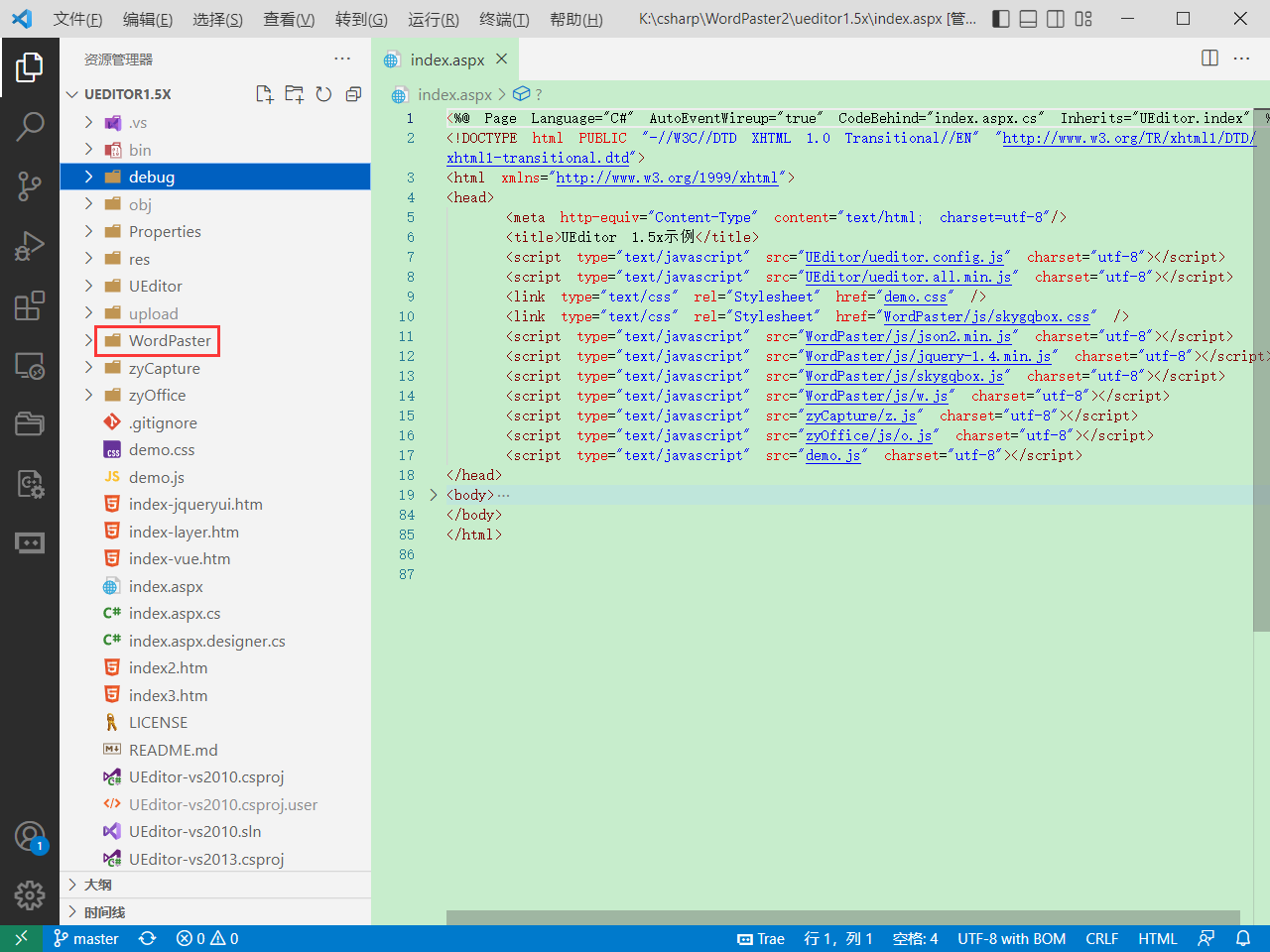
复制插件目录
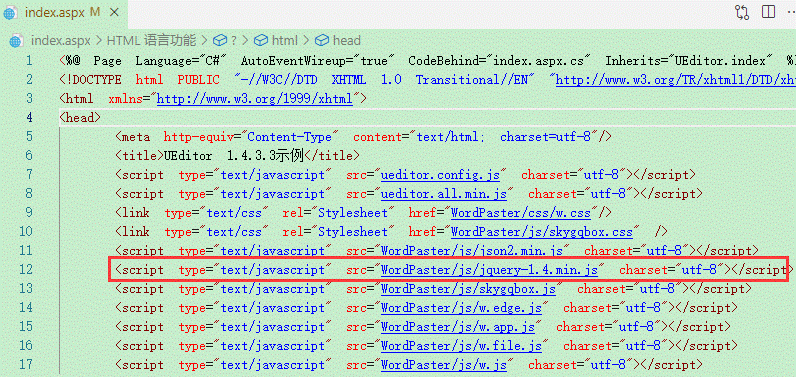
引入插件文件
UEditor 1.4.3.3示例
注意:不要重复引入jquery,如果您的项目已经引入了jq,则不用再引入jq-1.4
在工具栏中增加插件按钮
//工具栏上的所有的功能按钮和下拉框,可以在new编辑器的实例时选择自己需要的重新定义
    toolbars: [
      [
        "fullscreen",
        "source",
        "|",
        "zycapture",
        "|",
        "wordpaster","importwordtoimg","netpaster","wordimport","excelimport","pptimport","pdfimport",
        "|",
        "importword","exportword","importpdf"
      ]
    ]
初始化控件
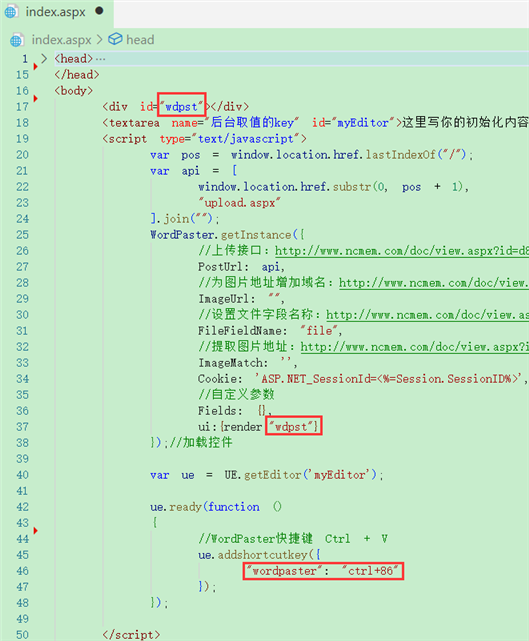
        var pos = window.location.href.lastIndexOf("/");
        var api = [
            window.location.href.substr(0, pos + 1),
            "asp/upload.asp"
        ].join("");
        WordPaster.getInstance({
			//上传接口:http://www.ncmem.com/doc/view.aspx?id=d88b60a2b0204af1ba62fa66288203ed
            PostUrl: api,
			//为图片地址增加域名:http://www.ncmem.com/doc/view.aspx?id=704cd302ebd346b486adf39cf4553936
            ImageUrl: "",
            //设置文件字段名称:http://www.ncmem.com/doc/view.aspx?id=c3ad06c2ae31454cb418ceb2b8da7c45
            FileFieldName: "file",
            //提取图片地址:http://www.ncmem.com/doc/view.aspx?id=07e3f323d22d4571ad213441ab8530d1
            ImageMatch: ''
        });//加载控件
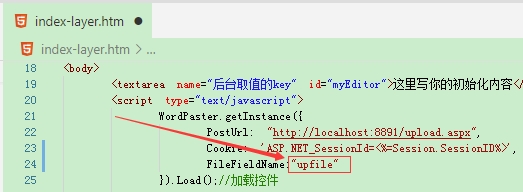
注意
如果接口字段名称不是file,请配置FileFieldName。ueditor接口中使用的upfile字段
点击查看详细教程
配置ImageMatch
匹配图片地址,如果服务器返回的是JSON则需要通过正则匹配
ImageMatch: '',
配置ImageUrl
为图片地址增加域名,如果服务器返回的图片地址是相对路径,可通过此属性添加自定义域名。
ImageUrl: "",
配置SESSION
如果接口有权限验证(登陆验证,SESSION验证),请配置COOKIE。或取消权限验证。
参考:http://www.ncmem.com/doc/view.aspx?id=8602DDBF62374D189725BF17367125F3
效果
编辑器界面
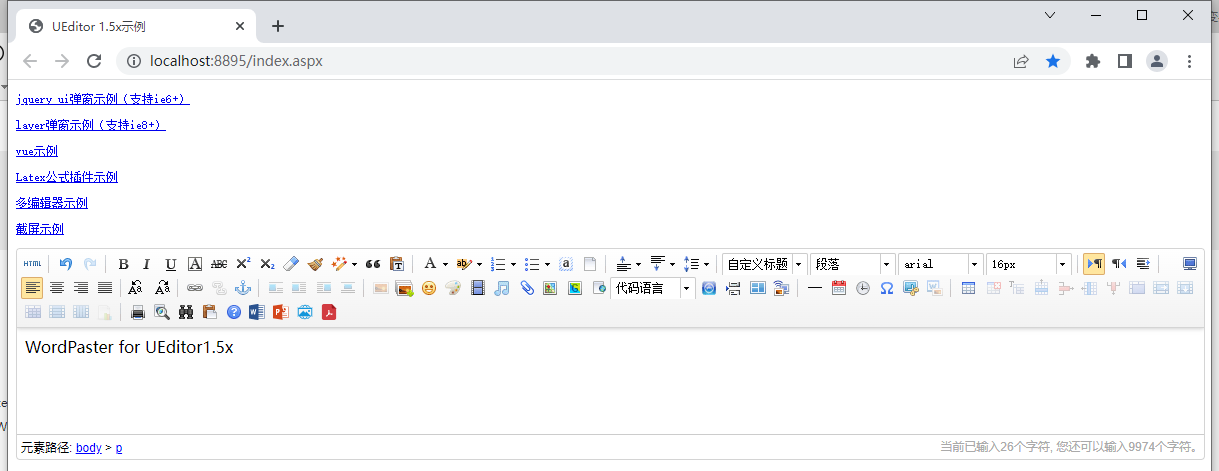
导入Word文档,支持doc,docx

导入Excel文档,支持xls,xlsx

粘贴Word
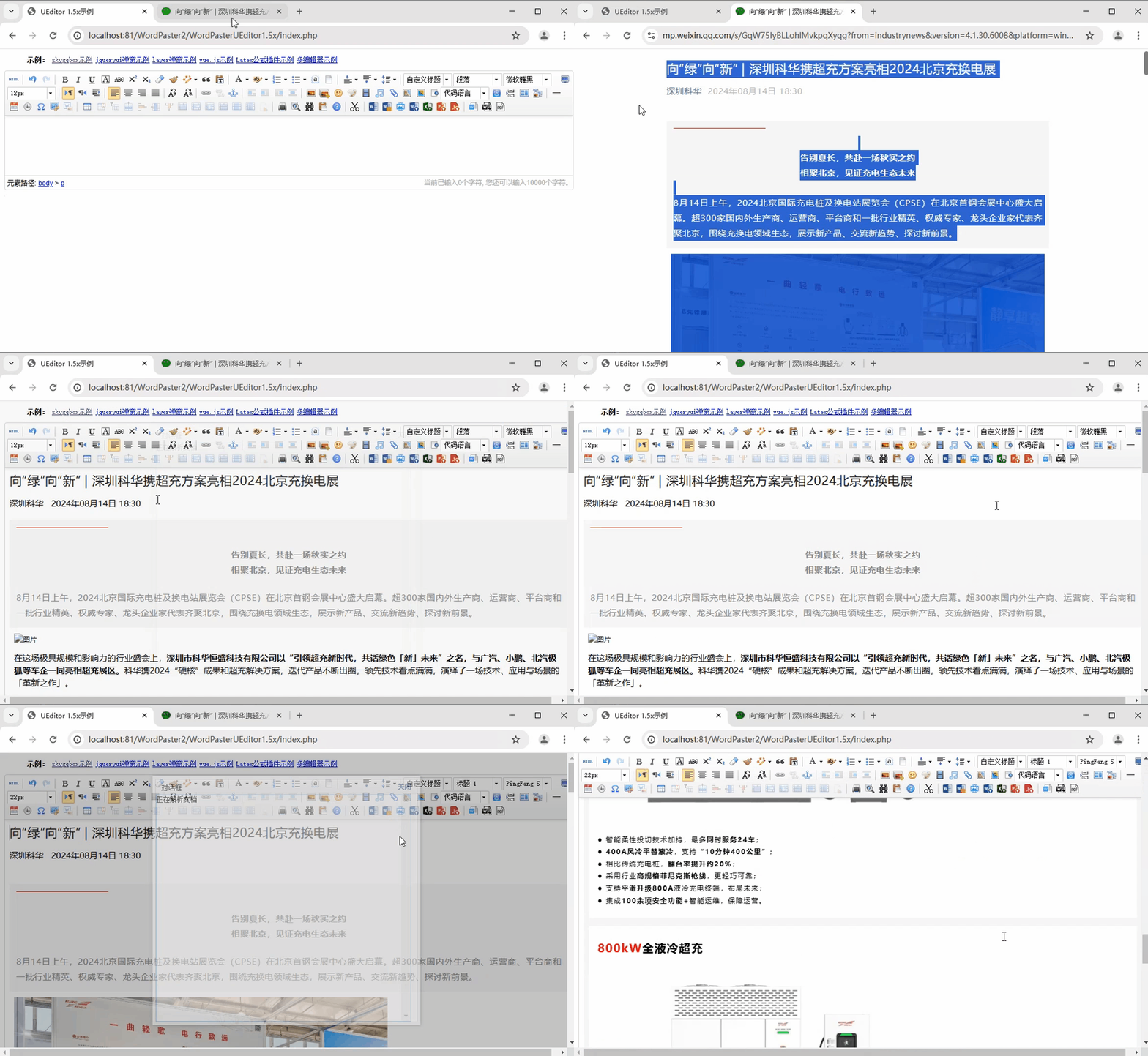
一键粘贴Word内容,自动上传Word中的图片,保留文字样式。

Word转图片
一键导入Word文件,并将Word文件转换成图片上传到服务器中。

导入PDF
一键导入PDF文件,并将PDF转换成图片上传到服务器中。

导入PPT
一键导入PPT文件,并将PPT转换成图片上传到服务器中。

上传网络图片





 扫一扫
扫一扫


 1184
1184

 被折叠的 条评论
为什么被折叠?
被折叠的 条评论
为什么被折叠?
 到【灌水乐园】发言





