


浮动的色块
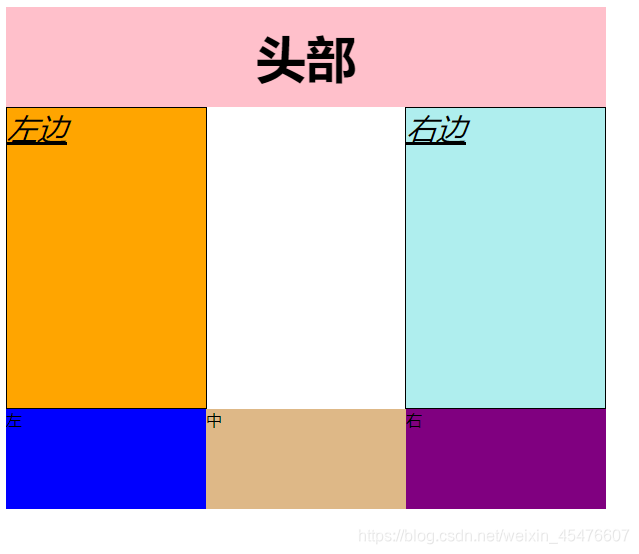
可以将色块分为三大部分
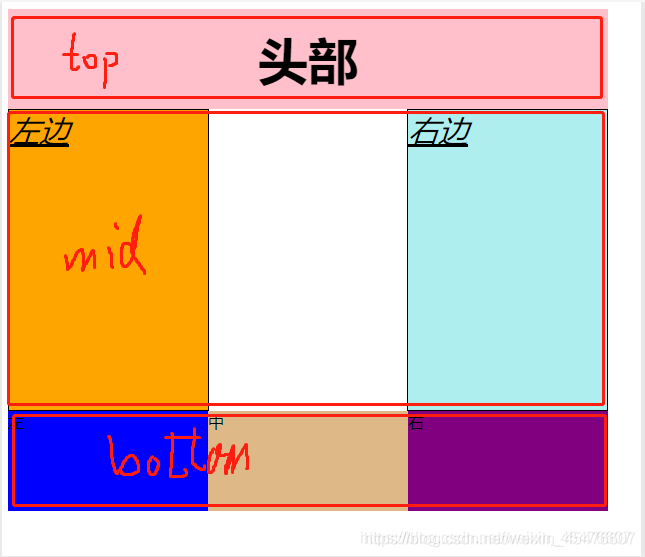
中间部分又可以分为两个部分,由于加了1px的边框,为了不让他超出div,所以左右的宽度 各减1px,为了让中间也占地方 给中间空白地方也建了一个div,宽度是减2px的。
其实也可以不用中间的div占地方,可以用float:left和float:right,我这里都用的是float:left

最后的部分比较简单,直接用三个div,然后float:left就可以了,值得注意的是bottom这个盒子需要设置宽高,不然会将色块挤走。
html部分代码
<!DOCTYPE html>
<html lang="en">
<head>
    <meta charset="UTF-8">
    <meta http-equiv="X-UA-Compatible" content="IE=edge">
    <meta name="viewport" content="width=device-width, initial-scale=1.0">
    <title>Document</title>
    <link rel="stylesheet" href="css/浮动色块.css">
</head>
<body>
    <div class="top">头部</div>
    <div class="middle">
        <div class="left">左边</div>
        <div class="mid"></div>
        <div class="right">右边</div>
    </div>
    <div class="bottom">
        <div class="left1">左</div>
        <div class="mid1">中</div>
        <div class="right1">右</div>
    </div>
</body>
</html>
css部分代码
.top{
    height: 100px;
    width: 600px;
    background-color:#FFC0CB ;
    font-weight: 700;
    font-size: 50px;
    text-align: center;
    line-height: 100px;
}
.middle{
    height: 300px;
    width: 600px;
}
.bottom{
    height: 100px;
    width: 600px;
}
.left{
    height: 300px;
    width: 199px;
    background-color: #FFA500;
    border: 1px solid black;
    font-size: 30px;
    font-style: italic;
    text-decoration: underline;
    float: left;
}
.mid{
    height: 300px;
    width: 198px;
    float: left;
}
.right{
    height: 300px;
    width: 199px;
    background-color: #AFEEEE;
    border: 1px solid black;
    font-size: 30px;
    font-style: italic;
    text-decoration: underline;
    float: left;
}
.left1{
    height: 100px;
    width: 200px;
    background-color: #0000FF;
    float: left;
    margin-left: 0;
}
.mid1{
    height: 100px;
    width: 200px;
    background-color: #DEB887;
    float: left;

}
.right1{
    height: 100px;
    width: 200px;
    background-color: #800080;
    float: left;
}





 扫一扫
扫一扫


 847
847

 被折叠的 条评论
为什么被折叠?
被折叠的 条评论
为什么被折叠?
 到【灌水乐园】发言





