


 本文详细介绍如何在Hadoop环境下使用Java程序筛选特定格式的文件并进行内容合并。通过具体步骤展示从启动Hadoop集群、创建文件到编写并运行Java代码的全过程。
基于JAVA语言的HDFS文件过滤与合并
编写JAVA程序,筛选出符合条件的文件(如.abc文件)并将这些文件内容合并到Merge.txt中。
一、启动Hadoop
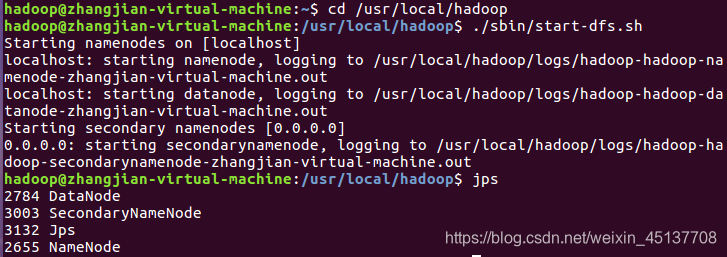
进入Hadoop环境
cd /usr/local/hadoop
启动Hadoop
./sbin/start-dfs.sh
查看是否启动成功
jps
二、创建需要的文件夹和文件
在/user/hadoop下创建file文件夹,用来保存数据文件
./bin/hdfs dfs -mkdir /user/hadoop/file
创建学生信息文件
./bin/hdfs dfs -cat /user/hadoop/file/firstFile.txt
对firstFile.txt文件写入学生信息
echo "name-10000-物联1701班-信息科学与工程学院 " | ./bin/hdfs dfs -appendToFile - /user/hadoop/file/firstFile.txt
查看是否写入成功
./bin/hdfs dfs -cat /user/hadoop/file/firstFile.txt

多创建几个信息文件:secondFile.txt、thirdFile.txt步骤和上面一致


创建过滤类型文件file.abc
./bin/hdfs dfs -touchz /user/hadoop/file/file.abc
写入内容到file.abc
echo "Jane-10004-物联1704班-物联网工程" | ./bin/hdfs dfs -appendToFile - /user/hadoop/file/file.abc
查看是否写入成功
./bin/hdfs dfs -cat /user/hadoop/file/file.abc
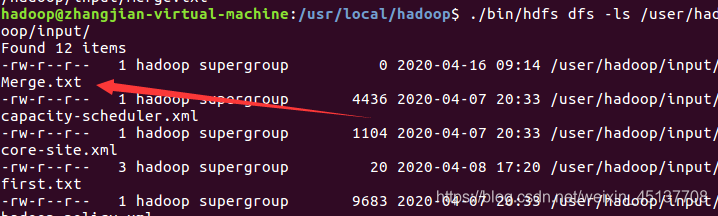
创建文件Merge.txt文件,用于合并接收过滤后的文件
./bin/hdfs dfs -touchz /user/hadoop/input/Merge.txt
查看Merge.txt文件是否创建成功
./bin/hdfs dfs -ls /user/hadoop/input/
三、编写Java程序实现
新建class: MergeFileFilter
import java.io.IOException;
import java.io.PrintStream;
import java.net.URI;
import org.apache.hadoop.conf.Configuration;
import org.apache.hadoop.fs.FSDataInputStream;
import org.apache.hadoop.fs.FSDataOutputStream;
import org.apache.hadoop.fs.FileStatus;
import org.apache.hadoop.fs.FileSystem;
import org.apache.hadoop.fs.Path;
import org.apache.hadoop.fs.PathFilter;
public class MergeFileFilter {
	Path inputPath = null;  //待合并的文件所在的目录的路径
    Path outputPath = null; //输出文件的路径
    public MergeFileFilter(String input, String output){
        this.inputPath = new Path(input);
        this.outputPath = new Path(output);
    }
    public void doMerge() throws IOException{
        Configuration conf = new Configuration();
        conf.set("fs.defaultFS","hdfs://localhost:9000" );
        conf.set("fs.hdfs.impl", "org.apache.hadoop.hdfs.DistributedFileSystem");
        FileSystem fsSource = FileSystem.get(URI.create(inputPath.toString()),conf);
        FileSystem fsDst = FileSystem.get(URI.create(outputPath.toString()),conf);
        FileStatus[] sourceStatus = fsSource.listStatus(inputPath, new myPathFilter(".*\\.abc"));   //过滤掉目录中后缀为.abc的文件
        FSDataOutputStream fsdos = fsDst.create(outputPath);
        //下面分别读取过滤之后的每个文件的内容,并输出到同一个文件中
        for(int i=0;i<sourceStatus.length;i++){
            System.out.println("路径: " + sourceStatus[i].getPath()+ "   文件大小: " + sourceStatus[i].getLen() + "   权限: " + sourceStatus[i].getPermission() + "  内容: ");
            FSDataInputStream fsdis = fsSource.open(sourceStatus[i].getPath());
            byte[] data = new byte[1024];
            int read = -1;
            PrintStream ps = new PrintStream(System.out);
            while((read = fsdis.read(data)) > 0){
                ps.write(data, 0, read);
                fsdos.write(data, 0, read);
            }
        }
        fsdos.close();
    }
    public static void main(String args[]) throws IOException{
    	MergeFileFilter merge = new MergeFileFilter("/user/hadoop/file", "/user/hadoop/input/Merge.txt");
        merge.doMerge();
    }
}
class myPathFilter implements PathFilter{  //过滤掉文件名满足特定条件的文件
    String reg = null;
    myPathFilter(String reg){
        this.reg = reg;
    }
    public boolean accept(Path path) {
        if(!(path.toString().matches(reg)))
            return true;
        return false;
    }
}
运行结果:
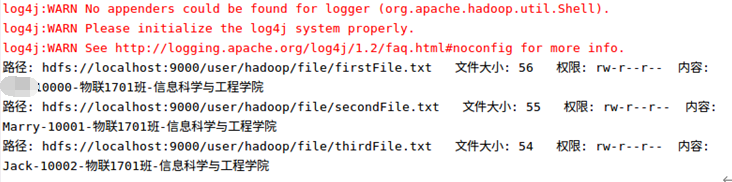
查看Merge.txt文件的内容
./bin/hdfs dfs -cat /user/hadoop/input/Merge.txt

大功告成!





 扫一扫
扫一扫


 2479
2479

 被折叠的 条评论
为什么被折叠?
被折叠的 条评论
为什么被折叠?
 到【灌水乐园】发言





