



 本文详细介绍了数据处理的常见步骤,包括数据预处理、特征选择、空值处理等,并通过企业欺诈识别、会员卡预测及每日订单预测的实际案例,演示了如何使用Python进行数据处理与预测,涉及pandas、NumPy、scikit-learn等多个库的使用。
本节内容摘抄自文档1
本节内容虽然看起来是例题,但必须全部背诵,因为这是处理数据最常用的方法
1.企业欺诈识别
(本节内容的数据见电脑F:/python数据/audit_risk 或腾讯微云文件”python数据\audit_risk “)

最后一列是预测列,预测是否存在风险;前面的列是特征列。
我们要把特征列和预测列单独分开。
1.划分数据
(把数据划分为特征列和预测列,最后一列是预测列;前面的列是特征列。)
import  pandas as pd

frame=pd.read_csv('F:/python数据/audit_risk.csv',header=0)
y=frame[frame.columns[len(frame.columns)-1]] #最后一列Risk是预测列,我们要单独提出来
#frame.columns[len(frame.columns)-1]得到的就是最后一列的列名称“Risk”;同理,frame.columns[7]得到的就是第七列的列名称
frame.drop(frame.columns[len(frame.columns)-1],axis=1,inplace=True) #删除最后一列,其余的作为特征列
X=frame
print(X)

'''我们之所以没有用frame['Risk']直接定位最后一列,是因为我们有时候见到的数据是没有列名的'''

2.企业欺诈识别的完善
(本节内容的数据见电脑F:/python数据/audit_risk 或腾讯微云文件”python数据\audit_risk “)
1.数据预处理

①非数值的处理
import  pandas as pd
import numpy as np

frame=pd.read_csv('F:/python数据/audit_risk.csv')
results=frame.applymap(np.isreal)
#applymap(函数a)可以将DtaFrame中所有元素都应用一下“函数a”的运算,np.isreal判断是不是数字
#只要某一列中存在一个非数字型数据,那么这一列就全是False
print(results)

import  pandas as pd
import numpy as np

frame=pd.read_csv('F:/python数据/audit_risk.csv')
results=frame.applymap(np.isreal).all() #加上.all()就可以只显示我们需要的信息
print(results)

import  pandas as pd
import numpy as np

frame=pd.read_csv('F:/python数据/audit_risk.csv')
results=frame.applymap(np.isreal).all()
print(results[(results==False)]) #只显示有问题的列

import  pandas as pd
import numpy as np

frame=pd.read_csv('F:/python数据/audit_risk.csv')
frame['LOCATION_ID']=pd.to_numeric(frame['LOCATION_ID'],errors='coerce')
#将我们检索出来的异常列全部用数值填充那些异常数值,pd.to_numeric就是转为数值的意思,errors='coerce'就是用空值填充非数字的数据

results=frame.applymap(np.isreal).all() #再次检索看看还有没有非数字列
print(results)

②空值的处理
import  pandas as pd
import numpy as np

frame=pd.read_csv('F:/python数据/audit_risk.csv')
frame['LOCATION_ID']=pd.to_numeric(frame['LOCATION_ID'],errors='coerce')
#将我们检索出来的异常列全部用数值填充那些异常数值,errors='coerce'就是用空值填充异常数据

results=frame.isnull() #返回一个和原始DataFrame一样大小的矩阵,其中True表示该数字为空值
print(results)

import  pandas as pd
import numpy as np

frame=pd.read_csv('F:/python数据/audit_risk.csv')
frame['LOCATION_ID']=pd.to_numeric(frame['LOCATION_ID'],errors='coerce')

results=frame.isnull().any(0) #使用any(0)当这一列内在任何一个空值则这一列返回True
print(results)

import  pandas as pd
import numpy as np

frame=pd.read_csv('F:/python数据/audit_risk.csv')
frame['LOCATION_ID']=pd.to_numeric(frame['LOCATION_ID'],errors='coerce')

results=frame.isnull().any(1) #使用any(1)当这一行内在任何一个空值则这一行返回True
print(results[results==True])

import  pandas as pd
import numpy as np

frame=pd.read_csv('F:/python数据/audit_risk.csv')
frame['LOCATION_ID']=pd.to_numeric(frame['LOCATION_ID'],errors='coerce')
frame=frame.fillna(0) #使用0来填充对应的空值
results=frame.isnull().any(0)
print(results)

import  pandas as pd
from sklearn.impute import SimpleImputer

frame=pd.read_csv('F:/python数据/audit_risk.csv')
frame['LOCATION_ID']=pd.to_numeric(frame['LOCATION_ID'],errors='coerce')
imp=SimpleImputer(strategy='mean') #利用空值所在列的数据平均值来填充空值
newframe=imp.fit_transform(frame)
print(newframe)

import  pandas as pd
from sklearn.impute import SimpleImputer

frame=pd.read_csv('F:/python数据/audit_risk.csv')
print(frame)  #数据是DataFrame类型
frame['LOCATION_ID']=pd.to_numeric(frame['LOCATION_ID'],errors='coerce')
print(frame)  #数据还是DataFrame类型
imp=SimpleImputer(strategy='mean') #利用空值所在列的数据平均值来填充空值
newframe=imp.fit_transform(frame)
print(newframe)  #经过这一步处理,数据变成了numpy类型

'''我们有一步是划分特征数据与预测数据
y=frame[frame.columns[len(frame.columns)-1]]
frame.drop(frame.columns[len(frame.columns)-1],axis=1,inplace=True)
这一步必须趁着还是DataFrame类型时处理'''

3.会员卡预测
(本节内容的数据见电脑F:/python数据/customer 或腾讯微云文件”python数据\customer “)

包含27个相关的特征(姓名、地址、教育情况);还有一个会员卡的类型(金卡、银卡、铜卡、普通卡)
1.决策树
特征的选择:特征列太多,我们先选择三个数字型特征的列(年收入,小孩数,家庭汽车拥有量)。年收入是一个范围,我们要替换一下才能用;

import pandas as pd

frame=pd.read_csv('F:/python数据/customer.csv')
print(frame['yearly_income'].head(2))
frame['yearly_income']=frame['yearly_income'].str.replace('[^0-9]','') #frame['yearly_income'].str获得列那一列元素的字符串表示,然后用空字符替换不属于0-9的阿拉伯数字
print(frame['yearly_income'].head(2))

'''用3050表示30-50'''

方法二:
import pandas as pd

frame=pd.read_csv('F:/python数据/customer.csv')
print(frame['yearly_income'].head(2))
frame['yearly_income']=frame['yearly_income'].str.split(' ').str[0].str.replace('[^0-9]','') #我们只取下限作为年收入
print(frame['yearly_income'].head(2))

import pandas as pd
from sklearn.tree import DecisionTreeClassifier
from sklearn.model_selection import cross_val_score
import numpy as np

frame=pd.read_csv('F:/python数据/customer.csv')
frame['yearly_income']=frame['yearly_income'].str.split(' ').str[0].str.replace('[^0-9]','') #我们只取下限作为年收入
y=frame['member_card'] #把会员卡列作为预测列
X=frame[["yearly_income",'total_children','num_cars_owned']] #将三个数值列作为特征列
如果能够引入更多的分类特征,决策树的效果会更好一些,比如受教育程度和职业与会员等级也有很大的联系

import pandas as pd
from sklearn.preprocessing import LabelEncoder

frame=pd.read_csv('F:/python数据/customer.csv')
encoding=LabelEncoder() #使用这种方法将字符串映射为数字
encoding.fit(frame['education'])
education_new=encoding.transform(frame['education'])
print(frame['education'].values)
print(education_new)

import pandas as pd
from sklearn.tree import DecisionTreeClassifier
from sklearn.model_selection import cross_val_score
from sklearn.preprocessing import LabelEncoder
import numpy as np


frame=pd.read_csv('F:/python数据/customer.csv')
frame['yearly_income']=frame['yearly_income'].str.split(' ').str[0].str.replace('[^0-9]','') #我们只取下限作为年收入
encoding=LabelEncoder()  #使用这种方法将字符串映射为数字
encoding.fit(frame['education'])
frame['education_new']=encoding.transform(frame['education'])
y=frame['member_card'] #把会员卡列作为预测列
X=frame[["yearly_income",'total_children','num_cars_owned']] #将三个数值列作为特征列

clf=DecisionTreeClassifier() #用了决策树
scores=cross_val_score(clf,X,y,scoring='accuracy')
print(np.mean(scores))


import pandas as pd
from sklearn.preprocessing import OneHotEncoder
import numpy as np


frame=pd.read_csv('F:/python数据/customer.csv')
encoding=OneHotEncoder()
print(frame['education'].values)
newData=encoding.fit_transform(np.vstack(frame['education'].values)).todense()
print(newData)

import pandas as pd
import numpy as np


frame=pd.read_csv('F:/python数据/customer.csv')
print(frame['education'].values)
print(np.vstack(frame['education'].values)) #vstack把序列竖了起来,只有这样才能存储独热编码的那些列

import pandas as pd
from sklearn.preprocessing import OneHotEncoder
import numpy as np


frame=pd.read_csv('F:/python数据/customer.csv')
encoding=OneHotEncoder()
newData=encoding.fit_transform(np.vstack(frame['education'].values)).todense()
frame_new=pd.DataFrame(newData)
frame_full=pd.merge(frame[['yearly_income','total_children','num_cars_owned']],frame_new,left_index=True,
                    right_index=True)
print(frame_full)

4.会员卡预测改进
(本节内容的数据见电脑F:/python数据/customer 或腾讯微云文件”python数据\customer “)
包含27个相关的特征(姓名、地址、教育情况);还有一个会员卡的类型(金卡、银卡、铜卡、普通卡)
1.数据的预处理
import pandas as pd

frame=pd.read_csv('F:/python数据/customer.csv')
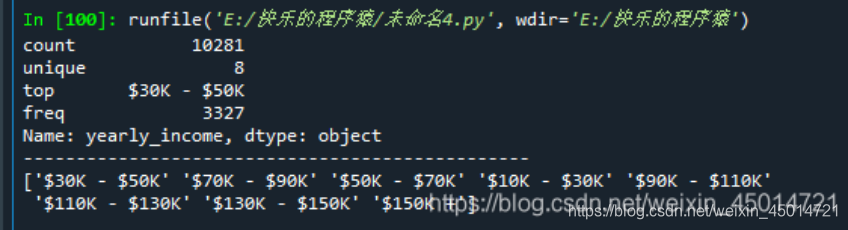
print(frame['yearly_income'].describe()) #了解这一列数据的总数,出现次数最高的数据,出现次数最高的数据出现的次数

print('------------------------------------------------')

print(frame['yearly_income'].unique()) #可以得到年收入的八种不同取值依次是什么
import pandas as pd

frame=pd.read_csv('F:/python数据/customer.csv')
frame['yearly_income']=frame['yearly_income'].str.split(' ').str[0].str.replace('[^0-9]','')
frame['yearly_income_new']=frame['yearly_income'].astype(int)
print(frame['yearly_income_new'].describe())

'''std=35.973839可以看到方差非常大,数据分布非常分撒,我们得处理一下'''

import pandas as pd

frame=pd.read_csv('F:/python数据/customer.csv')
frame['yearly_income']=frame['yearly_income'].str.split(' ').str[0].str.replace('[^0-9]','')
frame['yearly_income_new']=frame['yearly_income'].astype(int)
frame['yearly_income_new']=frame['yearly_income_new']//30 #将数据调整的小一些
print(frame['yearly_income_new'].describe())

import pandas as pd

frame=pd.read_csv('F:/python数据/customer.csv')
frame['age']=pd.to_datetime(frame['date_accnt_opened']).dt.year-pd.to_datetime(frame['birthdate']).dt.year #顾客开卡的时间减去生日等于顾客开卡的年龄
frame['age']=frame['age']//20 #除以20减小方差
print(frame['age'].describe())

5.每日订单预测
(本节内容的数据见电脑F:/python数据/Daily_Demand_Forecasting_Orders 或腾讯微云文件”python数据\Daily_Demand_Forecasting_Orders “)

import pandas as pd

frame=pd.read_csv('F:/python数据/Daily_Demand_Forecasting_Orders.csv',sep=';')
pd.set_option('display.max_columns',None)
print(frame.head(1))

由上图可以看到部分列名过长,需要修改
import pandas as pd

frame=pd.read_csv('F:/python数据/Daily_Demand_Forecasting_Orders.csv',sep=';')
pd.set_option('display.max_columns',None)
frame.rename(columns={'Week of the month (first week, second, third, fourth or fifth week':'week',
                      'Day of the week (Monday to Friday)':'day',
                      "Orders from the traffic controller sector":'sector',
                      'Target (Total orders)':'Target'},inplace=True
             )
print(frame.head(1))

import pandas as pd

frame=pd.read_csv('F:/python数据/Daily_Demand_Forecasting_Orders.csv',sep=';')
pd.set_option('display.max_columns',None)
frame.rename(columns={'Week of the month (first week, second, third, fourth or fifth week':'week',
                      'Day of the week (Monday to Friday)':'day',
                      "Orders from the traffic controller sector":'sector',
                      'Target (Total orders)':'Target'},inplace=True
             )
X=frame['Non-urgent order'].values.reshape(-1,1)
#选择了一个“非紧急订单”,将这个特征数列的数据转换为一个二元数据,reshape(-1,1) 其中1是指1列,-1是指根据实际情况确定行数
print(X)

import pandas as pd
from sklearn.linear_model import LinearRegression
from sklearn.model_selection import cross_val_score
import numpy as np

frame=pd.read_csv('F:/python数据/Daily_Demand_Forecasting_Orders.csv',sep=';')
pd.set_option('display.max_columns',None)
frame.rename(columns={'Week of the month (first week, second, third, fourth or fifth week':'week',
                      'Day of the week (Monday to Friday)':'day',
                      "Orders from the traffic controller sector":'sector',
                      'Target (Total orders)':'Target'},inplace=True
             )
X=frame['Non-urgent order'].values.reshape(-1,1)
y=frame['Target']
regressor=LinearRegression() #线性回归
scores=cross_val_score(regressor,X,y,scoring='r2')
print(np.mean(scores))





 扫一扫
扫一扫


 738
738

 被折叠的 条评论
为什么被折叠?
被折叠的 条评论
为什么被折叠?
 到【灌水乐园】发言





