


 本文介绍了在Spring Boot中如何配置和使用Thymeleaf模板,包括配置步骤、常见错误分析以及Thymeleaf的基本语法。强调了在导入Thymeleaf时可能与其它库冲突的问题,并提供了解决办法。
在日常开发中模板一般来说是这四种:
JSP、Velocity、Freemarker、Thymelea
但在springboot中推荐的模板是thymeleaf(语法更简单,功能更强大)

使用thymeleaf第一步(配置):
在pom.xml导入:
		<dependency>
			<groupId>org.springframework.boot</groupId>
			<artifactId>spring-boot-starter-thymeleaf</artifactId>
          	2.1.6
		</dependency>
<!--切换thymeleaf版本-->
<properties>
        <project.build.sorucesEncoding>UTF-8</project.build.sorucesEncoding>
        <project.reporting.outputEncoding>UTF-8</project.reporting.outputEncoding>
        <java.version>1.8</java.version>
        <thymeleaf.version>3.0.9.RELEASE</thymeleaf.version>
        <!-- 布局功能的支持程序  thymeleaf3主程序  layout2以上版本 -->
        <!-- thymeleaf2   layout1-->
        <thymeleaf-layout-dialect.version>2.2.2</thymeleaf-layout-dialect.version>
    </properties>
但是请注意,在导入thymeleaf配置后运行会报错!!
报错代码如下:
***************************
APPLICATION FAILED TO START
***************************

Description:

An attempt was made to call the method org.thymeleaf.spring5.SpringTemplateEngine.setRenderHiddenMarkersBeforeCheckboxes(Z)V but it does not exist. Its class, org.thymeleaf.spring5.SpringTemplateEngine, is available from the following locations:

    jar:file:/D:/OpenSources/MyRepository/org/thymeleaf/thymeleaf-spring5/3.0.9.RELEASE/thymeleaf-spring5-3.0.9.RELEASE.jar!/org/thymeleaf/spring5/SpringTemplateEngine.class

It was loaded from the following location:

    file:/D:/OpenSources/MyRepository/org/thymeleaf/thymeleaf-spring5/3.0.9.RELEASE/thymeleaf-spring5-3.0.9.RELEASE.jar


Action:

Correct the classpath of your application so that it contains a single, compatible version of org.thymeleaf.spring5.SpringTemplateEngine
在properties中应当改为:
 <properties>
        <project.build.sorucesEncoding>UTF-8</project.build.sorucesEncoding>
        <project.reporting.outputEncoding>UTF-8</project.reporting.outputEncoding>
        <java.version>1.8</java.version>
        <springboot-thymeleaf.version>3.0.9.RELEASE</springboot-thymeleaf.version>
        <!-- 布局功能的支持程序  thymeleaf3主程序  layout2以上版本 -->
        <!-- thymeleaf2   layout1-->
        <thymeleaf-layout-dialect.version>2.2.2</thymeleaf-layout-dialect.version>
    </properties>
于是我问了其他人后总结出来的问题原因
这里用的是org.springframework.boot下的spring-boot-starter-thymeleaf,使用<thymeleaf.version>做标签时可能与org.thymeleaf有冲突,导致包获取不正确
所以导致报错!!!
因为这个是很多新手都犯的错误所以我就做了这个笔记,还请多多点赞!
使用thymeleaf第二步(原理):
底层源码:
@ConfigurationProperties(prefix = "spring.thymeleaf")
public class ThymeleafProperties {

	private static final Charset DEFAULT_ENCODING = Charset.forName("UTF-8");

	private static final MimeType DEFAULT_CONTENT_TYPE = MimeType.valueOf("text/html");

	public static final String DEFAULT_PREFIX = "classpath:/templates/";

	public static final String DEFAULT_SUFFIX = ".html";
通过底层源码不难看出只要我们把html页面放入classpath:/templates/,thymeleaf就会自动渲染
使用thymeleaf第三步(语法):
1,导入thymeleaf名称空间
<html lang="en" xmlns:th="http://www.thymeleaf.org">
2,使用语法
<!DOCTYPE html>
<html lang="en" xmlns:th="http://www.thymeleaf.org">
<head>
    <meta charset="UTF-8">
    <title>Title</title>
</head>
<body>
    <h1>成功!</h1>
    <!--th:text 将div里面的文本内容设置为 -->
    <div th:text="${hello}">这是显示欢迎信息</div>
</body>
</html>
3,语法规则
th:text;改变当前元素里面的文本内容;
th:任意html属性;来替换原生属性的值、th:text;改变当前元素里面的文本
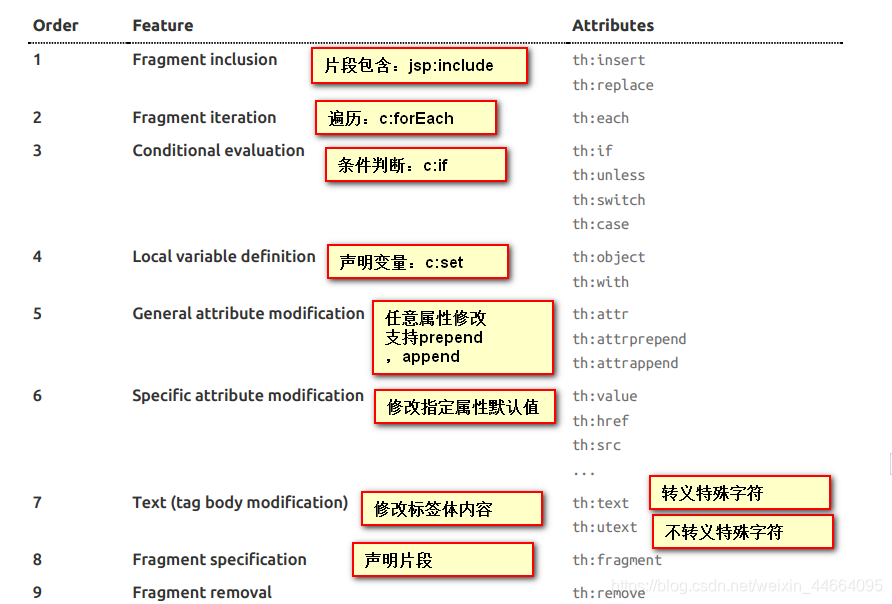
更加详细的请参照:使用thymeleaf官方文档
格言:不驰于空想,不骛于虚声





 扫一扫
扫一扫


 2387
2387

 被折叠的 条评论
为什么被折叠?
被折叠的 条评论
为什么被折叠?
 到【灌水乐园】发言





