效果预览图
原界面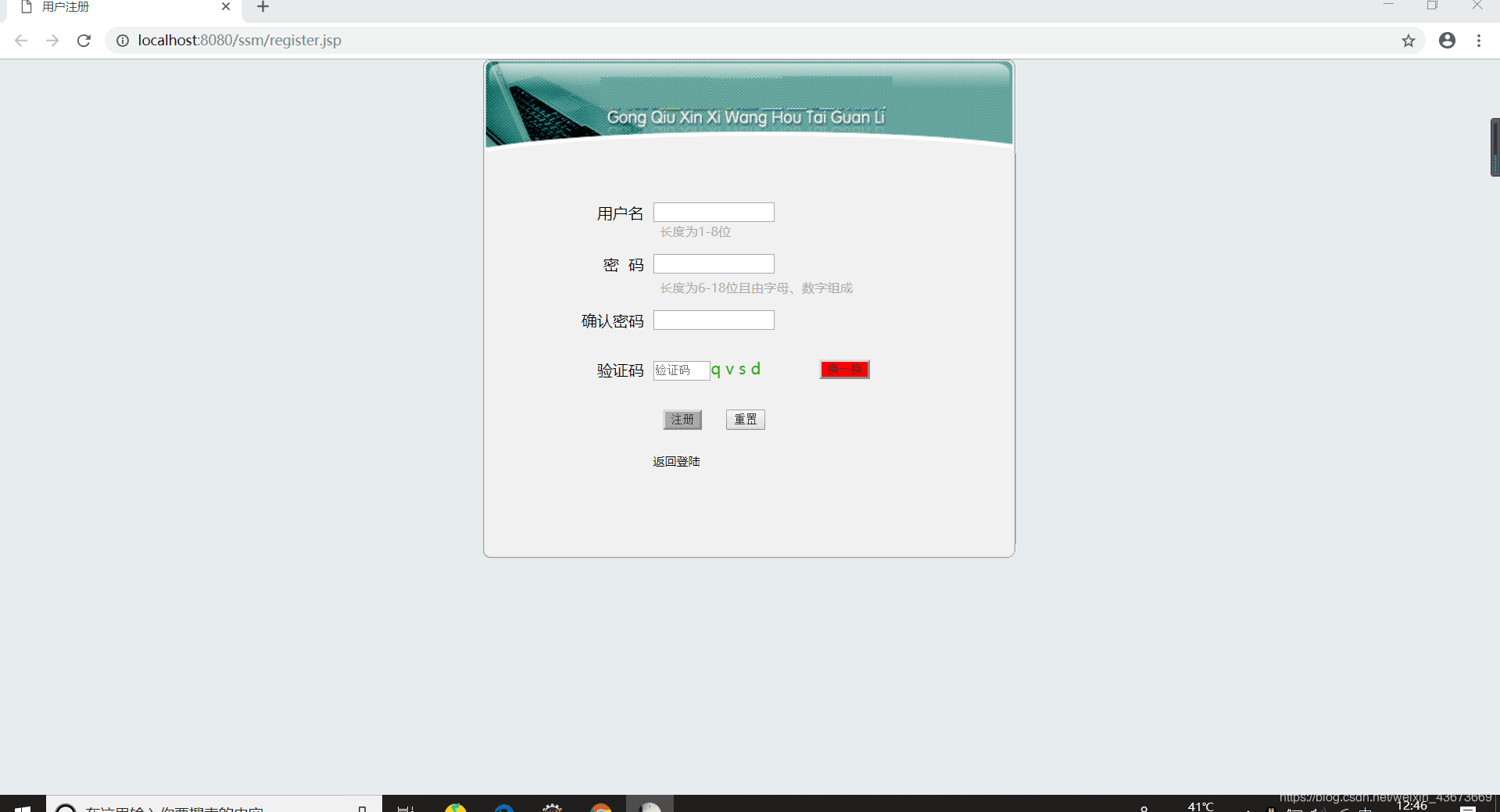
格式错误
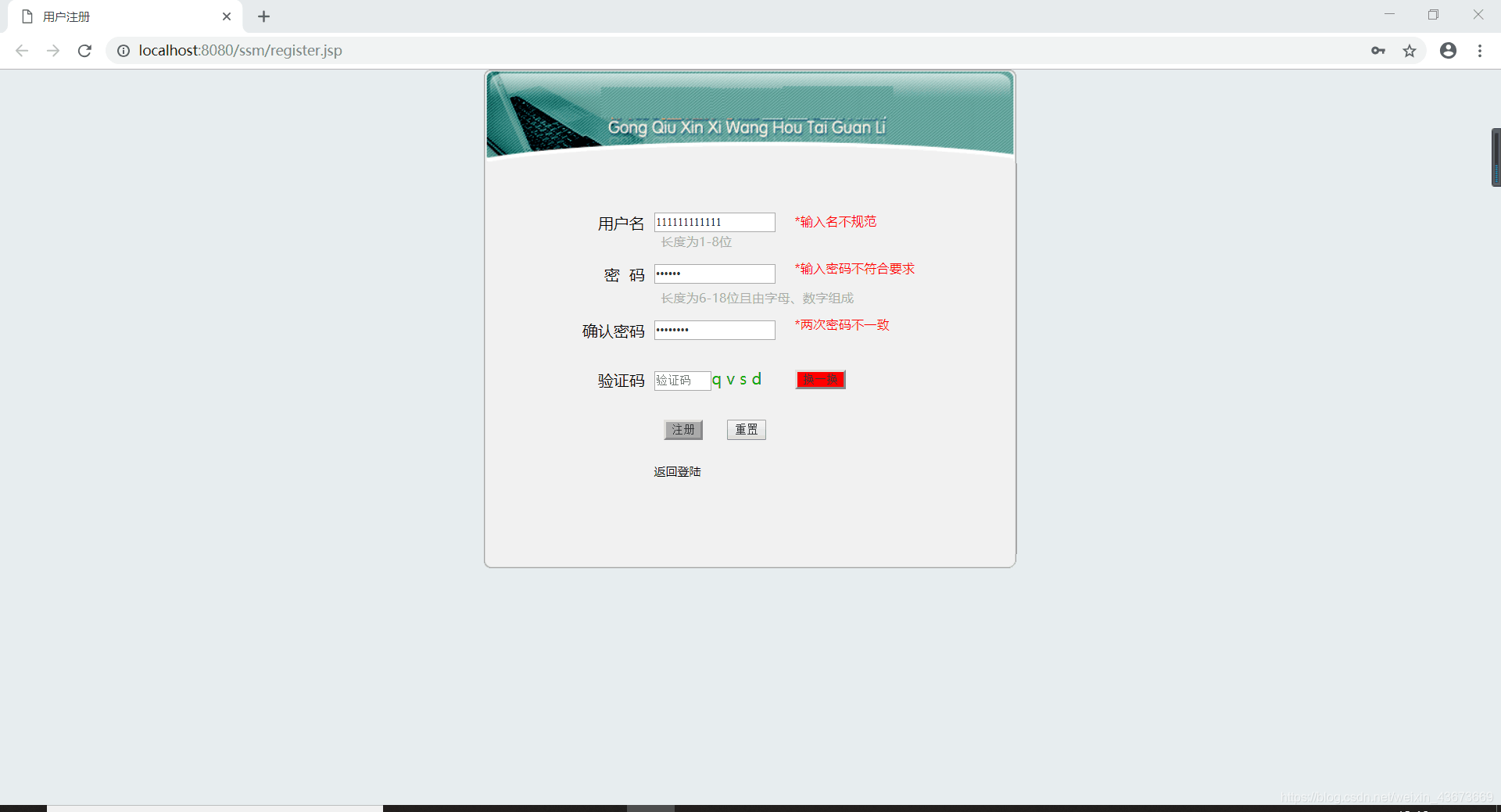
格式正确
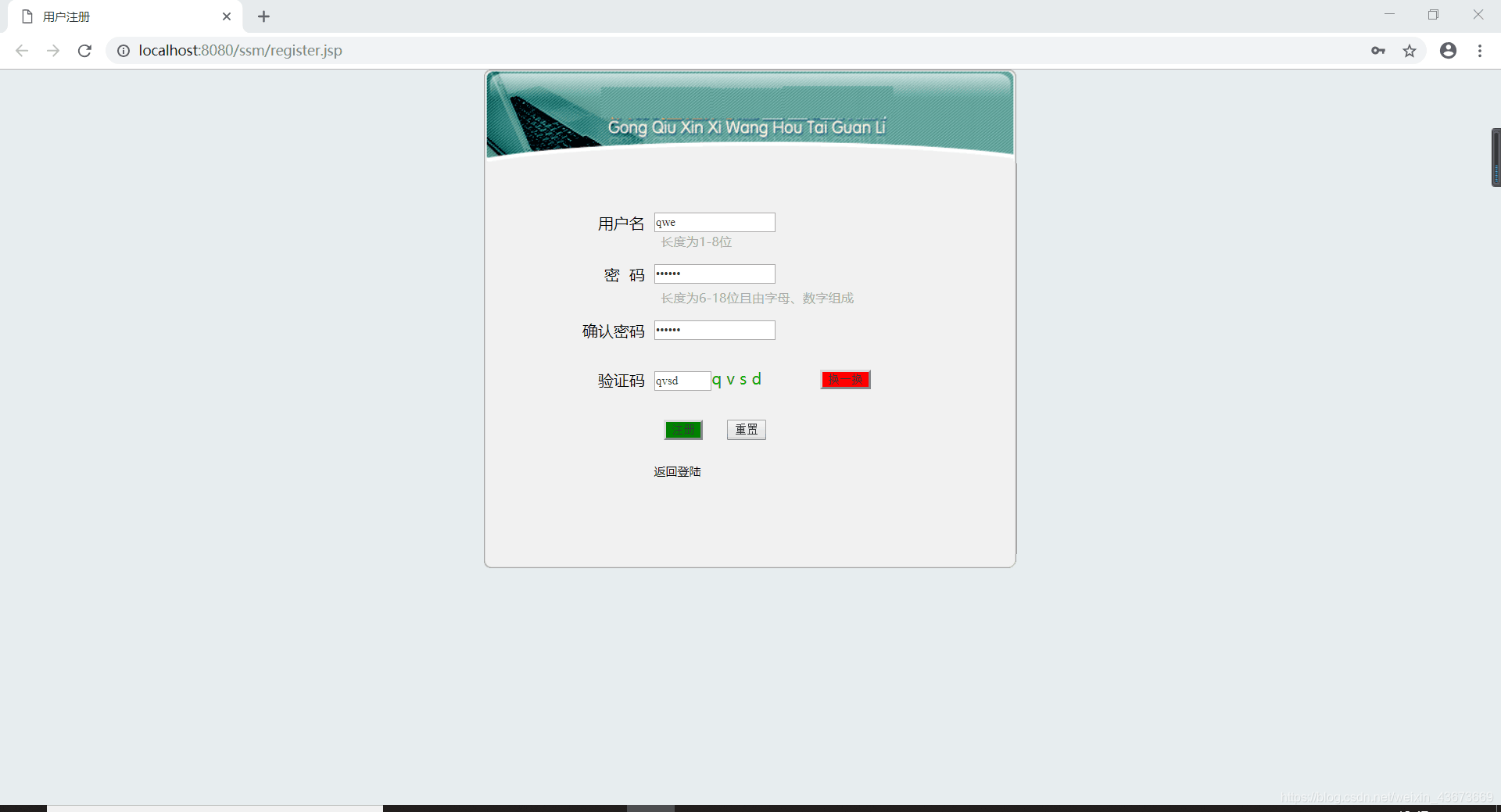
代码
<html>
<head>
<title>用户注册</title>
<meta charset="utf-8" />
<link type="text/css" rel="stylesheet" href="css/style.css;">
<style type="text/css">
</style>
<script type="text/javascript">
var code;
var test1 = 0, test2 = 0, test3 = 0, test4 = 0, test5 = 0;
var okpassword = document.getElementById("okpassword");
window.onload=function createCode()
{
code = "";
var codeLength = 4;
var selectChar = new Array(0,1,2,3,4,5,6,7,8,9,'a','b','c','d','e','f','g','h','i','j','k',
'l','m','n','o','p','q','r','s','t','u','v','w','x','y','z');
for(var i = 0; i < codeLength; i++)
{
var charIndex = Math.floor(Math.random()*36);
code += selectChar[charIndex];
}
document.getElementById("discode").style.fontFamily ="Fixedsys";
document.getElementById("discode").style.letterSpacing = "5px";
document.getElementById("discode").style.color = "#0ab000";
document.getElementById("discode").innerHTML = code;
}
function changeCode()
{
{
code = "";
var codeLength = 4;
var selectChar = new Array(0,1,2,3,4,5,6,7,8,9,'a','b','c','d','e','f','g','h','i','j','k',
'l','m','n','o','p','q','r','s','t','u','v','w','x','y','z');
for(var i = 0; i < codeLength; i++)
{
var charIndex = Math.floor(Math.random()*36);
code += selectChar[charIndex];
}
document.getElementById("discode").style.fontFamily ="Fixedsys";
document.getElementById("discode").style.letterSpacing = "5px";
document.getElementById("discode").style.color = "#0ab000";
document.getElementById("discode").innerHTML = code;
}
function but()
{
var val1 = document.getElementById("t1").value;
var val2 = code;
if(val1 != val2){
alert("验证码错误!");
document.getElementById('t1').value = "";
return false;
}
else{
return reg();
}
}
function checkname(){
var username = document.getElementById("username");
if(username.value.length > 0 && username.value.length <= 8) test1 = 1;
else test1 = 0;
}
function checkpassword(){
var password1 = document.getElementById("password1").value;
var pattern = /^(?=.*[a-zA-Z]+)(?=.*[0-9]+)[a-zA-Z0-9]+$/ ;
if(pattern.test(password1)) test2 = 1;
else test2 = 0;
}
function checkok(){
var password1=document.getElementById("password1").value;
var password2=document.getElementById("password2").value;
if(password1==password2) test3=1;
else test3=0;
}
function showname () {
var nameindication = document.getElementById("nameindication");
if(test1 == 0) nameindication.style.display = "block";
else nameindication.style.display = "visible";
}
function showpassword () {
var passwordindication = document.getElementById("passwordindication");
if(test2 == 0) passwordindication.style.display = "block";
else passwordindication.style.display = "visible";
}
function showok () {
var okpasswordindication = document.getElementById("okpasswordindication");
if(test3 == 0) okpasswordindication.style.display = "block";
else okpasswordindication.style.display = "visible";
}
function check(){
var password2 = document.getElementById("password2").value;
if(password2 != "") test4=1;
var button = document.getElementById("submitmessage");
if(test1 == 1 && test2 == 1 && test3 ==1 && test4 == 1)
button.style.backgroundColor = "green";
else
button.style.backgroundColor = "darkgray";
}
function reg(){
if(test1 == 0){
alert("用户名不规范");
return false;
}
if(test2 == 0){
alert("密码须6-18位且由字母和数字组成");
return false;
}
if(test3 == 0){
alert("两次密码不一致");
return false;
}
return true;
}
function resetinformation(){
var username=document.getElementById("username");
var password1=document.getElementById("password1");
var password2=document.getElementById("password2");
var nameindication=document.getElementById("nameindication");
var passwordindication=document.getElementById("passwordindication");
var okpasswordindication=document.getElementById("okpasswordindication");
username.innerText("");
password1.innerText("");
password2.innerText("");
nameindication.style.display="none";
passwordindication.style.display="none";
okpasswordindication.style.display="none";
test1=0; test2=0; test3=0; test4=0;
}
</script>
</head>
<body bgcolor="#E7ECEF">
<center>
<form id="fromer" onsubmit="return but()" action="xxx.jsp">
<table border="0" cellspacing="0" cellpadding="0" style="margin-top:130">
<tr><td><img src="images/logon_top.gif"></td></tr>
<tr height="400">
<td background="images/logon_middle.gif" align="center" valign="top">
<table border="0" width="90%" cellspacing="0" cellpadding="0">
<tr style="height: 50px;"><td colspan="3"></td></tr>
<tr style="height: 20px;">
<td align="right" width="30%">用户名 </td>
<td style="text-indent:5;width: 150px;"><input type="text" name="adminName" size="30" value="" id="username" style="width: 120px;" onblur="checkname(); showname()" oninput="checkname(); check()"/></td>
<td id="nameindication" style="display: none;width: 200px;padding-left: 20px;font-size: small;color: #FF0000;">*输入名不规范</td>
</tr>
<tr style="height: 10px;padding-top: 2px;" >
<td></td>
<td style="font-size: small;padding-left: 7px;color: #AAAAAA;padding-top: 0px;"colspan="2">长度为1-8位</td>
</tr>
<tr style="height: 10px"></tr>
<!-- -------------------------------------------------------------------------------->
<tr style="height: 30px;">
<td align="right">密 码 </td>
<td style="text-indent:5"><input type="password" name="adminPassword" size="30" id="password1" style="width: 120px;" onblur="checkpassword(); showpassword()" oninput="checkok();check()"/></td>
<td id="passwordindication" style="display: none; width: 200px;padding-left: 20px;font-size: small;color: #FF0000;">*输入密码不符合要求</td>
</tr>
<tr style="height: 10px;">
<td></td>
<td style="font-size: small;padding-left: 7px;color: #AAAAAA;padding-top: 0px;"colspan="2">长度为6-18位且由字母、数字组成</td>
</tr>
<tr style="height: 10px"></tr>
<!-- -------------------------------------------------------------------------------->
<tr style="height: 30px;">
<td align="right">确认密码 </td>
<td style="text-indent:5"><input type="password" name="okpassword" size="30" id="password2" style="width: 120px;" oninput=" checkok();showok();check()"/></td>
<td id="okpasswordindication" style="width: 200px;display:none;padding-left: 20px;font-size: small;color: #FF0000;">*两次密码不一致</td>
</tr>
<tr style="height: 20px"></tr>
<!-- -------------------------------------------------------------------------------->
<tr style="height: 30px;">
<td align="right">验证码 </td>
<td style="text-indent:5;width: 120px;"><input id="t1" type="text" name="" placeholder="验证码" size="30" style="width: 55px;"/><span id="discode"></span></td>
<td style="padding-left: 20px;"><input type="button" value="换一换" style="height:20px;background-color: red;"onClick="changeCode()"></td>
</tr>
<tr style="height: 20px"></tr>
<!-- -------------------------------------------------------------------------------->
<tr height="30">
<td></td>
<td><input id="submitmessage" type="submit" value="注册" style="margin: auto;margin-left: 10px;background-color: darkgrey;"/>
<input type="reset" value="重置" style="margin: auto;margin-left: 20px;"id="reset" onclick="resetinformation()"> </td>
</tr>
<tr style="height: 20px"></tr>
<!-- -------------------------------------------------------------------------------->
<tr>
<td></td>
<td> <a id="log_Login_action_" href="adminTemp.jsp ">返回登陆</a></td>
<td></td>
</tr>
</table>
</td>
</tr>
<tr><td><img src="images/logon_end.gif"></td></tr>
</table>
</form>
</center>
</body>
</html>



 本文详细介绍了使用HTML和JavaScript实现的用户注册表单,包括用户名、密码、确认密码及验证码的验证逻辑。通过正则表达式检查密码强度,确保密码包含字母和数字,同时检查用户名和密码是否符合规范。





 扫一扫
扫一扫


 4543
4543

 被折叠的 条评论
为什么被折叠?
被折叠的 条评论
为什么被折叠?
 到【灌水乐园】发言





