
Invalid content was found starting with element ‘{“http://xmlns.jcp.org/xml/ns/javaee“:init-param}‘

错误提示

Invalid content was found starting with element '{"http://xmlns.jcp.org/xml/ns/javaee":init-param}'. One of '{"http://xmlns.jcp.org/xml/ns/javaee":enabled, "http://xmlns.jcp.org/xml/ns/javaee":async-supported, "http://xmlns.jcp.org/xml/ns/javaee":run-as, "http://xmlns.jcp.org/xml/ns/javaee":security-role-ref, "http://xmlns.jcp.org/xml/ns/javaee":multipart-config}' is expected.
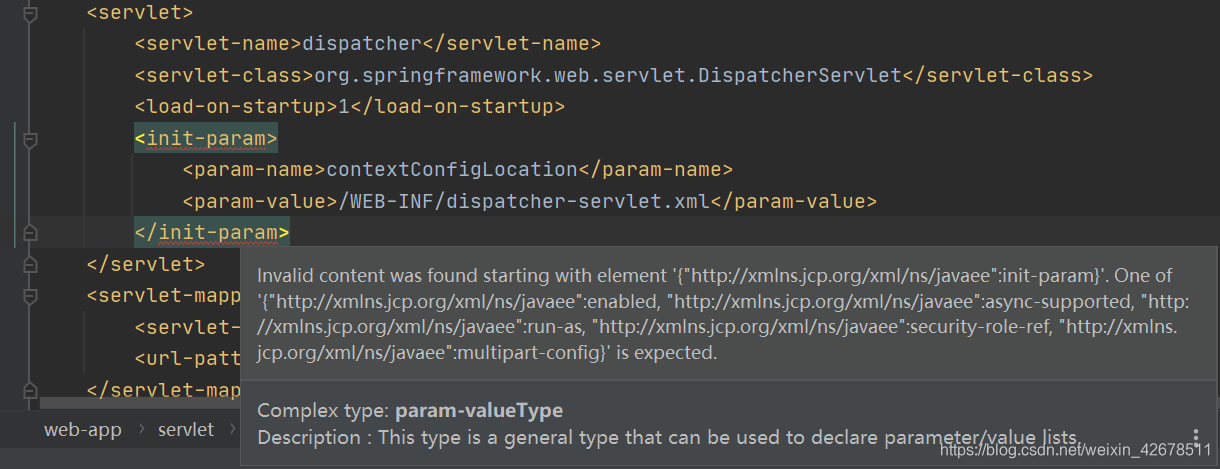
把<init-param>放到<load-on-startup>上面!!!
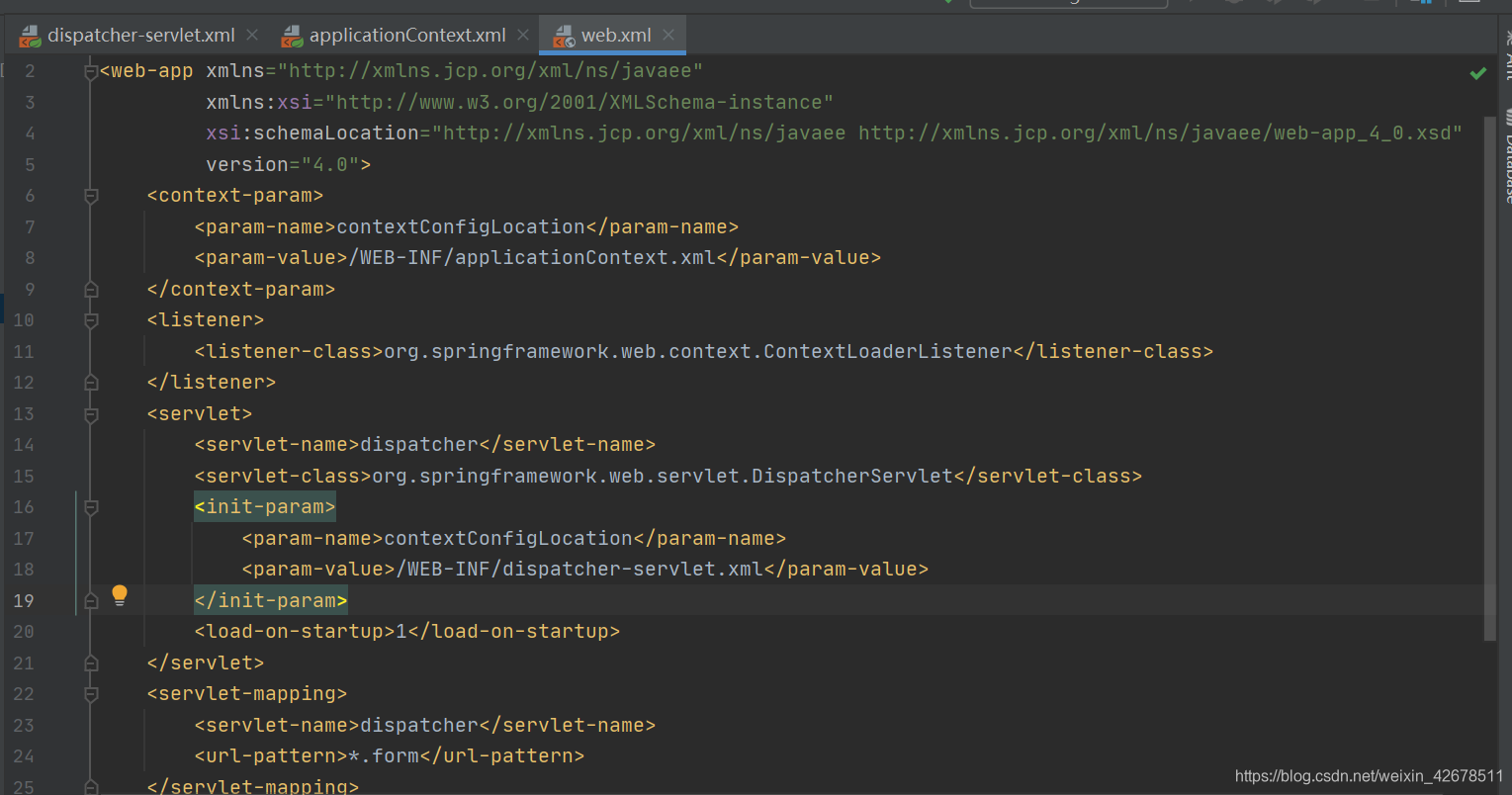
害,谁能想到竟然是这样!

index.jsp <%@ page contentType="text/html;charset=UTF-8" language="java" %> <html> <head> <title>首页</title> </head> <body> <h2>登录成功!</h2> <!-- 从请求域中获取用户名并显示 --> <p>欢迎您,${username}!</p > </body> </html> login.jsp <%@ page contentType="text/html;charset=UTF-8" language="java" %> <html> <head> <title>登录</title> </head> <body> <h3>用户登录</h3> <!-- 表单提交到LoginServlet(路径对应web.xml中的url-pattern) --> <form action="/ch6/login" method="post"> 用户名:<input type="text" name="username"><br><br> <input type="submit" value="登录"> </form> </body> </html> LoginServlet.java package com.demo; import javax.servlet.http.HttpServlet; import javax.servlet.http.HttpServletRequest; import javax.servlet.http.HttpServletResponse; import java.io.IOException; // 处理登录提交的Servlet public class LoginServlet extends HttpServlet { @Override protected void doPost(HttpServletRequest request, HttpServletResponse response) throws IOException { // 1. 设置请求编码(解决中文乱码) request.setCharacterEncoding("UTF-8"); // 2. 获取表单提交的用户名(仅演示,不验证) String username = request.getParameter("username"); // 3. 将用户名存入请求域(供首页使用) request.setAttribute("username", username); // 4. 转发到首页(跳转页面) try { request.getRequestDispatcher("/index.jsp").forward(request, response); } catch (Exception e) { e.printStackTrace(); } } } web.xml <?xml version="1.0" encoding="UTF-8"?> <web-app xmlns="http://xmlns.jcp.org/xml/ns/javaee" xmlns:xsi="http://www.w3.org/2001/XMLSchema-instance" xsi:schemaLocation="http://xmlns.jcp.org/xml/ns/javaee http://xmlns.jcp.org/xml/ns/javaee/web-app_4_0.xsd" version="4.0"> <!-- 配置LoginServlet --> <servlet> <servlet-name>LoginServlet</servlet-name> <!-- Servlet名称(自定义) --> <servlet-class>com.demo.LoginServlet</servlet-class> <!-- 完整类名(包名+类名) --> </servlet> <servlet-mapping> <servlet-name>LoginServlet</servlet-name> <!-- 与上方名称一致 --> <url-pattern>/login</url-pattern> <!-- 访问路径(表单提交地址) --> </servlet-mapping> </web-app> 1.空用户名提交→跳转到loginError.jsp,显示“用户名不能为空”。 2.空密码提交→跳转到loginError.jsp,显示“密码不能为空”。 3.错误账号密码(如user/123)→跳转到loginError.jsp,显示“账号或密码错误”。 4.正确账号密码(admin/123456)→重定向到index.jsp,显示“欢迎您,admin!”,使用session存储用户名。 5.刷新首页→无“重复提交表单”提示,证明redirect生效。 6.修改web.xml中rightPwd为654321→用新密码登录成功,证明init方法读取配置生效。 7.直接访问Servlet路径(如http://localhost:8080/你的项目名/loginServlet)→显示提示“请通过登录表单提交请求,不要直接访问此页面”。 给我实现这些页面跳转,错误跳转到loginError.jsp,先完成前五个要求,再修改web.xml文件,继续完成别的要求
11-14
[2025-07-22T13:09:26.958+08:00][][main][ERROR][org.apache.catalina.core.ContainerBase][?][][]:A child container failed during start java.util.concurrent.ExecutionException: org.apache.catalina.LifecycleException: Failed to start component [StandardEngine[Tomcat].StandardHost[localhost].TomcatEmbeddedContext[]] at java.util.concurrent.FutureTask.report(FutureTask.java:122) ~[?:1.8.0_461] at java.util.concurrent.FutureTask.get(FutureTask.java:192) ~[?:1.8.0_461] at org.apache.catalina.core.ContainerBase.startInternal(ContainerBase.java:756) ~[tomcat-embed-core-9.0.107.jar:9.0.107] at org.apache.catalina.core.StandardHost.startInternal(StandardHost.java:721) ~[tomcat-embed-core-9.0.107.jar:9.0.107] at org.apache.catalina.util.LifecycleBase.start(LifecycleBase.java:164) ~[tomcat-embed-core-9.0.107.jar:9.0.107] at org.apache.catalina.core.ContainerBase$StartChild.call(ContainerBase.java:1203) ~[tomcat-embed-core-9.0.107.jar:9.0.107] at org.apache.catalina.core.ContainerBase$StartChild.call(ContainerBase.java:1193) ~[tomcat-embed-core-9.0.107.jar:9.0.107] at java.util.concurrent.FutureTask.run(FutureTask.java:266) ~[?:1.8.0_461] at org.apache.tomcat.util.threads.InlineExecutorService.execute(InlineExecutorService.java:76) ~[tomcat-embed-core-9.0.107.jar:9.0.107] at java.util.concurrent.AbstractExecutorService.submit(AbstractExecutorService.java:134) ~[?:1.8.0_461] at org.apache.catalina.core.ContainerBase.startInternal(ContainerBase.java:749) ~[tomcat-embed-core-9.0.107.jar:9.0.107] at org.apache.catalina.core.StandardEngine.startInternal(StandardEngine.java:211) ~[tomcat-embed-core-9.0.107.jar:9.0.107] at org.apache.catalina.util.LifecycleBase.start(LifecycleBase.java:164) ~[tomcat-embed-core-9.0.107.jar:9.0.107] at org.apache.catalina.core.StandardService.startInternal(StandardService.java:412) ~[tomcat-embed-core-9.0.107.jar:9.0.107] at org.apache.catalina.util.LifecycleBase.start(LifecycleBase.java:164) ~[tomcat-embed-core-9.0.107.jar:9.0.107] at org.a
07-23
完成SPRING MVC中关于json数据解读、拦截器等内容的设计 实验要求: (1)假定有以下数据传递,设计读取的controller和model 内存列表查询(跳转 JSP):@GetMapping("/list") public String getStudentList(Model model) { List<Student> list = studentService.getStudentTempList(); model.addAttribute("studentList", list); return "studentList"; }; 单个查询(JSON 响应):@GetMapping("/{id}") @ResponseBody public Student getStudentById(@PathVariable Integer id) { return studentService.getStudentTempById(id); }; 新增(JSON 响应):@PostMapping("/add") @ResponseBody public Map<String, String> addStudent(@RequestBody Student student) { boolean success = studentService.addStudentTemp(student); Map<String, String> result = new HashMap<>(); result.put("code", success?"200":"500"); result.put("msg", success?"新增成功":"新增失败"); return result; }。 (2)在服务器端完成对用户注册表单的自动参数传递和校验,要求用户姓名必须在2~20个中文字符,密码不可以为空,且两次密码校验正确 (3)设计拦截器:编写登录拦截器LoginInterceptor:实现HandlerInterceptor接口,在preHandle方法中判断 Session 是否存在 “user”(模拟登录状态),不存在则跳转登录页(/login.jsp);测试:未登录访问http://localhost:8080/ssm-student/student/list,验证是否跳转登录页;登录后(Session 存入 “user”)可正常访问 实验考核 1. 提交 Spring MVC 配置文件、Controller 类代码,确保项目能在 Tomcat 上正常运行。所有配置按照最新来
最新发布
11-24
评论 6
成就一亿技术人!
拼手气红包6.0元
还能输入1000个字符
 
红包 添加红包
表情包 插入表情
 条评论被折叠 查看
添加红包

请填写红包祝福语或标题

红包个数最小为10个

红包金额最低5元

当前余额3.43前往充值 >
需支付:10.00
成就一亿技术人!
领取后你会自动成为博主和红包主的粉丝 规则
hope_wisdom
发出的红包
实付
使用余额支付
点击重新获取
扫码支付
钱包余额 0

抵扣说明:

1.余额是钱包充值的虚拟货币,按照1:1的比例进行支付金额的抵扣。
2.余额无法直接购买下载,可以购买VIP、付费专栏及课程。

余额充值


