
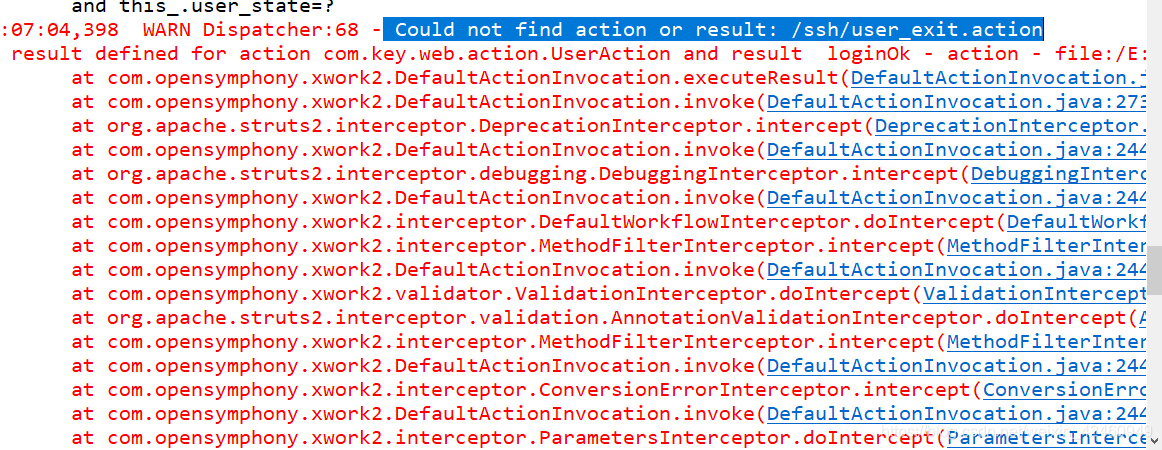
使用SSH框架编写程序时,出现 Could not find action or result: /ssh/user_exit.action问题,但配置文件没有出错

问题出现后,首先检查了配置文件的问题,并没有出错,然后网上也搜了不少,一直没解决,最后,重点来了,使用其他路径时,没有报错,我就检查了方法返回的字符串路径,发现字符串路径多了一个空格!重新写了下字符串路径,问题解决。其实我发现,很多程序上出现的问题都是一些很小的问题,却总是浪费我们很多时间去查找,各位在编写程序的时候尽量仔细一点,耐心一点啦,我找这个问题差点崩溃,哈哈哈。
在这里插入图片描述

5. Image Compile and Gerrit Feedback Locate "Build Steps" and Click on Add build step -> Execute Shell # CONTAINERIZED BUILD VERIFICATION AND GERRIT FEEDBACK # - Launches Docker container with compilation environment for testing # - Verifies container user permissions and working directory # - Posts verification status (+1) back to Gerrit review system # - Extracts build commands from project README files # - Executes containerized build process with discovered make commands # - Provides build environment validation and compilation execution echo "Checking for file: ${IS_BUILT_CHECK}" # Check if the sentinel file EXISTS if [ -f "${IS_BUILT_CHECK}" ]; then echo "Image Built file found. Prerequisites are met." echo "--- Building custom component only: ${GERRIT_PROJECT} ---" else # The sentinel file DOES NOT EXIST. We must do a full build. echo "Image Built file NOT found. Performing a full image build..." echo "This will take a long time." # REPLACE THE BELOW INFORMATION WITH APPROPRIATE PATHS RESPECTIVE TO YOUR CONFIGURATION CONTAINER_ID=$(docker run -d -u compile -v "$WORKSPACE/prplos:/home/compile/prpLink" ubuntu18.04-be65pro:latest tail -f /dev/null) # Run commands inside the container docker exec $CONTAINER_ID sh -c " echo "Current user:" whoami echo "Current directory:" pwd cd ${BUILD_DIR_IN_DOCKER} make MODEL=be65pro SPEC=TEST all " docker stop $CONTAINER_ID docker rm $CONTAINER_ID echo "--- Full build successful. Creating sentinel file. ---" touch ${IS_BUILT_CHECK} fi mount_path=$(repo info | grep -A2 "Project: ${GERRIT_PROJECT}" | grep "Mount path:" | cut -d: -f2 | xargs) make_cmd=$(find "$mount_path" -name "README*" -exec grep -l "Build Process:" {} \; | head -1 | xargs grep -A1 "Build Process:" | grep "make" | xargs) echo "make command: $make_cmd" # REPLACE THE BELOW INFORMATION WITH APPROPRIATE PATHS RESPECTIVE TO YOUR CONFIGURATION CONTAINER_ID=$(docker run -d -u compile -v "$WORKSPACE/prplos:/home/compile/prpLink" ubuntu18.04-be65pro:latest tail -f /dev/null) # Run commands inside the container docker exec $CONTAINER_ID sh -c " echo 'Current user:' whoami echo 'Current directory:' pwd cd ${BUILD_DIR_IN_DOCKER} echo ${make_cmd} ${make_cmd} " docker stop $CONTAINER_ID docker rm $CONTAINER_ID echo "--- Build process complete ---" echo "--- Sending Verified +1 to Gerrit ---" # REPLACE THE BELOW INFORMATION WITH APPROPRIATE JENKINS USER ssh -p 29418 jenkins_scr@gerrit gerrit review --verified +1 ${GERRIT_CHANGE_NUMBER},${GERRIT_PATCHSET_NUMBER} 6. SonarQube Scan Preparation Locate "Build Steps" and Click on Add build step -> Execute Shell This will prepare the workspace for SonarQube scanning. This DOES NOT PERFORM the scan itself. #!/bin/bash # SONARQUBE SCAN PREPARATION # - Clones All-Users repository containing developer GPG keys # - Searches for GPG keys belonging to the patchset uploader # - Imports and establishes trust for the developer's public key # - Prepares GPG verification for commit signature validation set -e # Exit on any error set -u # Exit on undefined variables # Function to get project path mount_path=$(repo info | grep -A2 "Project: ${GERRIT_PROJECT}" | grep "Mount path:" | awk '{$1=$2=""; print $0}' | sed 's/^ *//') # Find README and extract make command readme_file=$(find "${mount_path}" -name "README*" -exec grep -l "Build Process:" {} \; | head -1) make_cmd=$(grep "Build Process:" "${readme_file}" | sed 's/^.*Build Process:[[:space:]]*//') build_dir=$(grep "Build Directory:" "${readme_file}" | sed 's/^.*Build Directory:[[:space:]]*//') pkg_version=$(grep "Package Version:" "${readme_file}" | sed 's/^.*Package Version:[[:space:]]*//') # Try to cd into the build directory and get absolute path if [ -n "${build_dir}" ]; then # Use bash glob expansion to resolve wildcards shopt -s nullglob build_paths=(${build_dir}) shopt -u nullglob if [ ${#build_paths[@]} -gt 0 ] && [ -d "${build_paths[0]}" ]; then cd "${build_paths[0]}" PROJECT_PATH=$(pwd) echo "✅ Successfully changed to build directory: ${PROJECT_PATH}" else echo "⚠️ Could not find build directory matching '${build_dir}', using mount path instead" PROJECT_PATH="${mount_path}" fi else echo "⚠️ No build directory specified, using mount path" PROJECT_PATH="${mount_path}" fi echo "BUILD DIR:" echo "${PROJECT_PATH}" cd "${WORKSPACE}" pwd cat > sonar-project.properties << 'EOF' sonar.projectKey=EBG:FIRM:PLACEHOLDER_MODEL-PLACEHOLDER_PROJECT sonar.projectName=PLACEHOLDER_MODEL_PLACEHOLDER_PROJECT sonar.projectVersion=PLACEHOLDER_PACKAGE_VERSION sonar.sources=PLACEHOLDER_PROJECT_PATH sonar.host.url=PLACEHOLDER_HOST_URL EOF sed -i "s|PLACEHOLDER_PROJECT_PATH|${PROJECT_PATH}|g" sonar-project.properties sed -i "s|PLACEHOLDER_HOST_URL|${SONAR_HOST_URL}|g" sonar-project.properties sed -i "s|PLACEHOLDER_MODEL|${MODEL}|g" sonar-project.properties PROJECT=$(basename "${GERRIT_PROJECT}") sed -i "s|PLACEHOLDER_PROJECT|${PROJECT}|g" sonar-project.properties sed -i "s|PLACEHOLDER_PACKAGE_VERSION|${pkg_version}|g" sonar-project.properties cat sonar-project.properties SonarQube Scan Refer to 01 - How To: Jenkins SAST SCA Integration Post-Build Actions Locate "Post-Build Actions" 1. Artifact Archiving Locate "Post-Build Actions" and o Add post-build action -> Archive the Artifacts Identify where the binary images are created, and add a wildcard operator to allow Jenkins to archive all images. Post Build Scripts Ensure you have the 2 following plugins installed: Post build task PostBuildScript Ensure the "Execute Scripts" Option is Available 2. Workspace Cleanup After adding the "Execute Scripts" Option, click on add Post Build Step: Then click on "Add build step" -> Execute shell #!/bin/bash # WORKSPACE CLEANUP # - Reverts applied changes to maintain clean workspace set -e # Exit on any error set -u # Exit on undefined variables # SONARQUBE CLEANUP echo "SonarQube properties file cleaned up" # Function to get project path get_project_path() { local project_path=$(repo info "${GERRIT_PROJECT}" | grep "Mount path:" | awk '{$1=$2=""; print $0}' | sed 's/^ *//') if [ -z "${project_path}" ] || [ ! -d "${project_path}" ]; then echo "ERROR: Could not find local path for project '${GERRIT_PROJECT}'." >&2 exit 1 fi echo "${project_path}" } PROJECT_PATH=$(get_project_path) cd "${PROJECT_PATH}" pwd # Only reset if we actually applied a change if [ -f "$WORKSPACE/.cherry_pick_applied" ]; then echo "Removing cherry-picked commit..." git reset --hard HEAD~1 rm -f "$WORKSPACE/.cherry_pick_applied" echo "✅ Cherry-picked commit removed, workspace is clean" else echo "No cherry-pick was applied, skipping reset" fi git log --oneline -5 Scroll down and ensure all options are selected for "If build was": Use ctrl + click to select all options. Make sure they are grey. End result should look like this: Finite State SCA Scan Refer to 01 - How To: Jenkins SAST SCA Integration for further instructions After adding the "Execute Scripts" Option, click on add Post Build Step: Then click on "Add build step" -> Execute shell #!/bin/bash set -e ## FINITESTATE SCA SCAN # - Parses image bin file for version and release number # - Initiates scan on Finite State Platform parse_firmware() { local filename="$1" local version="" local build_date="" version=$(echo "$filename" | grep -oP '\d+\.\d+\.\d+' | head -1) if [ -z "$version" ]; then version=$(echo "$filename" | grep -oP 'ver\d+-\d+-\d+' | head -1 | sed 's/ver//' | tr '-' '.') fi if [ -z "$version" ]; then version=$(echo "$filename" | grep -oP '\d+-\d+-\d+' | head -1 | tr '-' '.') fi if [ -z "$version" ]; then version=$(echo "$filename" | grep -oP '\d+_\d+_\d+' | head -1 | tr '_' '.') fi if [ -z "$version" ]; then version=$(echo "$filename" | grep -oP 'v\d+[._-]\d+[._-]\d+' | head -1 | sed 's/^v//' | tr '_-' '..') fi build_date=$(echo "$filename" | grep -oP '\d{8}' | head -1) if [ -z "$build_date" ]; then build_date=$(echo "$filename" | grep -oP '\[\d{8}' | head -1 | tr -d '[') fi if [ -z "$build_date" ]; then build_date=$(echo "$filename" | grep -oP '\d{4}_\d{2}_\d{2}' | head -1 | tr -d '_') fi if [ -z "$build_date" ]; then build_date=$(echo "$filename" | grep -oP '\d{4}-\d{2}-\d{2}' | head -1 | tr -d '-') fi if [ -z "$version" ] || [ -z "$build_date" ]; then echo "ERROR: Could not parse version or build date from: $filename" >&2 echo " Found version: ${version:-NONE}" >&2 echo " Found build_date: ${build_date:-NONE}" >&2 return 1 fi if ! [[ "$build_date" =~ ^[0-9]{8}$ ]]; then echo "ERROR: Invalid build date format: $build_date" >&2 return 1 fi if ! [[ "$version" =~ ^[0-9]+\.[0-9]+\.[0-9]+$ ]]; then echo "ERROR: Invalid version format: $version" >&2 return 1 fi echo "${version}_${build_date}" } WORKSPACE_DIR="$WORKSPACE" echo "Workspace: $WORKSPACE_DIR" echo "" # Find files JAR_FILE=$(find . -name "finitestate.jar" -type f | head -1) # Replace search filter with the correct filter to find the unencrypted image. BIN_FILE=$(find $IMAGES_DIR -name "*v2_up.bin" -type f | head -1) # Strict validation if [ -z "$JAR_FILE" ]; then echo "ERROR: finitestate.jar not found" exit 1 fi if [ -z "$BIN_FILE" ]; then echo "ERROR: Binary file (*V2-up*.bin) not found " exit 1 fi echo "Found JAR: $JAR_FILE" echo "Found BIN: $BIN_FILE" echo "" # Verify files are readable if [ ! -r "$JAR_FILE" ]; then echo "ERROR: Cannot read JAR file: $JAR_FILE" exit 1 fi if [ ! -r "$BIN_FILE" ]; then echo "ERROR: Cannot read binary file: $BIN_FILE" exit 1 fi # Extract version from binary filename BIN_FILENAME=$(basename "$BIN_FILE") FIRMWARE_VERSION=$(parse_firmware "$BIN_FILENAME") echo "Parsed firmware version: $FIRMWARE_VERSION" echo "" # Run verification with FS #java -jar "$JAR_FILE" \ --name="MODEL_NAME_HERE" \ # For example, "Omada Gateway ER605 v2.0" --version="$FIRMWARE_VERSION" \ --upload=sca,sast,config,vulnerability_analysis \ "$(realpath "$BIN_FILE")"
最新发布
12-20
评论
成就一亿技术人!
拼手气红包6.0元
还能输入1000个字符
 
红包 添加红包
表情包 插入表情
 条评论被折叠 查看
添加红包

请填写红包祝福语或标题

红包个数最小为10个

红包金额最低5元

当前余额3.43前往充值 >
需支付:10.00
成就一亿技术人!
领取后你会自动成为博主和红包主的粉丝 规则
hope_wisdom
发出的红包
实付
使用余额支付
点击重新获取
扫码支付
钱包余额 0

抵扣说明:

1.余额是钱包充值的虚拟货币,按照1:1的比例进行支付金额的抵扣。
2.余额无法直接购买下载,可以购买VIP、付费专栏及课程。

余额充值


