


Introduction
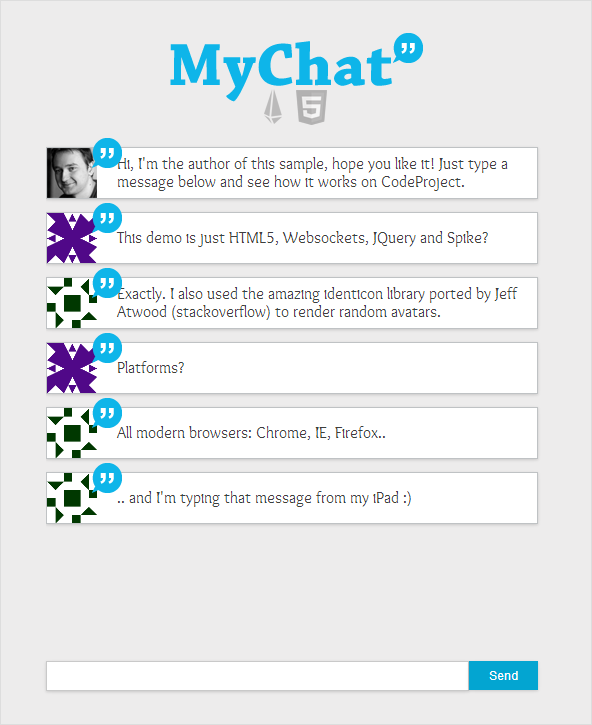
Everything in the web becomes increasingly real-time and HTML5 finally offers some facilities to build efficient, simple and robust real-time applications on the web. This article serves as a demonstration of such facilities in building a fun and simple client-server chat:
It uses websocketsinternally, but abstracted by Spike-Engine, will fallback to flash sockets for older browsers.
It uses HTML5 Data URI for rendering images streamed from the server as byte arrays.
It uses custom fonts and jQuery for animated rendering.
It is cross-platform and with a minimized packet payload and message compression.
The application server is a self-hosted executable and the client is just a plain html file.
Client-Server Protocol
First of all, we need to define a communication protocol between. This represents the messages which are exchanged between the client and the server. Spike-Engine simplifies the networking implementation and allows expressing this protocol declaratively via an XML file. This part is quite straightforward, check the user guide on their website for more info.
XML
Copy Code
Essentially, we've declared 3 message types:
JoinMyChat: initiated by the client who wants to join the chat room. Server will add the client to the room (a list of clients) and generate an identicon to be used as an avatar for that client.
SendMyChatMessage: initiated by the client and contains a string message to send to everyone in the chat room.
MyChatMessages: initiated by the server, sends the avatar and the message to everyone in the room. This is an event of type push, it is pushed to the clients. More info: http://en.wikipedia.org/wiki/Push_technology
Because we are using Spike-Engine to abstract our websockets/flashsockets communication, the network layer is automatically generated, similarly to web services. I won't go into the code generation part here, as a step-by-step explanation can be found here: http://www.spike-engine.com/manual-client and is out of the scope of this article.
Identicons and HTML5 Data URI
In our chat application, I wanted to use avatars, but I didn't want the users to log-in or chose one, it had to be automatically generated. But not randomly, same IP address should have the same avatar, identifying the person even if he disconnects/reconnects or uses a different computer to chat. Identiconsare the right answer for that job. An Identicon is a visual representation of a hash value, usually of an IP address, that serves to identify a user of a computer system as a form of avatar while protecting the users' privacy.

How to generate them? Jeff Atwood, from stackoverflow wrote a port of such library: http://www.codinghorror.com/blog/2007/01/identicons-for-net.html. And I used their open-sourced library to do this: http://identicon.codeplex.com, with some small alterations. The rendering is straightforward.
C#
Copy Code
public byte[] Render(IClient client)
{
using (var stream = new MemoryStream())
{
//Get the code from the ip address
var code = IdenticonUtil.Code(client.Channel.Address.ToString());
//Generate the identicon
var image = this.Render(code, 50);
//Save as png
image.Save(stream, ImageFormat.Png);
return stream.ToArray();
}
}
The interesting part is that on each message, we want to send the avatar of the user, represented as a byte[]. But how do we actually render it once the JavaScript client received the array? The answer is the new HTML5 feature called Data URI.
"The data URI scheme is a URI scheme (Uniform Resource Identifier scheme) that provides a way to include data in-line in web pages as if they were external resources. This technique allows normally separate elements such as images and style sheets to be fetched in a single HTTP request rather than multiple HTTP requests, which can be more efficient." - From Wikipedia's entry on Data URI.
The following code snipped shows how we render the byte array received by javascript and convert it to a data uri. The final step is just assigning that URI to an element.
JavaScript
Copy Code
//Get the bytes of the image and convert it to a BASE64 encoded string and then
//we use data URI to add dynamically the image data
var avatarUri = "data:image/png;base64," + avatar.toBase64();
Appendix A: Server-Side Implementation
For the sake of completeness of this article, here is the full server-side implementation of the chat, exluding the identicon file.
C#
Copy Code
public static class MyChatImpl
{
/// ///A public static function, when decorated with InvokeAt attribute will be ///invoked automatically by Spike Engine. This particular one will be invoked ///when the server is initializing (only once). /// [InvokeAt(InvokeAtType.Initialize)]
public static void Initialize()
{
//First we need to hook the events while the server is initializing,
//giving us the ability to listen on those events.
MyChatProtocol.JoinMyChat += new RequestHandler(OnJoinChat);
MyChatProtocol.SendMyChatMessage += new RequestHandler(OnSendMessage);
//Since we will add the clients in the chat, we need to remove them from
//the chat room once they are disconnected.
Service.ClientDisconnect += new ClientDisconnectEventHandler(OnClientDisconnect);
}
/// ///A list of all clients currently in the chat. This is a concurrent list that ///helps us to avoid most of the concurrency issues as many clients could be ///added/removed to the list simultaneously. /// public static ConcurrentList PeopleInChat = new ConcurrentList();
/// ///Static method that is ivoked when a client sends a message to the server. /// static void OnSendMessage(IClient client, SendMyChatMessageRequest packet)
{
//Validate the message
var message = packet.Message;
if (message == null || message == String.Empty || message.Length > 120)
return;
//We loop through all people in the chat and we broadcast them
//the incoming message.
foreach (var person in PeopleInChat)
{
//Send the message now
person.SendMyChatMessagesInform(
(byte[])client["Avatar"], //The avatar of the client who sends the message
message //The message to be sent
);
}
}
/// ///Static method that is ivoked when a client decides to join the chat. /// static void OnJoinChat(IClient client)
{
//We add the person to the chat room
if (!PeopleInChat.Contains(client))
{
//Generate the avatar for the client
client["Avatar"] = IdenticonRenderer.Create(client);
//Add the person in the room
PeopleInChat.Add(client);
//Say something nice
SayTo(client, "Hi, I'm the author of this sample, hope you like it!
Just type a message below and see how it works on CodeProject.");
}
}
/// ///Static method that is invoked when a client is disconnected. /// static void OnClientDisconnect(ClientDisconnectEventArgs e)
{
//Remove the client from the list if he's
//disconnected from the chat
if (PeopleInChat.Contains(e.Client))
PeopleInChat.Remove(e.Client);
}
/// ///Author says something to a particular client in the chat room. /// static void SayTo(IClient client, string message)
{
client.SendMyChatMessagesInform(Resources.Author, message);
}
}
Appendix B: Client-Side Implementation
The client-side implementation is a bit more tricky, as there's some JQuery for visualisation and css files. Everything is included in the source package attached to this codeproject article.
JavaScript
Copy Code
var bubbles = 1;
var maxBubbles = 8;
var server;
function sendMessage() {
server.sendMyChatMessage($("#msgText").val());
$("#msgText").val("");
}
function addBubble(avatar, text) {
//Get the bytes of the image and convert it to a BASE64 encoded string and then
//we use data URI to add dynamically the image data
var avatarUri = "data:image/png;base64," + avatar.toBase64();
var bubble = $('
'class="bubble">
' + text +
'
$("#msgText").val("");
$(".bubble-container:last")
.after(bubble);
if (bubbles >= maxBubbles) {
var first = $(".bubble-container:first")
.remove();
bubbles--;
}
bubbles++;
$('.bubble-container').show(250, function showNext() {
if (!($(this).is(":visible"))) {
bubbles++;
}
$(this).next(".bubble-container")
.show(250, showNext);
$("#wrapper").scrollTop(9999999);
});
}
//On page loaded and ready
$(window).load(function () {
//First we need to create a server channel on the given URI, in a form http://IP:PORT
//For your local test you might try http://127.0.0.1:8002 (or a different IP address/port)
server = new spike.ServerChannel('http://127.0.0.1:8002');
//When the browser is connected to the server, we show that we are connected to the user
//and provide a transport name (websockets, flashsockets etc.).
server.on('connect', function () {
//Once connected, we need to join the chat
server.joinMyChat();
});
//Here we hook the room messages inform event so we know when
//the server sends us the messages. We need to show them properly in the text area.
server.on('myChatMessagesInform', function (p) {
addBubble(p.avatar, p.message);
});
});
History
23/06/2015 - Source code & article updated to Spike v3
14/09/2013 - Updated source code references & links.
16/08/2013 - Live demo link.
15/08/2013 - Initial article.
 1424


 扫一扫


 被折叠的 条评论
为什么被折叠?
 到【灌水乐园】发言


