



 本文介绍如何使用Flask-Cache扩展为Flask应用添加缓存功能,包括安装配置、缓存视图函数、缓存数据读取及更新、缓存清除等关键步骤。
Django里面可以很方便的应用缓存,那Flask里面没准备这么周全怎么办?自己造轮子么?不用的,前人种树后人乘凉,我们有Flask-Cache,用起来和Django里面一样方便哦!
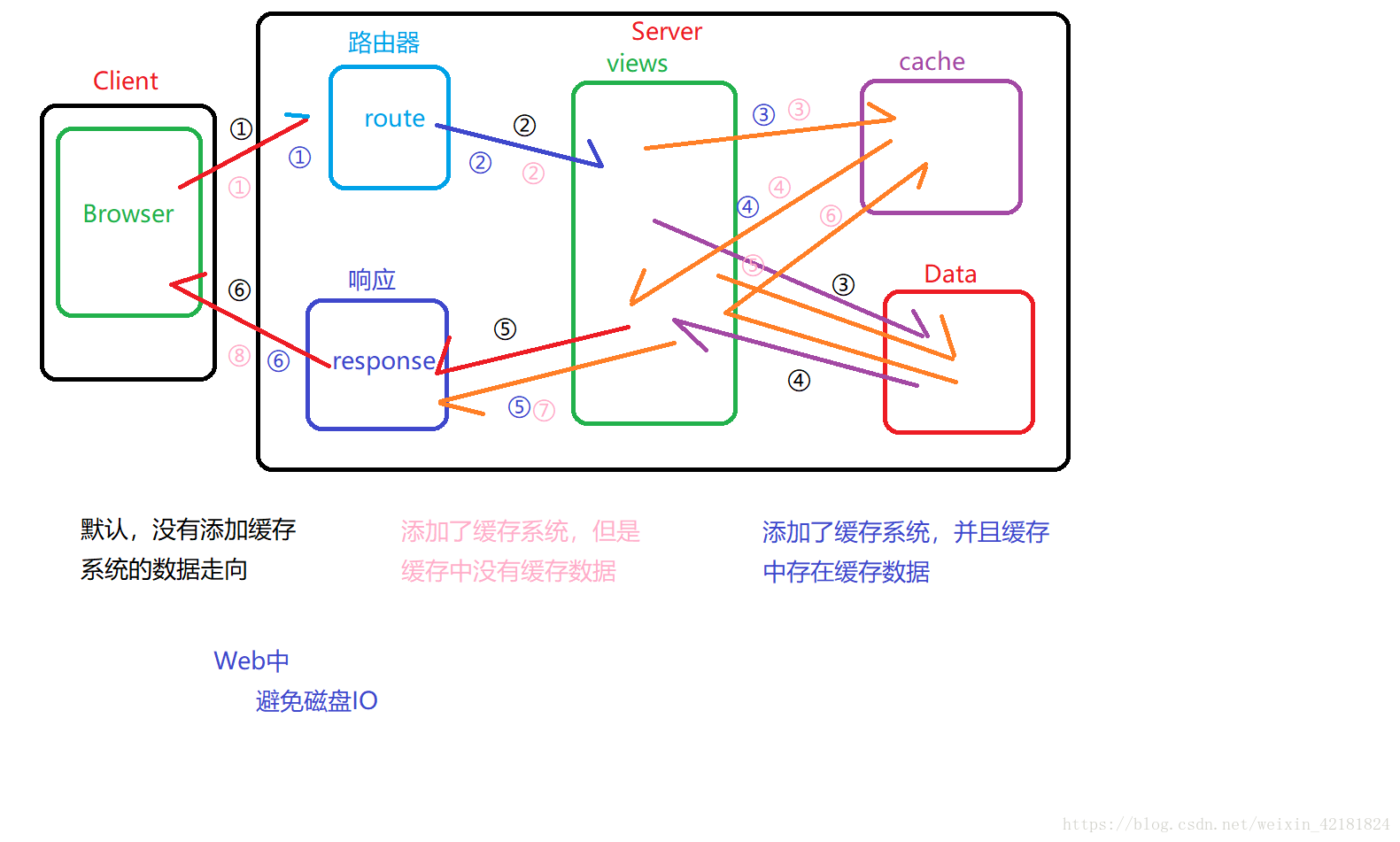
 1.安装
1.安装
pip install Flask-Cache
- 1
 2.配置
2.配置
在config.py里面,设置simple缓存类型,也可以用第三方的redis之类的,和Django一样,装好redis改下设置就行
class Config:
    #省略
    CACHE_TYPE = 'simple'
在app/init.py里面
from flask_cache import Cache

#缓存
cache = Cache()

def create_app(config_name):
    app = Flask(__name__)

    #此处省略若干字
    cache.init_app(app)


    return app
 3.应用
3.应用
在views.py里面
from .. import db, cache from . import main from ..decorators import admin_required, permission_required #缓存视图函数@cache.cached必须在@demo.route之后 @demo.route('/paginatestudent/') @cache.cached(timeout=10, key_prefix=make_cache_key) def paginate_student(): print('请求数据了') page_num = int(request.args['page_num']) per_page = 5 pagination = Student.query.paginate(page=page_num, per_page=per_page) return render_template('index.html', pagination=pagination)缓存数据: def get_all_students(): # 一上来就从缓存里查找,看有没有数据 students = cache.get('students') # 如果缓存里没有数据,查询数据库,并且把查询到的结果写入到缓存里 if not students: print('没有缓存数据,查询数据库') students = Student.query.all() cache.set('students', students, timeout=10) return render_template('ShowStudents.html', students=students) ## 中间件 @demo.before_request def handle_before(): # 先从缓存里查询次数 count = cache.get('count') or 1 # 如果次数大于10,直接不让用户再继续了 if count >= 10: # return '5秒钟以内只能刷新十次' abort(404) count += 1 cache.set('count', count, timeout=50) if not request.user_agent: return '爬虫别爬了'
执行一遍,看看有没有print输出,就可以看到缓存是否生效
 4.清除缓存的方式
CACHE_DEFAULT_TIMEOUT 或者装饰器加参数timeout=50。
第二种方法就是主动删除,比如@cache.cached(timeout=300,key_prefix=’index’)设置好了缓存,删除的时候用cache.delete(‘index’)即可
@main.route('/get_all_students/', methods=['GET','POST'])
@login_required
def get_all_students():
    #提问题写入数据库操作省略
    cache.delete('index')#删除缓存

    return render_template('get_all_students.html', form=form, posts=posts, pagination=pagination)
就像上面如果没设置key的话,默认的key_prefix=’view/%s’,这个%s就是请求的路径request.path,所以如果用@cache.cached(timeout=300)建立缓存就可以用
cache.delete(‘view//’)来清除缓存了,请求路径有的函数没有,最好设置key来搞
还有一种清除所有缓存的cache.clear()





 扫一扫
扫一扫


 2433
2433


 到【灌水乐园】发言



