

如何解决 Tauri 运行报错 “failed to run custom build command for tauri-app“ 的问题 Are you sure you have RC.EXE

在这里插入图片描述
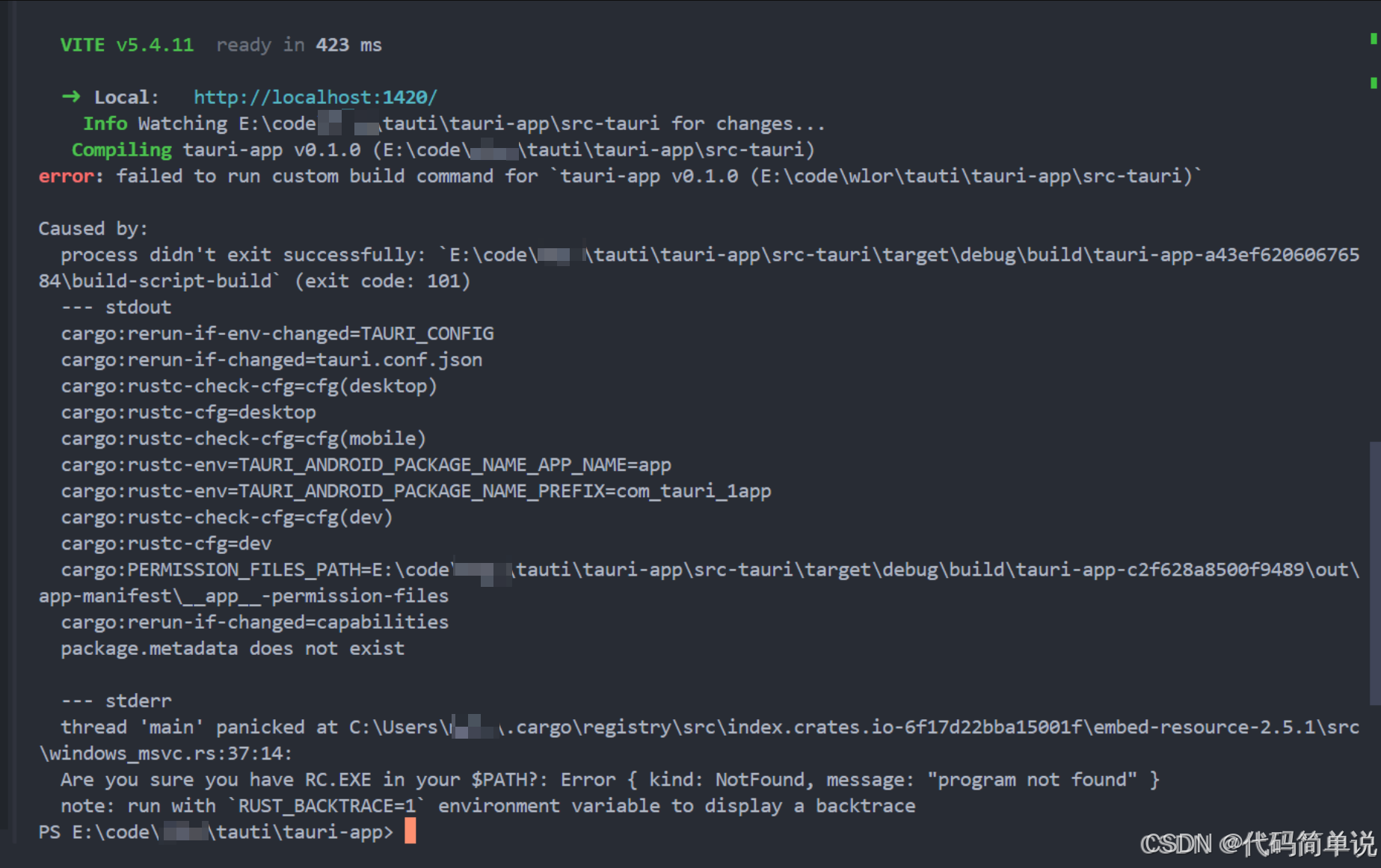
Are you sure you have RC.EXE in your $PATH?: Error { kind: NotFound, message: “program not found” }

今天在使用 Tauri 开发桌面应用时,遇到了以下错误:

error: failed to run custom build command for `tauri-app v0.1.0 (E:\code\xxx\tauti\tauri-app\src-tauri)`

Caused by:
  process didn't exit successfully: `E:\code\xxx\tauti\tauri-app\src-tauri\target\debug\build\tauri-app-a43ef62060676584\build-script-build` (exit code: 101)
  --- stdout
  cargo:rerun-if-env-changed=TAURI_CONFIG
  cargo:rerun-if-changed=tauri.conf.json
  cargo:rustc-check-cfg=cfg(desktop)
  cargo:rustc-cfg=desktop
  cargo:rustc-check-cfg=cfg(mobile)
  cargo:rustc-env=TAURI_ANDROID_PACKAGE_NAME_APP_NAME=app
  cargo:rustc-

你遇到了这个关键错误: ``` failed to run 'cargo metadata' command to get workspace directory: failed to run command cargo metadata --no-deps --format-version 1: No such file or directory (os error 2) ``` --- ## ❌ 错误原因:**Rust 和 Cargo 没有安装** Tauri 是基于 Rust 的桌面应用框架,即使你在前端项目中使用 `npx tauri dev`,它仍然需要: - ✅ **Rust 编程语言** - ✅ **Cargo(Rust 的包管理器)** - ✅ **系统构建工具(如 gcc, make 等)** 而你现在运行的环境(看起来像是 Docker 容器或 Alpine Linux)**没有安装 Rust 工具链**,所以 `cargo` 命令不存在 → 报错 “No such file or directory”。 --- ## ✅ 解决方案:安装 Rust 工具链 你需要先安装 **Rust + Cargo**。 ### ✅ 步骤 1:安装 Rust(会自动包含 Cargo) ```bash # 使用官方脚本安装 Rust curl --proto '=https' --tlsv1.2 -sSf https://sh.rustup.rs | sh ``` > 如果提示 `curl not found`,先运行: > > ```bash > apk add curl # Alpine Linux > # 或 > apt-get update && apt-get install curl # Debian/Ubuntu > ``` 安装完成后,激活环境变量: ```bash source "$HOME/.cargo/env" ``` 或者重启 shell,或者执行: ```bash export PATH="$HOME/.cargo/bin:$PATH" ``` --- ### ✅ 步骤 2:验证是否安装成功 ```bash cargo --version rustc --version ``` 你应该看到类似输出: ``` cargo 1.70.0 (example-hash 2023-06-05) rustc 1.70.0 (example-hash 2023-06-05) ``` ✅ 成功! --- ### ✅ 步骤 3:现在再运行 Tauri 命令 ```bash npx tauri dev ``` 这次应该可以正常启动了! --- ## 🛠️ 补充:如果你在 Docker 中开发 你当前路径是 `/app/my-tauri-app`,很可能是进入了某个容器。你需要一个**预装 Rust 的基础镜像**。 ### 推荐使用官方 Tauri 构建镜像(适用于 CI/CD) ```Dockerfile FROM ghcr.io/tauri-apps/tauri-action:latest AS builder WORKDIR /app COPY . . RUN npm install RUN npm run build RUN npx tauri build ``` 或者自己构建带 Rust 的镜像: ```Dockerfile FROM node:18-alpine AS base ENV NODE_ENV=development # 安装必要的依赖 RUN apk add --no-cache \ curl \ g++ \ make \ python3 \ git # 安装 Rust RUN curl --proto '=https' --tlsv1.2 -sSf https://sh.rustup.rs | sh -s -- -y ENV PATH="/root/.cargo/bin:${PATH}" WORKDIR /app COPY package*.json ./ RUN npm install COPY . . RUN npm run build RUN npx tauri build ``` 然后构建镜像: ```bash docker build -t my-tauri-app . ``` --- ## 🔍 额外检查项 | 检查点 | 命令 | 预期输出 | |-------|------|---------| | Node.js 是否存在 | `node --version` | v16+ | | npm 是否存在 | `npm --version` | 8+ | | cargo 是否存在 | `cargo --version` | 1.60+ | | 是否有 `src-tauri/` 目录 | `ls src-tauri` | 应该看到 `tauri.conf.json`, `Cargo.toml` 等 | 如果没有 `src-tauri/` 目录,说明你还没初始化 Tauri,需要先运行: ```bash npx tauri init ``` (但必须先装好 Rust!) --- ## ✅ 总结 | 问题 | 原因 | 解决方法 | |------|------|-----------| | `cargo metadata` 找不到 | Rust/Cargo 未安装 | 运行 `curl --proto '=https' --tlsv1.2 -sSf https://sh.rustup.rs | sh` | | `npx tauri dev` 失败 | 缺少底层编译支持 | 必须安装 Rust + 构建工具 | | 在容器中无法构建 | 基础镜像缺失依赖 | 使用 `ghcr.io/tauri-apps/tauri-action` 或手动安装 | ---
评论
成就一亿技术人!
拼手气红包6.0元
还能输入1000个字符
 
红包 添加红包
表情包 插入表情
 条评论被折叠 查看
添加红包

请填写红包祝福语或标题

红包个数最小为10个

红包金额最低5元

当前余额3.43前往充值 >
需支付:10.00
成就一亿技术人!
领取后你会自动成为博主和红包主的粉丝 规则
hope_wisdom
发出的红包

打赏作者

代码简单说

你的鼓励将是我创作的最大动力

¥1 ¥2 ¥4 ¥6 ¥10 ¥20
扫码支付:¥1
获取中
扫码支付

您的余额不足,请更换扫码支付或充值

打赏作者

实付
使用余额支付
点击重新获取
扫码支付
钱包余额 0

抵扣说明:

1.余额是钱包充值的虚拟货币,按照1:1的比例进行支付金额的抵扣。
2.余额无法直接购买下载,可以购买VIP、付费专栏及课程。

余额充值


