
Go image, image/draw package (must-read) and gif decoder

这篇博客介绍了Go语言中的图像处理包`image`和`image/draw`,包括颜色模型、点和矩形的概念,以及图像的格式解析。`image/draw`包定义了图像绘制操作,如源图像覆盖目的地图像。博客还提供了一个使用Go解码和创建GIF图像的例子,展示了如何生成和写入GIF文件。

Source:
(1) The Go image package;
(2) The Go image/draw package;
(3) A GIF decoder: an exercise in Go interfaces

Digest:

I. image package:
1. Colors and Color Models:
Color is an interface that defines the minimal method set of any type that can be considered a color: one that can be converted to red, green, blue and alpha values. The conversion may be lossy, such as converting from CMYK or YCbCr color spaces.
A Model is simply something that can convert Colors to other Colors, possibly lossily. For example, the GrayModel can convert any Color to a desaturated Gray. A Palette can convert any Color to one from a limited palette.
2. Points and Rectangles:
A point is an (x,y) co-ordinate on the integer grid, with axes increasing right and down. It is neither a pixel nor a grid square. A Point has no intrinsic width, height or color.
A Rectangle is an axis-aligned rectangle on the integer grid, defined by its top-left and bottom-right Point. A Rectangle also has no intrinsic color. A Rectangle is inclusive at the top-left and exclusive at the bottom-right. For a Point p and a Rectangle r, p.In(r) if and only if r.Min.X <= p.X && p.X < r.Max.X, and similarly for Y. This is analogous to how a slice s[i0:i1] is inclusive at the low end and exclusive at the high end. (Unlike arrays and slices, a Rectangle often has a non-zero origin.)
3. Images:
An Image maps every grid square in a Rectangle to a Color from a Model. "The pixel at (x,y)" refers to the color of the grid square defined by the points (x,y), (x+1,y), (x+1,y+1) and (x,y+1).
The slice-based Image implementations also provide a SubImage method, which returns an Image backed by the same array. Modifying the pixels of a sub-image will affect the pixels of the original image, analogous to how modifying the contents of a sub-slice s[i0:i1] will affect the contents of the original slice's.
For low-level code that works on an image's Pix fields, be aware that ranging over Pix can affect pixels outside an image's bounds. Higher-level code, such as the At and Set methods or the image/draw package, will clip their operations to the image's bounds.
4. Image Formats:
If you have image data of unknown format, the image.Decode function can detect the format. The set of recognized formats is constructed at run time and is not limited to those in the standard package library. An image format package typically registers its format in an init function, and the main package will "underscore import" such a package solely for the side effect of format registration.

II. image/draw package:
Package image/draw defines only one operation: drawing a source image onto a destination image, through an optional mask image.
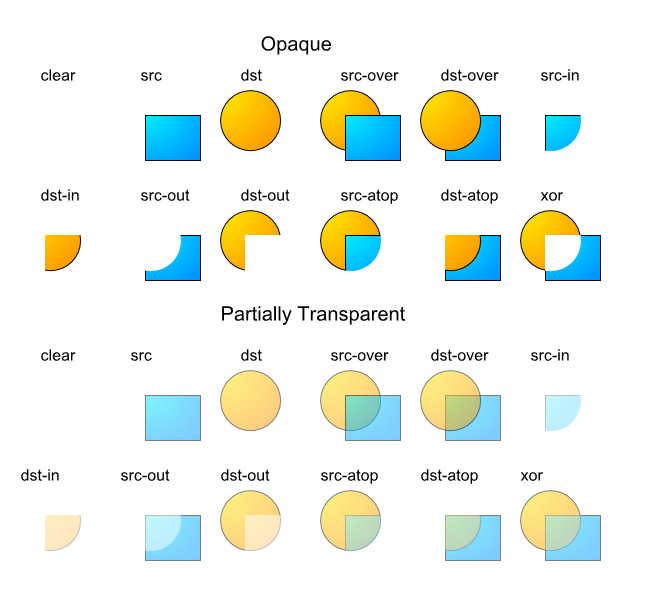
Composition is performed pixel by pixel in the style of the Plan9 graphics library and the X Render extension. The model is based on the classic "Compositing Digital Images" paper by Porter and Duff, with an additional mask parameter: dst = (src IN mask) OP dst. For a fully opaque mask, this reduces to the original Porter-Duff formula: dst = src OP dst. In Go, a nil mask image is equivalent to an infinitely sized, fully opaque mask image.
The Porter-Duff paper presented 12 different composition operations, but with an explicit mask, only 2 of these are needed in practice: source-over-destination and source. In Go, these operations are represented by the Over and Src constants. The Over operator performs the natural layering of a source image over a destination image: the change to the destination image is smaller where the source (after masking) is more transparent (that is, has lower alpha). The Src operator merely copies the source (after masking) with no regard for the destination image's original content. For fully opaque source and mask images, the two operators produce the same output, but the Src operator is usually faster.
1. Geometric Alignment:(omit, but must-read)
2. Filling a Rectangle:(omit, but must-read)
3. Copying an Image:(omit, but must-read)
4. Scrolling an Image:(omit, but must-read)
5. Converting an Image to RGBA:(omit, but must-read)
6. Drawing Through a Mask:(omit, but must-read)
7. Drawing Font Glyphs:(omit, but must-read)
8. Performance:(omit, but must-read)
9. An example:

package main

import (
	"image"
	"image/color"
	"image/png"
	"log"
	"os"
)

const width, height = 256, 256

func main() {
	// Create a colored image of the given width and height.
	img := image.NewNRGBA(image.Rect(0, 0, width, height))
	for y := 0; y < height; y ++ {
		for x := 0; x < width; x ++ {
			img.Set(x, y, color.NRGBA{
				R: uint8((x+y)&255),
				G: uint8((x+y)<<1&255),
				B: uint8((x+y)<<2&255),
				A: 255,
			})
		}
	}
	f, err := os.Create("/tmp/image.png")
	if err != nil {
		log.Fatal(err)
	}
	defer f.Close()
	if err := png.Encode(f, img); err != nil {
		log.Fatal(err)
	}
}

III. A GIF decoder: an exercise in Go interfaces:
An example:

package main

import (
	"image"
	"image/color"
	"image/gif"
	"io"
	"log"
	"math"
	"math/rand"
	"net/http"
	"os"
	"time"
)

var palette = []color.Color{color.White, color.Black}

const (
	whiteIndex = 0
	blackIndex = 1

	cycles = 5		// 完整的x振荡器变化的个数
	res= 0.001		// 角度分辨率
	size = 100		// 图像画布包含[-size...+size]
	nframes = 64	// 动画中的帧数
	delay = 8		// 以10ms为单位的帧间延迟 
)

func lissajous(out io.Writer) {
	freq := rand.Float64()*3.0	// y振荡器的相对频率
	anim := gif.GIF{LoopCount: nframes}
	phase := 0.0				// phase difference
	for i := 0; i < nframes; i ++ {
		rect := image.Rect(0, 0, 2*size+1, 2*size+1)
		img := image.NewPaletted(rect, palette)
		for t := 0.0; t < cycles*2*math.Pi; t += res {
			x := math.Sin(t)
			y := math.Sin(t*freq + phase)
			img.SetColorIndex(size+int(x*size+0.5), size+int(y*size+0.5), blackIndex)
		}
		phase += 0.1
		anim.Delay = append(anim.Delay, delay)
		anim.Image = append(anim.Image, img)
	}
	gif.EncodeAll(out, &anim)
}

func main() {
	rand.Seed(time.Now().UTC().UnixNano())
	if len(os.Args) > 1 && os.Args[0] == "web" {
		handler := func(w http.ResponseWriter, r *http.Request) {
			lissajous(w)
		}
		http.HandleFunc("/", handler)
		log.Fatal(http.ListenAndServe("localhost:8000", nil))
	}
	f, err := os.Create("/tmp/anim.gif")
	if err != nil {
		log.Fatal(err)
	}
	defer f.Close()
	lissajous(f)
}
package org.hds.Graphics; import java.net.*; import java.io.*; import java.util.*; import java.awt.*; import java.awt.image.*; public class GifDecoder { /** * File read status: No errors. */ public static final int STATUS_OK = 0; /** * File read status: Error decoding file (may be partially decoded) */ public static final int STATUS_FORMAT_ERROR = 1; /** * File read status: Unable to open source. */ public static final int STATUS_OPEN_ERROR = 2; protected BufferedInputStream in; protected int status; protected int width; // full image width protected int height; // full image height protected boolean gctFlag; // global color table used protected int gctSize; // size of global color table protected int loopCount = 1; // iterations; 0 = repeat forever protected int[] gct; // global color table protected int[] lct; // local color table protected int[] act; // active color table protected int bgIndex; // background color index protected int bgColor; // background color protected int lastBgColor; // previous bg color protected int pixelAspect; // pixel aspect ratio protected boolean lctFlag; // local color table flag protected boolean interlace; // interlace flag protected int lctSize; // local color table size protected int ix, iy, iw, ih; // current image rectangle protected Rectangle lastRect; // last image rect protected BufferedImage image; // current frame protected BufferedImage lastImage; // previous frame protected byte[] block = new byte[256]; // current data block protected int blockSize = 0; // block size // last graphic control extension info protected int dispose = 0; // 0=no action; 1=leave in place; 2=restore to bg; 3=restore to prev protected int lastDispose = 0; protected boolean transparency = false; // use transparent color protected int delay = 0; // delay in milliseconds protected int totaldelay = 0; // delay in milliseconds protected int transIndex; // transparent color index protected static final int MaxStackSize = 4096; // max decoder pixel stack size // LZW decoder working arrays protected short[] prefix; protected byte[] suffix; protected byte[] pixelStack; protected byte[] pixels; protected ArrayList frames; // frames read from current file protected int frameCount; static class GifFrame { public GifFrame(BufferedImage im, int del) { image = im; delay = del; } public BufferedImage image; public int delay; } /** * Gets display duration for specified frame. * * @param n int index of frame * @return delay in milliseconds */ public int getDelay(int n) { // delay = -1; if ((n >= 0) && (n < frameCount)) { delay = ((GifFrame) frames.get(n)).delay; } return delay; } /** * Gets the number of frames read from file. * @return frame count */ public int getFrameCount() { return frameCount; } /** * Gets the number of frames read from file. * @return frame count */ public int gettotaldelay() { return totaldelay; } /** * Gets the first (or only) image read. * * @return BufferedImage containing first frame, or null if none. */ public BufferedImage getImage() { return getFrame(0); } /** * Gets the "Netscape" iteration count, if any. * A count of 0 means repeat indefinitiely. * * @return iteration count if one was specified, else 1. */ public int getLoopCount() { return loopCount; } /** * Creates new frame image from current data (and previous * frames as specified by their disposition codes). */ protected void setPixels() { // expose destination image's pixels as int array int[] dest = ((DataBufferInt) image.getRaster().getDataBuffer()).getData(); // fill in starting image contents based on last image's dispose code if (lastDispose > 0) { if (lastDispose == 3) { // use image before last int n = frameCount - 2; if (n > 0) { lastImage = getFrame(n - 1); } else { lastImage = null; } } if (lastImage != null) { int[] prev = ((DataBufferInt) lastImage.getRaster().getDataBuffer()).getData(); System.arraycopy(prev, 0, dest, 0, width * height); // copy pixels if (lastDispose == 2) { // fill last image rect area with background color Graphics2D g = image.createGraphics(); Color c = null; if (transparency) { c = new Color(0, 0, 0, 0); // assume background is transparent } else { c = new Color(lastBgColor); // use given background color } g.setColor(c); g.setComposite(AlphaComposite.Src); // replace area g.fill(lastRect); g.dispose(); } } } // copy each source line to the appropriate place in the destination int pass = 1; int inc = 8; int iline = 0; for (int i = 0; i < ih; i++) { int line = i; if (interlace) { if (iline >= ih) { pass++; switch (pass) { case 2 : iline = 4; break; case 3 : iline = 2; inc = 4; break; case 4 : iline = 1; inc = 2; } } line = iline; iline += inc; } line += iy; if (line < height) { int k = line * width; int dx = k + ix; // start of line in dest int dlim = dx + iw; // end of dest line if ((k + width) < dlim) { dlim = k + width; // past dest edge } int sx = i * iw; // start of line in source while (dx < dlim) { // map color and insert in destination int index = ((int) pixels[sx++]) & 0xff; int c = act[index]; if (c != 0) { dest[dx] = c; } dx++; } } } } /** * Gets the image contents of frame n. * * @return BufferedImage representation of frame, or null if n is invalid. */ public BufferedImage getFrame(int n) { BufferedImage im = null; if ((n >= 0) && (n < frameCount)) { im = ((GifFrame) frames.get(n)).image; } return im; } /** * Gets image size. * * @return GIF image dimensions */ public Dimension getFrameSize() { return new Dimension(width, height); } /** * Reads GIF image from stream * * @param BufferedInputStream containing GIF file. * @return read status code (0 = no errors) */ public int read(BufferedInputStream is) { init(); if (is != null) { in = is; readHeader(); if (!err()) { readContents(); if (frameCount < 0) { status = STATUS_FORMAT_ERROR; } } } else { status = STATUS_OPEN_ERROR; } try { is.close(); } catch (IOException e) { } return status; } /** * Reads GIF image from stream * * @param InputStream containing GIF file. * @return read status code (0 = no errors) */ public int read(InputStream is) { init(); if (is != null) { if (!(is instanceof BufferedInputStream)) is = new BufferedInputStream(is); in = (BufferedInputStream) is; readHeader(); if (!err()) { readContents(); if (frameCount < 0) { status = STATUS_FORMAT_ERROR; } } } else { status = STATUS_OPEN_ERROR; } try { is.close(); } catch (IOException e) { } return status; } /** * Reads GIF file from specified file/URL source * (URL assumed if name contains ":/" or "file:") * * @param name String containing source * @return read status code (0 = no errors) */ public int read(String name) { status = STATUS_OK; try { name = name.trim().toLowerCase(); if ((name.indexOf("file:") >= 0) || (name.indexOf(":/") > 0)) { URL url = new URL(name); in = new BufferedInputStream(url.openStream()); } else { in = new BufferedInputStream(new FileInputStream(name)); } status = read(in); } catch (IOException e) { status = STATUS_OPEN_ERROR; } return status; } /** * Decodes LZW image data into pixel array. * Adapted from John Cristy's ImageMagick. */ protected void decodeImageData() { int NullCode = -1; int npix = iw * ih; int available, clear, code_mask, code_size, end_of_information, in_code, old_code, bits, code, count, i, datum, data_size, first, top, bi, pi; if ((pixels == null) || (pixels.length < npix)) { pixels = new byte[npix]; // allocate new pixel array } if (prefix == null) prefix = new short[MaxStackSize]; if (suffix == null) suffix = new byte[MaxStackSize]; if (pixelStack == null) pixelStack = new byte[MaxStackSize + 1]; // Initialize GIF data stream decoder. data_size = read(); clear = 1 << data_size; end_of_information = clear + 1; available = clear + 2; old_code = NullCode; code_size = data_size + 1; code_mask = (1 << code_size) - 1; for (code = 0; code < clear; code++) { prefix[code] = 0; suffix[code] = (byte) code; } // Decode GIF pixel stream. datum = bits = count = first = top = pi = bi = 0; for (i = 0; i < npix;) { if (top == 0) { if (bits < code_size) { // Load bytes until there are enough bits for a code. if (count == 0) { // Read a new data block. count = readBlock(); if (count <= 0) break; bi = 0; } datum += (((int) block[bi]) & 0xff) << bits; bits += 8; bi++; count--; continue; } // Get the next code. code = datum & code_mask; datum >>= code_size; bits -= code_size; // Interpret the code if ((code > available) || (code == end_of_information)) break; if (code == clear) { // Reset decoder. code_size = data_size + 1; code_mask = (1 << code_size) - 1; available = clear + 2; old_code = NullCode; continue; } if (old_code == NullCode) { pixelStack[top++] = suffix[code]; old_code = code; first = code; continue; } in_code = code; if (code == available) { pixelStack[top++] = (byte) first; code = old_code; } while (code > clear) { pixelStack[top++] = suffix[code]; code = prefix[code]; } first = ((int) suffix[code]) & 0xff; // Add a new string to the string table, if (available >= MaxStackSize) break; pixelStack[top++] = (byte) first; prefix[available] = (short) old_code; suffix[available] = (byte) first; available++; if (((available & code_mask) == 0) && (available < MaxStackSize)) { code_size++; code_mask += available; } old_code = in_code; } // Pop a pixel off the pixel stack. top--; pixels[pi++] = pixelStack[top]; i++; } for (i = pi; i < npix; i++) { pixels[i] = 0; // clear missing pixels } } /** * Returns true if an error was encountered during reading/decoding */ protected boolean err() { return status != STATUS_OK; } /** * Initializes or re-initializes reader */ protected void init() { status = STATUS_OK; frameCount = 0; frames = new ArrayList(); gct = null; lct = null; } /** * Reads a single byte from the input stream. */ protected int read() { int curByte = 0; try { curByte = in.read(); } catch (IOException e) { status = STATUS_FORMAT_ERROR; } return curByte; } /** * Reads next variable length block from input. * * @return number of bytes stored in "buffer" */ protected int readBlock() { blockSize = read(); int n = 0; if (blockSize > 0) { try { int count = 0; while (n < blockSize) { count = in.read(block, n, blockSize - n); if (count == -1) break; n += count; } } catch (IOException e) { } if (n < blockSize) { status = STATUS_FORMAT_ERROR; } } return n; } /** * Reads color table as 256 RGB integer values * * @param ncolors int number of colors to read * @return int array containing 256 colors (packed ARGB with full alpha) */ protected int[] readColorTable(int ncolors) { int nbytes = 3 * ncolors; int[] tab = null; byte[] c = new byte[nbytes]; int n = 0; try { n = in.read(c); } catch (IOException e) { } if (n < nbytes) { status = STATUS_FORMAT_ERROR; } else { tab = new int[256]; // max size to avoid bounds checks int i = 0; int j = 0; while (i < ncolors) { int r = ((int) c[j++]) & 0xff; int g = ((int) c[j++]) & 0xff; int b = ((int) c[j++]) & 0xff; tab[i++] = 0xff000000 | (r << 16) | (g << 8) | b; } } return tab; } /** * Main file parser. Reads GIF content blocks. */ protected void readContents() { // read GIF file content blocks boolean done = false; while (!(done || err())) { int code = read(); switch (code) { case 0x2C : // image separator readImage(); break; case 0x21 : // extension code = read(); switch (code) { case 0xf9 : // graphics control extension readGraphicControlExt(); break; case 0xff : // application extension readBlock(); String app = ""; for (int i = 0; i < 11; i++) { app += (char) block[i]; } if (app.equals("NETSCAPE2.0")) { readNetscapeExt(); } else skip(); // don't care break; default : // uninteresting extension skip(); } break; case 0x3b : // terminator done = true; break; case 0x00 : // bad byte, but keep going and see what happens break; default : status = STATUS_FORMAT_ERROR; } } } /** * Reads Graphics Control Extension values */ protected void readGraphicControlExt() { read(); // block size int packed = read(); // packed fields dispose = (packed & 0x1c) >> 2; // disposal method if (dispose == 0) { dispose = 1; // elect to keep old image if discretionary } transparency = (packed & 1) != 0; delay = readShort() * 10; // delay in milliseconds transIndex = read(); // transparent color index read(); // block terminator } /** * Reads GIF file header information. */ protected void readHeader() { String id = ""; for (int i = 0; i < 6; i++) { id += (char) read(); } /* * 如果id!=GIF89a佳毅判断不了暂时不用 */ if(!id.equals("GIF89a")) { status = STATUS_FORMAT_ERROR; return; } if (!id.startsWith("GIF")) { status = STATUS_FORMAT_ERROR; return; } readLSD(); if (gctFlag && !err()) {//全局定义颜色列表 gct = readColorTable(gctSize); bgColor = gct[bgIndex]; } } /** * Reads next frame image * 读每帧图片信息 */ protected void readImage() { ix = readShort(); // (sub)image position & size iy = readShort(); iw = readShort(); ih = readShort(); if(ix > width || iy > height || iw > width || ih > height)//当帧位置大小有问题佳毅不支持 {status = STATUS_FORMAT_ERROR;} int packed = read(); lctFlag = (packed & 0x80) != 0; // 1 - local color table flag局部颜色列表 interlace = (packed & 0x40) != 0; // 2 - interlace flag // 3 - sort flag // 4-5 - reserved lctSize = 2 << (packed & 7); // 6-8 - local color table size if (lctFlag) { status = STATUS_FORMAT_ERROR;//局部颜色列表 佳毅不支持 lct = readColorTable(lctSize); // read table act = lct; // make local table active } else { act = gct; // make global table active if (bgIndex == transIndex) bgColor = 0; } int save = 0; if (transparency) { save = act[transIndex]; act[transIndex] = 0; // set transparent color if specified } if (act == null) { status = STATUS_FORMAT_ERROR; // no color table defined } if (err()) return; decodeImageData(); // decode pixel data skip(); if (err()) return; frameCount++; // create new image to receive frame data image = new BufferedImage(width, height, BufferedImage.TYPE_INT_ARGB_PRE); setPixels(); // transfer pixel data to image frames.add(new GifFrame(image, delay)); // add image to frame list totaldelay += delay; if (transparency) { act[transIndex] = save; } resetFrame(); } /** * Reads Logical Screen Descriptor */ protected void readLSD() { // logical screen size width = readShort(); height = readShort(); // packed fields int packed = read(); gctFlag = (packed & 0x80) != 0; // 1 : global color table flag 全局定义颜色列表 true // 2-4 : color resolution // 5 : gct sort flag gctSize = 2 << (packed & 7); // 6-8 : gct size bgIndex = read(); // background color index pixelAspect = read(); // pixel aspect ratio } /** * Reads Netscape extenstion to obtain iteration count */ protected void readNetscapeExt() { do { readBlock(); if (block[0] == 1) { // loop count sub-block int b1 = ((int) block[1]) & 0xff; int b2 = ((int) block[2]) & 0xff; loopCount = (b2 << 8) | b1; } } while ((blockSize > 0) && !err()); } /** * Reads next 16-bit value, LSB first */ protected int readShort() { // read 16-bit value, LSB first return read() | (read() << 8); } /** * Resets frame state for reading next image. */ protected void resetFrame() { lastDispose = dispose; lastRect = new Rectangle(ix, iy, iw, ih); lastImage = image; lastBgColor = bgColor; int dispose = 0; boolean transparency = false; int delay = 0; lct = null; } protected void skip() { do { readBlock(); } while ((blockSize > 0) && !err()); } }
<think>好的,我现在需要帮助用户解决Jenkins中Java编译报错“cannot find symbol”的问题。首先,我得回忆一下这个错误的常见原因。根据用户提供的引用信息,可能的原因有几个:代码未提交到SVN、引用的jar包过旧、或者Maven没有强制更新。 用户提到错误出现在ContentConsumer.java文件的1177行46列,所以定位到具体代码位置是关键。首先,应该检查该行代码,确认是否有拼写错误或者引用不存在的类、方法或变量。比如,是否使用了正确的类名,是否有导入语句缺失。 接下来考虑版本控制的问题。如果代码没有正确提交到SVN,Jenkins拉取的代码可能缺失部分内容,导致编译失败。需要确认所有相关文件,尤其是ContentConsumer.java及其引用的类是否都已提交,并且是最新版本。 然后是依赖管理方面的问题。用户提到可能是引用的jar包过旧,或者Maven没有更新。这时候需要检查项目的pom.xml文件,确认依赖的版本是否正确,特别是报错的类所在的jar包是否被正确引入。同时,在Jenkins构建时,可能需要执行mvn clean install -U命令强制更新依赖,确保使用的是最新的jar包。 另外,Java版本兼容性也是一个可能的原因。如果项目使用的是较高版本的JDK,而Jenkins环境配置的是较低版本,可能会导致某些类或方法无法识别。需要检查Jenkins的JDK配置,确保与开发环境一致。 还有,IDE缓存问题有时候也会引发类似错误,但在Jenkins上可能不常见。不过,清理Maven的本地仓库(.m2/repository)并重新构建可以排除这种情况。 最后,如果以上步骤都无法解决,可能需要查看具体的错误日志,确定缺失的符号具体是什么,比如是某个类、方法还是变量。根据缺失的符号进一步排查对应的依赖或代码错误。 总结下来,解决步骤应该是:检查代码提交情况、清理并更新Maven依赖、确认JDK版本、检查依赖配置,最后查看详细日志定位具体问题。需要一步步排除可能的原因,逐步缩小问题范围。</think>### 解决Jenkins中Java编译报错“cannot find symbol”的步骤 #### 1. **定位代码问题** - 检查`ContentConsumer.java`文件的**1177行46列**,确认是否存在以下问题: - 类名、方法名或变量名拼写错误(例如`Base64Decoder`写成`BASE64Decoder`) - 缺少必要的导入语句(如`import java.util.Base64;`) - 使用了未定义的类或方法[^2] - **示例**:若报错涉及`BASE64Decoder`,需确认是否应替换为Java 8+的`Base64`类: ```java // 旧版(JDK 1.8前) BASE64Decoder decoder = new BASE64Decoder(); // 新版(JDK 1.8+) Base64.Decoder decoder = Base64.getDecoder(); ``` #### 2. **检查代码提交与版本控制** - 确认`ContentConsumer.java`及相关依赖类已**完整提交到SVN/Git**,避免Jenkins拉取时代码缺失[^1] - 使用命令检查本地与仓库差异: ```bash svn status # 或 git status ``` #### 3. **清理并强制更新Maven依赖** - 在Jenkins构建脚本中添加Maven强制更新命令,确保依赖最新: ```bash mvn clean install -U ``` - 若问题仍存在,**手动删除本地Maven仓库**中的旧依赖: ```bash rm -rf ~/.m2/repository/path/to/problematic-jar/ ``` #### 4. **验证依赖配置** - 检查`pom.xml`中是否正确定义了报错类所在的依赖: ```xml <!-- 示例:Base64相关依赖 --> <dependency> <groupId>commons-codec</groupId> <artifactId>commons-codec</artifactId> <version>1.15</version> </dependency> ``` #### 5. **检查JDK版本兼容性** - 确认Jenkins使用的**JDK版本与开发环境一致**(如JDK 8/11/17) - 在Jenkins全局配置中设置正确的JDK路径: ``` Manage Jenkins → Global Tool Configuration → JDK ``` #### 6. **查看详细编译日志** - 在Jenkins构建日志中搜索`ContentConsumer.java:1177`,获取缺失符号的具体名称: ```log [ERROR] /path/to/ContentConsumer.java:[1177,46] cannot find symbol symbol: class BASE64Decoder location: class ContentConsumer ``` --- ###
评论
成就一亿技术人!
拼手气红包6.0元
还能输入1000个字符
 
红包 添加红包
表情包 插入表情
 条评论被折叠 查看
添加红包

请填写红包祝福语或标题

红包个数最小为10个

红包金额最低5元

当前余额3.43前往充值 >
需支付:10.00
成就一亿技术人!
领取后你会自动成为博主和红包主的粉丝 规则
hope_wisdom
发出的红包
实付
使用余额支付
点击重新获取
扫码支付
钱包余额 0

抵扣说明:

1.余额是钱包充值的虚拟货币,按照1:1的比例进行支付金额的抵扣。
2.余额无法直接购买下载,可以购买VIP、付费专栏及课程。

余额充值