



Python提供了丰富的文件操作方法,允许你创建、读取、更新和删除文件。
目录
1. 打开文件
使用open()函数打开文件:
file = open("filename.txt", "mode")1.1 文件打开模式
| 模式 | 描述 |
|---|---|
| 'r' | 只读(默认) |
| 'w' | 写入,会覆盖已存在的文件 |
| 'x' | 创建新文件,如果文件已存在则失败 |
| 'a' | 追加,如果文件存在则在末尾追加 |
| 'b' | 二进制模式 |
| 't' | 文本模式(默认) |
| '+' | 更新(可读可写) |
2. 文件对象方法
2.1 读取文件
-
read(size)- 读取指定大小的数据,如果不指定size则读取全部content = file.read() # 读取全部内容 part = file.read(100) # 读取前100个字符 -
readline()- 读取一行line = file.readline() -
readlines()- 读取所有行并返回列表lines = file.readlines()
2.2 写入文件
-
write(string)- 写入字符串file.write("Hello, World!\n") -
writelines(sequence)- 写入字符串序列lines = ["第一行\n", "第二行\n"] file.writelines(lines)
2.3 文件位置
-
tell()- 返回当前文件指针位置position = file.tell() -
seek(offset[, whence])- 移动文件指针file.seek(0) # 移动到文件开头 file.seek(10, 0) # 从文件开头移动10个字节 file.seek(-5, 2) # 从文件末尾向前移动5个字节
2.4 其他方法
-
close()- 关闭文件file.close() -
flush()- 刷新缓冲区,立即将缓冲区的数据写入文件file.flush() -
truncate([size])- 截断文件到指定大小,默认为当前位置file.truncate(100) # 截断到100字节
3. 使用with语句(推荐)
with 语句是 Python 中处理文件操作的最佳实践,它能够自动管理资源(如文件),确保文件在使用后被正确关闭,即使在操作过程中发生异常也是如此。
3.1 基本语法
with open('filename', 'mode') as file:
    # 在这里进行文件操作
    # 文件会自动关闭
3.2 主要优点
-
自动关闭文件:不需要手动调用
close()方法 -
异常安全:即使在文件操作过程中发生异常,文件也会被正确关闭
-
代码简洁:减少了资源管理的代码量
3.3 使用示例
1. 读取文件
# 读取整个文件内容
with open('example.txt', 'r') as file:
    content = file.read()
    print(content)

# 逐行读取文件
with open('example.txt', 'r') as file:
    for line in file:
        print(line.strip())  # strip() 移除每行末尾的换行符
2. 写入文件
# 写入新文件(会覆盖已存在文件)
with open('output.txt', 'w') as file:
    file.write("第一行内容\n")
    file.write("第二行内容\n")

# 追加内容到文件
with open('output.txt', 'a') as file:
    file.write("这是追加的内容\n")
3. 同时读写文件
with open('data.txt', 'r+') as file:
    content = file.read()
    file.seek(0, 0)  # 移动指针到文件开头
    file.write("新内容\n" + content)
4. 处理二进制文件
# 读取二进制文件(如图片)
with open('image.jpg', 'rb') as file:
    data = file.read()

# 写入二进制文件
with open('copy.jpg', 'wb') as file:
    file.write(data)
5. 同时处理多个文件
with open('source.txt', 'r') as src, open('destination.txt', 'w') as dst:
    content = src.read()
    dst.write(content.upper())  # 将内容转为大写后写入新文件
3.4 高级用法
处理编码问题
# 指定文件编码(特别是处理非ASCII文本时)
with open('utf8_file.txt', 'r', encoding='utf-8') as file:
    content = file.read()
错误处理
try:
    with open('nonexistent.txt', 'r') as file:
        content = file.read()
except FileNotFoundError:
    print("文件不存在!")
except IOError:
    print("读取文件时发生错误!")
使用上下文管理器处理自定义资源
with 语句不仅适用于文件,还可以用于任何实现了上下文管理协议的对象:
class MyResource:
    def __enter__(self):
        print("资源已分配")
        return self

    def __exit__(self, exc_type, exc_val, exc_tb):
        print("资源已释放")

    def do_something(self):
        print("正在使用资源")

with MyResource() as resource:
    resource.do_something()
注意事项
-
with块结束后,文件会自动关闭,再次尝试访问文件会引发ValueError -
对于非常大的文件,建议逐行或分块读取,而不是一次性读取整个文件
-
在 Windows 上处理文本文件时,可能需要指定
newline=''参数来控制换行符处理
4. 文件操作示例
# 写入文件
with open("example.txt", "w") as f:
    f.write("Hello, Python!\n")
    f.write("This is a file operation example.\n")

# 读取文件
with open("example.txt", "r") as f:
    print(f.read())

# 逐行读取
with open("example.txt", "r") as f:
    for line in f:
        print(line.strip())

# 追加内容
with open("example.txt", "a") as f:
    f.write("Appending new line.\n")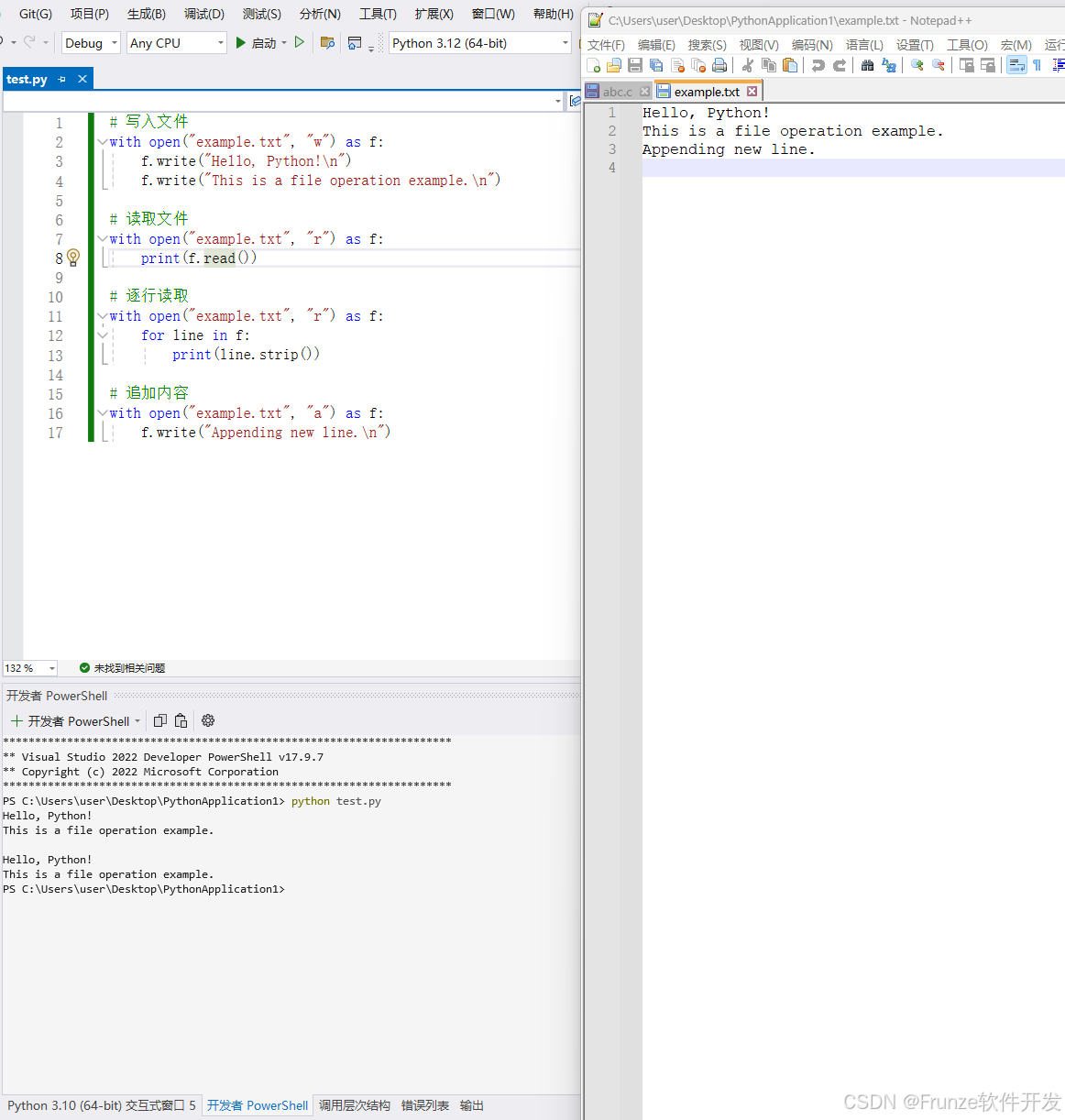
5. 文件系统操作
Python的os模块和os.path模块提供了许多文件系统操作:
import os

# 重命名文件
os.rename("old.txt", "new.txt")

# 删除文件
os.remove("file.txt")

# 获取文件大小
size = os.path.getsize("example.txt")

# 检查文件是否存在
if os.path.exists("example.txt"):
    print("File exists")

# 获取文件列表
files = os.listdir(".")
这些是Python3中文件操作的基本方法,掌握它们可以让你有效地处理文件I/O操作。





 扫一扫
扫一扫


 1477
1477

 被折叠的 条评论
为什么被折叠?
被折叠的 条评论
为什么被折叠?
 到【灌水乐园】发言





