


 本文分享了Java分页展示的具体代码。使用SSH框架,包含前台JSP页面的分页按钮动态处理、根据页数和下拉框查询数据列表等功能的代码,以及后台查询需求列表的Action、Service和Dao层代码,为Java分页展示提供思路。
本文实例为大家分享了Java分页展示的具体代码,供大家参考,具体内容如下
先上图吧,大致如图,也就提供个思路(ps:使用了SSH框架)
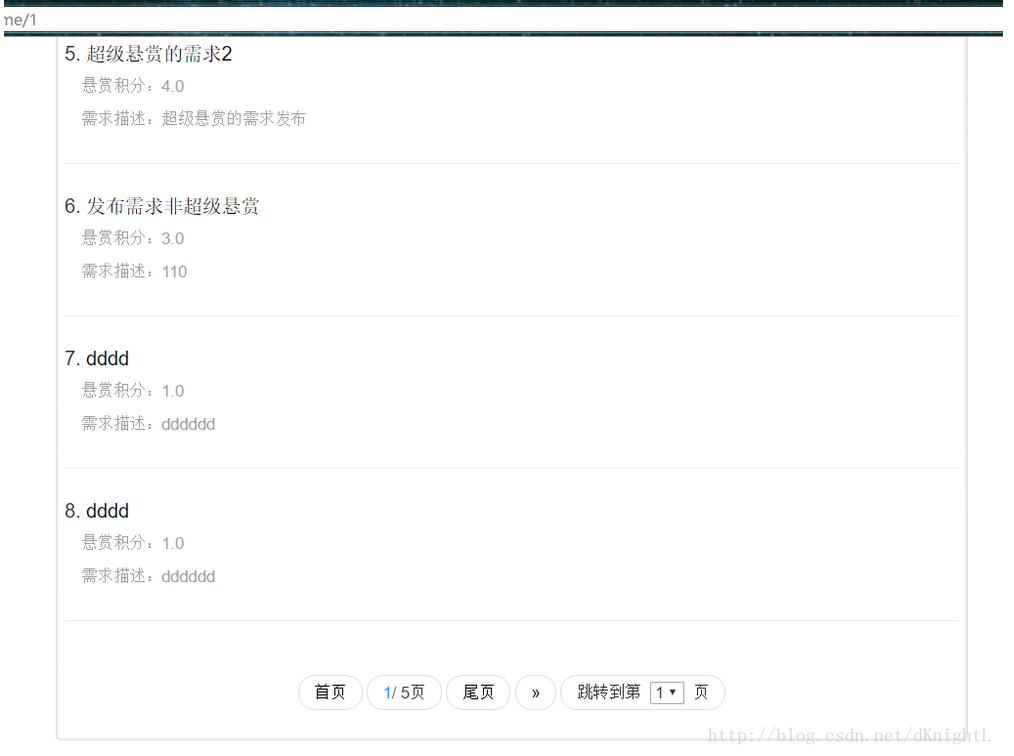
前台JSP页面
pageEncoding="utf-8"%>
数据交易猫//1分页下,动态添加disable给分页按钮
/*
$(function(){
var myPageId="#"+$("#hidCurrentPage").val();
var myPageAId="#"+$("#hidCurrentPage").val()+" a";
$(myPageAId).addClass('main-bgcolor');
$(myPageAId).attr('href','javascript:void(0)')
$(myPageId).addClass('disabled');
$(myPageId).addClass('disabledControl');
})
*/
//
$(function(){
})
//根据页数查询数据列表
function queryRequirListByPage(i) {
var pageNo=i;
var sortValue=$('#hidSortValue').val();
$.ajax({
url:'${pageContext.request.contextPath}/bid/reAction_queryRequirListByPage.action',
type:'POST',
data:{
sortValue:sortValue,
pageNo:pageNo
},
success:function(datas){
$('#requireContentDiv').html(datas);
},
error:function(){
alert("失败");
},
});
}
//根据下拉查询数据列表
function selectPage(obj){
var pageNo=obj.options[obj.selectedIndex].value;
var sortValue=$('#hidSortValue').val();
$.ajax({
url:'${pageContext.request.contextPath}/bid/reAction_queryRequirListByPage.action',
type:'POST',
data:{
sortValue:sortValue,
pageNo:pageNo
},
success:function(datas){
$('#requireContentDiv').html(datas);
},
error:function(){
alert("失败");
},
});
}
//根据下拉选择排序方式
function selectSort(obj){
var sortValue = obj.options[obj.selectedIndex].value;
var pageNo =1;
$.ajax({
url:'${pageContext.request.contextPath}/bid/reAction_queryRequirListByPage.action',
type:'POST',
data:{sortValue:sortValue,
pageNo:pageNo
},
success:function(datas){
$('#requireContentDiv').html(datas);
},
error:function(){
alert("失败");
},
});
}
$(document).ready(function(){
var backSortValue=$('#backSortValue').val();
console.log("backSortValue"+backSortValue)
$("#category option").each(function(){
var thisId='#'+this.id;
var thisValue=this.value;
if(backSortValue==thisValue){
$(thisId).attr('selected','selected');
}
});
})
需求列表
筛选:按
最新
价格降序
«
- 首页
${currentPage}/ ${allPage}页
- 尾页
»
跳转到第
页
action
//查询需求列表
public String queryRequirListByPage(){
int pageSize=5;//每页记录
String hql="select r from Requirement r where r.reStatus !=2 ";
if(sortValue == null || sortValue.length() <= 0){
hql=hql+"order by r.publishDatetime desc";
ActionContext.getContext().put("sortValue", "publishDatetime"); //当前页码条件
session.put("sessionReqSortValue","publishDatetime");
}else{
hql=hql+"order by r."+sortValue+" desc";
ActionContext.getContext().put("sortValue", sortValue); //当前页码条件
session.put("sessionReqSortValue",sortValue);
}
long icount=requirementService.countAllRe();//总记录数
long allPage;//总页数
//判断是否能整除,能则直接,不能则+1;
if((icount%pageSize)==0){
allPage=icount/pageSize;
}
else{
allPage=(icount/pageSize)+1;
}
System.out.println("总记录:"+icount+";总页数:"+allPage+";当前页码:"+pageNo);
List requiList=requirementService.queryByPage(hql, pageNo, pageSize);
ActionContext.getContext().put("requiList", requiList);//需求列表
ActionContext.getContext().put("icount", icount);//总记录数
ActionContext.getContext().put("allPage", allPage);//总页数
ActionContext.getContext().put("currentPage", pageNo); //当前页码
session.put("sessionCurrentPage", pageNo);
return "requireContent";
}
service
public long countAllRe() {
return requirementDao.countAllRe();
}
public List queryByPage(String hql, int pageNo, int pageSize) {
return requirementDao.queryByPage(hql, pageNo, pageSize);
}
dao
//这里可能会报错,就是直接查询数据列表(使用了SSH)
public long countAll() {
List> l = getSession().createQuery("select count(*) from "
+ clazz.getSimpleName()).list();
if (l != null && l.size() == 1 )
{
return (Long)l.get(0);
}
return 0;
}
public List queryByPage(String hql, int pageNo, int pageSize) {
return getSession()
.createQuery(hql)
.setFirstResult((pageNo - 1) * pageSize)
.setMaxResults(pageSize)
.list();
}
以上就是本文的全部内容,希望对大家的学习有所帮助,也希望大家多多支持脚本之家。





 扫一扫
扫一扫


 1788
1788

 被折叠的 条评论
为什么被折叠?
被折叠的 条评论
为什么被折叠?
 到【灌水乐园】发言





