


 该博客详细介绍了如何配置和运行Apache Nutch 2.1来抓取网页内容,并将其存储到MySQL数据库中。然后,它说明了如何设置Apache Solr 3.6.1,以便对Nutch抓取的数据进行索引和搜索。通过这些步骤,读者可以学习到一个完整的爬虫和索引系统的搭建过程。
参考资料:http://nlp.solutions.asia/?p=180#tab-3
1、mysql 数据库配置
linux mysql安装步骤省略。
创建数据库与表
CREATE DATABASE nutch DEFAULT CHARACTER SET utf8 DEFAULT COLLATE utf8_general_ci;
CREATE TABLE `webpage` (
`id` varchar(767) CHARACTER SET latin1 NOT NULL,
`headers` blob,
`text` mediumtext DEFAULT NULL,
`status` int(11) DEFAULT NULL,
`markers` blob,
`parseStatus` blob,
`modifiedTime` bigint(20) DEFAULT NULL,
`score` float DEFAULT NULL,
`typ` varchar(32) CHARACTER SET latin1 DEFAULT NULL,
`baseUrl` varchar(512) CHARACTER SET latin1 DEFAULT NULL,
`content` mediumblob,
`title` varchar(2048) DEFAULT NULL,
`reprUrl` varchar(512) CHARACTER SET latin1 DEFAULT NULL,
`fetchInterval` int(11) DEFAULT NULL,
`prevFetchTime` bigint(20) DEFAULT NULL,
`inlinks` mediumblob,
`prevSignature` blob,
`outlinks` mediumblob,
`fetchTime` bigint(20) DEFAULT NULL,
`retriesSinceFetch` int(11) DEFAULT NULL,
`protocolStatus` blob,
`signature` blob,
`metadata` blob,
PRIMARY KEY (`id`)
) ENGINE=InnoDB DEFAULT CHARSET=utf8;
2、安装nutch2.1A、
nutch下载地址:http://apache.etoak.com/nutch/2.1/apache-nutch-2.1-src.zip
下载完成后家压缩,
B、以下将nutch的根目录定位${APACHE_NUTCH_HOME}.
C、配置nutch对mysql的支持,修改${APACHE_NUTCH_HOME}/ivy/ivy.xml文件
将这行的注释取消default”/>
修改${APACHE_NUTCH_HOME}/conf/gora.properties文件,
注释默认存储配置
###############################
# Default SqlStore properties #
###############################
#gora.sqlstore.jdbc.driver=org.hsqldb.jdbc.JDBCDriver
#gora.sqlstore.jdbc.url=jdbc:hsqldb:hsql://localhost/nutchtest
#gora.sqlstore.jdbc.user=sa
#gora.sqlstore.jdbc.password=
取消以下代码注释,
###############################
# MySQL properties
################################
gora.sqlstore.jdbc.driver=com.mysql.jdbc.Driver
gora.sqlstore.jdbc.url=jdbc:mysql://localhost:3306/nutch?createDatabaseIfNotExist=true
gora.sqlstore.jdbc.user=xxxxx(mysql用户名)
gora.sqlstore.jdbc.password=xxxxx(mysql密码) D、修改${APACHE_NUTCH_HOME}/conf/nutch-site.xml 加入如下代码:
http.agent.name
Your Nutch Spider
http.accept.language
ja-jp, en-us,en-gb,en;q=0.7,*;q=0.3
Value of the “Accept-Language” request header field.
This allows selecting non-English language as default one to retrieve.
It is a useful setting for search engines build for certain national group.
parser.character.encoding.default
utf-8
The character encoding to fall back to when no other information
is available
storage.data.store.class
org.apache.gora.sql.store.SqlStore
The Gora DataStore class for storing and retrieving data.
Currently the following stores are available: ….
E、使用ant编译
${APACHE_NUTCH_HOME} 。
F、设置待抓取的网站
cd ${APACHE_NUTCH_HOME}/runtime/local
mkdir -p urls
echo 'http://nutch.apache.org/' > urls/seed.txt
G、执行爬行操作: bin/nutch crawl urls -depth 3 -topN 5
执行完在mysql中即可以查看到爬虫抓取的内容
3、安装solr,对nutch抓取的内容进行索引
(注意:参考资料中推荐使用solr4.0版本,4.0的两个版本我都试了,没有成功,所以替换为3.6.1版本)
A、解压缩下载包,
C、启动solr
cd ${APACHE_SOLR_HOME}/example
java -jar start.jar
E、另起linux终端,输入如下命令,使solr对nutch抓取内容进行索引。
cd ${APACHE_NUTCH_HOME}/runtime/local/
bin/nutch solrindex http://127.0.0.1:8983/solr/ -reindex
4、测试
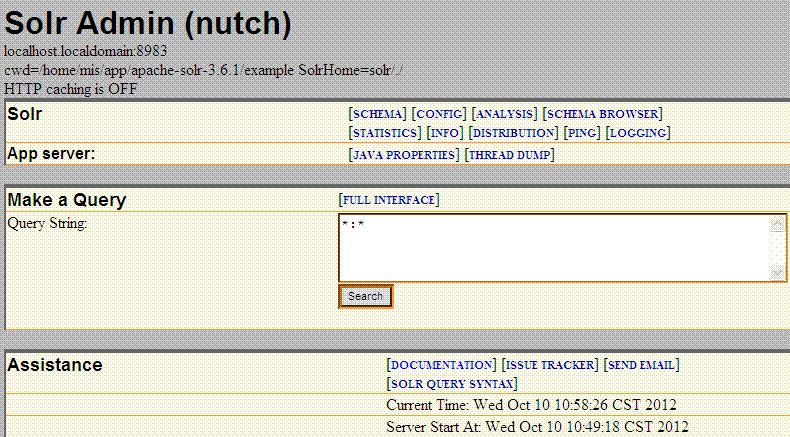
在文本框中输入 content:nutch 点击查询,便可查处内容中包含nutch关键字的网页





 扫一扫
扫一扫


 111
111

 被折叠的 条评论
为什么被折叠?
被折叠的 条评论
为什么被折叠?
 到【灌水乐园】发言





