


在这个移动端的时代,微信公众号也逐渐成为人们获取信息的一种渠道,也是商家发展潜在客户的一种手段,因此,许多程序员转战微信开发,那么今天,我们就来为大家介绍一下微信公众号开发中的网页授权到底要怎样才能实现。
在这之前先给大家一个我自定义的请求接口的函数,在下面的示例代码中请求接口用的都是这个函数
该函数的作用是,想接口发起请求,传递参数并返回接口返回的数据
(这个里面的代码就不做多解释了,如果大家想要了解可以去看一下php curl函数总结)
1
2
3
4
5
6
7
8
9
10
11
12
13
14
15
16
17
18
19
//自定义请求接口函数,$data为空时发起get请求,$data有值时发情post请求
function http_url($url,$data=null){
$ch = curl_init();
curl_setopt($ch,CURLOPT_URL,$url);
curl_setopt($ch,CURLOPT_SSL_VERIFYPEER,FALSE);
curl_setopt($ch,CURLOPT_SSL_VERIFYHOST,0);
curl_setopt($ch,CURLOPT_RETURNTRANSFER,TRUE);
if(!empty($data)){
curl_setopt($ch,CURLOPT_POST,1);
curl_setopt($ch,CURLOPT_POSTFIELDS,$data);
}
$res = curl_exec($ch);
if(curl_errno($ch)){
echo "error:".curl_error($ch);
exit;
}
curl_close($ch);
return $res;
}
(文中所使用的接口为腾讯官方提供,大家可以参考一下微信公众平台的开发者文档)
一、首先我们需要配置我们的公众号
1、在微信公众号请求用户网页授权之前,开发者需要先到公众平台官网中的“开发 - 接口权限 - 网页服务 - 网页帐号 - 网页授权获取用户基本信息”的配置选项中,修改授权回调域名。请注意,这里填写的是域名(是一个字符串),而不是URL,因此请勿加 http:// 等协议头;
2、授权回调域名配置规范为全域名,比如需要网页授权的域名为:www.qq.com,配置以后此域名下面的页面http://www.qq.com/music.html 、 http://www.qq.com/login.html 都可以进行OAuth2.0鉴权。但http://pay.qq.com 、 http://music.qq.com 、 http://qq.com无法进行OAuth2.0鉴权
3、如果公众号登录授权给了第三方开发者来进行管理,则不必做任何设置,由第三方代替公众号实现网页授权即可
二、用户同意授权,获取code
接口地址:https://open.weixin.qq.com/connect/oauth2/authorize?appid=APPID&redirect_uri=REDIRECT_URI&response_type=code&scope=SCOPE&state=STATE#wechat_redirect (注意接口参数)
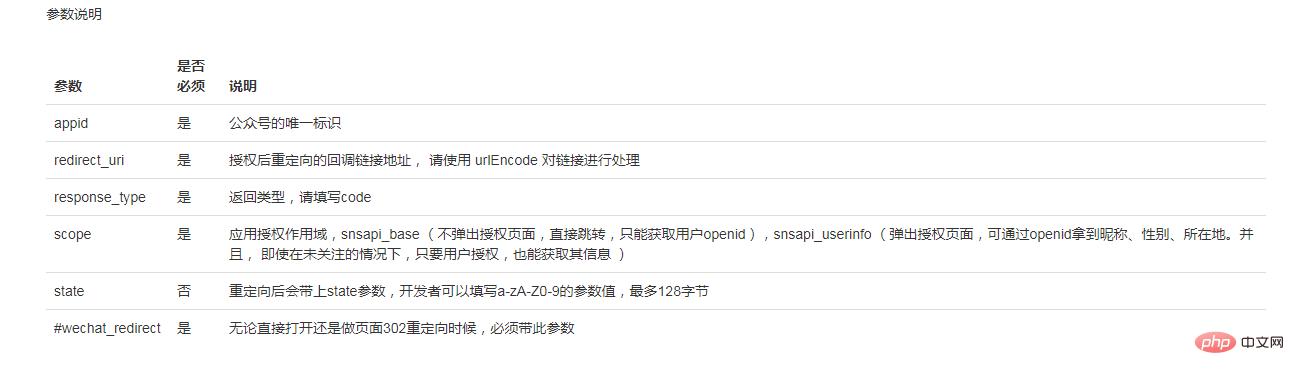
1
2
3
4
5
6
7
8
function Get_Code() //获取code
{
//构造请求地址
$code_url = "https://open.weixin.qq.com/connect/oauth2/authorize?appid=微信公众号appid&redirect_uri=请求功后回调地址&response_type=code&scope=snsapi_userinfo&state=STATE #wechat_redirect";
//跳转到请求地址,应为本省设置了回调地址,所以不需要使用file_get_content()来请求接口。
header("location:" . $code_url);
exit;
}
三、通个获取到的code来或缺access_token和openid
接口:https://api.weixin.qq.com/sns/oauth2/access_token?appid=APPID&secret=SECRET&code=CODE&grant_type=authorization_code

1
2
3
4
5
6
7
8
9
10
11
/**
* 通过获取到的code来获取access_token和openid
* $code为获取到的code
* 接口的参数注意换成自己的,如appid和secret
*/
function GetAccess_Token($code)
{
$get_access_token_url = "https://api.weixin.qq.com/sns/oauth2/access_token?appid=appid&secret=secret&code=$code&grant_type=authorization_code";
$res = http_url($get_access_token_url);
return json_decode($res, true);
}
四、判断access_token是否有效
接口:https://api.weixin.qq.com/sns/auth?access_token=ACCESS_TOKEN&openid=OPENID

1
2
3
4
5
6
7
8
9
10
11
12
13
14
15
/**
* 检查access_token是否有效
*
*/
function CkeckAccessToken($access_token, $openid)
{
$check_url = "https://api.weixin.qq.com/sns/auth?access_token=$access_token&openid=$openid";
$res = http_url($check_url);
$result = json_decode($res, true);
if (isset($result['errmsg']) && $result['errmsg'] == 1) {
return 1; //access_token有效
} else {
return 0; //access_token无效
}
}
五、如果失效,刷新access_token
接口:https://api.weixin.qq.com/sns/oauth2/refresh_token?appid=APPID&grant_type=refresh_token&refresh_token=REFRESH_TOKEN

1
2
3
4
5
6
7
8
9
10
/**
* 如果获取到的access_token无效,通过refresh_token来刷新access_token
*接口的参数注意换成自己的
*/
function GetRefresh_Token($refresh_token)
{
$get_refresh_token_url = "https://api.weixin.qq.com/sns/oauth2/refresh_token?appid=appid&grant_type=refresh_token&refresh_token=$refresh_token";
$res = http_url($get_refresh_token_url);
return json_decode($res, true);
}
六、获取用户信息
接口:https://api.weixin.qq.com/sns/userinfo?access_token=ACCESS_TOKEN&openid=OPENID&lang=zh_CN

1
2
3
4
5
6
/** * 获取用户基本信息 * */
function Get_User_Info($access_token, $openid){
$get_user_info = "https://api.weixin.qq.com/sns/userinfo?access_token=$access_token&openid=$openid&lang=zh_CN";
$res = http_url($get_user_info);
return json_decode($res, true);
}
获取到用户信息数据:
1
2
3
4
5
6
7
8
9
10
11
{
"openid":" OPENID





 扫一扫
扫一扫


 5633
5633

 被折叠的 条评论
为什么被折叠?
被折叠的 条评论
为什么被折叠?
 到【灌水乐园】发言





