



 这篇博客介绍了Unity游戏UI中如何实现消息显示的系统。通过使用DisplayMessageManager和NotificationToast脚本,结合UItable和Event系统,实现了消息的延迟显示、淡入淡出效果以及消息列表的动态更新。DisplayMessageManager负责接收事件并根据时间戳管理待显示的消息,而NotificationToast则控制单个消息的生命周期。整个系统利用了Unity的组件系统和简单的事件监听机制。
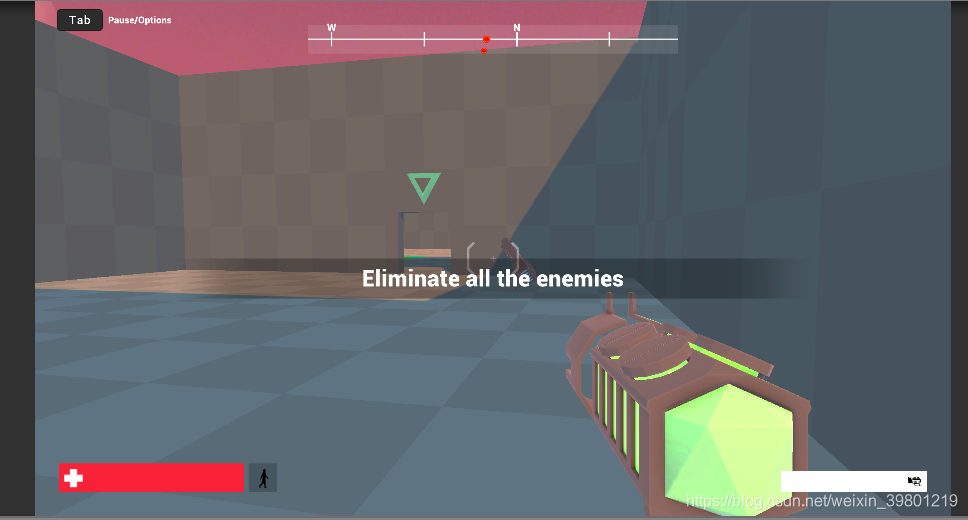
效果图:
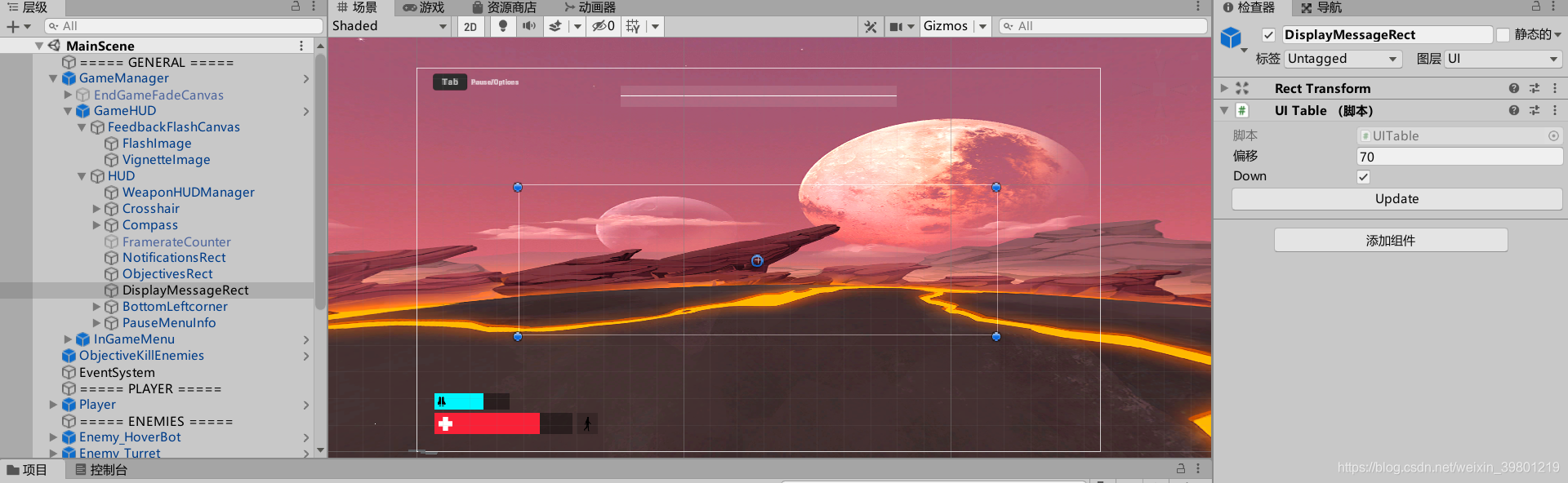
- 在主画布放置需要展示在的区域,即DisplayMessageRect。
挂上UItable脚本,用于控制消息产生的位置。
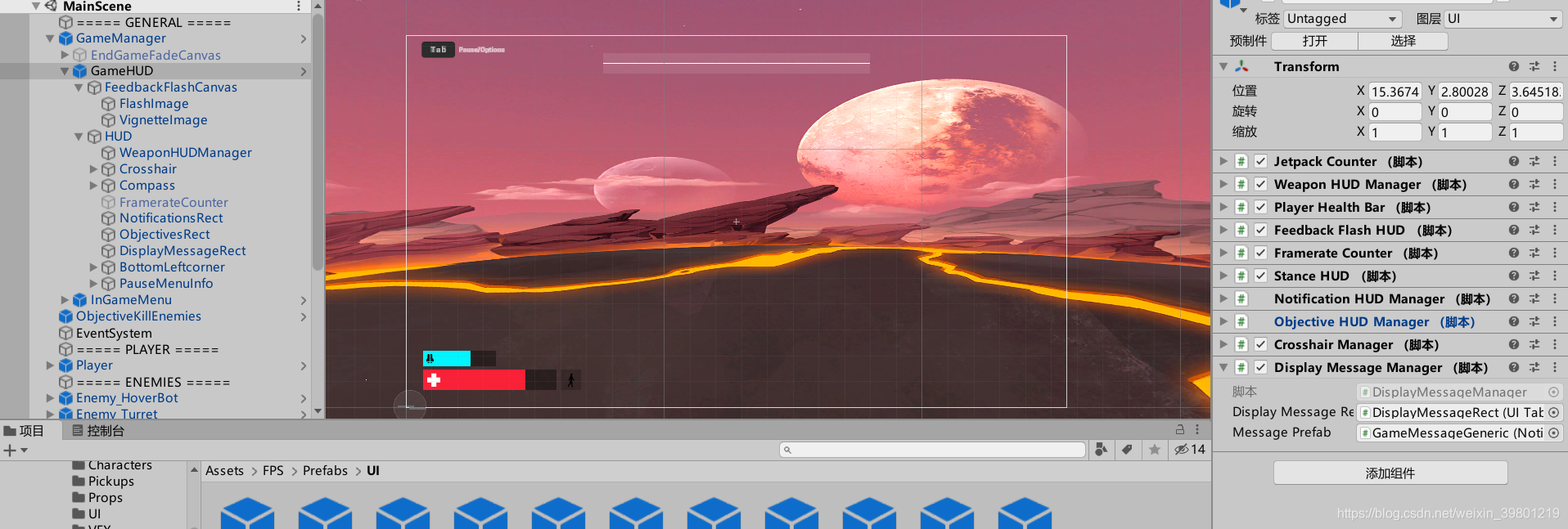
- 在GAMEHUD挂上DisplayManager脚本,把Rect挂上。
预制体为GameMessageGeneric。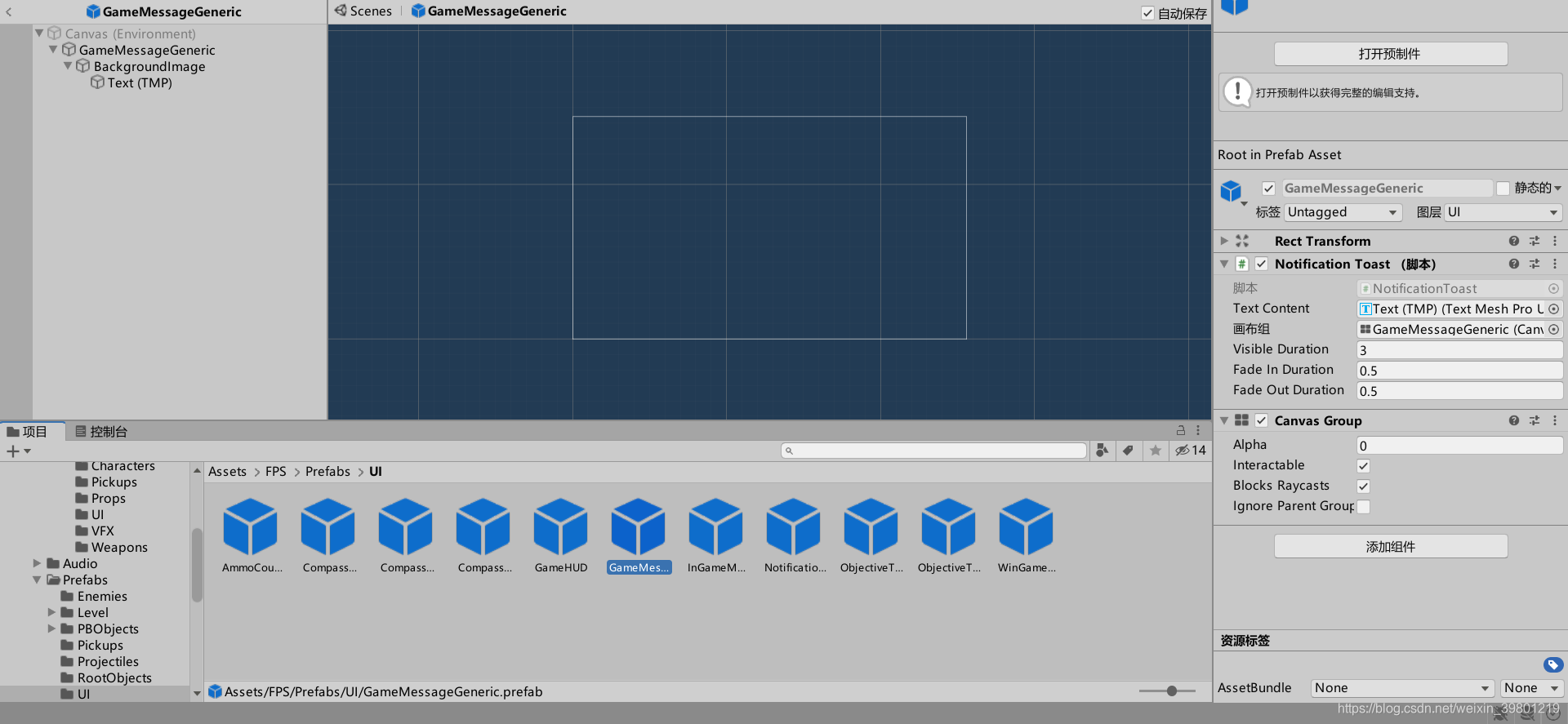
挂上脚本NotificationToast,用来规划消息产生的时间和消失的时间。把TMpro挂在正中间。
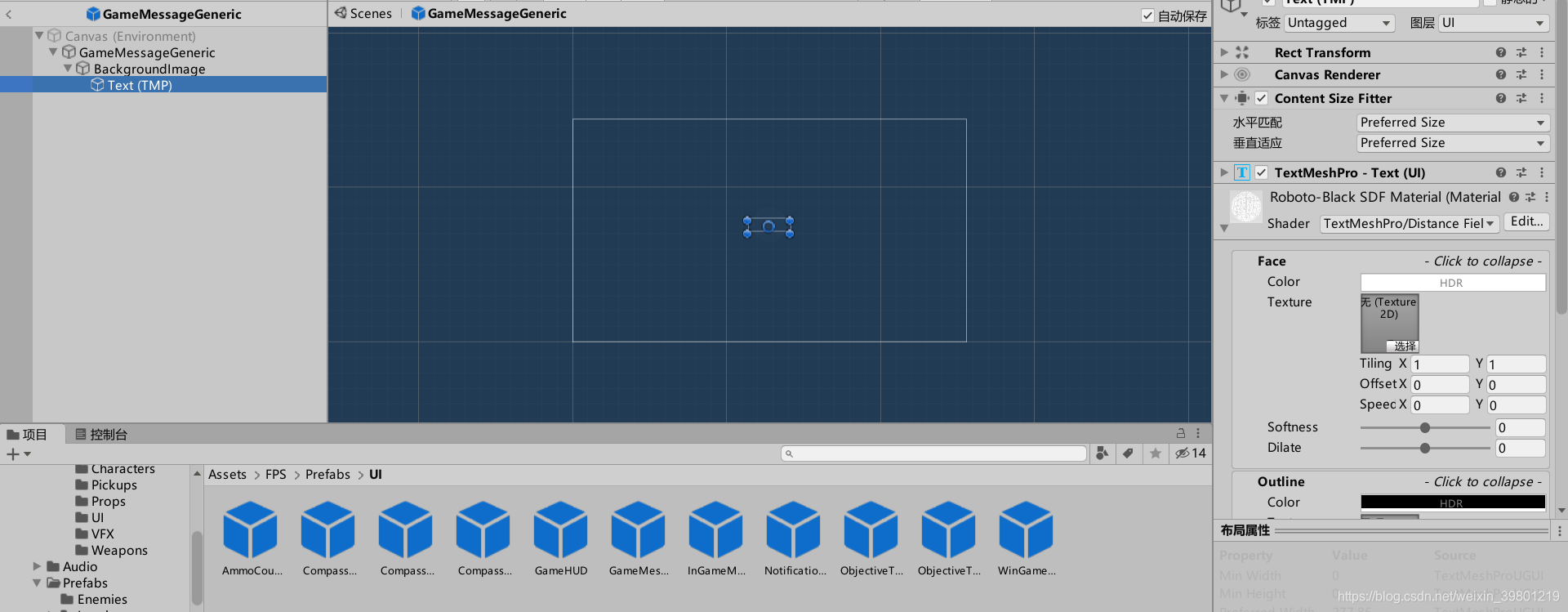
NotificationToast:
using UnityEngine;

namespace Unity.FPS.UI
{
    public class NotificationToast : MonoBehaviour
    {
        [Tooltip("Text content that will display the notification text")]
        public TMPro.TextMeshProUGUI TextContent;
        [Tooltip("Canvas used to fade in and out the content")]
        public CanvasGroup CanvasGroup;
        [Tooltip("How long it will stay visible")]
        public float VisibleDuration;
        [Tooltip("Duration of the fade in")]
        public float FadeInDuration = 0.5f;
        [Tooltip("Duration of the fade out")]
        public float FadeOutDuration = 2f;

        public bool Initialized { get; private set; }
        float m_InitTime;

        public float TotalRunTime => VisibleDuration + FadeInDuration + FadeOutDuration;

        public void Initialize(string text)
        {
            TextContent.text = text;
            m_InitTime = Time.time;

            // start the fade out
            Initialized = true;
        }

        void Update()
        {
            if (Initialized)
            {
                float timeSinceInit = Time.time - m_InitTime;
                if (timeSinceInit < FadeInDuration)
                {
                    // fade in
                    CanvasGroup.alpha = timeSinceInit / FadeInDuration;
                }
                else if (timeSinceInit < FadeInDuration + VisibleDuration)
                {
                    // stay visible
                    CanvasGroup.alpha = 1f;
                }
                else if (timeSinceInit < FadeInDuration + VisibleDuration + FadeOutDuration)
                {
                    // fade out
                    CanvasGroup.alpha = 1 - (timeSinceInit - FadeInDuration - VisibleDuration) / FadeOutDuration;
                }
                else
                {
                    CanvasGroup.alpha = 0f;

                    // fade out over, destroy the object
                    Destroy(gameObject);
                }
            }
        }
    }
DisplayMessageManager:
using System.Collections.Generic;
using Unity.FPS.Game;
using UnityEngine;

namespace Unity.FPS.UI
{
    public class DisplayMessageManager : MonoBehaviour
    {
        public UITable DisplayMessageRect;
        public NotificationToast MessagePrefab;

        List<(float timestamp, float delay, string message, NotificationToast notification)> m_PendingMessages;

        void Awake()
        {
            EventManager.AddListener<DisplayMessageEvent>(OnDisplayMessageEvent);
            m_PendingMessages = new List<(float, float, string, NotificationToast)>();
        }

        void OnDisplayMessageEvent(DisplayMessageEvent evt)
        {
            NotificationToast notification = Instantiate(MessagePrefab, DisplayMessageRect.transform).GetComponent<NotificationToast>();
            m_PendingMessages.Add((Time.time, evt.DelayBeforeDisplay, evt.Message, notification));
        }

        void Update()
        {
            foreach (var message in m_PendingMessages)
            {
                if (Time.time - message.timestamp > message.delay)
                {
                    message.Item4.Initialize(message.message);
                    DisplayMessage(message.notification);
                }
            }

            // Clear deprecated messages
            m_PendingMessages.RemoveAll(x => x.notification.Initialized);
        }

        void DisplayMessage(NotificationToast notification)
        {
            DisplayMessageRect.UpdateTable(notification.gameObject);
            //StartCoroutine(MessagePrefab.ReturnWithDelay(notification.gameObject, notification.TotalRunTime));
        }

        void OnDestroy()
        {
            EventManager.RemoveListener<DisplayMessageEvent>(OnDisplayMessageEvent);
        }
    }
}
- 创建一个Event.cs,不挂在任何物体上。
using UnityEngine;

namespace Unity.FPS.Game
{
    // The Game Events used across the Game.
    // Anytime there is a need for a new event, it should be added here.

    public static class Events
    {
        public static DisplayMessageEvent DisplayMessageEvent = new DisplayMessageEvent();
    }

        public class DisplayMessageEvent : GameEvent
    {
        public string Message;
        public float DelayBeforeDisplay;
    }
}
- EventManager.cs,创建不挂载,作用未知。
using System;
using System.Collections.Generic;

namespace Unity.FPS.Game
{
    public class GameEvent
    {
    }

    // A simple Event System that can be used for remote systems communication
    public static class EventManager
    {
        static readonly Dictionary<Type, Action<GameEvent>> s_Events = new Dictionary<Type, Action<GameEvent>>();

        static readonly Dictionary<Delegate, Action<GameEvent>> s_EventLookups =
            new Dictionary<Delegate, Action<GameEvent>>();

        public static void AddListener<T>(Action<T> evt) where T : GameEvent
        {
            if (!s_EventLookups.ContainsKey(evt))
            {
                Action<GameEvent> newAction = (e) => evt((T) e);
                s_EventLookups[evt] = newAction;

                if (s_Events.TryGetValue(typeof(T), out Action<GameEvent> internalAction))
                    s_Events[typeof(T)] = internalAction += newAction;
                else
                    s_Events[typeof(T)] = newAction;
            }
        }

        public static void RemoveListener<T>(Action<T> evt) where T : GameEvent
        {
            if (s_EventLookups.TryGetValue(evt, out var action))
            {
                if (s_Events.TryGetValue(typeof(T), out var tempAction))
                {
                    tempAction -= action;
                    if (tempAction == null)
                        s_Events.Remove(typeof(T));
                    else
                        s_Events[typeof(T)] = tempAction;
                }

                s_EventLookups.Remove(evt);
            }
        }

        public static void Broadcast(GameEvent evt)
        {
            if (s_Events.TryGetValue(evt.GetType(), out var action))
                action.Invoke(evt);
        }

        public static void Clear()
        {
            s_Events.Clear();
            s_EventLookups.Clear();
        }
    }
}
DisplayMessageManager.cs:
using System.Collections.Generic;
using Unity.FPS.Game;
using UnityEngine;

namespace Unity.FPS.UI
{
    public class DisplayMessageManager : MonoBehaviour
    {
        public UITable DisplayMessageRect;
        public NotificationToast MessagePrefab;

        List<(float timestamp, float delay, string message, NotificationToast notification)> m_PendingMessages;

        void Awake()
        {
            EventManager.AddListener<DisplayMessageEvent>(OnDisplayMessageEvent);
            m_PendingMessages = new List<(float, float, string, NotificationToast)>();
        }

        void OnDisplayMessageEvent(DisplayMessageEvent evt)
        {
            NotificationToast notification = Instantiate(MessagePrefab, DisplayMessageRect.transform).GetComponent<NotificationToast>();
            m_PendingMessages.Add((Time.time, evt.DelayBeforeDisplay, evt.Message, notification));
        }

        void Update()
        {
            foreach (var message in m_PendingMessages)
            {
                if (Time.time - message.timestamp > message.delay)
                {
                    message.Item4.Initialize(message.message);
                    DisplayMessage(message.notification);
                }
            }

            // Clear deprecated messages
            m_PendingMessages.RemoveAll(x => x.notification.Initialized);
        }

        void DisplayMessage(NotificationToast notification)
        {
            DisplayMessageRect.UpdateTable(notification.gameObject);
            //StartCoroutine(MessagePrefab.ReturnWithDelay(notification.gameObject, notification.TotalRunTime));
        }

        void OnDestroy()
        {
            EventManager.RemoveListener<DisplayMessageEvent>(OnDisplayMessageEvent);
        }
    }
}
UI Table:
using UnityEngine;

namespace Unity.FPS.UI
{
    // The component that is used to display the Objectives, the Notification and the game messages like a list
    // When a new one is created, the previous ones move down to make room for the new one

    public class UITable : MonoBehaviour
    {
        [Tooltip("How much space should there be between items?")]
        public float Offset;

        [Tooltip("Add new the new items below existing items.")]
        public bool Down;

        public void UpdateTable(GameObject newItem)
        {
            if (newItem != null)
                newItem.GetComponent<RectTransform>().localScale = Vector3.one;

            float height = 0;
            for (int i = 0; i < transform.childCount; i++)
            {
                RectTransform child = transform.GetChild(i).GetComponent<RectTransform>();
                Vector2 size = child.sizeDelta;
                height += Down ? -(1 - child.pivot.y) * size.y : (1 - child.pivot.y) * size.y;
                if (i != 0)
                    height += Down ? -Offset : Offset;

                Vector2 newPos = Vector2.zero;

                newPos.y = height;
                newPos.x = 0;//-child.pivot.x * size.x * hi.localScale.x;
                child.anchoredPosition = newPos;
            }
        }
    }
}






 扫一扫
扫一扫


 326
326

 被折叠的 条评论
为什么被折叠?
被折叠的 条评论
为什么被折叠?
 到【灌水乐园】发言





