


 本文介绍了机器学习中的模型评估方法,包括使用混淆矩阵和ROC曲线。通过乳腺癌数据集展示了如何构建混淆矩阵,并利用SVM进行预测。接着,探讨了ROC曲线的绘制,以及在fetch_lfw_people数据集上进行人脸识别的SVM模型训练。最后,文章总结了超参数调优和模型性能的重要性。
评估模型的性能并调参
0.0 概述
- 网格搜索、随机搜索
- 混淆矩阵的绘制
- ROC曲线
- fetch_lfw_people数据集识别
1.0 超参数搜索
之前的课程记录过了,这里就不重复工作了,请见https://blog.youkuaiyun.com/weixin_39800983/article/details/115191072
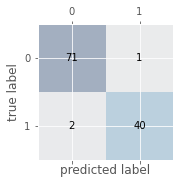
2.0 混淆矩阵
代码实现:
# 混淆矩阵:
# 加载数据
df = pd.read_csv("http://archive.ics.uci.edu/ml/machine-learning-databases/breast-cancer-wisconsin/wdbc.data",header=None)
'''
乳腺癌数据集:569个恶性和良性肿瘤细胞的样本,M为恶性,B为良性
'''
# 做基本的数据预处理
from sklearn.preprocessing import LabelEncoder

X = df.iloc[:,2:].values
y = df.iloc[:,1].values
le = LabelEncoder()    #将M-B等字符串编码成计算机能识别的0-1
y = le.fit_transform(y)
le.transform(['M','B'])
# 数据切分8:2
from sklearn.model_selection import train_test_split

X_train,X_test,y_train,y_test = train_test_split(X,y,test_size=0.2,stratify=y,random_state=1)
from sklearn.svm import SVC
pipe_svc = make_pipeline(StandardScaler(),SVC(random_state=1))
from sklearn.metrics import confusion_matrix

pipe_svc.fit(X_train,y_train)
y_pred = pipe_svc.predict(X_test)
confmat = confusion_matrix(y_true=y_test,y_pred=y_pred)
fig,ax = plt.subplots(figsize=(2.5,2.5))
ax.matshow(confmat, cmap=plt.cm.Blues,alpha=0.3)
for i in range(confmat.shape[0]):
    for j in range(confmat.shape[1]):
        ax.text(x=j,y=i,s=confmat[i,j],va='center',ha='center')
plt.xlabel('predicted label')
plt.ylabel('true label')
plt.show()
3.0 ROC曲线
# 绘制ROC曲线:
from sklearn.metrics import roc_curve,auc
from sklearn.metrics import make_scorer,f1_score
scorer = make_scorer(f1_score,pos_label=0)
gs = GridSearchCV(estimator=pipe_svc,param_grid=param_grid,scoring=scorer,cv=10)
y_pred = gs.fit(X_train,y_train).decision_function(X_test)
#y_pred = gs.predict(X_test)
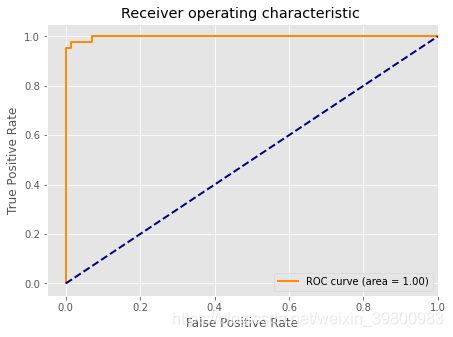
fpr,tpr,threshold = roc_curve(y_test, y_pred) ###计算真阳率和假阳率
roc_auc = auc(fpr,tpr) ###计算auc的值
plt.figure()
lw = 2
plt.figure(figsize=(7,5))
plt.plot(fpr, tpr, color='darkorange',
         lw=lw, label='ROC curve (area = %0.2f)' % roc_auc) ###假阳率为横坐标,真阳率为纵坐标做曲线
plt.plot([0, 1], [0, 1], color='navy', lw=lw, linestyle='--')
plt.xlim([-0.05, 1.0])
plt.ylim([-0.05, 1.05])
plt.xlabel('False Positive Rate')
plt.ylabel('True Positive Rate')
plt.title('Receiver operating characteristic ')
plt.legend(loc="lower right")
plt.show()
4.0 fetch_lfw_people数据集识别
源码:
from __future__ import print_function

from time import time
import logging
import matplotlib.pyplot as plt

from sklearn.model_selection import train_test_split,GridSearchCV
from sklearn.datasets import fetch_lfw_people
from sklearn.metrics import classification_report
from sklearn.metrics import confusion_matrix
from sklearn.decomposition import PCA
from sklearn.svm import SVC


print(__doc__)

# Display progress logs on stdout
logging.basicConfig(level=logging.INFO, format='%(asctime)s %(message)s')
###############################################################################
# Download the data, if not already on disk and load it as numpy arrays

lfw_people = fetch_lfw_people(min_faces_per_person=70, resize=0.4)

# introspect the images arrays to find the shapes (for plotting)
n_samples, h, w = lfw_people.images.shape

# for machine learning we use the 2 data directly (as relative pixel
# positions info is ignored by this model)
X = lfw_people.data
n_features = X.shape[1]

# the label to predict is the id of the person
y = lfw_people.target
target_names = lfw_people.target_names
n_classes = target_names.shape[0]

print("Total dataset size:")
print("n_samples: %d" % n_samples)
print("n_features: %d" % n_features)
print("n_classes: %d" % n_classes)


print("Image size:")
print("h: %d" % h)
print("w: %d" % w)
target_names

# split into a training and testing set
X_train, X_test, y_train, y_test = train_test_split(
    X, y, test_size=0.25, random_state=50)
Total dataset size:
n_samples: 1288
n_features: 1850
n_classes: 7
Image size:
h: 50
w: 37
###############################################################################
# Compute a PCA (eigenfaces) on the face dataset (treated as unlabeled
# dataset): unsupervised feature extraction / dimensionality reduction
n_components = 60

print("Extracting the top %d eigenfaces from %d faces"
      % (n_components, X_train.shape[0]))
t0 = time()
pca = PCA(n_components=n_components, whiten=True, svd_solver='randomized').fit(X_train)
print("done in %0.3fs" % (time() - t0))

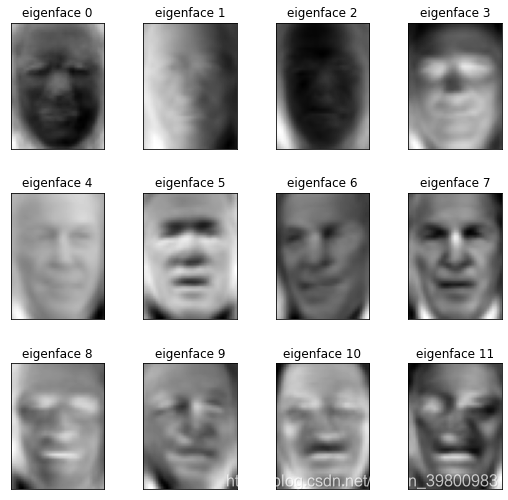
eigenfaces = pca.components_.reshape((n_components, h, w))

print("Projecting the input data on the eigenfaces orthonormal basis")
t0 = time()
X_train_pca = pca.transform(X_train)
X_test_pca = pca.transform(X_test)
print("done in %0.3fs" % (time() - t0))
###############################################################################
# Train a SVM classification model

print("Fitting the classifier to the training set")
t0 = time()
param_grid = {'C': [1,10, 100, 500, 1e3, 5e3, 1e4, 5e4, 1e5],
              'gamma': [0.0001, 0.0005, 0.001, 0.005, 0.01,0.02, 0.1], }
clf = GridSearchCV(SVC(kernel='rbf', class_weight='balanced'), param_grid)
clf = clf.fit(X_train_pca, y_train)
print("done in %0.3fs" % (time() - t0))
print("Best estimator found by grid search:")
print(clf.best_estimator_)

print(clf.best_estimator_.n_support_)
Extracting the top 60 eigenfaces from 966 faces
done in 0.344s
Projecting the input data on the eigenfaces orthonormal basis
done in 0.028s
Fitting the classifier to the training set
done in 54.182s
Best estimator found by grid search:
SVC(C=1, class_weight=‘balanced’, gamma=0.02)
[ 56 173 84 373 79 51 101]
###############################################################################
# Quantitative evaluation of the model quality on the test set

print("Predicting people's names on the test set")
t0 = time()
y_pred = clf.predict(X_test_pca)
print("done in %0.3fs" % (time() - t0))

print(classification_report(y_test, y_pred, target_names=target_names))
Predicting people’s names on the test set
done in 0.082s
                 precision    recall  f1-score   support

 Ariel Sharon         0.82      0.70      0.76        20
 Colin Powell         0.90      0.88      0.89        52
Donald Rumsfeld       0.93      0.76      0.84        34
George W Bush         0.81      0.96      0.88       129
Gerhard Schroeder     0.86      0.83      0.84        29
  Hugo Chavez         1.00      0.76      0.87        17
   Tony Blair         0.87      0.66      0.75        41

     accuracy                             0.85       322
    macro avg         0.88      0.79      0.83       322
 weighted avg         0.86      0.85      0.85       322
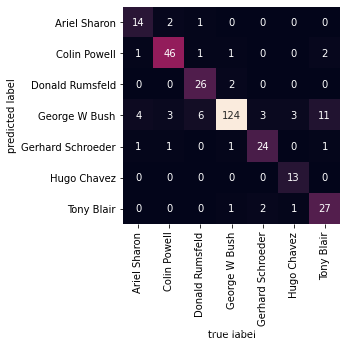
mat = confusion_matrix(y_test, y_pred, labels=range(n_classes))

sns.heatmap(mat.T, square=True, annot=True, fmt='d', cbar=False,
            xticklabels=target_names,
            yticklabels=target_names)
plt.xlabel('true label')
plt.ylabel('predicted label')
###############################################################################
# Qualitative evaluation of the predictions using matplotlib

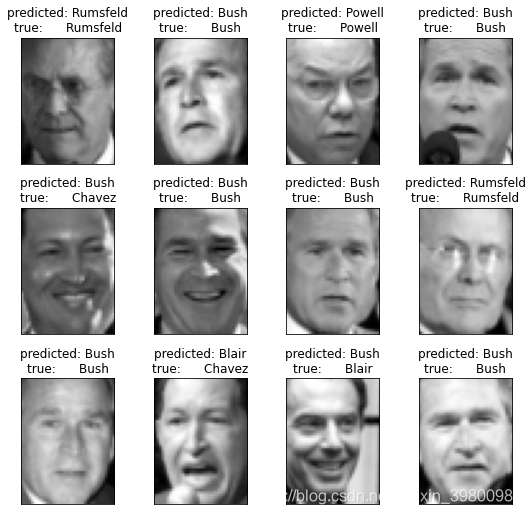
def plot_gallery(images, titles, h, w, n_row=3, n_col=4):
    """Helper function to plot a gallery of portraits"""
    plt.figure(figsize=(1.8 * n_col, 2.4 * n_row))
    plt.subplots_adjust(bottom=0, left=.01, right=.99, top=.90, hspace=.35)
    for i in range(n_row * n_col):
        plt.subplot(n_row, n_col, i + 1)
        # Show the feature face
        plt.imshow(images[i].reshape((h, w)), cmap=plt.cm.gray)
        plt.title(titles[i], size=12)
        plt.xticks(())
        plt.yticks(())


# plot the result of the prediction on a portion of the test set

def title(y_pred, y_test, target_names, i):
    pred_name = target_names[y_pred[i]].rsplit(' ', 1)[-1]
    true_name = target_names[y_test[i]].rsplit(' ', 1)[-1]
    return 'predicted: %s\ntrue:      %s' % (pred_name, true_name)

prediction_titles = [title(y_pred, y_test, target_names, i)
                     for i in range(y_pred.shape[0])]

plot_gallery(X_test, prediction_titles, h, w)

# plot the gallery of the most significative eigenfaces

eigenface_titles = ["eigenface %d" % i for i in range(eigenfaces.shape[0])]
plot_gallery(eigenfaces, eigenface_titles, h, w)

plt.show()
5.0 总结
这次作业主要是对之前的知识进行回顾,感觉还是比较轻松,不过要举一反三还是需要多加练习。此外,这次留下一个练习,对照参考资料,我跑了几回,效果都不算特别好,菜鸡落泪了,哭唧唧~~
参考
[1]. https://github.com/datawhalechina/team-learning-data-mining/tree/master/EnsembleLearning
[2].https://scikitlearn.com.cn/0.21.3/57/#_3
[3].https://blog.youkuaiyun.com/cwlseu/article/details/52356665





 扫一扫
扫一扫


 3363
3363

 被折叠的 条评论
为什么被折叠?
被折叠的 条评论
为什么被折叠?
 到【灌水乐园】发言





