


 本文介绍了WebSocket协议的产生背景及其优势,强调了其双向通信和无跨域限制的特点。通过讲解WebSocket帧的结构,包括数据帧用于传递数据和状态帧用于心跳检测,展示了使用Netty实现WebSocket发送图片的详细步骤,包括服务端消息处理和HTML页面的交互。最终,运行示例验证了WebSocket的正常工作。
什么是WebSocket?
我们一直使用的http协议只能由客户端发起,服务端无法直接进行推送,这就导致了如果服务端有持续的变化客户端想要获知就比较麻烦。WebSocket协议就是为了解决这个问题应运而生。WebSocket协议,客户端和服务端都可以主动的推送消息,可以是文本也可以是二进制数据。而且没有同源策略的限制,不存在跨域问题。协议的标识符就是ws。
WebSocket是H5之后提供的一种网络通讯技术,属于应用层协议。它基于 TCP 传输协议,并复用 HTTP 的握手通道。
WebSocket帧:
数据帧 -- 传递数据
TextWebSocketFrame:文本帧 BinaryWebSocketFrame:二进制帧(图片、表情等等)状态帧 -- 检测心跳
PingWebSocketFrame:ping帧(客户端发送ping帧) PongWebSocketFrame:pong帧(服务端响应pong帧) CloseWebSocketFrame:关闭帧开始代码:
服务端:
/** * @Author Joker * @Date 2020/11/16 * @since 1.8 */public class ServerDemo { public static void main(String[] args) { EventLoopGroup masterEventLoopGroup = new NioEventLoopGroup(); EventLoopGroup slaveEventLoopGroup = new NioEventLoopGroup(); ServerBootstrap bootstrap = new ServerBootstrap(); ChannelFuture channelFuture = bootstrap.group(masterEventLoopGroup, slaveEventLoopGroup) .channel(NioServerSocketChannel.class) .childHandler(new ChannelInitializer() { @Override protected void initChannel(Channel channel) throws Exception { ChannelPipeline pipeline = channel.pipeline(); pipeline.addLast(new HttpServerCodec()); pipeline.addLast(new HttpObjectAggregator(1024 * 1024)); pipeline.addLast(new WebSocketServerProtocolHandler("/")); // 在10秒之内收不到消息自动断开 pipeline.addLast(new ReadTimeoutHandler(10, TimeUnit.SECONDS)); pipeline.addLast(new WebSocketHandler()); } }) .bind(8888); try { channelFuture.sync(); System.out.println("连接服务器成功..."); } catch (InterruptedException e) { e.printStackTrace(); } }}消息处理:
/** * @Author Joker * @Date 2020/11/16 * @since 1.8 */public class WebSocketHandler extends SimpleChannelInboundHandler { private final String HEART = "ws-heart"; @Override protected void channelRead0(ChannelHandlerContext channelHandlerContext, TextWebSocketFrame textWebSocketFrame) throws Exception { String text = textWebSocketFrame.text(); System.out.println("接收到消息: " + text); if(HEART.equals(text)){ TextWebSocketFrame socketFrame = new TextWebSocketFrame(HEART); channelHandlerContext.writeAndFlush(socketFrame); } } /** * 用户加入 * @param ctx * @throws Exception */ @Override public void channelRegistered(ChannelHandlerContext ctx) throws Exception { super.channelRegistered(ctx); System.out.println("用户连接"); } /** * 用户断开 * @param ctx * @throws Exception */ @Override public void channelUnregistered(ChannelHandlerContext ctx) throws Exception { super.channelUnregistered(ctx); System.out.println("用户断开"); } /** * * @param ctx * @param cause * @throws Exception */ @Override public void exceptionCaught(ChannelHandlerContext ctx, Throwable cause) throws Exception { super.exceptionCaught(ctx, cause); System.out.println("用户非正常断开"); }}HTML页面:
<html> <head> <meta charset="utf-8"> <title>websockettitle> <script src="./js/jquery-3.4.1.js" type="text/javascript" charset="UTF-8">script> head> <script> $(function(){ var ws = new WebSocket("ws://127.0.0.1:8888"); var heartTime; if(window.WebSocket){ // 连接服务器 ws.onopen = function(){ debugger var html = "连接服务器成功"; $("#toke").append(html); sendHeart(); } // 断开服务器 ws.onclose = function(e){ clearInterval(heartTime); var html = "客户端断开连接" $("#toke").append(html); } // 服务器发生异常 ws.onerror = function(){ var html = "服务器异常" $("#toke").append(html); } ws.onmessage = function(data){ if(data.data == "ws-heart"){ return; } var html = "服务器:"+ data.data +"" $("#toke").append(html); } } else{ alert("当前浏览器不支持WebSocket!"); } $("#send").click(function(){ var msg = $("#con").val(); ws.send(msg); msg = ""+ msg +""; var showMsg = $("#toke"); showMsg.append(msg); $("#con").val(""); }); function sendHeart(){ heartTime = setInterval(function(){ ws.send("ws-heart"); },5000); } })script> <body> <div id="toke" style="width: 400px; height: 300px;border: 1px solid #f00;"> div> <input type="text" name="con" id="con" width="100px" /> <button id="send">发送button> body>html>到这,整个步骤就差不多结束了!
接下来运行:
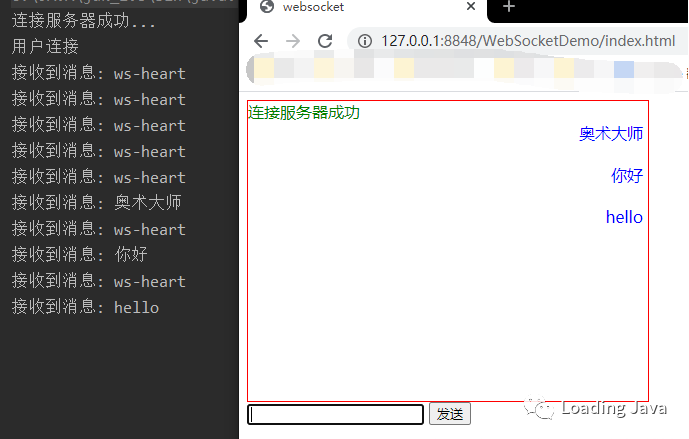
可以看到消息能正常发送,正常响应,Over!!





 扫一扫
扫一扫


 4282
4282

 被折叠的 条评论
为什么被折叠?
被折叠的 条评论
为什么被折叠?
 到【灌水乐园】发言





